
You are using an out of date browser. It may not display this or other websites correctly.
You should upgrade or use an alternative browser.
You should upgrade or use an alternative browser.
PS3 Apollo save tool (development thread)
- Thread starter bucanero
- Start date

pinky
Retired
playtime is important to me. when my original switch died and I was sent a replacement, my activity log still showed the same times, so they must be uploaded to nintendo's servers. I was able to erase it and start over for all of my games. I just didn't want it to look like I sucked badly at the games. 

Cypher_CG89
Senior Member
Matter for those who want complete his data.
And still, they are technically game saves...
Not what you said here so make up your mind .....
[QUOTE="Berion, post: 227202, member: 1431"] It doesn't matter if only profile cannot be copied because it is the only one which will be unable to check in mass copy function from XMB[/QUOTE]
And just a quick FYI.... When I said they did not matter... I meant the copy protection as they were the only ones that were and that's it! You might notice that it was the statement followed after the "copy protection part"

He was obviously not saying the save does not matter, he was saying the type of the save doesnt matter. His whole point is that the save does matter.Not what you said here so make up your mind .....
And just a quick FYI.... When I said they did not matter... I meant the copy protection as they were the only ones that were and that's it! You might notice that it was the statement followed after the "copy protection part"

bucanero
Developer
hello guys i want to add something that i managed to check today on apollo pkg, it is that for example there are saves that on the evil within this one does not allow to be copied into a usb device on the ps3 system but when i tried to remove the copy protection somehow is not working for these kind of games that does not allow to copy saves to external drives, such as driver san francisco, mass effect saga games, lollipop chainsaw, final fantasy lightning return autosave, those are the ones that i manage to test and the removal of copy protection does not work, still this same post i will added it on the original post from apollo thread just in case, thank you in advance have a nice day.
I don't have every game you mentioned, but I do have Lollipop chainsaw (US), and I had no issues removing the copy-lock and copying the save to USB.
Just to be sure, after you select "Remove copy protection", do you clicked on "Apply patch & resign save" ? If you didn't apply and resign, then the copy-flag wasn't modified at all.
Another check, after you remove the flag, exit the app, then go to the XMB and browse your PS3 saves. If you select the "lollipop" savegame and click on "information", does it still show as "Copying Prohibited" ?
I think I also have Driver san francisco somewhere, I'll try to check it too.
Edit: btw, I've got some saves you sent, but there's no description of what game is which folder, nor a description of what stuff is in the save (e.g. "Yakuza 3, completed game, all unlocked on Hard difficulty") so I can't do much with that
Please follow the notes in https://bucanero.github.io/apollo-saves/
(make a .Zip for each save-game , and then make a simple text file explaining each savegame)
Last edited:
bucanero
Developer
@ashura Could You try unlock save and after that rebuild database? Maybe CP is also part of XMB db and it is not checking in real time. No one before doing it on PS3 so no one yet test it. If You be able to copy such saves after rebuilding database (i.e from recovery mode), then it is important information to @bucanero to also updating db, to avoid such inconvenience. There is no any other Copy Protection mechanism on saves than parram in SFO and eventually guarded by PFD (because not all are guarded). Worth to mention, to of course don't overwriting such save by game until copy try because it is possible that CP will returned and test will fail.
yes that's another good thing to check, I forgot about the database... even if the flag is gone, maybe the XMB still has the "locked" flag cached in the database and blocks you from copying from XMB.
In any case, I can just add a "copy to USB" option from Apollo itself, to transfer a save no matter what flag it has


Berion
Developer
@bucanero Yeah, it is also good idea, maybe under User Backup with the rest? ^^
Meanwhile, I have finished Title Screen:

And assets pack no.1 in attachment. There could be less graphics and more simplified but in a way I did, it open future possibilities with some effects/transitions.
Meanwhile, I have finished Title Screen:
And assets pack no.1 in attachment. There could be less graphics and more simplified but in a way I did, it open future possibilities with some effects/transitions.
Attachments
Last edited:
Oui, je confirme, il faut décrypter la SAVE avant d'appliquer le ou les patchs. Après le patch, la SAVE doit être ré-encodée et re-signée.btw, I'm not an expert on BSD patches, but as I understand, before applying any binary patch, the file needs to be decrypted with PFD tools , right?
then after the patch, you have to encrypt the file again, and resign everything.
please correct me if I'm wrong
@+++
bucanero
Developer
thanks a lot @Berion !!  now I hope I can make it look as good as your screenshots!
regarding the fonts, I was doing some tests using the internal PS3 fonts (with UTF-8) and all the issues with the missing characters were gone. My only question about Roboto is the case of Japanese save-games (titles, descriptions, etc)
I'll do some tests (before I get bug reports from japanese users ); I think I have one or two jap savegames around
btw, I got the "export to .Zip" and the "bulk copy" (licenses, trophy) working, after I apply the new design I think I can make a new release.
now I hope I can make it look as good as your screenshots! regarding the fonts, I was doing some tests using the internal PS3 fonts (with UTF-8) and all the issues with the missing characters were gone. My only question about Roboto is the case of Japanese save-games (titles, descriptions, etc)
I'll do some tests (before I get bug reports from japanese users
); I think I have one or two jap savegames aroundbtw, I got the "export to .Zip" and the "bulk copy" (licenses, trophy) working, after I apply the new design I think I can make a new release.
 I do like his work.
ashura
Member
Hello bucanero thank you actually i am working on a text document that will have descriptions on every save data into one document in order to me to be able yo send to you this info attached into the same save zip data that i sent you before, still if you like i can send you file by file that info it will take me more time but i will be able to do IT as well, btw i managed to do this process on the saves like you told me however on some of them let me copy saves to usb and on others no
bucanero
Developer
Hello bucanero thank you actually i am working on a text document that will have descriptions on every save data into one document in order to me to be able yo send to you this info attached into the same save zip data that i sent you before, still if you like i can send you file by file that info it will take me more time but i will be able to do IT as well, btw i managed to do this process on the saves like you told me however on some of them let me copy saves to usb and on others no
Based on feedback and ideas, the process will be much easier on the next version with the "Export to Zip" function. Most of the work will be done by the app, then the user would have just to take the .zip files from the USB device and upload the zip and description. It will save time and avoid troubles.
Anyways, before the next version, if you can provide a text file with a description for each folder (game name, and what kind of save it is) then I'll look into uploading those saves to the database.
Berion
Developer
@bucanero System font(s) is(>>are) also nice. So if this will be easier for You, and if they will be displayed the same as on XMB, then forget about Roboto.
Exactly the same could be hard or even impossible. In about screen preview, I used different font type and some like i.e our all nicks a special format which Photoshop allow me (first letter is normal big letter but the rest are also big but smaller). So don't worry, if something is impossible or demand coding to much to worth the time and effort. ^^
Exactly the same could be hard or even impossible. In about screen preview, I used different font type and some like i.e our all nicks a special format which Photoshop allow me (first letter is normal big letter but the rest are also big but smaller). So don't worry, if something is impossible or demand coding to much to worth the time and effort. ^^
Berion
Developer
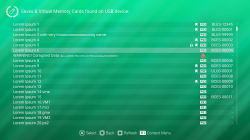
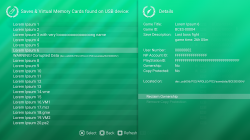
Berion
Developer
@bucanero Forgot to mention: maybe "Apply Cheat" and "Upload save" could be a third and fourth option under "Reclaim Ownership" and "Remove Copy Protection"? I completely forgot about this, sorry.
BTW: I have ~200 let's call them "master saves" for PS3 games. I don't connecting my PS3s to network, also I don't want share my saves with my NP Account ID. Is possible to resigning stuff based not on any PARAM.SFO in system saves or xRegistry.sys but ownership.txt alone (i.e reading such file would have highest priority)? Would be very nice. ^^
BTW: I have ~200 let's call them "master saves" for PS3 games. I don't connecting my PS3s to network, also I don't want share my saves with my NP Account ID. Is possible to resigning stuff based not on any PARAM.SFO in system saves or xRegistry.sys but ownership.txt alone (i.e reading such file would have highest priority)? Would be very nice. ^^
Last edited:
bucanero
Developer
@bucanero Sorry for reorganize a little sub menus. I hope You will not kill me for adding You work but IMHO it looks better now and it is more intuitive.
View attachment 23963 View attachment 23964
And assets pack no.2 in attachment.
wow, that looks great!
Amazing work !  don't worry I won't kill anyone
  hahahah but I do need to think about how I can modify the code to actually support some of the changes. Probably I'll start with getting it working with the current code, and then iterate over it.
Forgot to mention: maybe "Apply Cheat" and "Upload save" could be a third and fourth option under "Reclaim Ownership" and "Remove Copy Protection"? I completely forgot about this, sorry.
well, if I manage to implement all the cheat patching code from Bruteforce SD, I think that "apply cheat" will need to stay in a separate screen because you can have tons of code/cheats for a game, and it won't fit in the "details" screen.
BTW: I have ~200 let's call them "master saves" for PS3 games. I don't connecting my PS3s to network, also I don't want share my saves with my NP Account ID. Is possible to resigning stuff based not on any PARAM.SFO in system saves or xRegistry.sys but ownership.txt alone (i.e reading such file would have highest priority)? Would be very nice. ^^
I'm not sure why would you want to resign your save with external information (except if you want to share the saves, right?), but yes it can be done. For example, if there's a "owner.txt" file in "/dev_hdd0/game/NP0APOLLO/USRDIR/", then the app will use that information instead of whatever IDs can get for the console. Probably I won't add a UI for that, but I'll add the backend code.
Berion
Developer
wow, that looks great!
Thanks. ^^
don't worry I won't kill anyone
I believe in You.
well, if I manage to implement all the cheat patching code from Bruteforce SD, I think that "apply cheat" will need to stay in a separate screen because you can have tons of code/cheats for a game, and it won't fit in the "details" screen.
"Apply Cheat" could adding another "shuffle card" (layer 3), on top of "Details" menu (layer 2). I'm not sure how width we need but in worst scenario, could be just larger than detail "shuffle card" (for best looking, should be a little smaller but functionality of course have top priority).
I'll make another preview to visualize what I have in mind, with updated details menu with forgotten options.
I'm not sure why would you want to resign your save with external information (except if you want to share the saves, right?)
Two reasons.
- One is removing my own IDs to avoid possible account ban for that (this was never happen before but Id' like when risk == 0), in case of save sharing.
- Second reason, is situation when user want resign save for someone on OFW who already have needed IDs.
but yes it can be done. For example, if there's a "owner.txt" file in "/dev_hdd0/game/NP0APOLLO/USRDIR/", then the app will use that information instead of whatever IDs can get for the console. Probably I won't add a UI for that, but I'll add the backend code.
That's fine for me as long it will be possible. ^^
bucanero
Developer
I've a bunch of new features ready (like export to zip, and copy to USB) plus some fixes, so I'm going to do one last release with the old GUI, probably tomorrow.
Then I'll be free to shift to the new GUI, and once the new UI is settled, I can return to implement new features (like the BSD patches).
Current users should get a notification within the app when the version it's ready.
Then I'll be free to shift to the new GUI, and once the new UI is settled, I can return to implement new features (like the BSD patches).
Current users should get a notification within the app when the version it's ready.
Similar threads
-
-
-
 PS5 Porkfolio All in One PS5 Utility (Game Library, Backporks, FTP Transfers, Cheats, Saves, Pa
- Started by Red
- Replies: 0
-
