
And there it is. After other Console Developers like Nintendo, SEGA or ATARI re-released their older but wonderful and classic Home Consoles in it's new and tiny chassis marketed with some catchy words like "Mini", "Retro" or "Flashback", Sony decided "to jump on the bandwagon" by releasing their own Classic Console in a miniature format - namely the "PlayStation Classic". Announced back in September 2018, the PlayStation Classic is a dedicated version of the Original PlayStation (in short "PS1" or as you would know it as "PSX") providing 20 Classic Video Game Titles built-in. And while reviews from other video gaming journalists showed already that sadly, the PlayStation Classic is a bad example how to re-release a "Retro Console" compared to it's competitors, this Thread will help you with Everything you need to know about the Console itself, it's built-in Video Games and how fast several well-known Developers from other Sony Consoles are already tinkering with it to fix several Problems Sony was too lazy for and to provide additional Features like Emulators and other Homebrew etc.
By keeping the Original Design, but smaller, the PlayStation Classics provides 20 Game Titles built-in while mirroring the same Button layout and logos - but 45% smaller than the Original Release back in 1994.
-
The User Interface from the PlayStation Classic is a homage to the Original UI used on the Original PSX with the same color scheme like in 1994.
With a price of 99,- USD (99,- EUR in Europe - 89,- GBP in United Kingdom - 9.980,- JPY in Japan), the PlayStation Classic comes with two wired Controllers. Sadly those are the Standard Controllers without giving any Analogue Sticks, or even a Vibration function, unlike the very first "DualShock Controller" for the PS1. And unlike the Original PSX (don't worry you don't need to search for your old AV/SCART cables from your basement ), the PlayStation Classic provides a HDMI Output giving a 720p Output Resolution with 60 Frames per Second (FPS). But it is important to note that while it ships with a USB cable to connect it on a USB power source, a USB AC adaptor is NOT included so you will need to use your own, like from your Smartphone or from your TV built-in for example. You also won't need to search for your old Memory Cards since each Game supports it's own Virtual Memory Card giving the classic 15 slots. So technically you have 20 Memory Cards built-in - One Memory Card for each Game. It also supports the neat feature of Save States, so you can resume your Game wherever you need to without searching for Save Points with Cloud and his Friends inside the Northern Cave while grinding your Characters to Level 99.
-
The review from Digital Foundry shows why the PlayStation Classic is sadly a "Disappointed" Approach of bringing the nostalgic Games back with the PlayStation Classic.
Sadly, we already have to speak about the bad things this "Mini-PlayStation" provides. While there was already a hefty discussion about the Gaming Line-up the PlayStation Classic provides with several well-known Classic Game Titles missing, the 20 Games built-in are barely optimized for giving you a 100% perfect and nostalgic experience like you had back in the 90's. While using a Open-Source Emulation solution - namely PCSX ReARMed - the PlayStation Classic shows several Problems during in-Game such as blurry and dithered effects, mismatching sound effects and the most important "bummer" is that several Games are provided as "PAL Versions". Especially the Users reading this Thread here in America will be surprised how slow several Games would run on this tiny machine and how bad this would be for your Gaming Experience. The Video above from Digital Foundry shows exactly how bad this Emulation solution, Sony has chosen, performs and even the other Games, which supports fully 60 FPS instead of 50 FPS only like the European PAL Versions does, has massive frame-drops compared to the Original Hardware and/or other Sony Devices supporting PS1 Games through Emulation.
-
Games included in all Regions (PAL Versions are in red color):
- Battle Arena Toshinden (known in Japan as バトルアリーナ闘神伝 [Batoru Arīna Tōshinden])
- Final Fantasy VII (the Japanese PlayStation Classic uses the "International Version")
- I.Q.: Intelligent Qube (known in Europe as "Kurushi")
- Jumping Flash
- Metal Gear Solid
- Mr. Driller (known in Japan as ミスタードリラー [Misuta Dorira])
- R4: Ridge Racer Type 4
- Resident Evil: Director's Cut (Bio Hazard Director's Cut)
- Revelations: Persona
- Super Puzzle Fighter II Turbo (known in Japan as スーパーパズルファイターII X [Super Puzzle Figher II X])
- Tekken 3
- Wild Arms
-
Games Exclusive for North America / Europe / South Korea
- Cool Boarders 2
- Destruction Derby
- Grand Theft Auto (GTA)
- Oddworld: Abe's Oddysee
- Rayman
- Syphon Filter
- Tom Clancy's: Rainbow Six
- Twisted Metal
-
Games Exclusive for Japan / Taiwan / Hong Kong
- Arc the Lad
- Arc the Lad II
- Armored Core
- G-Darius
- Gradius Gaiden (never saw a "Western Release" for the PSX, but for the PSP)
- Parasite Eve
- SaGa Frontier
- XI [sái] (Devil Dice)
-
Games included in all Regions (PAL Versions are in red color):
-
Thanks to @nvsofts, Doom is already playable on the PlayStation Classic (although it would be interesting to play this with the PlayStation Controller).
Not only the PlayStation Classic itself shows how little Sony was interested to implement a proper self-made and internal Emulation solution like they did for their previous Home Consoles, it seems that they didn't showed any interest as well when we speak about Security Features for this Device. Since the PlayStation Classic runs on bare-metal, it shows that you can observe the internals in both Hardware and Software very easily, which sounds very great. In fact, several well-known Developers from other Sony Home Consoles already showed what's possible to do Sony won't like you do. It's impressive to see, that there are already so many Achievements presented in the first week of it's release. The following list will give you a overview what is already known about the technical specifications from the PlayStation Classic itself, as for playing with the Software itself such as Dumping the Firmware or playing additional PlayStation Games, Sony missed to include by their own. I think we will see a bright future here for this device when we speak about Emulators and Homebrew.
- Developer @v9938 dumps the Firmware used inside the PlayStation Classic
- Developer xyzz shows the internal code from the Emulation Solution Sony modified to get it run on the PlayStation Classic which shows that Sony tested more Games during their Development
- Developer @bakueikozo showcases a demonstration of loading additional PS1 Games not included by Sony
- Developer @nvsofts presents that the Classic Doom is already running on the PlayStation Classic
- Both Developers @yifanlu and @DaveeFTW also showcases how they were able to load additional PS1 Games on the PlayStation Classic
- Developer @emuonpsp is showing more details about several "Debug Settings" used from the Emulator itself
-
Getting to the "Debug Settings" by pressing a single button? This was never so easy as before.
But not only the Developers themselves shows the potential of this tiny device. It seems that even Sony itself allows everyone to dig into the internals from their PlayStation Classic very easy. How you may ask? Well, if you already own the PlayStation Classic, just plug a external USB Keyboard in one of it's USB slots used for the Controllers normally and press the "Esc-Button". You will be surprised how easy you can contribute as showed by the Team behind the YouTube-Channel "RETRO GAMING ARTS". Their video shows how many entries you get by tinkering with this device but also that even Sony was able to making things better with the Emulation itself (like with the 50 FPS PAL Versions implemented as explained before). But also Developers like @yifanlu showed together with @madmonkey how easy you can implement your own Games, Emulators, Homebrew or nearly anything else by your own. This shows how lazy (or how inexperienced) the Developers from Sony are during the Development of the PlayStation Classic. Even the decision to choose a Open-Source Solution for the Emulaton shows how they wanted to keep this device as cost-effective as possible, with the bad side effect for those who can't enjoy the Classic Games. It seems that the Homebrew and Hacking Community has to fix Sony's own mistake again like in the past.
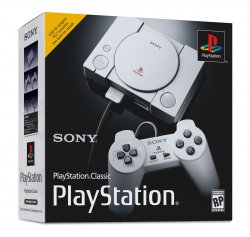
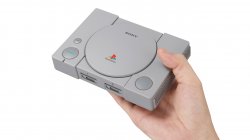
Quite handy the new PlayStation Classic, isn't it?
Our community is also already discussing about the possibilities with the PlayStation Classic. Our own Admin [COLOR=#ff0000]@STLcardsWS[/COLOR] opened a dedicated Forum Section for the PlayStation Classic only where you are welcome to discuss everything related. I would personally welcome a discussion if the PlayStation Classic is even worth the money or to summarize the alternatives from the PlayStation Classic, especially compared to Sony's previous Emulation solutions like they used for the PS2, PS3, or even the PSP and PSvita. The PlayStation TV also looks like Sony's own competitor to the PlayStation Classic where many people already said that they don't need the PlayStation Classic when their PlayStation TV is already emulating their own PlayStation Library in a proper way. Also Thanks to User [COLOR=#ff0000]@GregoryRasputin[/COLOR], you can even share your own discoveries since he opened a new PlayStation Developer Wiki dedicated to the PlayStation Classic only. And lastly, User [COLOR=#ff0000][U]@Roxanne[/U][/COLOR] is also planing to expand her Compatibility Lists for the PlayStation Classic, which will be released very soon (UPDATE: RELEASED) and will give a great opportunity for everyone to contribute in both this Forum, as for the wiki. Again I have to admit that we will see great times here with this tiny toy.
So what do you think of Sony's approach for releasing the PlayStation Classic? You are welcome to discuss your opinions down below.
Last edited by a moderator:

 Of course, PSC version is the same version as on PSX but PS4/NS version is the same as on PC released long ago. It is not only port with added trophies but also with absolutely ugly upscalled pre-rendered backgrounds. On PSC like in any emu, You have control over scalling, on such ports no and You are doomed to what developers setup. So... they are not girlfriend VS granny but dilemma between two different sister girls with pros and cons in each of them.







