

sandungas
Developer
How is that ?I'll make proper video if someone compiles it. That version of rcomage keeps crashing for me.


How is that ?I'll make proper video if someone compiles it. That version of rcomage keeps crashing for me.


Wow is a lot for a small file ... do you plan to add this on the Coldboot (PS logo) rco that you are doing?Im thinking in renaming the accelMode to easingMode
Accelmode is more intuitive and is the original name used by rcomage since years ago, but today i realized the name "ease" is more technical, im not sure if sony used the codename "ease" for it (with some prefix or suffix) when they wrote this RCO functions, but nowadays the name "ease" seems to be an standard, at least in some web programming languages like CSS
Is a long story, but im going to explain how it works roughly
Inside a RAF format file (used by coldboot.raf and the background.raf of dynamic PS3 themes) there is a program written in javascript, in it you can use all the animations types that exists in RCO format, like moving an image, rotate it, resize it, change his colors... and also allows for some more features like using maths operations, logical operators like if-else, for loops, etc...
In some of the functions there is an optional parameter used to represent a bezier curve with full freedom to select the values of it, bezier curves are tipically with speed/time and accelerations
Take a look at this web service, they have a cool tool to create bezier curves that will help you to understand his usage better
https://cubic-bezier.com
And how are implemented in CSS in this web https://www.w3.org/TR/css-easing-1/
Not needed to read everything, just scroll down a bit, keep an eye at this image, and the name of this feature, is named easing
--------------------------------------------
In the RCO animations there is a value to choose the easing from a predefined selection of bezier curves
Basically, all this values have been found in OFW, so are valid, i dont know which one is each, but i guess is going to be something like this:
accelMode=0 (linear)
accelMode=1 (ease-in)
accelMode=2 (ease-out)
accelMode=3 (ease-in-out)
FYI @Danxx444 @LuanTeles @DeViL303 @Cypher_CG89
Is using it actually, take a look at the lines when it does the <Fade> effects. they are using accelMode="0x3"Wow is a lot for a small file ... do you plan to add this on the Coldboot (PS logo) rco that you are doing?
accelMode=4 is a valid value too, used in the official anim_gameboot animation of PS3 firmwaresIn the RCO animations there is a value to choose the easing from a predefined selection of bezier curves
Basically, all this values have been found in OFW, so are valid, i dont know which one is each, but i guess is going to be something like this:
accelMode=0 (linear)
accelMode=1 (ease-in)
accelMode=2 (ease-out)
accelMode=3 (ease-in-out)

I don't know really, just crashes any time i try to extract an rco.How is that ?
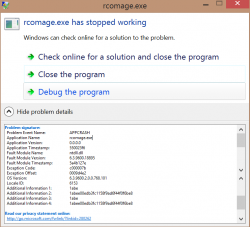
In the .zip there are 2 DLL files, have you tryed to copy them next to rcomage.exe ?

it is really a pain needing to imput a command for every image to convert
Yeah, I wish I knew how to make a little all in one gui exe for it with options to batch convert all pngs in the folder and options for each type of conversion. It really is a pain.
@RandomDude Can sound entries be added in rcomage?
because i'm thinking about a backgroud music in the xmb like ps4
but the rco mage doesnt allow me to add a tag for example OnActive="sound:MySound"
The attribute "sound" is just speculation, is something i realized while looking at rco format, but the speculation have a solid baseI have no idea about the PS3, I just developed a small console project that allowed proper gim conversions.
But by googling, I've probably found a method that allows this:- <Entry sound="sound:mysound"> ?
Probably answer lies somewhere here https://www.psdevwiki.com/ps3/Resource_Container_(RCO)
Or you should be asking @sandungas

All this rco files from PS3 firmware contains soundsThis entry must be referenced somewhere in a file if support exists. I guess its possible that it does not exist any more.
For example, you remember the icon_fixed_width/height references we found in pre retail xmls, I found those referenced in older explore plugin like 1.50 OFW, no longer in explore plugin anymor, so no support for that xml entry any more.
Then how do we test adding sound entries, does rcomage have support for 0x04040000 or is there any way to test this even with hex?

The unknown reference type 0x04060000 ?... no, this reference type is longer to explain and is a bit special, but it works like the other reference typesOff topic kind of. Is it possible that "debug" is one of the other unknowns? I ask because in the gaia sprx it uses "debug" in the same way that it uses "anim" .
View attachment 20566


textUnk48 = unk
textUnk49 = unk
textUnk50 = unk
textUnkFloat51 = float
textUnkFloat52 = float
textUnkFloat53 = float
textUnkFloat54 = floattextGlowOffsetX = float
textGlowOffsetY = float
textGlowOffsetZ = float
textGlowColorScaleR = float
textGlowColorScaleG = float
textGlowColorScaleB = float
textGlowColorScaleA = float
Im taking a look at a radom rco (impose_plugin.rco) and it seems most of the <Text> objects uses this values:@sandungas seems like the textFontSizeY only works in the psp
in the ps3 it has no effect but, seems like it is controlled by textOverrideUnk56 (it is not multiplying any value since i messed with the other textUnks and had no changes)
Here are some values that i used
0x15000010
0x14000100 Bigger than 0x15000010
0x16000100 Smaller than 0x15000010
0x17000100 Smaller than 0x16000010
0x18000100 Bigger than 0x17000010 and cuts the text
0x19000100 Smaller than 0x18000010 , bigger than the others and cuts the text
0x20000100 Seems like the same size of 0x19000100 and cuts the text
0x21000100 It doesnt show? and bugs the infos, and after side panels too, icon labels , impose screen
textFontSizeY="10" textOverrideUnk56="0x14000000" textOverrideUnk57="0x3000000"