PlayStation News RetroArch v1.7 Release: PS3 / PSP / VITA / PlayStation TV Ports Updated + Other Platforms

The RetroArch emulation project continues to evolve, now progressing to version 1.7 across most supported platforms. This includes updates for the PS3, PSP & VITA/PSTV with various changes across each port. Looking at the PS3 port there has been some new changes and fixes that included a much improved font rendering, Now HTTP request are working which allows for some features such as Downloads & Core Updater to now be utilized on the PS3 Port & a ton of new changes and fixes. The PSP port seen a number of fixes and improvements, the first task was to get this port working again and a fix to content loading has made the port usable, then also the audio syncing issues have now been resolved. Also 64MB can now be used when avaiable and to round out the PSP changes and to segue in the VITA/PSTV changes the PSP port can now be used on Vita's Adrenaline and also for PS Vita / PlayStation TV you can now enjoy improved installation times and improved packaging of the homebrew: Checkout all the misc. changes and changes to other ports in the full RetroArch v1.7 Changelog

retroarch.png

Image Created by LizardBone.JPG


  • RetroArch 1.7.0 has just been released! Grab it here.
    We here at RetroArch/Libretro wish you a Merry Christmas and a Happy New Year!
    If you'd like to show your support, consider donating to us. Check here in order to learn more.​


    General changelog
    • CHEEVOS: Add badges for achievements, shows thumbnail images of achievements.
    • CHEEVOS: Leaderboard support
    • CHEEVOS: Only disable savestates on hardcore mode if achievements are not available.
    • COMMANDLINE: Fix fullscreen toggle switch.
    • COMMON: Add 'Automatically Load Content To Playlist' feature, enabled by default.
    • COMMON: Fix slowmotion ratio always being reset back to 1.
    • COMMON: Optimized NBIO implementations now for Apple, Windows, and Linux. Uses mmap for Linux/Windows/BSD if/when available. File I/O should now be much faster for loading images inside the menu.
    • COMMON: Native Blissbox support now for latest firmware as of writing (2.0). Implementation through libusb and/or native Windows HID.
    • COMMON: New lightgun API.
    • COMMON: New VFS (Virtual File System) API.
    • COMMON: Fixed some playlist bugs.
    • COMMON: New snow shader.
    • COMMON: Fix Quick Menu title, no longer shows 'Select File'.
    • COMMON: Fix loading cores that require no content one after another.
    • COMMON: Map Delete key to Y button for non-unified menu keyboard controls.
    • COMMON: Fix for relative paths being normalised and generating a duplicate history entry.
    • EMSCRIPTEN: Fix references to browserfs.
    • FREEBSD: Support libusb HID input driver.
    • HAIKU: Buildfix.
    • INPUT: Map clear button to DEL key.
    • LINUX/X11: Add RetroArch logo to window title bar.
    • LINUX/X11: Input driver now supports new lightgun code.
    • LINUX/X11: Support window transparency (requires a compositing window manager).
    • LOBBIES: Fix for crash on join netplay rooms via touch / glui.
    • LOCALIZATION: Update Italian translation.
    • LOCALIZATION: Update Japanese translation.
    • LOCALIZATION: Update Portuguese-Brazilian translation.
    • LOCALIZATION: Update Polish translation.
    • LOCALIZATION: Update Russian translation.
    • MENU: Snowflake menu shader effect.
    • OSX/PPC: Fix the GL2 renderchain, had to use EXT versions of framebuffer/renderbuffer functions.
    • PS3: HTTP requests / downloads should now work.
    • PS3: Core Updater now works.
    • PS3: Improved font rendering, enable STB Unicode font renderer.
    • PSP: Make it work with Vita's Adrenaline.
    • PSP: Fix audio sync.
    • PSP: Fix content loading, port should be functional again.
    • PSP: Use 64MB when available.
    • SCANNER: Fix crash from Windows-incompatible format string.
    • VITA: Improve packaging, installation times.
    • WIIU: Disabled the controller patcher for now since it was the source of many stability issues.
    • VULKAN: Various stability fixes for WSI.
    • WINDOWS: Add MSVC 2017 solution.
    • WINDOWS: Get rid of the empty console window in MSVC 2010 builds.
    • WINDOWS: Raw input driver now supports new lightgun code.
    • WINDOWS: Use configured OSD/text message color on GDI driver.
    • WINDOWS/XINPUT: Populate XInput VID/PID from DInput so autoconfig doesn't rely solely on joypad names
    • WINDOWS/XINPUT: Fix crash that occurs in some situations with Steam running and a Steam Controller plugged in.
    • WINDOWS: Improve version reporting under System Information.
    • WINDOWS: Support window transparency.
    • WINDOWS: Correct usage of GetWindowPlacement per MS docs, fixes game window position on Win95/98.
    • WINDOWS: Added Visual Studio 2017 support.


    RetroArch_PlayStation _3_PS3.jpg
    Improved PlayStation 3 port
    clienthax from the @rpcs3 team has helped us significantly improve RetroArch PS3! Core Updater, netplay and downloading assets and other files is now supported! And you can run it with the @rpcs3 emulator itself of course!

    So many important improvements that have been made to the PlayStation3 port as a result of our newfound friendly collaboration with an RPCS3 dev:
    • Downloads now work
    • Netplay now works. You can netplay between two PS3s, or with another system that is also of the big-endian architecture. For instance – netplay between RetroArch PS3 and RetroArch Wii U works. NOTE: There might still be some endian-specific code in certain cores that can cause bugs.
    • Content Downloader works. You can download many demos and freeware homebrew games from this.
    • Thumbnail Downloader works. You can download boxarts and titles/snaps for your games from here.
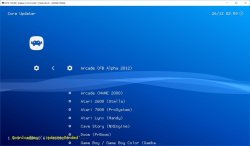
    • Core Updater works. Now you can directly download freshly updated cores directly through the built-in Core Updater. New cores will be added over time, and best of all, you don't need to install a new RetroArch version in order to obtain these new cores either.
    • Improved font rendering inside the menu. Non-Western languages are now also supported by this improved font rendering, including Japanese, Korean, Chinese, Russian, etc.
    DR7_kUhW4AIDZ9b.jpg

    PSP port works again
    DQ2IwiKW4AAROpd.jpg

    RetroArch PSP will work again for version 1.7.0 thanks to @frangar! This is a picture of it running inside the standalone version of PPSSPP, the PSP emulator.


    There's more

    There's a ton more that we have properly not covered in this blog article, but we leave it up to the user to discover that for themselves.


    What's coming next for RetroArch

    We will have a separate blog post on this soon, as well as more separate blog articles detailing some of the other progress that has been made on the cores front.​

Downloads @: retroarch.com

Source (& FULL v1.7 Release Notes):
libretro.com

Update NEW DL Links & Version (v1.7.1)
http://www.psx-place.com/threads/retroarch-v1-7-1-cheevos-achievement-support-added-for-ps3.16468/
 
Last edited:
just looked the option is there (did not try and see if it works but should, that is the path from earlier versions.)
"menu_wallpaper = "" "

You should be able to add your image path (location) in that option. Its near the bottom of ther CFG file. (You can open the CFG in Wordpad or something and then save and then open in Notepad. Will align the rows instead of being a wall of text.

Using a new one by core, now i know each core can have its own CFG file that can be created and loaded with that core., BUT I AM NOT 100% if that will allow for all the options or just emu type options. I have Never config core by core much. .


Yea i am sure its a small bug

Thank you for your help. I was able to edit the custom background path in the cfg file. It still does not work, RetroArch is not setting it up. Well, at least RetroArch is able to display the image file name as the selected background in the user interface options, which means it is reading the cfg correctly but not implementing the wallpaper.


Was aiming for something like this:

Thank you for your time! Let's hope this gets sorted out in the next release.
 
Last edited:
Thank you for your help. I was able to edit the custom background path in the cfg file. It still does not work, RetroArch is not setting it up. Well, at least RetroArch is able to display the image file name as the selected background in the user interface options, which means it is reading the cfg correctly but not implementing the wallpaper.


Was aiming for something like this:

Thank you for your time! Let's hope this gets sorted out in the next release.

Yea i am trying to figure out what we can and can;t do yet.
I been playing with it this weekend a bit.
Its a pain because you do not know if your doing something wrong or it simply does not work..

alot of trial and error. :)

Has any been able to download thumbnails? with v1.7 ps3?
 
Yea i am trying to figure out what we can and can;t do yet.
I been playing with it this weekend a bit.
Its a pain because you do not know if your doing something wrong or it simply does not work..

alot of trial and error. :)

Has any been able to download thumbnails? with v1.7 ps3?

I couldn't. Installed the RA pc version and exported the thumbnail folder to the ps3 via ftp.
 
Thank you for your help. I was able to edit the custom background path in the cfg file. It still does not work, RetroArch is not setting it up. Well, at least RetroArch is able to display the image file name as the selected background in the user interface options, which means it is reading the cfg correctly but not implementing the wallpaper.


Was aiming for something like this:

Thank you for your time! Let's hope this gets sorted out in the next release.

Here is another workaround.
but there is a bug you have to avoid as well.

Okay ,so if you turn off the wave or background animations off . We can manage s background image .
when "Menu Shader Pipline" option is selected to OFF there is a default image for each icon set ( but be aware because there is an option that will freeze the PS3 while scrolling those options.. So you might freeze your PS3 a time or two there.retroarch CFG should have an option to toggle it if you want to avoid a console freeze)

When that is feature is turned off the default BG is enabled We can overwrite that (different depending on your "MENU ICON THEME" chosen) that background is in each icon folder as bg.png (i believe png)
\USRDIR\cores\assets\xmb\ ... (then your icon set)\bg.png

So you can select your icon theme and overwrite that bg.png image and you should have your background and not sure but maybe you can assign different icon sets by core cfg and there is another workaround perhaps for each core.


RetroArch bugs
  • The filetype scanning needs fixed on choosing the back ground image from option
  • The Menu Shader Pipline Bug need fixed, an option creates a PS3 freeze, not sure which one, maybe someone else can confirm this one.
 
Last edited:
Here is another workaround.
but there is a bug you have to avoid as well.

Okay ,so if you turn off the wave or background animations off . We can manage s background image .
when "Menu Shader Pipline" option is selected to OFF there is a default image for each icon set ( but be aware because there is an option that will freeze the PS3 while scrolling those options.. So you might freeze your PS3 a time or two there.retroarch CFG should have an option to toggle it if you want to avoid a console freeze)

When that is feature is turned off the default BG is enabled We can overwrite that (different depending on your "MENU ICON THEME" chosen) that background is in each icon folder as bg.png (i believe png)
\USRDIR\cores\assets\xmb\ ... (then your icon set)\bg.png

So you can select your icon theme and overwrite that bg.png image and you should have your background and not sure but maybe you can assign different icon sets by core cfg and there is another workaround perhaps for each core.


RetroArch bugs
  • The filetype scanning needs fixed on choosing the back ground image from option
  • The Menu Shader Pipline Bug need fixed, an option creates a PS3 freeze, not sure which one, maybe someone else can confirm this one.

Works like a charm! Thank you!

Regarding the feeze: it triggers while scrolling the "menu shader pipeline" option on and off, very quickly.

Just needed to adjust the background opacity to 0.600 and voilá, it's perfect.

Now to try and figure out how to set up a background for each core.

Thanks again! :)
 
Regarding the feeze: it triggers while scrolling the "menu shader pipeline" option on and off, very quickly.

hade it setting on OFF for awhile not hit it one time and never left Off and froze. for me speed does not matter. Its a bug for sure.

Edit:
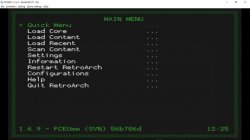
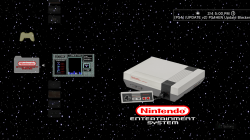
A small preview, (trying to do a juiced up NES inspired standalone and focus with all the resources working and ready to go.) Past version to much was broken but 1.7 might have enough working to make it a go.

ra(1).png
 
Last edited:
I couldn't. Installed the RA pc version and exported the thumbnail folder to the ps3 via ftp.

Instead of PC version, also you can just DL each thumbnail asset from here http://thumbnailpacks.libretro.com/

Then anyone reading, you FTP that anywhere on your PS3 and in the "Directory" Options in the RetroArch XMB you can locate and set the "thumbnail" folder.

One thing that is a problem that i do notice with options and scrolling content in general if done fast you can get a screen. and seems using thumbnails increases that a bit (but maybe not, havent used it enough yet with thumbnails to be certain).

Content Scanning, That has been buggy for me, its hit and miss but odd thing is the hit and miss will be on the same exact content. So it makes little sense to me .. but when you finally get it to scan things its nice.

Overall the its nice and i like the directions its going but still needs a bit of work, but very very close, (The UI)
 
Instead of PC version, also you can just DL each thumbnail asset from here http://thumbnailpacks.libretro.com/

Then anyone reading, you FTP that anywhere on your PS3 and in the "Directory" Options in the RetroArch XMB you can locate and set the "thumbnail" folder.

One thing that is a problem that i do notice with options and scrolling content in general if done fast you can get a screen. and seems using thumbnails increases that a bit (but maybe not, havent used it enough yet with thumbnails to be certain).

Content Scanning, That has been buggy for me, its hit and miss but odd thing is the hit and miss will be on the same exact content. So it makes little sense to me .. but when you finally get it to scan things its nice.

Overall the its nice and i like the directions its going but still needs a bit of work, but very very close, (The UI)

Indeed. I was aware of the thumbnailpacks and forgot to mention it, because I had already got them by installing the pc version and given up on them for some 3d ones instead.

I don't get a lot of freezing while using RA, unless I'm toying around with the "menu shader pipeline" option. Using covers for all my games and scroling through them does not cause any issues.

Content scanning does not detect a lot of roms (I've also manually edited the playlist.cfg so that I can change the game titles and, sometimes, point the rom path to the translated roms: RA usually does not detect those). So, I manually scanned the roms individually: yep, just a custom collection with only the games I'm very fond of.

If you meanwhile launch a game, RA will stop scanning succesfully. I need to restart it again for it to scan again. That's a bug for me.

After playing and exiting a game, all the covers will disappear in the playlist column. You just need to scroll RA again through its xmb options to make them reappear again.

Also, RA won't launch a third game in the same session, you will get back to the xmb. At least, that's what always happens to me.

Still haven't tried the custom bg for each core. Will definitely do as soon as i can.

Ok, I got them working. Enable the "Dynamic Wallpaper" option. Then, edit the retroarch.cfg file and edit the dynamic wallpaper path to the folder of your choice somewhere on the PS3 hdd. Make sure the wallpaper's png names match the ones in "/dev_hdd0/game/SSNE10000/USRDIR/cores/assets/wallpapers/bichromatic pads/1440x900". And voilá, you are set.
 
Last edited:
@exo5
Indeed. I was aware of the thumbnailpacks and forgot to mention it, because I had already got them by installing the pc version and given up on them for some 3d ones instead.

I don't get a lot of freezing while using RA, unless I'm toying around with the "menu shader pipeline" option. Using covers for all my games and scroling through them does not cause any issues.

I have one folder that had alot of roms, when i have thumbnails enabled (any type) and scroll a bit to fast a freeze every time for me)

Content scanning does not detect a lot of roms (I've also manually edited the playlist.cfg so that I can change the game titles and, sometimes, point the rom path to the translated roms: RA usually does not detect those). So, I manually scanned the roms individually: yep, just a custom collection with only the games I'm very fond of.
Yea, it will only detect original dumps that match checksum i believe, Why there is not an option to manually add any roms is beyond me.

If you meanwhile launch a game, RA will stop scanning succesfully. I need to restart it again for it to scan again. That's a bug for me.

That explains why i could not get my custom RA (NES Edition) to load, i had added the RetroXMB edits to allow for a game to boot on launch . So that one had no chance of scanning that explains alot lol.. Thanks..


Also, RA won't launch a third game in the same session, you will get back to the xmb. At least, that's what always happens to me.

This one i have not experienced yet on v1.7, For the most part i been playing with NES cores. I just tested with QuickNES loaded and just tried 6 games no issue. ( i am using a slightly modded version, but still same core's so they should behave the same in that regard.)

Ok, I got them working. Enable the "Dynamic Wallpaper" option. Then, edit the retroarch.cfg file and edit the dynamic wallpaper path to the folder of your choice somewhere on the PS3 hdd. Make sure the wallpaper's png names match the ones in "/dev_hdd0/game/SSNE10000/USRDIR/cores/assets/wallpapers/bichromatic pads/1440x900". And voilá, you are set.

Nice :) , A bit of a work around, but nice to see it works :) ....
 
Can't download the newer 1.7 dex or cex versions for ps3....the links they have takes you to some xbins site where the most current ps3 version they have is 1.3! anybody have the 1.7 dex and cex versions ?
 
Anyone knows if at least simple shaders are back in working? I can't imagine retroarch without scanlines shaders :D

Also libretro on twitter stated they would try to fix them for this release...
 

Featured content

Trending content

Back
Top