PS3 [Work In Progress] Using the Photo grid layout to mount games

I just wanted to say this project is still one of my favorites right now!
Has this been put on ice or is there any progress behind the scene?
I want to get back to this.


I think we need a different approach.

  • A) this needs to be possible in normal Cobra CFW really, if it requires extra stuff its too much hassle, I have no clue how to use mamba really and seems complicated to set up.
  • B) We need to exclude the images used for games from the photo category, and exclude the normal images from the game category.
I can not do much about A, so I want to work on B for now. I am thinking maybe we should base this exclusion system on a really rare image format or a specific resolution as nothing else works so far.

@sandungas i tried the stuff you were saying previously but none of it worked. Any other ideas?
 
Last edited:
Had a bit of luck but still not happy.

I can include/exclude images from any folder if I use entries like this:
Code:
<View id="PhotoGUI_items">
<Attributes>
<Table key="ps3">
<Pair key="icon"><String>/dev_hdd0/tmp/wm_icons/icon_wm_album_ps3.png</String></Pair>
<Pair key="title"><String>PLAYSTATION®3</String></Pair>
<Pair key="str_noitem"><String>msg_error_no_content</String></Pair>
</Table>
<Table key="ps2">
<Pair key="icon"><String>/dev_hdd0/tmp/wm_icons/icon_wm_album_ps2.png</String></Pair>
<Pair key="title"><String>PLAYSTATION®2</String></Pair>
<Pair key="str_noitem"><String>msg_error_no_content</String></Pair>
</Table>
<Table key="psx">
<Pair key="icon"><String>/dev_hdd0/tmp/wm_icons/icon_wm_album_psx.png</String></Pair>
<Pair key="title"><String>PLAYSTATION®</String></Pair>
<Pair key="str_noitem"><String>msg_error_no_content</String></Pair>
</Table>
<Table key="psp">
<Pair key="icon"><String>/dev_hdd0/tmp/wm_icons/icon_wm_album_psp.png</String></Pair>
<Pair key="title"><String>PLAYSTATION®PORTABLE</String></Pair>
<Pair key="str_noitem"><String>msg_error_no_content</String></Pair>
</Table>
<Table key="video">
<Pair key="icon"><String>/dev_hdd0/tmp/wm_icons/icon_wm_album_dvd.png</String></Pair>
<Pair key="title"><String>Blu-ray™ and DVD</String></Pair>
<Pair key="str_noitem"><String>msg_error_no_content</String></Pair>
</Table>
</Attributes>
<Items>
<Query
class="type:x-xmb/folder-pixmap"
key="ps3"
attr="ps3"
src="xcb://localhost/query?ssort=root.sort_selected.photo_all&cond=Aa+Photo:Photo.codec+Ae+Photo:Photo.width 270+Ae+Photo:Photo.height 340"
/>
<Query
class="type:x-xmb/folder-pixmap"
key="ps2"
attr="ps2"
src="xcb://localhost/query?ssort=root.sort_selected.photo_all&cond=Aa+Photo:Photo.codec+Ae+Photo:Photo.width 270+Ae+Photo:Photo.height 390"
/>
<Query
class="type:x-xmb/folder-pixmap"
key="psx"
attr="psx"
src="xcb://localhost/query?ssort=root.sort_selected.photo_all&cond=Aa+Photo:Photo.codec+Ae+Photo:Photo.width 275+Ae+Photo:Photo.height 250"
/>
<Query
class="type:x-xmb/folder-pixmap"
key="psp"
attr="psp"
src="xcb://localhost/query?ssort=root.sort_selected.photo_all&cond=Aa+Photo:Photo.codec+Ae+Photo:Photo.width 210+Ae+Photo:Photo.height 360"
/>
<Query
class="type:x-xmb/folder-pixmap"
key="video"
attr="video"
src="xcb://localhost/query?ssort=root.sort_selected.photo_all&cond=Aa+Photo:Photo.codec+Ae+Photo:Photo.width 270+Ae+Photo:Photo.height 342"
/>
</Items>
</View>

BUT this src code does not allow the grid view, just normal list view .


I need to be able to combine this: (Allows Grid view)
Code:
src="xcb://localhost/query?sort=+PhotoList:Common.titleForSort&cond=Ae+PhotoList:PhotoList.type %xCB_LIST_TYPE_PHOTO_TAGS"

With this: (Allows to show only specific resolutions and exclude all others)
Code:
src="xcb://localhost/query?ssort=root.sort_selected.photo_all&cond=Aa+Photo:Photo.codec+Ae+Photo:Photo.width 270+Ae+Photo:Photo.height 340"
 
Last edited:
So this is what I have now.


I really want to get that grid view working. The main advantages of this without the grid view are that the covers show correctly, not stretched, and that there would never be any RAM issues with thousands of games, no xmls to be generated, no reboot needed when adding new games. Still though I reckon it is possible to get that grid view working.
 
So this is what I have now.


I really want to get that grid view working. The main advantages of this without the grid view are that the covers show correctly, not stretched, and that there would never be any RAM issues with thousands of games, no xmls to be generated, no reboot needed when adding new games. Still though I reckon it is possible to get that grid view working.

Maybe designate a special folder that needs to be filled. Kind of like the old school way that we used the GAMEZ folder or PS3ISO folders, etc? Kind of thinking that you'll have to have images and games in the same folder no matter how you slice it, but i'm not always right :)
 
Maybe designate a special folder that needs to be filled. Kind of like the old school way that we used the GAMEZ folder or PS3ISO folders, etc? Kind of thinking that you'll have to have images and games in the same folder no matter how you slice it, but i'm not always right :)
Location is not an issue really, We are detecting the system accessing the image, and using that as a TRIGGER to mount a game, the game can be anywhere, external, nethost etc.

upload_2019-4-24_3-39-0-png.17187


Note: When I say "right" "left" in that image, what I mean is it starts caching the images beside the one you have chosen to view fullscreen (and mount), it caches them in that order. 1st on right, 1st on left, 2nd on right, 2nd on left etc.

The issue I am having is that I want the images to display like this in a grid but I can not figure out the correct XML syntax.

 
Last edited:
Nice progress with the filtering :)
Just an small correction, in the conditionals of this line you was not telling the codec identifyer
src="xcb://localhost/query?ssort=root.sort_selected.photo_all&cond=Aa+Photo:Photo.codec+Ae+Photo:Photo.width 270+Ae+Photo:Photo.height 340"
What i highlighted in bold (Photo:Photo.codec) is the database access path (ordered like a hierarchy, from top to bottom, you are descending 3 levels)
Inmediatly after it (separated by an space) is needed to tell the codec identifyer, so the correct way to do it should be with something like this:
src="xcb://localhost/query?ssort=root.sort_selected.photo_all&cond=Aa+Photo:Photo.codec SOMETHING+Ae+Photo:Photo.width 270+Ae+Photo:Photo.height 340"

I guess this mistake in the conditions of the filter is making all the codecs valid (so is not really filtering the search "by codec")... not sure though
Also, im not sure which values are valid for the codecs, in the wiki doesnt appears any example for them
https://www.psdevwiki.com/ps3/XMB_database#Photo

Most probably inside the dabatabase files the values of that codecs are stored as a number (things like 0x120 instead of JPG) but in this example i dont know which one you are supposed to use in the XML (either the 0x120 or the JPG from my previous example)
Maybe the firmware allows to type JPG in the XMBML files and it does the "translation" back from the 0x120 at the time is loaded

In the worst scenario posible (incase the syntax rules used in the XMBML files only allows to use numbers to identify the codecs), we can harvest that values by scanning some sample database files with a modifyed version of the db3crawler
The concept is the same, but is needed to modify the search patterns and output only the filename + the value of the codec


-----------------------------
To use the good looking grid mode i think you are going to need to "build" it inside registory.xml
This file allows to build on a higher level, as far i remember there are a few syntax constructions (in that "src" lines) that are exclusive for it

In some way is like dividing the custom code in half and using registory.xml as a proxy to access the database files

 
Last edited:
I need to be able to combine this: (Allows Grid view)
Code:
src="xcb://localhost/query?sort=+PhotoList:Common.titleForSort&cond=Ae+PhotoList:PhotoList.type %xCB_LIST_TYPE_PHOTO_TAGS"
Note the fuction is generic, not specific to images (xcb://localhost/query?) and it have 2 arguments:

sort = this is secondary, doesnt really matters, it tells the way how contents are going to be shorted, alphabetically, by timestamp, etc... but if you delete it the syntax probably is going to be valid because the firmware have a default value for sorting

cond = this is the real deal, it starts with a database access path, but his value is very special (%xCB_LIST_TYPE_PHOTO_TAGS), i dont know the technical name of it or what does exactly, but is something special for the .sprx that is loading the "src" line from the XMBML file

So i think this should work fine too, because is doing the same (without the shorting)
Code:
src="xcb://localhost/query?cond=Ae+PhotoList:PhotoList.type %xCB_LIST_TYPE_PHOTO_TAGS"

In other words... the %xCB_LIST_TYPE_PHOTO_TAGS is a "must have" to achieve the grid display, and as far i remember the only way to do is is by "building" this part of the custom code inside registory.xml

At this point i cant tell much more about how the registory.xml file works though, the last time i was looking at it i had the feeling i was starting understanding well how it works, but im not so sure, is a bit tricky

Anyway... take a look at how works that "src" strings inside registory.xml that contains names like %xCB_SOMETHING and try to copy them into new <items> using custom names (to dont interfere with the official code)
 
Last edited:
Just an small correction, in the conditionals of this line you was not telling the codec identifyer
What i highlighted in bold (Photo:Photo.codec) is the database access path (ordered like a hierarchy, from top to bottom, you are descending 3 levels)
Inmediatly after it (separated by an space) is needed to tell the codec identifyer, so the correct way to do it should be with something like this:
I guess this mistake in the conditions of the filter is making all the codecs valid (so is not really filtering the search "by codec")... not sure though
Also, im not sure which values are valid for the codecs, in the wiki doesnt appears any example for them
https://www.psdevwiki.com/ps3/XMB_database#Photo
Ah I see, removed Aa+Photo:Photo.codec and its still the same...cool. Thanks.

To use the good looking grid mode i think you are going to need to "build" it inside registory.xml
This file allows to build on a higher level, as far i remember there are a few syntax constructions (in that "src" lines) that are exclusive for it

In some way is like dividing the custom code in half and using registory.xml as a proxy to access the database files
I am not sure about that, maybe though.

I can put this into the category_game.xml and get the grid mode:

Code:
<Query
class="type:x-xmb/folder-pixmap"
key="ps3"
attr="ps3"
src="xcb://localhost/query?sort=+PhotoList:Common.titleForSort&cond=Ae+PhotoList:PhotoList.type %xCB_LIST_TYPE_PHOTO_TAGS"
/>
This is the same, like you say the sort is not needed.
Code:
<Query
class="type:x-xmb/folder-pixmap"
key="ps3"
attr="ps3"
src="xcb://localhost/query?cond=Ae+PhotoList:PhotoList.type %xCB_LIST_TYPE_PHOTO_TAGS"
/>

BUT The issue with these methods is this src gives me Album view in my custom folder, which I dont want.
upload_2020-4-10_13-13-22.png

upload_2020-4-10_13-17-43.png


I need to be able to just "show all" if you know what I mean, skipping the album layer? Hard to explain.


I was kinda thinking I might need to use registry.xml but not 100% sure yet as I can get the grid mode to work like the above image without using it.

I am finding it hard to work my way around that registry.xml. It seems every section in the registry.xml links up with other section like a big loop. It's like following a treasure hunt :)

For example the main photo category has this:
upload_2020-4-10_13-21-12.png


So I follow that to the registry.xml like this: Root > view_selected > photo. That gets me to here:

upload_2020-4-10_13-22-12.png


So I follow that like this: view_photo > month . That gets me up to here:
upload_2020-4-10_13-23-44.png


So I follow root > sort_selected > photo > month that gets me down to here:
upload_2020-4-10_13-26-25.png


So I follow that and it gets me to here:
upload_2020-4-10_13-27-47.png


Then I am like "what the actual F%$# is going on here!!". :D
 
Last edited:
Now I could move this album view up to the top level, so you would just see these at the top level and that would be fine too.. That is what I did in my original 11,000 covers video.

upload_2020-4-10_13-13-22-png.25245


But the big issue with this is that I have no filtering options, so I show ALL albums here and I show ALL albums in photo.
 
Ok, so all of these will show the grid view without using registry.xml

Code:
<Query
class="type:x-xmb/folder-pixmap"
key="ps3"
attr="ps3"
src="xcb://localhost/query?cond=Ae+PhotoList:PhotoList.type %xCB_LIST_TYPE_PHOTO_ALBUM_YEAR"
/>
upload_2020-4-10_14-3-17.png


Code:
<Query
class="type:x-xmb/folder-pixmap"
key="ps3"
attr="ps3"
src="xcb://localhost/query?cond=Ae+PhotoList:PhotoList.type %xCB_LIST_TYPE_PHOTO_ALBUM_MONTH"
/>
upload_2020-4-10_14-5-2.png


Code:
<Query
class="type:x-xmb/folder-pixmap"
key="ps3"
attr="ps3"
src="xcb://localhost/query?cond=Ae+PhotoList:PhotoList.type %xCB_LIST_TYPE_PHOTO_TAGS"
/>
upload_2020-4-10_14-6-19.png


So this tells me that its more likely that the PhotoList:PhotoList is causing the grid view.

What confirms that even more is that the option I need = ALL is written like this in the registry.xml and has no grid view:

Code:
<Pair key="all"><String>xcb://localhost/query?ssort=root.sort_selected.photo_all&cond=Aa+Photo:Photo.codec</String></Pair>
So basically I need to be abl;e to convert that last line to include PhotoList:PhotoList if possible...I think?

:)

What I really need is something like %xCB_LIST_TYPE_PHOTO_ALL

I am trying stuff like this now , no luck so far:
Code:
src="xcb://localhost/query?cond=Ae+PhotoList:PhotoList.type %xCB_LIST_TYPE_PHOTO_USER_DEFINED+Ae+Photo:Photo.width 270+Ae+Photo:Photo.height 340"
Code:
src="xcb://localhost/query?cond=Ae+PhotoList:Photo.width 270+Ae+PhotoList:Photo.height 340"

I think maybe I need to try all these:
upload_2020-4-10_14-36-39.png
 
Last edited:
@sandungas Progress .that last bit about PhotoList being the key is right.


Code:
src="xcb://localhost/query?cond=Ae+PhotoList:PhotoList.numOfItems 80"

^^ This works and shows grid view. So we know its not %xCB_LIST_TYPE that is important, its Photolist:


That above src is a kind of filtering, it only shows albums with 80 images. :) Not exactly what I wanted but its a start.

upload_2020-4-10_15-3-33.png
 
Sorry for all the posts in a row.

I am looking through the main explore sprx and there are more examples of PhotoList syntax in there that are not on the wiki. Its complicated.


Maybe you will be able to see something here or have some ideas based on these @sandungas
Code:
xcb://localhost/query?cond=Ai+xCB:PhotoList

PhotoList:PhotoList.type.

PhotoList:Common.title

attr=PhotoList:Common.title+PhotoList:Common.titleForSort+PhotoList:PhotoList.numOfItems+PhotoList:Common.size+PhotoList:PhotoList.type+PhotoList:PhotoList.reserved22

xcb://localhost/query?trigger=off&range=ahead 0 1024&cond=Ae+PhotoList:PhotoList.type %xCB_LIST_TYPE_PHOTO_USER_DEFINED+Ae+PhotoList:Common.title

PhotoList:Common.size

&sort=+PhotoList:Common.titleForSort+PhotoList:Common.dirPath+PhotoList:Common.fileName&cond=

+Op+PhotoList:Common.dirPath

xcb://localhost/query?sort=+PhotoList:Common.titleForSort+PhotoList:Common.title+PhotoList:Common.stat.timeImportedTicks&cond=Ae+PhotoList:PhotoList.type %xCB_LIST_TYPE_PHOTO_USER_DEFINED

+PhotoList:Common.titleForSort+PhotoList:Common.title+PhotoList:Common.stat.timeImportedTicks

xcb://localhost/exists?having=off&rquery=root.fixed_items.playlistempty&cond=Ai+xCB:PhotoList


This shows ALL album types at once, might be onto something here. Just need to find a way to exclude the ones we dont want to see.

Code:
src="xcb://localhost/query?cond=An+PhotoList:PhotoList.numOfItems 0"

This also shows all albums types at once:
Code:
src="xcb://localhost/query?cond=An+PhotoList:PhotoList.type %xCB_LIST_TYPE_PHOTO_USER_DEFINED"

upload_2020-4-10_16-55-30.png


EDIT: This is a valid entry, filters the view to only show albums with more and 1 image.

Code:
src="xcb://localhost/query?cond=Ae+PhotoList:PhotoList.type %xCB_LIST_TYPE_PHOTO_TAGS+An+PhotoList:PhotoList.numOfItems 1"

We can also add attributes to the end with &attr...most testing needed. If anyone has any ideas for attributes that might help me filter out stuff let me know?
 
Last edited:
An important correction about what i wrote before...
src="xcb://localhost/query?ssort=root.sort_selected.photo_all&cond=Aa+Photo:Photo.codec+Ae+Photo:Photo.width 270+Ae+Photo:Photo.height 340"
What i highlighted in bold (Photo:Photo.codec) is the database access path (ordered like a hierarchy, from top to bottom, you are descending 3 levels)
Inmediatly after it (separated by an space) is needed to tell the codec identifyer, so the correct way to do it should be with something like this:
src="xcb://localhost/query?ssort=root.sort_selected.photo_all&cond=Aa+Photo:Photo.codec SOMETHING+Ae+Photo:Photo.width 270+Ae+Photo:Photo.height 340"

The "Photo" entity inside the database is used by every image indexed in the database... is like a label and all the images uses it... when doing a search in the database using "Photo" it returns a list of all the images

But the "PhotoList" is something different, i guess (but im not sure) it exists only 1 main "PhotoList" inside the database (and maybe is designed to allow to create others manually by the user), and the code line i was commenting seems to be working in a different way
Code:
src="xcb://localhost/query?cond=Ae+PhotoList:PhotoList.type %xCB_LIST_TYPE_PHOTO_TAGS"

As far i could see (by looking at how the "Game" contents works), the attributes are divided in 2 groups, in this case:
-PhotoList:PhotoList.attribute <--- specific attributes (only for PhotoList)
-PhotoList:Common.attribute <--- common attributes (used also by "Game", "Video", etc...)

The PhotoList:PhotoList.type is special because is not scanning the database directly... it seems to be calling a filter function from the .sprx (+ some display settings)

I thought the %xCB was the responsible of the grid display, but it looks is just a setting for it
At this point i think the "PhotoList" is a single entity in the database and contains info for all the other "Photo" entities of the database
Not sure, time ago i was taking a look at "Photo" entities, but i never took a look at "PhotoList" entities, but i guess there are going to be more differences in between "Photo" and "PhotoList" than in between "Photo" and "Game"
"Photo" and "Game" have lot of things in common, literally, most of the attributes under access paths: "Photo:Common.attribute" and "Game:Common.attribute" are the same
 
Not sure if you tryed it before, but you should try this:
Code:
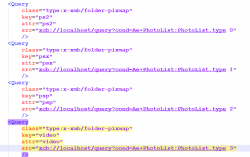
src="xcb://localhost/query?cond=Ae+PhotoList:PhotoList.type 0"
And this:
Code:
src="xcb://localhost/query?cond=Ae+PhotoList:PhotoList.type 1"

Im suggesting this because it seems the fields that allows to use %xCB names also allows to use numbers, that numbers works as identifyers of every %xCB available, as example this is valid, indicates a range that includes 7 different %xCB_LIST_TYPE_SOMETHING
Code:
src="xcb://localhost/query?cond=Ae+PhotoList:PhotoList.type 0 6"

Im not telling to selec them in a range (at this point i think is not going to be useful to selected several together)
Im mentioning this just incase there is some of the available %xCB names in wiki missing
So for experiments... instead of trying the names that appears in wiki you can use his numbers
Incase there is some special %xCB mode that displays images in a "raw" grid i guess sony could assign it type = 0
https://www.psdevwiki.com/ps3/XMB_database#PhotoList
 
Last edited:
OK, I have a basic work around until we can find something better.

We use the amount of images in the album as a filter for what shows in the game category and what does not show in the photo category. It is the only one that I can find that works AFTER the "%xCB_LIST_TYPE_PHOTO_TAGS", no other operators will work here so far, if anyone else wants to test please do as there are many combinations I cant try them all and we have no way to know what is valid. Its like a lottery. :)

Anyway this is a viable option IMO. So a plugin like webman mod instead of having to write all the games to xml, would just have to write the amount of images in the PS3, PS2, PS1, PSP images folder to a custom xml on hdd. This way we can make so only albums with exactly that amount of images show up in game.

99.9% of the time this will not match any normal photo albums. If by some fluke it also matches a normal photo album, the user would need to add/remove a game or add/remove a photo from the affected album to solve the mix up
 
Not sure if you tryed it before, but you should try this:
Code:
src="xcb://localhost/query?cond=Ae+PhotoList:PhotoList.type 0"
And this:
Code:
src="xcb://localhost/query?cond=Ae+PhotoList:PhotoList.type 1"

Im suggesting this because it seems the fields that allows to use %xCB names also allows to use numbers, that numbers works as identifyers of every %xCB available, as example this is valid, indicates a range that includes 7 different %xCB_LIST_TYPE_SOMETHING
Code:
src="xcb://localhost/query?cond=Ae+PhotoList:PhotoList.type 0 6"

Im not telling to selec them in a range (at this point i think is not going to be useful to selected several together)
Im mentioning this just incase there is some of the available %xCB names in wiki missing
So for experiments... instead of trying the names that appears in wiki you can use his numbers
Incase there is some special %xCB mode that displays images in a "raw" grid i guess sony could assign it type = 0
https://www.psdevwiki.com/ps3/XMB_database#PhotoList
Thanks for suggestions, I just tried all of those from 0 to 7 with no luck unfortunately.

upload_2020-4-11_19-55-50.png

I really wish we knew what might be valid values for all of these entries.

upload_2020-4-11_19-59-2.png


Another topic: Does anyone know much about the NetShare features? I can not find any info on them, I just see loads of references in the FW.
 
Did anyone know, you can just dumps a load of images into the dev_hdd0/photo folder via FTP and then rebuild the database to see them on the xmb. But if you do this then they are not automatically arranged into albums with the date you imported them.
 
Did anyone know, you can just dumps a load of images into the dev_hdd0/photo folder via FTP and then rebuild the database to see them on the xmb. But if you do this then they are not automatically arranged into albums with the date you imported them.
yeah i did that once and wondered why the pics didnt show but i eventually remembered the database. it doesnt work with the video folder because the files are put in random subfolders. i.e. you can make a folder like xmb > video > funnyvids but the files are put in folders (under hdd0/video) named aa,ab,ac etc and randomly with files you copied 6 months back. if you copy lots of vids all at once they still go into different subfolders in hdd0/video. i dont know how music folder acts but assume its like photo folder too.
 
The photo folder normally acts like that too if you import images from the XMB. Making folders with year, month, day. but it can handle files in the root too if you just dump them in and rebuild database, kind of handy. :).
 
Last edited:

Similar threads

Back
Top