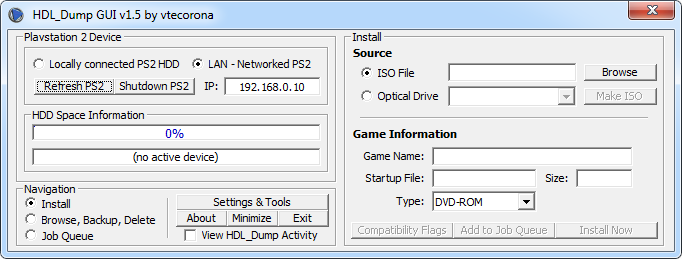
HDL_Dump GUI is a graphical program, which helps to install PS2 games from a PC onto the PS2. Its based on the command line program hdl_dump and includes mostly all its functions in an easier way.
With it you can install PS2 games over LAN or on a locally connected PS2 HDD through IDE or USB. It also can list and edit the installed games from the HDD which is stored in your PS2. You also can copy the games back from the PS2 HDD onto your PC.
This app maybe a bit obsolete. If you're having problem with launching this app, try Compatibility Mode: Windows XP SP3.
Changelog:
06.22.07 - v1.5
- Fixed a bug that only affected Vista users. When loading, the program would give an error "Run-time error 52: Bad file name or number." This has been fixed and the GUI should run smoothly on Vista; I did the update while running Vista Ultimate x86. I have a Vista\XP dual boot so if you are doing the same then you will have 2 separate hdl_dump.conf files in the OS's respective location. You can run the GUI from any drive and it will find the config file for the OS currently running. For vista this is c:\users\$user$\appdata\roaming and xp is c:\documents and settings\$user$\Application Data
If you run into any strange errors then you can try to set compatibility settings as follows on the GUI: Disable visual themes, Disable desktop composition, Disable display scaling on high dpi settings
05.11.07 - Removed .cue extension from image selection dialog. For some reason these files make hdl_dump crash.
11.04.06 - Made the status window minimize to system tray. I also made the tray icon display install status information when the mouse is hovering over it.
- The main window will not get maximized after installs complete.
10.31.06 - v1.4
- When installing, sometimes the hdl_dump server will send more than one of the status report packets (ie. "44% 1 min, 3 secs remaining -- 45% 1 min 1 sec remaining"). I made the data handling procedure split up the data and parse each line so none of the percentages should get missed on the status window anymore. It still may appear to skip a percentage but that is simply because the percentage will change immediately after the other when two percentages are received in 1 packet. I mainly did this fix because jobs were not displaying as 100% complete on the status window.
- New icon.
10.30.06 -
- Added formatted descriptions for the current job on the status window instead of displaying just the command line. Also added transfer speed to the status window taskbar tile when minimized.
- New percentage bars that display the percentage value.
10.28.06 -
- Added ability to play a sound file (wave only for now) when a job completes and\or when the entire job queue completes.
- Added more error trapping to help with stability.
- Added detection of whether or not a refresh is needed when the job queue completes. Previously the device would get refreshed no matter what job(s) were done but now only if games are installed or deleted from the device it will get refreshed.
- The GUI now checks if a game is CD or DVD before copying the game to another PS2 or a locally connected HDD; which means it will use inject_cd or inject_dvd accordingly. Previously only inject_dvd was used no matter if it was a CD or DVD on the device's game list.
- Fixed a bug that forced the user to restart hdld_svr.elf if an install is cancelled. The GUI will now wait until the user closes out the console (CLICK ME AND PRESS CTRL+C window).
10.25.06 -
- Added remote status checking via a built-in HTTP server.
- Added option to let the user select whether or not to close the status window when jobs complete.
- Fixed device refreshing error after job queue completes.
10.20.06 - v1.3
- Added option to select whether to delete a game via job queue or "delete now."
- Added elapsed time for current job and overall on the status window.
- The status window will now stay open after all jobs complete.
- Added a check to determine if there is sufficient disc space before installing via "Install Now." I am not sure whether I am going to apply this checking to adding install jobs to the job queue because it gets a bit complicated when multiple devices come into play plus the fact that deletes can now be added to the job queue. It will do a check when adding an install to the job queue based on size and available disk space but there is no calculations based on adding installs and subtracting deletes etc.
- Previously only a LAN device got refreshed after the job queue completed (dont remember why) but I made it refresh whatever device is selected when the job queue completes.
10.06.06 - v1.2
- Fixed a bug when selecting an optical disc in the drop-down combo. Users experiened an error when selecting a game disc on a drive that does not have SPTI capability. The error occurs when cdvd_info2 gets called and the drive parameter was not parsed correctly.
10.01.06 -
- When selecting Optical Drive (after the "query" command finishes) any found game disc will be auto-selected and game info will get read (if only 1 disc gets found).
09.30.06 -
- Added ability to export a list of games. By default games get saved in the format of: "1. Game Title" but there are optional items that you can insert such as size, startup, type, and flags.
09.27.06 - v1.1
- Added SPTI functionality so now you can install\dump DVD9 games. I successfully tested using Gran Turismo 4 with both install and ISO dump. Thanks to b081 for the help.
- Now using cdvd_info2 instead of cdvd_info. The difference is now the GUI can detect if the game is a CD or DVD and can also detect dual-layer discs. If a disc is dual-layer then a little red label will appear under the Size: textbox just letting you know that the disc is dual-layer.
- Cleaned up the Tools window a little.
- Put in a notification in for when renaming a game that tells the user that the command does not work if you are just changing the case of character(s); the new name must be different.
09.24.06 -
- Added a button to change font. You can now select font: name\size\bold\italic. I recommend sticking with the default tahoma size 8 because I designed the entire interface using tahoma size 8. Using some fonts\sizes makes some of the captions unreadable.
09.23.06 -
- Finally fixed a bug that affected users that had a large quantity of games on their HDD. This bug caused only a portion of the games (only 63 of 100+ based on Vegeta) to load and failure to display HD size information. For this fix I changed the way\time the GUI reads hdl_dump output. Previously, the GUI would read a chunk of games (~63) and send it to the handler and when the second chunk came in, the GUI thought it was already done reading all games so it would ignore the second batch. Now, aside from installs\backups, the data is handled after hdl_dump finishes the command totally.
09.20.06 - v1.0b
- Fixed the bug where users using Windows configured with a non-English language being nagged with a "Locate Application Data folder" on every load.
- Added ability to delete multiple games. (Hold control and select the games)
- Attempted to fix the bug that Vegeta pointed out where not all games are getting loaded to the HD list. I'm not sure what the threshold is but he has 150 and it got cut off at 63 so I guess it only affects people that have 63+ games.
09.17.06 - v1.0
- Fixed a problem that only affected users that have windows configured with a language other than english. The fix basically just replaces the "HDL_Dump Config" file location option to now store the location of the users Application Data folder. The non-english users will have to locate their Application Data folder on the first load. The directory will be automatically set for english users.
09.02.06 - Now using hdl_dump 0.8.6
- Added Backup TOC (Table Of Contents) and Restore TOC to Settings->Tools.
- Added the ability to manipulate a LAN PS2 with Settings->Tools
- Added ability to edit game names. Just highlight the game list-item and then single click the list-item again to edit.
- Added ability to edit a job command when you right-click the job queue entry.
08.31.06 - 0.9b2
- Minor adjustment to delete command
- Fixed a slight "bug" when using Install Now the job description was being outputted in the Overall Status label instead of the Job Description label.
- Made the game list sorted and slightly taller so 1 more game is displayed.
08.30.06 - 0.9b
- Fixed major bug that would make installs/create ISO's fail prematurely without any notification to the user. If anyone still has problems please PM me asap.
- If HDL_Dump crashes while creating an ISO or installing a dual-layer DVD then the job will now get flagged as finished with an error and the job queue will continue on. Previously the job queue would just freeze and the job would remain at "Active." indefinitely.
- Browse, Backup, Delete frame now displays the number of games on a device when refreshed. On the status window, the Current and Overall frames now display % complete.
08.25.06 - Added detection of dual-layer disks that just gives the user a msgbox that an error can potentially happen when installing or creating ISOs.
08.24.06 - Made it so any jobs in the job queue that do not have "Complete" as their status will get reattempted on any future runs of the job queue and any job marked as "Complete" will get skipped over.
- Fixed the loading\saving of hdl_dump.conf, again. The problem was lord bogami's GUI saves to the config file by using a character 13 + 10 carriage return while my GUI and hdl_dump.exe use only character 10. The cause of the problem is a user editing hdl_dumps settings with lord bogami GUI which leaves the settings unreadable by my GUI. The GUI will now successfully read the settings either way.
- Enabled the Toxic OS partition naming option.
08.23.06 -
- Fixed bug where if you close the status window there was no way of getting it
back. Now when you close it via the little X on the titlebar it will just get minimized.
- The overall percentage was inaccurate on the status window, that has been fixed.
08.21.06 -
- Found a little problem when creating an ISO from CDVD image and the ISO file you selected already exists and you choose to over-write. The job will return an error because of a "File already exists error." That bug has been fixed.
- No longer using a loop to cycle through the job queue. Slightly less (and probably unnoticeable) memory useage.
- The main window would not load centered if the "View HDL_Dump Activity" option was selected. It will now load centered either way.
08.15.06 - v0.9
- Added an Install Now button so users can install a game without having to use the job queue.
- Added ability to use custom colors for the interface. The user can select the backcolor and forecolor for the GUI. You can disable this feature and use Windows standard colors if you get annoyed by it.
08.13.06 -
- When selecting an ISO, if the game name is not found in the ISO data then the file name will be automatically inserted into the "Game Name" field. (it will take only the file name, the extension will be trimmed off.)
- Added systray balloon tips to notify the user of job queue additions and of other actions. If you are annoyed by these, dont worry, there is an option to turn them off.
08.09.06 -
- Fixed problem where target kbps and disk database file would not get saved to hdl_dump.conf which could potentially create a problem. Also changed the message when loading that alerts the user that hdl_dump.conf was not found. This sometimes happens if the user has never ran hdl_dump on their PC or if they have windows configured using a language other then english. The new msg basically informs the user of that.
- There apparently was no coding behind the Use Defaults button so I fixed that. I have no idea how it got erased because it used to work, I think it happened when I renamed the button control.
- Removed the remembering of the main window position on the screen. It will now load centered every time.
08.08.06 - v0.8c
- Added ability for the user to manually locate hdl_dump.conf
- Copy game to HDD was not working, it has been fixed. (only tested copying via LAN-PS2 to Local HDD)
- Fixed a problem where if a command was unsuccessfully sent to hdl_dump the user would get a nagging message box that sometimes would never stop.
- A few other random bug fixes I found along the way.
08.06.06 - v0.8b
- Just a minor bug pointed out by jetlee that needed fixing.
08.04.06 - v0.8
- Added a "Shutdown PS2" button to Playstation 2 device frame.
- Added option to control whether the GUI's windows stay on top of other windows.
- Added a "Default ISO" setting to the settings window so when browsing to Copy or Install an ISO it will default to the selected directory.
- Added detection of game disks in optical drives. Instead of displaying every optical drive on your PC now only drives with a game disk will be recognized.
- Added a Standby option to the status window to put the PC in standby mode when all jobs are complete.
- Made the program remember the window position so that it will load in the same position as when it was last exited.
- Added a Tools tab to the settings window. So far the only tool on there is a HDD formatter which formats a HDD for HDLoader use.
- Added a "Make ISO" button to the Install-frame to allow the user to make an ISO file from a CD\DVD game image.