

Need for Speed: Hot Pursuit Vita
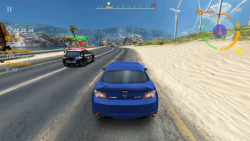
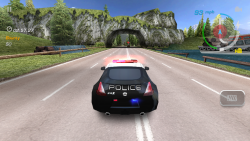
-
This is a wrapper/port of Need for Speed: Hot Pursuit Android for the PS Vita.
The port works by loading the official Android ARMv6 executable in memory, resolving its imports with native functions and patching it in order to properly run.
-
Setup Instructions (For End Users)
In order to properly install the game, you'll have to follow these steps precisely:
- Install kubridge and FdFix by copying kubridge.skprx and fd_fix.skprx to your taiHEN plugins folder (usually ur0:tai) and adding two entries to your config.txt under *KERNEL:
ux0:tai/kubridge.skprx
ux0:tai/fd_fix.skprx
NOTE: Don't install fd_fix.skprx if you're using repatch plugin
- Recommended: Install PSVshell to overclock your device to 500Mhz.
- Obtain your copy of Need for Speed: Hot Pursuit version 2.0.28 legally from the Google Play store in form of an .apk file and an .obb file (usually located inside the /sdcard/android/obb/com.eamobile.nfshp_row_wf/ folder). You can get all the required files directly from your phone or by using an apk extractor you can find in the play store. The apk can be extracted with whatever Zip extractor you prefer (eg: WinZip, WinRar, etc...) since apk is basically a zip file. You can rename .apk to .zip to open them with your default zip extractor. Unfortunately the game was taken down from the Google Play store and is not available for download unless you have bought it previously.
- Copy the main.2022.com.eamobile.nfshp_row_wf.obb file to ux0:data/nfshp/
- Open the apk and extract libnfshp.so from the lib/armeabi folder to ux0:data/nfshp/.
- Optional (Opening Video Playback): Extract published/.nfshp_intro_h800.mp4 from the .obb file and transcode the video stream to AVC (ffmpeg can be used for this task with the command ffmpeg -i .nfshp_intro_h800.mp4 -c:v libx264 -c:a copy opening.mp4). Once converted, copy opening.mp4 to ux0:data/nfshp/.
- Install NFSHP.vpk on your PS Vita.
- Multiplayer features are not yet implemented in this Vita port.
- Because the game requires touchscreen for menu navigation, you may not be able to play it on PSTV.
- The original Android game only supports accelerometer for steering and touch for other actions. The in-game input controls were reimplemented on the Vita, allowing you to use the analog joystick and hardware buttons, which are mapped accordingly:
- Left Joystick - Steering
- Left Trigger - Braking
- Right Trigger - Acceleration (Auto-Acceleration is enabled by default, and can be disabled in the game's options)
- Cross - Nitro
- Circle - Handbrake
- D-PAD Up - Trigger Roadblock / Overdrive
- D-PAD Left - Trigger Spikestrip / Oil slick
- D-PAD Right - Trigger EMP / Jammer
-
Screenshots


-
Credits
- TheFloW, Rinnegatamante for previous Android Vita ports
- GrapheneCt for PVR_PSP2
- xerpi for libvita2d


