

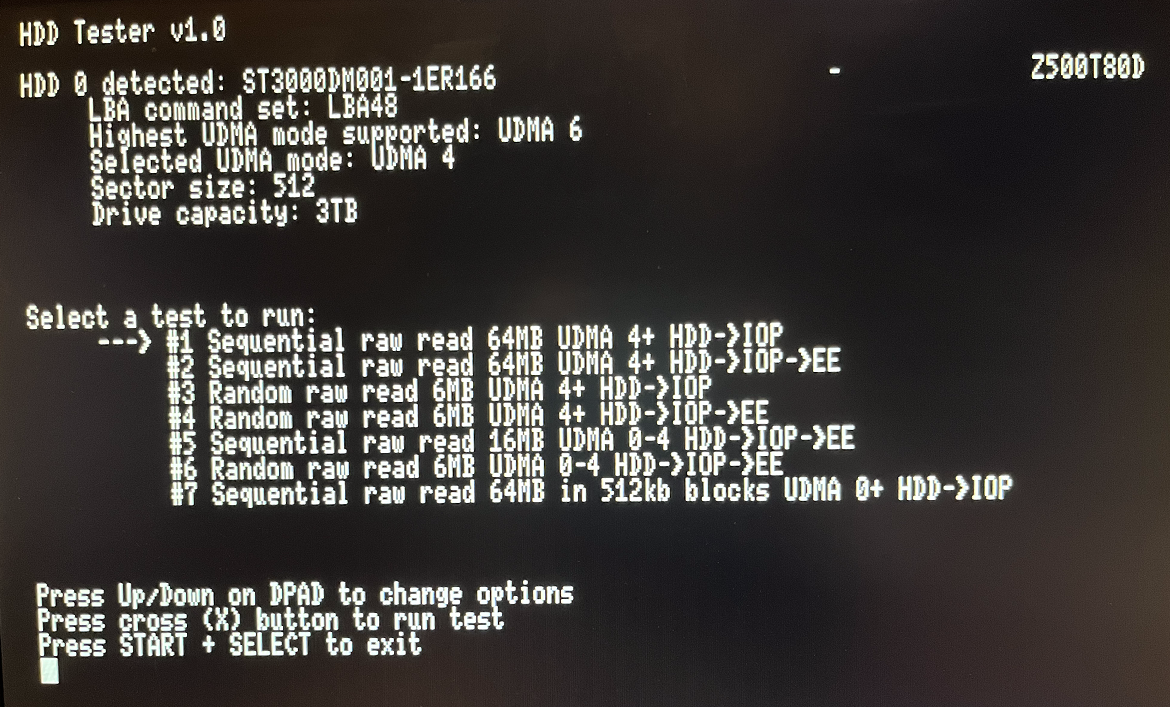
This is a small utility I wrote that can be used to get drive info, run speed tests, and check for data transfer errors on internal HDDs. I used this mainly for running speed tests while testing UDMA 5/6 support. Here are a couple things you might use this tool for:
Download v1.0: https://github.com/GrimBrew/PS2HDDTester/releases
Download v1.1: https://github.com/ps2homebrew/PS2HDDTester/releases
Source Code: https://github.com/GrimBrew/PS2HDDTester
Note: All data and screenshots in this post were performed using an official Sony network adapter with the BitFunx sata board.
- Checking if your HDD's sector size is compatible with OPL
- Checking for transfer errors when reading from the drive
- Seeing how fast the console can read from the HDD
Download v1.0: https://github.com/GrimBrew/PS2HDDTester/releases
Download v1.1: https://github.com/ps2homebrew/PS2HDDTester/releases
Source Code: https://github.com/GrimBrew/PS2HDDTester
Note: All data and screenshots in this post were performed using an official Sony network adapter with the BitFunx sata board.
-
Explanation of speed tests
Is it possible to use UDMA 5 and 6 on the PS2, and get higher than UDMA 4 maximum speeds?
Yes it is possible to use both UDMA 5 and 6, and get higher than UDMA 4 speeds. However, there are only very small performance gains to be had as almost no game will operate at the conditions required to achieve the speeds possible at UDMA 5 and 6. See below for additional details.
Does UDMA 5 or 6 change loading times for games running off the HDD?
For any games using large transfer sizes (32Kb or higher) there will be slight performance gains IF the data being read is contiguous. I don't know if there would be any noticeable difference in-game, but I suspect the answer is no. See below for additional details.
Do SSDs perform better than a mechanical HDD on the PS2?
Yes, but not in all cases. Comparing the results from the sequential read tests on a SDD vs a 7200 rpm mechanical HDD the results are almost identical. See below for additional details.
What about a 7200 rpm HDD vs a 5400 rpm HDD?
A 7200 rpm drive will beat a 5400 rpm drive in all tests. See below for additional details.
Do you have any data to backup these claims?
Yes, I have a chart with speed tests results for all tests on the github page linked above.
Speed Tests
There are 3 types of speed tests available, sequential read, random read, and high throughput. The sequential read tests will read a sequential block of data up to 64MB or 16MB (depending on the test) using a few different block sizes and UDMA modes. It's designed to simulate the best case scenario when reading data from the HDD.
The random read tests will read 6MB of data in random chunks, using a few different block sizes and UDMA modes. After each block read it will perform a seek with a 10% chance to seek backwards and 90% chance to seek forwards, up to 1GB away from the current position the drive is at. This test is designed to simulate the worst case scenario when reading data, ex: reading files that are heavily fragmented.
The high throughput test (test #7) serves no real purpose other than to prove that UDMA 5 works and can operate at such speeds (see below for additional details). The conditions this test operates under are not something any game or application would ever do.
When reading from the HDD all data must pass through the IOP before it becomes available to the EE (where games and homebrew run). I've added variations for most tests so you can see what the actual read speed is off the HDD (HDD -> IOP), and what the full trip time is from the HDD to the running application (HDD -> IOP -> EE).
Block sizes and UDMA modes
By varying the UDMA mode and block sizes for reads we can see how each affects the speed of reading data from the HDD. Lower block sizes = slower read times regardless of the UDMA mode selected. Using larger block sizes and higher UDMA modes work together for better results. Reading data in blocks of 2Kb at UDMA 4/5/6 has negligible performance gains compared to UDMA 0, whereas reading data in blocks of 16Kb at UDMA 4 will be ~50% faster than at UDMA 0. The trade off here is IOP memory used to perform the reads. Because all data must be read into IOP memory before it can be sent to the EE, larger block sizes = more IOP memory needed.
UDMA 5/6
So what's the secret to getting UDMA 5 and 6 working on the PS2? Nothing, literally nothing. All I did was set the drive transfer mode to UDMA 5 and 6 and it just worked. I guess no one ever tried?
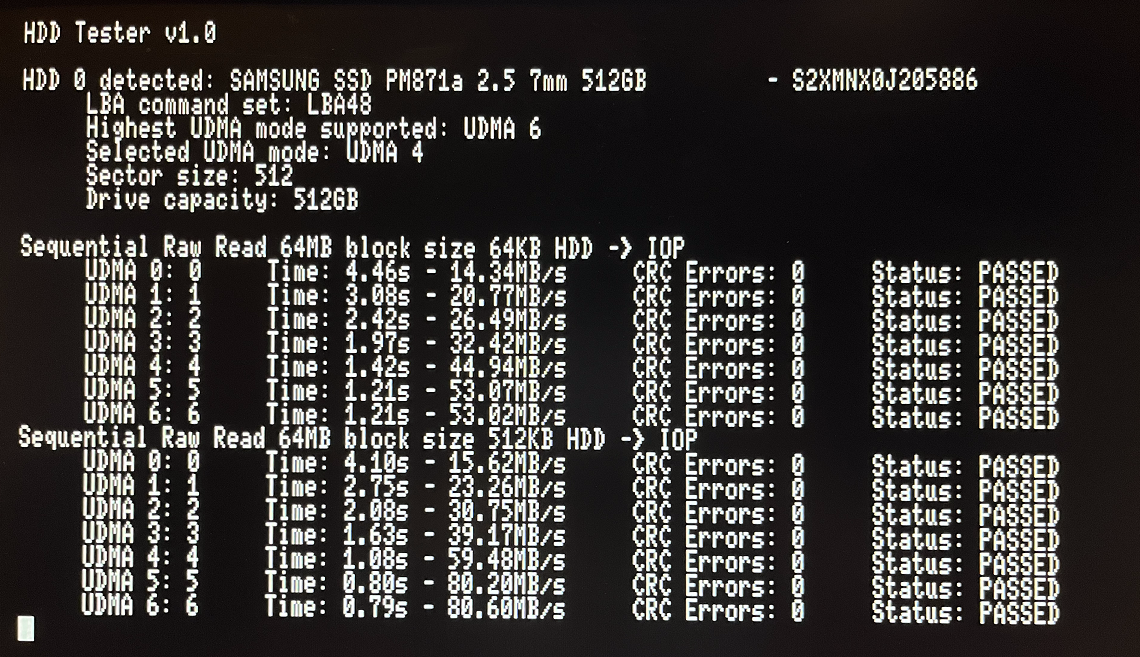
I've been able to get upwards of 80MB/s when going from the HDD to IOP (throughput to the EE would be lower) to demonstrate you can achieve speeds higher than UDMA 4 maximum. However, the conditions to achieve this are not something any game or application would ever do. The only way I was able to do this was to use ridiculously large block sizes of 512KB for the transfers to the IOP. To put that into perspective, 512KB is 1/4 of the available RAM the IOP processor has.
There's still room for improvement here if someone wanted to try and break the UDMA 5 limit as well (assuming the console can handle it).
So how does this affect loading times for games running off the HDD?
For any games using large transfer sizes (32Kb or higher) there will be slight performance gains IF the data being read is contiguous (the sectors being read are sequential, not fragmented or split up). I don't know if there would be any noticeable difference in-game, but I suspect the answer is no. This would mostly affect streaming IO for things like music, videos, etc., which typically require a continuous flow of data that's read asynchronously. However, if the sectors being read are not contiguous (ie: they are fragmented) then the performance gains from running at UDMA 5 or 6 is negligible at best.
Technical details
There's some code in ps2sdk that sets some register on the SPEED controller that is supposed to correspond to the UDMA mode selected for the drive:
Code:static void ata_ultra_dma_mode(int mode) { USE_SPD_REGS; u16 val; switch (mode) { case 1: val = 0x85; break; case 2: val = 0x63; break; case 3: val = 0x62; break; case 4: val = 0x61; break; default: val = 0xa7; } SPD_REG16(SPD_R_UDMA_MODE) = val; SPD_REG16(SPD_R_IF_CTRL) |= 0x49; }
I played around with the values in this switch statement quite a bit and I was not able to see any difference in transfer speed or times no matter what I set "val" to. I tried a wide change of numbers between 0 and 255 with no discernible difference in any of the tests. I'm not sure what this actually controls, if it even controls anything, maybe it's hardware version specific? Not sure, but on my phat PS2 console it makes no difference what it's set to.
SSD vs mechanical, 7200 rpm vs 5400 rpm
So does a SSD perform better than a mechanical HDD when put inside of a PS2? Yes, but not in all cases. Comparing the results from the sequential read tests on a SDD vs a 7200 rpm mechanical HDD the results are almost identical, in fact, the mechanical HDD actually out performed the SSD more often than the SSD out performed the HDD (though the difference in time is negligible at best). However, in the random read tests the SSD was 10x faster for block sizes of 2Kb and 4Kb, and 5x faster in block sizes of 16Kb and 32Kb. So for non-sequential reads the SSD will wipe the floor with the HDD. I guess that's good if your drive is fragmented to hell but I don't know how much of those gains will actually be realized when loading a game off the HDD.
So what about drive speed for mechanical drives, how much slower is a 5400 rpm drive vs. a 7200 rpm drive? For sequential read tests the 7200 rpm drive will complete read operations ~2-3 seconds faster on average than the 5400 rpm drive. For random read tests the 7200 rpm drive will complete ~10 seconds faster for block sizes of 2Kb and 4Kb, and 1-2 seconds faster for larger block sizes.
For a table of speed tests results comparing SSD vs HDD (7200 and 5400 rpm) see the github page linked above.
-
Changelog
v1.1:
- support for 2 ATA hdds connected in master/slave configuration
- extended support for 28-bit HDD
- last 3 tests also checks all 3 MDMA modes before UDMA
- check if disk is official Sony or not
- S.M.A.R.T check
- if hdd cannot set DMA mode, current test is skipped
- set hdds into idle mode on exit
v1.0:
- Initial release