
[TABLE="class: cms_table_grid, width: 98%"][TBODY][TR][TD="bgcolor: darkblue"]-----
 [/TD][/TR]
[TR][TD="bgcolor: darkgrey"]
SOURCE:
https://github.com/starshinata/PS4-Keyboard-and-Mouse-Adapter[/TD][/TR][/TBODY][/TABLE]
[TR][TD="bgcolor: darkgrey"]
PS4 Keyboard and Mouse Adapter
by starshinata

by starshinata
-
[TABLE="class: cms_table_grid, width: 98%"][TBODY][TR][TD="bgcolor: lightgrey"]Allows you to play any game on your PlayStation 4 with a keyboard and mouse, no controller required, and it's free.
Try our discord here https://discord.gg/zH4b8p4 where you can either suggest ideas or ask other members for help.
Disclaimer: This project is not endorsed or certified by Sony, Playstation or any of their partners.
Click the images below for bigger views
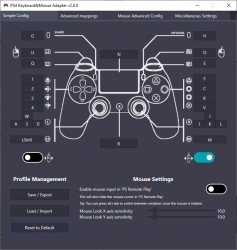
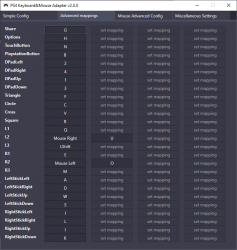
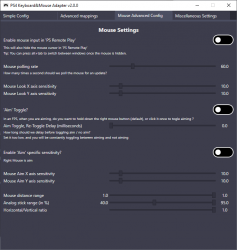
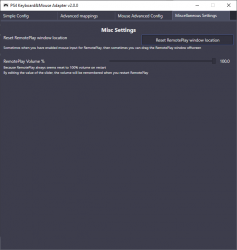 [/TD][/TR][/TBODY][/TABLE]
-
[TABLE="class: cms_table_grid, width: 98%"][TBODY][TR][TD="bgcolor: lightgrey"]- Do NOT plug your DS4 controller into your PC while using this tool. If it is plugged already, unplug it because it will interfere with the device emulation.
- Make sure you've enabled remote play from your PS4's settings menu. To do that:
- Go to your PS4, select (Settings) -> [Remote Play Connection Settings], and then select the checkbox for [Enable Remote Play].
- To activate it as your primary PS4, select (Settings) -> [Account Management] -> [Activate as Your Primary PS4] -> [Activate].
- Download and run the setup from the download link above. It will automatically do all the configuration stuff for you
- If you want 0 lag, connect your PS4 to your TV/Monitor and watch the game from there (thus NOT from the Remote Play app)
-
[TABLE="class: cms_table_grid, width: 98%"][TBODY][TR][TD="bgcolor: lightgrey"]- Explicit error message box for when mappings.json is missing or invalid
Currently it (kinda) silently fails unless you open it via a command line. - Detect when the user does have a DS4 controller plugged in ... and ask user to unplug it
- some game need to detect you shaking the controller, need to figure out how to handle/emulate that
- touchpad needs more work

- make DS4 emulation optional
- support for analog input like from a controller stick, controller trigger, or Steering wheel
- supporting ps5
- support linux/mac
- support chaikis
- Explicit error message box for when mappings.json is missing or invalid
-
[TABLE="class: cms_table_grid, width: 98%"][TBODY][TR][TD="bgcolor: lightgrey"]Questions ordered alphabetically
Can I get a profile for
We have a short list of profiles at https://github.com/starshinata/PS4-Keyboard-and-Mouse-Adapter/blob/master/profiles/
"I am looking for the perfect settings for ..."
Imagine you have walked in to a shoe shop, and you ask for the perfect shoe.
The shoe salesman will likely tell you the perfect shoe for you will be specific to you.
If you are curious how settings can depend on the user please have a read of https://github.com/starshinata/PS4-...b/master/documentation/mouse-configuration.md
Can I get banned from PSN for using this application?
I cannot find a specific text saying this is a bannable offense. But strictly because it is an unauthorised third party I would not be surprised if SIE LLC (Sony) claimed that using this is a banable offense.
No one has reported being banned for it.
Can this invalidate my Playstation warranty?
From the PS4 License agreement (checked 2020.11.24)
Source: https://www.playstation.com/en-us/legal/softwarelicense/
8. USE OF UNAUTHORIZED PRODUCTS. The use of software, peripherals or other products not authorized by SIE LLC may damage your PlayStation system and invalidate your PlayStation system warranty. Only official or licensed software and peripherals should be used with your PlayStation system (e.g., in the controller ports and memory card slots).
Because this software is not authorised by SIE LLC (Sony), this may technically " invalidate your PlayStation system warranty"
How do I increase mouse sensitivity so I can quickly turn 180 degress?
You cant
This is a limitation of console controllers. For a better explanation watch the first minute of
How do I uninstall PS4 KMA?
Goto %AppData%\..\Local\PS4KeyboardAndMouseAdapter in windows explorer and delete everything there
I have a question or issue, why havent you replied?
We do this in our free time, and we normally have 9-5 day jobs to contend with.
I would like to remind you this application is free.
Is Dualsense or PS5 supported?
Not currently, and I dont have a PS5 so no ETA on that support arriving.
Is using a mouse and keyboard cheating?
No.
Sony has licensed Hori products https://www.playstation.com/en-us/explore/accessories/specialty-controllers/, and Hori has provided mouse and keyboard options https://www.amazon.co.uk/HORI-Tactical-Assault-Commander-Pro/dp/B01K7JEII8
If you are using an application to improve you aim or response time, that could be considered cheating. The developers of this application consider this a accessibility aid for people who have issues using a controller (I personally have RSI and cannot play with a controller for long periods of time, but can use a mouse and keyboard all day).
Will this trigger Riot Valorant's Vanguard Anti Cheat?
https://support-valorant.riotgames.com/hc/en-us/articles/360046160933-What-is-Vanguard-
Assumption: we do not expect you to be playing Valorant, while you have PS4KMA (our adapter) running.
Vanguard is running all the time. Vanguard anticheat should not be triggered by our adapter. If it is triggered by our adapter (and the above assumption holds true) then there are much bigger privacy concerns about running the Vanguard Anticheat.
If you play Valorant with PS4KMA active then it may detect you as trying to cheat. It could be considered on par to using Discord's voice overlay (the overlay to see who is speaking). We dont see how capturing keyboard and mouse input could be used for cheating, but Vanguard is proprietary and we cannot look at it's inner workings.[/TD][/TR][/TBODY][/TABLE]
-
[TABLE="class: cms_table_grid, width: 98%"][TBODY][TR][TD="bgcolor: lightgrey"]All documenation here
But some popular topics are
[/TD][/TR][/TBODY][/TABLE]
-
[TABLE="class: cms_table_grid, width: 98%"][TBODY][TR][TD="bgcolor: lightgrey"]- PS4Macro - Big thanks to komefai for making and open-sourcing this tool. Komefai is MIA for 2 years and his repo is not supported anymore but you can still write pretty good bots with it, definitely check it out if you are into that kind of stuff
- EasyHook - The best tool for Windows API hooking. Works flawlessly - from the assembly injection, to the hook trampoline code. I haven't had a single problem with it I had one but that doesn't make EasyHook any less cool
- Jays2Kings/DS4Windows - don't need to explain that one
- soulehshaikh9 for pfx certificate generator
-
[TABLE="class: cms_table_grid, width: 98%"][TBODY][TR][TD="bgcolor: lightgrey"]v1.0.8
- Updated paths for the newest version of Sony's Remote Play app
v1.0.7
- Mapping from mouse to analog stick is now configurable
- New UI
- Bug fixes
v1.0.6
- Remote Play toolbar used to pop up at the bottom of the screen every time the mouse is moved, not anymore! The toolbar hides as soon as the mouse is hidden.
- Fixed a bug that assumed English system language when looking for Remote Play installation directory
v1.0.5
- Added mappings for DPad up, left, down, right
v1.0.4
- Added configurable mappings for L2, R2, and R3
- Fixed a bug where customized mappings are not saved between sessions
- Mouse movement feels much more smooth
v1.0.3
- Added mappings for L1, R1, L3, R3, and Touchpad buttons
- Various bug fixes
v1.0.2
- Fixed a bug where the updater was leaking memory and crashing the app after some time
- Fixed a startup injection error that was happening from time to time due to concurrency issues
v1.0.1
- Woo-hoo! The first release is here! Ready to pwn some noobs?
SOURCE:
https://github.com/starshinata/PS4-Keyboard-and-Mouse-Adapter[/TD][/TR][/TBODY][/TABLE]


