-
This is a modded version of HexFlow Launcher; a 3d coverflow like launcher for PS Vita.
This version includes categories for retro games which can be launched without bubbles for RetroArch and DaedalusX64. Playstation and PSP games can also be launched without having to create bubbles for every game!
Display and launch your retro games and homebrews in style.
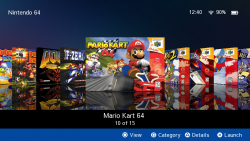
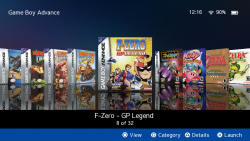
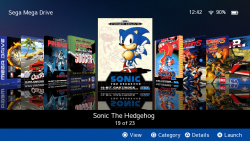
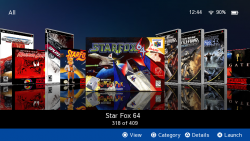
RetroFlow Launcher features a 3d user interface to display your games with their box art and supports many customization options like custom covers and backgrounds.
Launching a game or app from RetroFlow Launcher will close the launcher automaticaly without asking. -
Supported systems:
- PS Vita,
- PSP,
- Playstation,
- Nintendo 64,
- Super Nintendo,
- Nintendo Entertainment System,
- Game Boy Advance,
- Game Boy Color,
- Game Boy,
- Sega Mega Drive / Genesis,
- Sega Master System,
- Sega Game Gear,
- PC Engine, TurboGrafx-16,
- MAME 2000.
- DaedalusX64 is required for N64 games.
- RetroArch is required for other retro systems.
- Adrenaline is required for Playstation and PSP games.
- PS Vita,
-
Installation
1. Install the RetroFlow VPK's.
- Install the latest version of RetroFlow and additional RetroFlow Adrenaline launcher VPK from here.
- 'RetroFlow Launcher' is the app you will use to browse games. 'RetroFlow Adrenaline launcher' is needed for launching Playstation and PSP games.
- Renaming is needed for cover matching. RetroFlow will look for a title ID in the filename.
Please rename PSP ISO and CSO files using Leecherman's PSP ISO Renamer tool using the following parameters:
%NAME% (%REGION%) [%ID%]
The result should look like this (please notice the square brackets):
Cars 2 (US) [UCUS-98766].iso
Games can also be named with just the title ID like so: "UCUS98766.iso" but this isn't recommended.
Mac users:
See the FAQ's section for a guide on renaming on a mac.
More information on PSP and Playstation after the FAQ's section.
3. Check your PS1 and PSP are in the right folders
PS1 and PSP games with eboot files should be saved here:
ux0:pspemu/PSP/GAME/
PSP ISO and CSO games should be saved here:
ux0:pspemu/ISO/
4. Add your retro games to RetroFlow
- Launch RetroFlow for the first time, RetroFlow will create the folders where you can save your games.
- Once it's finshed loading; close RetroFlow and copy your favourite retro games into the relevant subfolders below:
- ux0:/data/RetroFlow/ROMS/
Tip: It's important that your roms are named using the no-intro file naming convention, e.g. "Game Name (USA)" , otherwise cover images won't be found.
5. Download covers
To download cover images, press start, then choose which covers you would like to download.
Issues loading games with Adrenaline?
Please try installing Adrenaline Bubble Manager to check bubbles load okay, or try installing AdrBubbleBooterInstaller.
Possible incompatabilities
Repatch
Potential issue with repatch / repatch_4 plugins in the tai config. May cause the Vita to shutdown. Try disabling these if you encounter an issue.
PSP Categories lite
Unsupported, if you're experiencing please try without the plugin.
-
RetroFlow FAQ's
I'm on a Mac, how do I rename PSP games?
You can use the UMD FileRenamer app here.
Step 1. Download the UMD FileRenamer app above Open the 'UMD_FileRenamer-1.0.jar' file and select your folder of games, then rename.
Step 2. Replace (parenthesis) with [brackets] In the finder, select all the games, right click and select 'rename items'. Replace the opening and closing parenthesis with square brackets instead.
Name (XXXX-XXXXX).iso
Will be renamed to:
Name [XXXX-XXXXX].iso
The game names will be missing the region code, but it's not required for the RetroFlow to work.
Can I use HexFlow too?
Yes; RetroFlow is seperate, it uses different folders and a different title ID.
Do I need to create bubbles for games?
No; RetroFlow doesn't need bubbles for games.
How should I name my games so covers are found?
It's recommended that your roms are named using the no-intro file naming convention, e.g. "Game Name (USA)" , these names are used to match with cover images.
Some systems aren't showing?
Empty collections are hidden by default, once you add some games into the roms folder, they will appear.
Can I change the Mega Drive name to Genesis?
Sure; changing your language to 'English - American' will change the 'Mega Drive' name and logo to 'Genesis'.
Can I change a core for RetroArch?
The cores have been set by system and cannot be changed on a game-by-game basis at the moment.
To change the core for an entire system, search for "Retroarch Cores" in the file below and edit the core file names accordingly.
ux0:/app/RETROFLOW/index.lua
The RetroArch core files can be found here: "ux0:/app/RETROVITA/"
Can I change the rom folder locations?
The locations have been setup to keep things simple, if you would like to change the locations, search for "ROM Folders" in the 'index.lua' file below and edit accordingly.
ux0:/app/RETROFLOW/index.lua
For example, to use the ux0 roms folder, the start of the section would look like
-- ROM Folders
local romFolder = "ux0:/Roms/"
local romFolder_N64 = romFolder .. "Nintendo - Nintendo 64"
Adding PSP and Playstation games
RetroFlow uses the game ID's for Playstation and PSP for cover matching. Please use the guides below.
PSP
For PSP ISO and CSO files please rename using Leecherman's PSP ISO Renamer tool using the following parameters:
%NAME% (%REGION%) [%ID%]
The result should look like this:
Cars 2 (US) [UCUS-98766].iso
RetroFlow uses the ID to match artwork, and tidies the rest of the filename to display in the app. CSO files are also supported, and should be named as above.
Playstation
For PSX2PSP, game folder name must match with the GameID. For example:
ux0:pspemu/PSP/GAME/**SLES01234**
Games will need to be in a EBOOT format, see here for information on how to convert PSX Disc Images to EBOOT for PSP. RetroFlow also uses the ID to lookup the name of the game.
Custom Covers
Place your custom covers in "ux0:/data/RetroFlow/COVERS/"
Cover images must be in png format. For Vita, PSP, PSX games and Homebrew the The cover image file name must match the Game ID or the Game Name of each app. For roms the cover image name should match the Rom Name i.e. "Game Name (USA).png". The recommended resolution for Vita covers is 250x320px. Sample image
Download Covers and Backgrounds
From v0.3 covers can be downloaded automatically from the settings menu (Start button). You can also download covers and backgrounds manually from the link below. A big thanks to astuermer for his contribution.
https://github.com/andiweli/hexflow-covers
Custom Background
Place your Background.png or Background.jpg image in "ux0:/data/RetroFlow/" (recomended resolution 1280x720px or less). Some custom backgrounds are available HERE
Custom Music
Place your Music.mp3 file in "ux0:data/RetroFlow/" (music will play automatically when the "Sounds" option is enabled)
AutoBoot
If you want to auto-launch RetroFlow Launcher every time your PS Vita boots up you can use the AutoBoot plugin by Rinnegatamante.
Controls
Navigate your library using the DPad or the Left Stick or with the Touch
Screen.
R/L triggers: Skip 5 items
Cross: Select/Launch game/app
Square: Change Category
Triangle: Game Details
Circle: Change View/Cancel
Start: Settings menu
-


- Author STLcardsWS
- Creation date
More resources from STLcardsWS
-
 PS3 webMAN MODA fork of deank's original webMAN with many additional features making it a true AIO plugin
 -
 PS VITA / PSTV UT99 Vita (Unreal Tournament)This is a wrapper/port of Unreal Tournament for the PS Vita.
 -
 PS VITA / PSTV Animal Crossing VitaAnimal Crossing (GameCube) on PS Vita via VitaGL. Based on flyngmt's ACGC-PC-Port decompilation.
 -
 PS VITA / PSTV Starship VitaThis is a port of Starship (v.1.0.0 for now but planned to be moved up to latest upstream) for Vita
 -
 PS3 Apollo Save ToolAn application to manage save-game files on the PlayStation 3.
 -
 PS VITA / PSTV Super Mario Bros. C - PS Vita PortAn attempt to translate the original Super Mario Bros. for the NES to readable C/C++.
 -
 PS VITA / PSTV 2ship2harkinian VitaA sourceport of The Legend of Zelda: Majora's Mask
Latest updates
-
RetroFlow-Launcher Version v8.0.2 is out!
RetroFlow-Launcher Version v8.0.2 is out! Changelog: Bug fixes CD based games: Fix for games... -
RetroFlow-Launcher Version 8.0.1 (hotfix) is out!
RetroFlow-Launcher Version 8.0.1 (hotfix) is out! Bug fixes Fix for the RetroFlow Adrenaline... -
RetroFlow-Launcher v8.0.0 is out!
RetroFlow-Launcher v8.0.0 is out! New Features DSVita Support The default and recommended ROM... -
RetroFlow Launcher v7.2.2 is out!
RetroFlow Launcher v7.2.2 is out! Bug fixes List view bug fix, where some games in mixed... -
RetroFlow-Launcher version 7.2.1 is out!
RetroFlow-Launcher version 7.2.1 is out! Bug fixes Fixed an issue where some PSP eboot games...