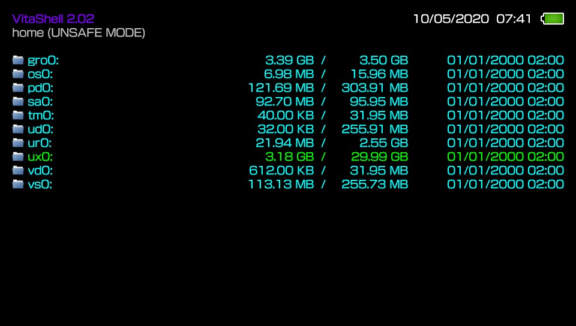
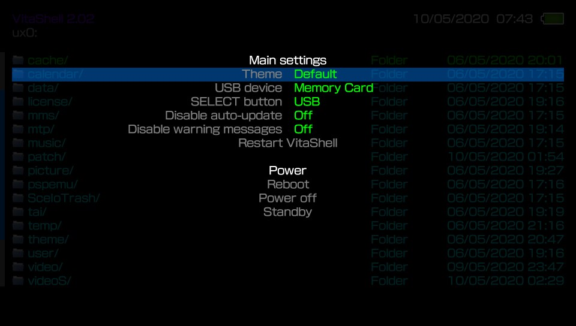
VitaShell is an alternative replacement of the PS Vita's LiveArea. It offers you a file manager, package installer, built-in FTP and much more. This homebrew was an entry of the Revitalize PS Vita homebrew competition and won the first prize. HENkaku's molecularShell is also based on VitaShell.
How to use an USB flash drive as Memory Card on a PS TV:
Format your USB flash drive as exFAT or FAT32.
Launch VitaShell and press ▲ in the home section.
Select Mount uma0: and attach your USB flash drive. You can now copy stuff from/to your USB stick.
Once uma0: is listed under the partitions, press ▲ again and choose Mount USB ux0:. This will copy important apps like VitaShell, molecularShell, and other files.
Your USB flash drive is now acting as a Memory Card.
To sync all your apps on your USB flash drive, press ▲ and choose Refresh livearea. This will NOT refresh PSP games.
If you wish to revert the patch, press ▲ and select Umount USB ux0:.
Note that this patch is only temporary and you need to redo the procedure everytime you launch your PS TV.
You can customize those files:
File
Note
colors.txt
All colors adjustable
archive_icon.png
Archive icon
audio_icon.png
Audio icon
battery.png
Battery border icon
battery_bar_charge.png
Charging battery bar
battery_bar_green.png
Green battery bar
battery_bar_red.png
Red battery bar
bg_audioplayer.png
Background for audio player
bg_browser.png
Background for file browser
bg_hexeditor.png
Background for hex editor
bg_photoviewer.png
Background for photo viewer
bg_texteditor.png
Background for text editor
context.png
Context menu image (Can be any size. Suggestion: It will look great if you add alpha channel to your image)
context_more.png
Context menu more image (Can be any size. Suggestion: It will look great if you add alpha channel to your image)
cover.png
Default album cover
dialog.png
Dialog menu image (Can be any size. This image file will be stretched by VitaShell to fit the dialog box. Suggestion: Don't use motives, as it will not look good with wrong proportion)
fastforward.png
Fastforward icon
fastrewind.png
Fastrewind icon
file_icon.png
File icon
folder_icon.png
Folder icon
ftp.png
FTP icon
image_icon.png
Image icon
pause.png
Pause icon
play.png
Play icon
settings.png
Settings icon
sfo_icon.png
SFO icon
text_icon.png
Text icon
wallpaper.png
Wallpaper
[TBODY]
[/TBODY]
[TBODY]
[/TBODY]
Theme setting: VitaShell will load the theme that is set in ux0:VitaShell/theme/theme.txt (THEME_NAME = "YOUR_THEME_NAME")
General info: You don't need to have all these files in your custom theme, if one of them is missing, the default image file will be loaded instead.
Dialog and context image: If these files are not available, the colors DIALOG_BG_COLOR and CONTEXT_MENU_COLOR from colors.txt will be used instead.
Put your language file at ux0:VitaShell/language/x.txt, where the file must be UTF-8 encoded and x is one of the language listed below:
japanese
english_us
french
spanish
german
italian
dutch
portuguese
russian
korean
chinese_t
chinese_s
finnish
swedish
danish
norwegian
polish
portuguese_br
turkish
VitaShell does automatically load the language that matches to the current system language. If your system language is for example french, it will load from ux0:VitaShell/language/french.txt.
Languages files are available in the l10n folder of this repository.
Credits:
Team Molecule for HENkaku
xerpi for ftpvitalib and vita2dlib
wololo for the Revitalize contest
sakya for Lightmp3
Everybody who contributed on vitasdk
Changelog 2.02
Reverted PSM refresh due to crashes.
Changelog 2.01
Added ability to refresh PSM games. Thanks to KuromeSan.
Added support for FW 3.57 and 3.73 Thanks to RealYoti.
Changelog 2.00
Added support for FW 3.72.
Changelog 1.99
Added support for FW 3.71.
Changelog 1.98
Improved "Refresh LiveArea". Thanks to TheRadziu.
Changelog 1.97
Added support for symlinks which enables ability to set and show bookmarks and recent files. Thanks to abertschi.
Added a few shortcuts: left+[]: show bookmarks, left+/: show recent files, left+O: QR scanner.
Fixed bug in ad-hoc dialog where X is always the enter button.
Changelog 1.96
Added ability to skip pages in file browser and SFO viewer using L/R triggers. (QR download has been temporarily removed and will be reimplemented later).
Added ability to move files between partitions by copying&removing.
Fixed bug where the option to disable warning message was not saved.
Undone usb changes because people reported an issue with vpk installation with it.
Changelog 1.95
Added option to disable warning messages when installing vpks.
Fixed bug in USB connection, where your Memory Card could be corrupted.
Fixed line breaks in SFO files and long names will now scroll.
Fixed compatibility with udcd_uvc.skprx thanks to xerpi.
Changelog 1.94
Added ability to umount all partitions that you can mount.
Fixed crash when using StorageMgr.
Changelog 1.93
Added xmc0: to partition list and added ability to mount xmc0:.
Fixed ux0: mounting bug where it wasn't detected that the gamesd has already been mounted.
Changelog 1.92
Added ability to mount gamesd ux0:
Fixed bug where the VitaShell kernel module was loaded but not started, thus it'd run out of memory after some launches.
Changelog 1.91
Added ability to create new files, thanks to abertschi.
Added ability to skip last dir by holding L on startup.
Added support for firmware 3.68.
Changelog 1.9
Added ability to open decrypted trophys, savedatas and appmetas.
Moved Open Decrypted entry to main context menu for faster access.