PS3 Installing new HDD with HEN

Xpunk.Zer0._

Forum Noob
hello i recently bought a PS3 Slim modded with Hen Firmware "HFW" ver 4.91, i want to add more storage so i bought a "Toshiba 1TB 5400RPM 8MB Cache SATA 3.0Gb/s 2.5 inch PS3/PS4 Hard Drive"
From amazon, can someone walk me through the correct way to install this hard drive so i don't mess up my ps3 hen pls A is there any tweaks i have to make first before installing this hard drive into my ps3 console?
3fb67f4531860c9cd2168d749b9eac6c.jpg

916cb62a6faac7015704e29422eea8f8.jpg
 
It's easy to change the Slim's hard drive, although you will have to start from scratch reinstall the OFW and install HEN again. Also, do you plan to retain any data on the PS3 before the upgrading the internal hdd? If so, back it up first and ensure everything is functional, such as the Blu-ray drive. Make sure it's working before upgrading the hard drive; otherwise, you won't be able to install the firmware. AFAIK, the PS3 checks all components to ensure they are functional. If you don't want to go through the entire process again, you can use a SATA to USB adapter or an HDD enclosure like ORICO to use the new drive as an external HDD for storing your games.
 
It's easy to change the Slim's hard drive, although you will have to start from scratch reinstall the OFW and install HEN again. Also, do you plan to retain any data on the PS3 before the upgrading the internal hdd? If so, back it up first and ensure everything is functional, such as the Blu-ray drive. Make sure it's working before upgrading the hard drive; otherwise, you won't be able to install the firmware. AFAIK, the PS3 checks all components to ensure they are functional. If you don't want to go through the entire process again, you can use a SATA to USB adapter or an HDD enclosure like ORICO to use the new drive as an external HDD for storing your games.

Wouldn't he be able to install HFW from the get-go seeing as the ROS banks already registered it so it's there anyways?

For example, when switching HDDs on CFW they would just install CFW pup instead of going ofw to cfw, right?
 
Wouldn't he be able to install HFW from the get-go seeing as the ROS banks already registered it so it's there anyways?

For example, when switching HDDs on CFW they would just install CFW pup instead of going ofw to cfw, right?

Not too long ago I watched Mr. Mario's HEN upgrade video, and it seems so. To be honest, I don't know much about HEN, nor am I interested in installing it since my PS3s are CFW-compatible. I only installed HEN once on a friend's PS3 Super Slim and didn't experiment with it after the installation.

However, if I manage to get a CECH-3000 (as I plan to buy a One Piece edition in the future on Yahoo Japan Auctions), I will install HEN and experiment with it.

As for CFW, yes, you can install it directly instead of OFW at least from what I've heard. Unfortunately, I had bad luck with that. Based on my experience, directly installing CFW only gave me errors. For context, I installed CFW on my PS3 twice 7-8 years ago by now since the old 800gb HDD I bought used was starting to fail so when I upgraded my HDD again to 1TB. I tried reinstalling REBUG firmware directly, but my PS3 refused to install it. And yes, I made sure to place the update file in PS3 > UPDATE and renamed it to"PS3UPDAT.PUP", but I still had to redo the process. Maybe I'll try installing CFW directly again on a PS3 I bought from Buyee once I have the money to upgrade the HDD.
Since OP did not mention the CECH of his PS3 If OP's PS3 is a CECH-20xx, 21xx, or 25xx (with a Minimum Firmware Version Check required since some 25xx models cannot install CFW), and the firmware is 3.56 or lower, then OP can install Evilnat, which is much better than HEN. However, if OP's console isn't compatible with CFW, HEN will work just fine.

Sources that might be helpful:
https://consolemods.org/wiki/PS3:Getting_Started
https://www.psdevwiki.com/ps3/Datecode

 
Last edited:
Not too long ago I watched Mr. Mario's HEN upgrade video, and it seems so. To be honest, I don't know much about HEN, nor am I interested in installing it since my PS3s are CFW-compatible. I only installed HEN once on a friend's PS3 Super Slim and didn't experiment with it after the installation.

However, if I manage to get a CECH-3000 (as I plan to buy a One Piece edition in the future on Yahoo Japan Auctions), I will install HEN and experiment with it.

As for CFW, yes, you can install it directly instead of OFW at least from what I've heard. Unfortunately, I had bad luck with that. Based on my experience, directly installing CFW only gave me errors. For context, I installed CFW on my PS3 twice 7-8 years ago by now since the old 800gb HDD I bought used was starting to fail so when I upgraded my HDD again to 1TB. I tried reinstalling REBUG firmware directly, but my PS3 refused to install it. And yes, I made sure to place the update file in PS3 > UPDATE and renamed it to"PS3UPDAT.PUP", but I still had to redo the process. Maybe I'll try installing CFW directly again on a PS3 I bought from Buyee once I have the money to upgrade the HDD.
Since OP did not mention the CECH of his PS3 If OP's PS3 is a CECH-20xx, 21xx, or 25xx (with a Minimum Firmware Version Check required since some 25xx models cannot install CFW), and the firmware is 3.56 or lower, then OP can install Evilnat, which is much better than HEN. However, if OP's console isn't compatible with CFW, HEN will work just fine.

Sources that might be helpful:
https://consolemods.org/wiki/PS3:Getting_Started
https://www.psdevwiki.com/ps3/Datecode
Interesting. I have a 2504B, date code 1A, which 99% cannot get CFW, but my minver is not only 3.55, it's 3.50! I think that might be rare
I didn't think to tinker with CFW until now due to it looking very confusing compared to HEN (now I know it's really just Evilnat the whole way), and the benefits currently don't seem worth risking rewriting the NOR of my childhood PS3. I might do it after a HDD swap - my HDD is currently on its way out and I am confident a CFW install will not go well.

Also, OP is showing a fb market posting which in the description says "modded consoles" meaning he (seller) has probably looked into CFW before. So it prooobably is only HEN-compatible
 
Interesting. I have a 2504B, date code 1A, which 99% cannot get CFW, but my minver is not only 3.55, it's 3.50! I think that might be rare
I didn't think to tinker with CFW until now due to it looking very confusing compared to HEN (now I know it's really just Evilnat the whole way), and the benefits currently don't seem worth risking rewriting the NOR of my childhood PS3. I might do it after a HDD swap - my HDD is currently on its way out and I am confident a CFW install will not go well.

Also, OP is showing a fb market posting which in the description says "modded consoles" meaning he (seller) has probably looked into CFW before. So it prooobably is only HEN-compatible


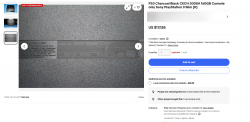
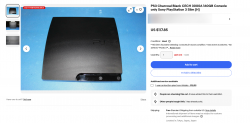
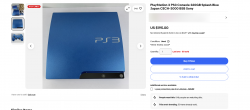
What I mean by that is, looking at the screenshot OP provided, the PS3 Slim has a mirror finish. I cannot clearly see the CECH model in the listing the screenshot OP posted, which makes it difficult to determine whether it's a CECH-2000 or CECH-3000. IIRC, some CECH-3000 models still have a mirror finish on the eject and power buttons which is identical to the 2000 but the difference is that the 3000 model no longer has lights on the eject and power button symbols., while the later ones have a matte finish. For example, early CECH-3000 units still have the same mirror finish as the CECH-2xxx.
If OP's PS3 is a CECH-25xx with firmware lower than 3.55 or an earlier model, then OP can install CFW instead.

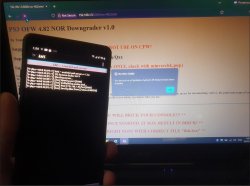
Also, that's nice yours is on firmware 3.50. Trust me, you can install CFW safely as long as you follow the instructions carefully. When I installed mine, I used the same method Mr. Mario later uploaded in his video. Coincidentally, it was the exact method I was using before he even uploaded it. The process involved an Android smartphone and an app called KWS Android Web Server. Unfortunately, KWS is no longer available on the Play Store, but I was able to extract it as an APK and save all the necessary files like the REBUG firmware and KWS app to my Google Drive in case I need them in the future.

I also used a Kingston DataTraveler USB for the installation. It's not necessarily required, but in my case, I tried several USB drives SanDisk, Lexar, Patriot, Toshiba, etc. and all of them caused my PS3 to freeze. For some reason, the Kingston drive worked flawlessly. No idea why, but you can use whatever you have.

I can confirm this method still works to this day. I just used it on the PS3 I bought from Buyee. The main reason I got it was that it was cheap, and its firmware version was 4.81 (I've since updated it to 4.82). It's now just a backup unit with REBUG installed. Now, two of my PS3s came from Japan: a CECH-21xx (formerly owned by my dad) and a CECH-20xx, lol. I don't plan on updating either of them; they'll stay offline for the rest of their lives unless I need to tinker or fix something.

To this day, I still prefer REBUG DEX, but to each their own. You can use whatever the latest CFW is, like Evilnat, for instance. If I were you, I'd install CFW on that PS3. I don't really recommend the method I used, just go with the latest method available.
 

Attachments

  • Screenshot 2025-03-26 at 23-44-20.png
    Screenshot 2025-03-26 at 23-44-20.png
    1.1 MB · Views: 28
  • Screenshot 2025-03-26.png
    Screenshot 2025-03-26.png
    756 KB · Views: 28
  • Screenshot 2025-03-26 at 23-45-33.png
    Screenshot 2025-03-26 at 23-45-33.png
    597 KB · Views: 26
  • 20250309_0100100.jpg
    20250309_0100100.jpg
    185 KB · Views: 30
Last edited:

Similar threads

Back
Top