

Rinnegatamante
Developer
VitaDB Downloader

-
VitaDB Downloader is the official Vita client for VitaDB allowing to easily install homebrews from VitaDB directly from your PSVITA/PSTV.Note
In order to run VitaDB Downloader you need libshacccg.suprx. If you don't have it installed already, you can install it by following this guide: https://samilops2.gitbook.io/vita-troubleshooting-guide/shader-compiler/extract-libshacccg.suprx
Features
- Searching by author/homebrew name.
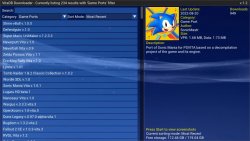
- Filtering apps by category.
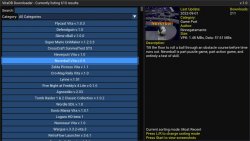
- Viewing of all available screenshots for apps.
- Sorting apps by different criteria (Most Recent, Oldest, Most Downloaded, Least Downloaded, Alphabetical)
- Showing of several metadata for apps.
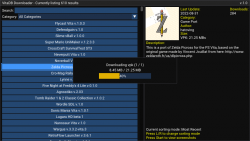
- Download and installation of vpk+data files or vpk only at user discretion. (No more need to redownload data files everytime you want to update an homebrew for which data files are unchanged)
- Minimalistic GUI based on dear ImGui with focus on robustness over fancyness.
- Fast boot time (Only the very first boot will take a bit more due to app icons download. Successive boots will be basically instant)
- Low storage usage (Screenshots are served on demand, the only data that are kept on storage are app icons with a complessive storage usage lower than 10 MBs).
- Tracking of installed apps, even when not installed through VitaDB Downloader, and of their state (outdated/updated).
- Background music (You can customize it by changing ux0:data/VitaDB/bg.ogg with your own preferred track).
- Background image/video (You can customize it by changing ux0:data/VitaDB/bg.mp4 or ux0:data/VitaDB/bg.png).
- Support for themes (Customization of GUI elements via ux0:data/VitaDB/themes.ini) with built-in downloader and manager. -
Themes
You can find some themes usable with this application on [this repository](https://github.com/CatoTheYounger97/vitaDB_themes).
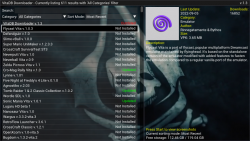
Those themes can also be accessed in the app itself by pressing L. While in Themes Manager mode, you can download themes by pressing X and install themes in two different ways (that can be interchanged by pressing Select):
Single = A downloaded theme will be installed as active one by pressing X
Shuffle = Pressing X will mark a theme, you can mark how many themes you want. Once you've finished, press again Select to install a set of themes for shuffling. This means that every time the app is launched, a random theme will be selected from the set and used as active one.
-
Controls
Up/Down Arrows = Move selection
Left/Right = Move selection (Fast)
Left Analog = Scroll scrollbar
Circle = Return to top of the list
Triangle = Start a search
Square = Change current Category filter
Start = Show/Hide screenshots for selected homebrew
Select = Show/Hide changelog for selected homebrew
R = Change homebrews sorting
L = Switch between Apps Lister and Themes Manager
X = Install homebrew -
Customization
You can customize your installation in the form of adding a custom background music and a custom background image/video.
Background music must be in .ogg format and placed in ux0:data/VitaDB/bg.ogg (Since this file is fully loaded in mem at boot, i suggest to stick to small files to not compromise the app functionalities).
Background image must be either in .mp4 format and placed in ux0:data/VitaDB/bg.mp4 for an animated one or .png format and placed in ux0:data/VitaDB/bg.png for a static one. Videos must be max 720p.
-
Changelog
### v.1.5
- Fixed a bug causing potential crashes if you had a few specific apps installed with a very big eboot.bin file.
- Fixed a bug causing more than a popup to not always show in certain circmustances.
- Fixed a bug causing the first icon of an app being shown after a sort mode change, a search or a filter change to be wrong.
- Fixed a bug causing cached hash files to be incorrectly generated when installing an app (Resulting in slower boot times).
- Fixed a bug that prevented changelog parser to properly escape " char.
- Made cleanup check for leftover unfinished app installs more robust.
- Added app name and version on changelog viewer titlebar.
- Properly aligned Filter text to Search text.
- Added some padding between Filter and Sort mode.
- Added possibility to customize font.
- Added possibility to properly customize any leftover uncustomizable element of the GUI.
- Moved missing icons download from everytime you hit an app lacking the icon to boot time (for all of them).
- Made so that Sort mode can be cycled only with R.
- Added themes downloader and manager with single theme and shuffling themes support (Reachable with L).
- Moved from SoLoud to SDL2 Mixer as audio backend. (Way faster booting time for the background audio playback).
- Fixed a bug causing a crash when opening the changelog viewer in certain circumstances.
- Fixed a bug causing VitaDB Downloader to be reported always as Outdated.
### v.1.4
- Added a check after installing an app wether the installation succeded or failed.
- Added proper cleanup of leftover files when an installation is abruptly aborted or fails.
- Fixed a bug causing wrong icon to be shown when performing a search and moving to the first app of the list.
- Fixed a bug causing app info to be shown also when cursor is not on an app.
- Added requirements popup when attempting to install an app having extra requirements for a proper setup (Eg. Plugin requirements or full data files from original game).
- Added possibility to customize color scheme for all GUI elements (ux0:data/VitaDB/themes.ini).
- Added proper tracking of applications state (Not Installed, Outdated, Updated).
- Speeded up boot time. Now VitaDB Downloader will launch approximately one second faster.
- Added possibility to check changelog for the selected app by pressing Select button.
- Renamed "Category: " option to "Filter: ".
- Added possibility to filter applications by Not Installed/Installed/Outdated criterias.
- Fixed a bug causing page down (Right arrow) to not properly reach end of the list when a filter or search was active in certain circumstances.
### v.1.3
- Made so that fast paging down with right arrow will go as down as the very last entry.
- Made visible on the top menubar the currently in-use filter for the apps list.
- Reworded data files installation question to sound more correct.
- Added Smallest and Largest sorting modes.
- Added a dropmenu to change sorting mode (L / R is still usable for cycling between sorting modes).
- Added possibility to cycle between category filters with Square button.
- Using different granularity (B, KB, MB, GB) for homebrew sizes depending on the size itself.
- Added free and total storage info on bottom right of the screen.
- Aligned to left homebrew names in the apps list.
- Added support for backgrounds (Both static (ux0:data/VitaDB/bg.png) and animated (ux0:data/VitaDB/bg.mp4)).
- Added a check prior downloading an app wether free storage is enough to install it.
### v.1.2
- Added possibility to start a search rapidly by pressing the Triangle button.
- Fixed a bug causing the app to crash if the background music file was missing.
- Fixed a bug preventing the app to be updated from within the app itself.
- Added auto updater.
- Fixed an issue causing crackling and stuttering with audio during archive extractions.
### v.1.1
- Added a check when more than a month passed since last boot. If this happens, provide an option to the user to re-download all app icons at once.
- Added possibility to fast scroll apps list with Left/Right arrows.
- Added possibility to fast scroll apps list by moving the scrollbar with left analog.
- Added possibility to instantly return to the top of the list by pressing Circle (Previously it was Circle + Left).
- Fixed a bug not making scrollbar instantly reposition when going to the top of the list.
- Fixed a bug causing selected app icon to get corrupted temporarily after installing an app.
- Added background music (You can disable it or change the track by removing/replacing ux0:data/VitaDB/bg.ogg)
- Fixed a bug causing selected app to change randomly when changing sort mode. -
Credits
- noname120 for the code related to head.bin generation.
- CatoTheYounger for testing the homebrew.
- Once13One for the Livearea assets.
- All my Patroners for their awesome support:
- Delon5
- Heraldian Despot
- Badmanwazzy37
- drd7of14
- Freddy Parra
- Jacob Martinez
- Joey
- Mighty Sashiman
- mmtechnodrone
- Shin Megami
- Simon Sawert
- sputnik
- The Libretro Team
- The Vita3K project
- Alexander
- @Sarkies_Proxy
- bruno lima Lima
- Al Capwn
- Colin Steinmann
- Count Duckula
- Elgx3 13
- Ian Stoffberg
- Igor Kovacs Biscaia
- Imran Akthar Syed
- John Laschober
- Mored4u
- polytoad
- PSX-Place.com
- rsn8887
- Russ Crandall
- tantaxa
- Waffeleisen
- Wiese
- Dieter B.
- Marc Cané
- Other Retro Matt
- Pape Moussa SARR
- suLac4ever
- CatoTheYounger
- Dean Stark
- mxadi25
- Neil
- steven powell
- Jonathan Steen
- Daniel Krusenbaum
- Alfredo Gutierrez
- Andyways
- Elwood Blues
- Enrique Romero
- Justin
- Anthony Miceli
- BrainCheese87
- Danny
- Kyle Ring
- 2Mourty
- Aaron Von
- BOBdotEXE
- Daniel Cassidy
- David Stieben
- Diego G.
- Dr Yosef Lodgardes IV
- drivenby
- Error
- Gonzalo Arévalo Ibarra
- Gwijde Maegherman
- Hòa Hiệp Bùi
- The Jack!
- James Guzman
- Jihel Jay
- Joe brindle
- LaFlex
- Lucas Brugnaro Badur
- Martial B.
- Matt Hargett
- Michael Kristensen
- gnmmarechal
- Neil MacAlasdair
- Pedro Guizar
- Pepelu1975
- Pirloui
- spriteice
- Stefanos P.
- Sternaid
- Thomas Würgler
Last edited:

