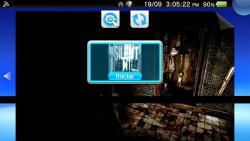
[TABLE="class: cms_table_grid, width: 98%"][TBODY][TR][TD="bgcolor: darkblue"]
 [/TD][/TR]
[TR][TD="bgcolor: darkgrey"]
SOURCE:
https://github.com/ONElua/AdrenalineBubbleManager/[/TD][/TR][/TBODY][/TABLE]
[TR][TD="bgcolor: darkgrey"]
About
ISO/CSO/PBP Content Selection Screen
Bubble Edit Screen
Inject Images and Manual to ABM Bubbles
Resources Online
Donation
Changelog
-
[TABLE="class: cms_table_grid, width: 98%"][TBODY][TR][TD="bgcolor: lightgrey"]Adrenaline Bubbles Manager
Create and organize your direct adrenaline bubbles.
Description
This useful application allows you to make personalized bubbles with 'icon' and 'title' of your PSP content (HBS/PSX/ISO/CSO) quick and easy, using the 'LMAN' plugin, forgetting completely of the tedious and long manual method.
IMPORTANT
Adrenaline Bubbles Manager (ABM) purpose is to create the bubbles and necesary links to boot chosen psp iso/cso/pbp files with adrenaline v6.x through Lman's plugin adrbblbooter, all done within the ps vita, but, ABM does not change cpu speed, any issue related with that should be mentioned to Lman or the_flow
Adrenaline Version v7.0
Adrenaline Bubble Booter Version v1.3
Adrenaline Bubbles Manager Current Version: 6.13
Instructions
-
Install Adrenaline v7.0 Make sure Adrenaline works correctly, to be able to boot Adrenaline opening it just once, it is highly recommended to add the following line below the kernel line in ur0:tai/config.txt.
Code:*KERNEL ux0:app/PSPEMUCFW/sce_module/adrenaline_kernel.skprx - After taking care of step 1, then you can start using Adrenaline Bubbles Manager to create bubbles for your PSP/PSX content.
NOTE:
Because a lot of PSP Homebrews have the same TitleID, the shotcuts of homebrew will be created like PSPEMUXXX.
Controls
Adrenaline Bubbles Manager does recognize the accept/cancel buttons According to console region.[/TD][/TR][/TBODY][/TABLE]
-
Install Adrenaline v7.0 Make sure Adrenaline works correctly, to be able to boot Adrenaline opening it just once, it is highly recommended to add the following line below the kernel line in ur0:tai/config.txt.
-
[TABLE="class: cms_table_grid, width: 98%"][TBODY][TR][TD="bgcolor: lightgrey"]Creating Bubbles
-
Triangle: Batch Installation for non installed content.
-
L: To switch the way the bubble will look like in Livearea (original icon look/stretched icon look)
-
R: Select the SetPack for each bubble.
-
SELECT: Sort List: Device, Install, GameId, Category.
-
Left/Right: To change the bubble background color for the selected content (when using original size not stretched icons, 17 available colors ).
-
Square: Multiple Selection.
-
Start: Open Extra Settings menu (set default bubble color, sort list, Adrenaline version check, Adrenaline Bubbles Manager version check).
-
X: Create Bubbles.
- O: Configurate/Edit Bubbles.
Extra Settings
This option allows you to set some preferences as default for ABM such as:
- Now you can disable the 8bit image conversion when creating or editing ABM bubbles.
You must be sure the images you are using are in compatible format, otherwise the bubble will fail. Enter the submenu to change this settings with start. - Set Imgs: Set1 to Set5, or Set PSP/PSX.
- Set sort list of your iso/cso/pbp.
- Select the default color for your bubbles.
- Customized: To let each bubble have its own settings keep it in YES.
- BubbleID: PSPEMUXXX or GAMEID.
- Enable/Disable ABM updates.
- Adrenaline version check.
This option disables/enables ABM to check the Adrenaline version you have installed in your ps vita. - Default BubbleName: By Title, By File Name or Input the desired Name.
NOTE:
If your Adrenaline.vpk gets updated online to a higher version used by ABM, then you'll have to disable this option to avoid reinstalling the adrbblbooter plugins to the PSPEMUCFW folder everytime you open ABM.[/TD][/TR][/TBODY][/TABLE]
-
Triangle: Batch Installation for non installed content.
-
[TABLE="class: cms_table_grid, width: 98%"][TBODY][TR][TD="bgcolor: lightgrey"]Editing Bubbles
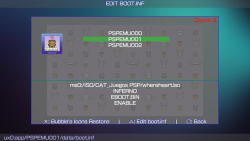
Triangle: Allows to edit the configuration file boot.inf
- Change driver: "INFERNO", "MARCH33", "NP9660"
- Changes the .bin booting mode: "EBOOT.BIN", "BOOT.BIN", "EBOOT.OLD"
- "Suspend game" Stop the game running on the psp when PS button is pressed.
- Disable/Enable plugins: "ENABLE", "DISABLE"
- "NonpDRM Engine" Load content using Quickrazor's plugin.
- "High Memory" Force high memory layout. (Disabled for GTA Native Resolution Patch)
- "Change game cpu clock speed" Improves loading speed and game response depending of chosen speed.
- "English or Custom:"Allows to load selected language at start: English or Custom", loads chosen language if set as default (ABM only not bubbles).
Uninstall Bubbles
- Press SELECT (single) or START (all) to select bubbles you wish to uninstall.
- Square: To uninstall the selected bubbles.
- Change driver: "INFERNO", "MARCH33", "NP9660"
-
[TABLE="class: cms_table_grid, width: 98%"][TBODY][TR][TD="bgcolor: lightgrey"]This option allows you to Insert your desired images to the selected bubble, this will improve the looks of your bubbles in Livearea.
To use this feature you have to follow the instructions below:
- Download or create the images to insert, those images to use have to be renamed and resized to:
- icon0.png 128x128
- startup.png 280x158 (max)
- pic0.png 960x544
- bg0.png 840x500
- boot.png 480x272
- template.xml
- Manual images inside (001.png, 002.png 960x544)
- Create a new folder, rename to anything you want, recommended to use your game name, inside this folder place the images created in step 1.
- Now is possible inject the Manual folder with your manual's images inside (001.png, 002.png 960x544). The folder of the Manual must be place in the following path ux0:ABM/(Gameid)/
- Copy/paste your newly created folder with the images inside to the path ux0:ABM/
NOTE:
Make sure the images are renamed as mentioned above and to be in png format, also make sure the images are resized to corresponding sizes mentioned avobe (if your images sizes are close to specs they will work too).
You can add your own template.xml file. (Make sure the images names are the same to images linked in the template.xml).
To insert new images to any selected bubble, when you are in the Edit Bubble menu:
- X: To open images folder list.
In images folder list:
-
X: To choose the folder where you have the images to insert (preview of the images will be shown).
- O: To go back.
After choosing a folder, when you can see the images previews:
-- O: To go back.
- START: Insert the previewed images to chosen bubble.
-
[TABLE="class: cms_table_grid, width: 98%"][TBODY][TR][TD="bgcolor: lightgrey"]Press SELECT in the Inyector of Images option to install incredibles Online Resources created by the community for all of us.
Credits
- eCFW Adrenaline By TheFloW.
- Adrenaline Bubble Booter By LMAN 'leecherman'
- startup.png By Freakler.
- Testers @Falaschi, @baltazarregala4.
- Translator @Z3R0N3__.
- Some graphics By WZ-JK.
-
[TABLE="class: cms_table_grid, width: 98%"][TBODY][TR][TD="bgcolor: lightgrey"]In case you want to support the work of the team on the vita, you can always donate for some coffee. Any amount is highly appreciated:
[/TD][/TR][/TBODY][/TABLE]
-
[TABLE="class: cms_table_grid, width: 98%"][TBODY][TR][TD="bgcolor: lightgrey"]Changelog 6.13
- Adrenaline Bubble Booter v1.3 Compatibility By LMAN 'leecherman'
- Adrenaline v7.0 Compatibility By LMAN 'leecherman'
Changelog 6.12
- Adrenaline Bubble Booter v1.2 Compatibility By LMAN 'leecherman'
Changelog 6.11
- Fixed bug when changing psp content path (bubble edit).
- Fixed callback getfile.
Changelog 6.10
- In the option Online Resources, you can see the list of the Resources availables separated by Authors or Creators. (You can move around the authors with the left/right key).
- Added the option to take the titleID of the PSP/PSX game to create the Shortcut. To apply this change, go to Extra Settings menu (press START in the iso/cso/pbp list), put the option BubbleID in TitleID.
Changelog 6.00
- Added option to inject only the game's Manual.
Changelog 5.30
- Fixed error when creating multi-bubbles, now each bubble gets its own name.
Changelog 5.27
- Added an option to use the filename ("example".iso) to rename bubbles made with ABM.
- Added compatibility with Adrenaline Bubble Booter v1.1.
Changelog 5.26
- Fix typo in spanish.txt.
Changelog 5.25
- Added option Lmans new customizable options such as:
"Suspend game" Stop the game running on the psp when PS button is pressed.
"Enable/Disable Plugins" very self explainatory.
"NonpDRM Engine" Load content using Quickrazor's plugin.
"High Memory" Force high memory layout. (Disabled for GTA Native Resolution Patch)
"Change game cpu clock speed" Improves loading speed and game response depending of chosen speed.
Changelog 5.24
- Added compatibility with adrenaline 6.9 thanks to LMAN.
- For Adrbubblebooter changelog visit its website AdrBooterv1.0
Changelog 5.23
- Now Manual folder is detected at resources injection option.
- Download Manual option added to online resources injection.
- Vitabubbles repo updated with lots of new resources.
Changelog 5.22
- Fixed template.xml and framesXX.png when injecting images.
- Added option to inject game Manual to bubbles.
Changelog 5.21
- Added Bubble fix option to START menu for fixing bubbles asking to install adrbblbooter on every boot.
- Fix menucolor.bin.
- Added FullBubble-Non Streched in inject resources.
Changelog 5.20
- Added PS button option to Extra Settings menu.
- Added PS button option to Edit Bubble Settings menu.
- Added description for the options in Edit Bubble menu.
- Now you can set an image as boot.png again and inject the desired image, should be 480*272.
Changelog 5.19
- Added compatibility with adrenaline 6.8 thanks to LMAN.
- For Adrbubblebooter changelog visit its website AdrBooterv0.9
Changelog 5.18
- Now the preview images look more like ABM made bubbles when switching from full to non stretched option with L button.
- Now the preview icons download is done by threads in function Online Resources.
Changelog 5.17
- Added option to download resources and inject them un the desired ABM bubble.
Changelog 5.16
- Re-add edit bubble path. Only when the path to the game does not exist
Changelog 5.15
- Removed option show pic with triangle button.
- Added Batch Installation Option by pressing triangle button for non installed content.
- Now you can uninstall non linked bubbles per batch.
Changelog 5.14
- Use Default Title option added to Submenu (START) enable it to skip the renaming process.
- Now when creating 2 or more bubbles you'll have to rename all the bubbles before the creating process begins.
Changelog 5.13
- Now you can select the SetPack for each bubble. Press R on the selected game.
- Fixed error with the STITLE when creating bubbles (max length 52).
Changelog 5.12
- Added PSP/PSX image set for bubble creation. Thanks to Sakitoshi
- Added option description at submenu.
- Added Adrenaline customized option enable/disable to ABM submenu. Thanks to Sakitoshi
- Added a new bubble color similar to original PSP/PSX bubbles. Thanks to Sakitoshi
- Added chinese support (download font from github repo and place at ux0:data/ABM/font)
Changelog 5.11
- Compatible with Adrenaline v6.7 and Adrenaline Bubble Booter v.08
Changelog 5.10
- Fixed reboot error (reboot loop).
Changelog 5.09
- Fix support for iso/cso/pbp in xmc0.
- Sort by Device (ux0,ur0,uma0, imc0, xmc0).
Changelog 5.08
- Compatible with Adrenaline v6.6 and Adrenaline Bubble Booter v.07
- Added support for iso/cso/pbp in xmc0 (Use Vitashell for mount xmc0).
- Fix "startup.png" images
- Support added for frameX.png images (with X from 1 to 5).
- Sort by ID.
- Light aesthetic changes and clean up code.
Changelog 5.07
- Fix error C2-12828-1 on ABM bubbles.
- Added Auto Repair boot.bin option on the START button submenu (changes the customized option to YES on the old Bubbles from ABM 5.04).
- Now the bg0.png is shown at Bubbles Edit screen.
Changelog 5.06
- Fixed reboot error (reboot loop).
Changelog 5.05
- Compatible with Adrenaline v6.4 and Adrenaline Bubble Booter v.06
- Auto-Conversion of boot.inf files to boot.bin files needed for ABB v.06
- In the Edit Bubble Screen this are the available combinations:
- Driver (INFERNO/MARCH33/NP9660).
- Execute (EBOOT.BIN/EBOOT.OLD/BOOT.BIN).
- Customized: (YES/NO).
- Now when showing the bubble's linked game path will be highlighted green if the content is found, if not found will be highlighted orange.
- *NOTE: If the game linked to your bubble is not there anymore the bubble will open Adrenaline or throw an error.
Changelog 5.04
- Now you can disable the 8bit image conversion when creating or editing ABM bubbles.
*NOTE: You must be sure the images you are using are in compatible format, otherwise the bubble will fail. Enter the submenu to change this settings with start.
- Some changes in the list of Inject Imgs.
Changelog 5.03
- New option to set default pic0 and bg0 images and your own xml file for your bubbles (up to 5 sets provided by you: ux0:ABM/Set1 to ux0:ABM/Set5).
- New option to sort: Category.
Changelog 5.02
- Fixed data.inf error.
- Added config.bin on each bubble (adrenaline boot screen disabled).
- New graphics by Wz-Jk.
Changelog 5.01
- Compatible with Adrenaline v6.3 thanks to Lman.
- Added npdrmfree enable/disable option to ABM bubble edit screen.
- Added ux0:data/ABM/crc.ini to detect the CRC32 of the skprx modules.
NOTE: With lman plugins update, now every bubble saves its own adrenaline configs if you like to disable adrenaline boot screen you have to do that for every bubble.
Changelog 5.00
- Added submenu for Extra Setting.
- Added hability to inject images to ABM bubbles.
Changelog 4.11
- Added drop down submenu when pressing START.
- Added option to choose a favorite color (Will be saved).
- Added option to show the sorted list according to preferences.
- Double tap when submenu is open for help.
Changelog 4.10
- Buttons X and O reassigned only when using ABM (only if required).
- Fix list sorting, now ABM shows last preset option everytime.
- Fix snowfall animation.
Changelog 4.09
- Support for 3.65 CFW (Thanks to Lecheerman).
- Fix automatic network update (Add TLS v1.2 Support).
- Updated to the latest version of ONElua.
Changelog 4.08
- Fix error when opening the OSK more than 10 times, thanks to The_Flow!.
- Update eboot.bin to ONELuavita V4R0.
Changelog 4.07
- Now the iso/cso/pbp list shows the installed content, if the game is installed as a bubble already the title will be highlighted green.
- Now you can choose between list sorting by Installed, Title or Modification Date.
Changelog 4.06
- Now the icons in iso/cso/pbp list are loaded "on the fly".
Changelog 4.05
- Now you can Sort your iso/cso/pbp by Title or by Date of Modification pressing SELECT.
- Pressing START in the iso/cso/pbp list will display the basic controls.
- Now the Bubble icons in the "EDIT DATA/BOOT.INF" section are loaded "on the fly".
- Please update your translations...New lines were added.
Changelog 4.04
- Added japanese letters support for game titles with Sony's OSK.
Changelog 4.03
- Fixed error with Homebrews with odd icons, forcing the img to 8bits.
- Fixed empty iso/cso/pbp list error (Press R) again!!!.
Changes thanks to 1upus:
- Autodetect System language and loads translation if found.
- Translations moved to resources/lang and renamed to .txt
- Use english_us.txt as default translation.
- Automatic creation of translation sample on ux0:data/ABM/lang/english_us.txt.
- Loading translation from ux0:data/ABM/lang/%language%.txt (if exists).
- Loading custom ttf font from ux0:data/ABM/resources/%language%.ttf (if exists)
- Some missed strings added to langpack (updater, custom message etc.).
- Some lua scripts and translation optimization.
Changelog 4.02
- Fixed empty iso/cso/pbp list error.
- Now you can select to resize the games icons to show in Full Bubble or keep the original psp looks (no stretched icons).
- Press L or R to switch between full or no stretched icons for your bubbles.
- The script lang.lua got modified, so please update your translation.
Changelog 4.01
- Support to load your own font.ttf (Must be placed in ux0:data/ABM/font.ttf).
- Now you can translate ABM, you have to translate only the texts in quotation marks of the "system/lang.lua" script found in ABM and place the translation in ux0:data/ABM/lang.lua).
- Now change the background color of each bubble is individual (Press left/right to change the color).
Changelog 4.00
- Fixed error which didn't allow to install more than 30 bubbles.
- Now when multi-installing more than 9 bubbles a custom keyboard will open after 10th bubble.
- Now the PS button will be blocked when Getting Resources and Instaling Bubble.
- Now you can select the bubble background color!!! (17 available colors).
- Removed more popup messages...again!!!.
- Thanks ZeroZelta and Dovemac for the iosk keyboard and DevDavis for the port a Psvita.
Changelog 3.10
- Fixed error caused with iso/cso/pbp which didn't have icons... again!!!.
- Light aesthetic changes for icons when shown in the lists.
Changelog 3.09
- Added support for iso/cso/pbp in imc0 (Use Vitashell for mount imc0).
Thanks to (Namikaze Ruisu).
Changelog 3.08
- New option to single or multi uninstall PSPEMU bubbles.
- Now the bubble's icons are not stretched and look a lot beter.
- Now you can do multi-bubble installation.
- Ps Button can be pushed to exit ABM.
- Cleaned up the code a bit and more popup messages were removed.
Changelog 3.07
- Fixed crash while trying to load some functions.
- Removed some popup messages.
Changelog 3.06
- Now the resources (images) for the new bubble are converted to 8bits, so dont worry aboud db rebuild.
- Support for Old ABM version has been removed.
- Removed restart after creating bubbles.
- NOTE: If the iso/cso/hb to launch lacks of icon0.png or pic1.png then ABM will use included Lmans images.
Changelog 3.05
Adrenaline Bubbles Manager has been updated to be able to create bubbles to use with Adrenaline v6 and Lman's recently updated plugin adrbubblebooter without loosing the compatibility with adrenaline v5 and lower versions and corresponding Lman's plugin adrbblbooter for those versions.
- Added compatibility with Adrenaline v6 and Lmans adrbubblebooter plugin for adrenaline v6.
- On this version ABM searches for the installed Adrenaline version and adapts to work with found Adrenaline version (either v6 or v5 and lower).
- Added the option to change the boot.inf driver setup.
- Added the option to use pic1.png to show as pic0.png and bg0.png, and to set icon0.png from iso/cso/hb to be shown in the bubble and as startup.png (changes will revert after a db rebuild and default Lmans plugin images will be shown).
- Added the option Bubble Restore to compensate the loss of the iso/cso/hb images from the bubbles after a db rebuild (to use this option ABM opens the selected bubble, but you have to return manually to ABM).
Changelog 3.01
- If adrenaline folder is found at ur0: then ABM will add corresponding lines to ur0:tai/config.txt, otherwise the lines will be added to ux0:tai/config.txt i adrenaline folder is found at ux0:
Changelog 3.00
- Adrbblbooter plugin files updated to newest version (v0.5) Thks LMAN leecherman. (adrbblbooter folder must be moved to ur0, and corresponding lines with especific paths must be added to ur0:tai/config.txt)
- Added support for iso/cso/pbp in uma0 (Use Adrenaline with support for uma0).
- Now options for PLUGINS and STARTDAT.PNG is Enable for default.
- Added option to Enable/Disable plugins when linking content to a bubble.
- Added option Edit GAMEID.txt within ABM for Custom Bubbles (no need to restart):
1. Path to the iso/cso/pbp file.
2. UMD driver (INFERNO\MARCH33).
3. Execute Boot (EBOOT.BIN\EBOOT.OLD\BOOT.BIN).
4. Plugins state (ENABLE\DISABLE).
5. STARTDAT.PNG state (ENABLE\DISABLE). - Removed adrbblbooter_nostartdat.suprx.
- uma0 support (Use a compiled version of Adrenaline that supports uma0 partition (Adrenaline uma0 commit 0f8e709) Thks LMAN.
- To be able to use adrenaline on the memory card or the msd with sd2vita adapter, adrenaline folder must be moved to ur0, and corresponding lines with especific paths must be added to ur0:tai/config.txt
- Remember to change adrbblbooter plugin path for isos already linked on config.txt
Code:*GAMEID ur0:adrbblbooter/adrbblbooter.suprx
Changelog 2.10
- Now you can press [] to install M33 driver from start screen (for iso/cso files only).
- NEW OPTION ICON0.DDS: Added the option to use pic1.png to show as bg0.png, and to set icon.dds to be shown in full bubble (but, to use this feature, te game must have been booted once and changes will revert after a db rebuild).
- More Code got cleaned up a bit.
- Cross: Make PBOOT.PBP
Inserts a title and icon0 to be shown in livearea to Adrenaline's pboot. - Circle: Make ICON0.DDS
Resizes the icon.dds to full bubble and sets the pic1 as bg0 for the chosen bubble. (Changes get reverted with db update)
Changelog 2.0
- Adrbblbooter plugin files updated to newest version (v0.4).
- Added the option to use selected content's pic1 as STARTDAT.PNG if found, otherwise Lman's plugin default STARTDAT.PNG will be used.
- Now the function Disable Adrbblbooter Bubbles allows to:
Eliminate the GAMEID.TXT and corresponding STARTDAT.png files from path "ux0:adrbblbooter/bubblesdb/".
Eliminate corresponding lines from ux0:tai/config.txt and reload config
Eliminate the PBOOT.PBP from chosen bubble. - Code got cleaned up a bit.
- Some stetic changes.
Changelog 1.0
- Initial release 'POC'.
- Added automatic network update. app will now notify you when there's a new update.
- Support get and view complete list of content of PSPemu.
- Added option enable/disable view of 'PIC1'.
- Adrenaline Bubble Booter v1.3 Compatibility By LMAN 'leecherman'
SOURCE:
https://github.com/ONElua/AdrenalineBubbleManager/[/TD][/TR][/TBODY][/TABLE]
AdrenalineBubbleManager
Create and organize your direct adrenaline bubbles
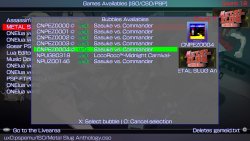
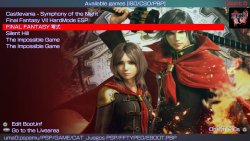
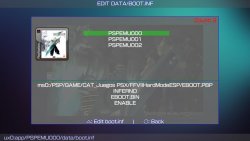
Create and organize your direct adrenaline bubbles
-
Description
This useful application allows you to make personalized bubbles with 'icon' and 'title' of your PSP content (HBS/PSX/ISO/CSO) quick and easy, using the 'LMAN' plugin, and adding the lines Of the plugin to the GAMEID in the config.txt of taihen, also creates the GAMEID.TXT for the plugin, forgetting completely of the tedious and long manual method.
Adrenaline Bubbles Manager has been updated to be able to create bubbles to use with Adrenaline v6 and Lman's recently updated plugin adrbubblebooter without loosing the compatibility with adrenaline v5 and lower versions and corresponding Lman's plugin adrbblbooter for those versions.
Instructions for the new version:- At the opening, ABM scans for available PSP content, as usual, then by pressing X, you can select the iso/cso/psp hb to be launched with the bubble to be made.
- After choosing the PSP content to be launched, a popup message will let you know that the resources (images) for your new bubble are getting ready and another popup will let you know the gameid of your freshly made bubble, after that, you'll be given the driver/loader options which you can change later, the buttons to setup the driver/loader are as follows:
1. X INFERNO /\ MARCH33 O NP9660. - Then the boot setup is as follows:
2. X EBOOT.BIN /\ EBOOT.OLD O BOOT.BIN. - Then after installing the newly made bubble ABM will ask you if there are more bubbles to be made, if the answer is yes ABM will take you back to the available PSP content list.
- Adrenaline Bubble Booter By LMAN 'leecherman'
- eCFW Adrenaline By TheFloW.
- PBOOT icon and livearea icon By Freakler.
- Testers @Falaschi, @baltazarregala4.
- Some graphics By WZ-JK.