4.93 EVILNAT (Cobra 8.5)

PS3 4.93 Evilnat w/ Cobra v8.5 - (CEX/PEX/D-PEX) 4.93

@aldostools
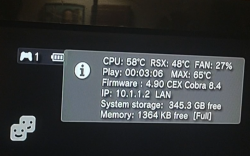
I have updated webman to the latest version for Evilnat PEX 4.90 But noticed an error which I am not sure if is present in all games but Specificly skate3 I was trying to monitor temps while playing yet when the monitor from webman is overlaying the screen the game will freeze if I go to XMB and hold start+select to disable monitor the game resumes as normal. Game is being loaded from WM as well. I have tested bioshock infinite as well as The Last of Us and seems to work fine with overlay on.
 
Last edited:
@aldostools
I have updated webman to the latest version for Evilnat PEX 4.90 But noticed an error which I am not sure if is present in all games but Specificly skate3 I was trying to monitor temps while playing yet when the monitor from webman is overlaying the screen the game will freeze if I go to XMB and hold start+select to disable monitor the game resumes as normal. Game is being loaded from WM as well. I have tested bioshock infinite as well as The Last of Us and seems to work fine with overlay on.

There are many possible reasons. It could have been a one time freeze. If you can reproduce it consistently, then it could be a memory issue. Sometimes these can be fixed switching to lite edition or unloading webMAN MOD.

Other possible causes include data corruption of the ISO, cross linked files, outdated cached .ntfs file, defective HDD, other plugins running in background, mods applied to the game, missing updates, etc.

EDIT: I asked the question to chatGPT and it was close to what I already answered :rolling:

upload_2023-3-18_14-30-7.png
 
There are many possible reasons. It could have been a one time freeze. If you can reproduce it consistently, then it could be a memory issue. Sometimes these can be fixed switching to lite edition or unloading webMAN MOD.

Other possible causes include data corruption of the ISO, cross linked files, outdated cached .ntfs file, defective HDD, other plugins running in background, mods applied to the game, missing updates, etc.

EDIT: I asked the question to chatGPT and it was close to what I already answered :rolling:

View attachment 40146
It only happens with that one game and it only happens when the information overlay is enabled it's reproducible 100% of the time. According to the overlay there seems to be plenty of memory because that part works just the game freezes and then when the overlay is disabled the game continues immediately. It's the only game I've ever noticed that with. The background music of the game will still play screen just turns black with the overlay on which still functions during that time.
Here is a short clip...
https://mega.nz/file/PYx3xSwQ#wVZRn4OTMaZJ1v1Gh4mUpRLh3HmRpJ0kjSMKBd6VzLo
The RAM is about the same with other games with this particular game with the overlay off the game plays fine even with webman enabled. I'm pretty sure it's not the hard drive it's brand new. Not really a big deal more of a curiosity.
 
It only happens with that one game and it only happens when the information overlay is enabled it's reproducible 100% of the time. According to the overlay there seems to be plenty of memory because that part works just the game freezes and then when the overlay is disabled the game continues immediately. It's the only game I've ever noticed that with.
Here is a short clip...
https://mega.nz/file/PYx3xSwQ#wVZRn4OTMaZJ1v1Gh4mUpRLh3HmRpJ0kjSMKBd6VzLo
The RAM is about the same with other games with this particular game with the overlay off the game plays fine even with webman enabled.

The FPScounter plugin by @TheRouLetteBoi seems to cause random freezes.
I recommend to use the overlay only for short periods just to check the info. Unload the plugin pressing L3+R3 again.

Use this link to report issues in that plugin: https://github.com/TheRouletteBoi/RouLetteVshMenu/issues
 
It could be an issue specific to that game.

You can try monitoring the temperature pressing L3+R3 to show VshFpsCounter overlay.

Or hold select+start until you hear one beep.

If these methods still freeze the game, try using a smartphone, laptop or tablet to monitor the temperature using the web commands /tempf.html or /cpursx.ps3 from the internet browser.
 
@Evilnat I just noticed reinstalling my PS3 that in your "EULA" it still says SCE (Sony Computer Entertainment). You might want to change that into SIE (Sony Interactive Entertainment) as SCE technically doesn't exist anymore and all OFW firmwares past 4.80 also reference SIE and not SCE anymore. Even the old logos have been removed from the firmwares.
 
It could be an issue specific to that game.

You can try monitoring the temperature pressing L3+R3 to show VshFpsCounter overlay.

Or hold select+start until you hear one beep.

If these methods still freeze the game, try using a smartphone, laptop or tablet to monitor the temperature using the web commands /tempf.html or /cpursx.ps3 from the internet browser.
FPS counter works without freeze but it's edges are cut off screen.
Screenshot_20230319-134936-254.png
 
Are your TV settings, you are using a mode that resizes the screen (and as consequence reduces its quality), change it to "game mode" (or similar names depending of the TV brand)

i hate the contrast and brightness in game mode, i like the contrast bar at maximum haha

He need to select "fit to screen" to have it displaying properly.
 
Are your TV settings, you are using a mode that resizes the screen (and as consequence reduces its quality), change it to "game mode" (or similar names depending of the TV brand)
This TV only has an automatic mode or widescreen. This was one of the first HDTVs in fact it says HD ready on it it's only 1080i. I'm not sure if it has an overscan option probably not. It does have an automatic option but then it randomly resizes the picture in game menus I guess from a box image to widescreen image which got really annoying so I just set it to widescreen. I'm surprised no CFW option allows for global screen adjustment.
 
i hate the contrast and brightness in game mode, i like the contrast bar at maximum haha

He need to select "fit to screen" to have it displaying properly.
Btw, to check the screen dimmensions accuratelly you can use ManaGunZ, in the settings there is an option that displays a image pattern at full screen

Well... in a default installation of ManaGunZ (before modifying any setting), that pattern needs to fit perfect on the TV screen
If it doesnt fits well it means your TV is doing some weird "post processing" of the video signal
TVTEST.PNG


The point of the "game mode" in some TV's is the video signal is not post-processed at all... lets say.... the TV displays the video signal as "raw" (so the responsible of scaling it is the console, not the TV)
Thats the idealistic scenario to achieve best video quality on games (and also XMB is affected by this too)

The PS3 have another setting that affects brightness, dont remember the exact name right now, but is something like "RGB full range" (or limited range), and as far i remember is better to use the limited range
 
FPS counter works without freeze but it's edges are cut off screen.
View attachment 40170

In the file /dev_hdd0/tmp/wm_res/VshFpsCounter.yaml you can change the font size and the position where you want to show the overlay.

By the way, if you have been using the LITE edition of webMAN MOD, today I uploaded a new updated that fixes a bug that freezes the console when a game is mounted.
 
In the file /dev_hdd0/tmp/wm_res/VshFpsCounter.yaml you can change the font size and the position where you want to show the overlay.

By the way, if you have been using the LITE edition of webMAN MOD, today I uploaded a new updated that fixes a bug that freezes the console when a game is mounted.
Thanks for that edit tip. I'm using the full installation of WM
This Edge issue is likely from the TV this model is here... There is a firmware update from 2008 maybe I will try that.
https://www.usa.philips.com/c-p/32PFL5322D_37/81-cm-32-inch-lcd-integrated-digital
 
Last edited:
In the file /dev_hdd0/tmp/wm_res/VshFpsCounter.yaml you can change the font size and the position where you want to show the overlay.
Thanks again for this tip... I was able to add extra info change the font size it seems the screen does not cut off on the right side so for in game I move the information to the top right and for xmb I move it to the bottom right. This seems to serve the same purpose as WM monitor.
Screenshot_20230319-152910-785.png
 
@aldostools i'm still having problems with .44 whe i switch between firmwares, let's say i install webMAN on 4.90 and i go back to 4.84 the console will freeze until i disable cobra and delete webMAN MOD and enable cobra again, if i install on 4.84 and go to 4.90 same thing.

Is there any thing i need to delete first?
 
Back
Top