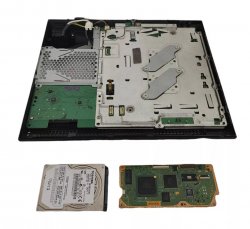
Accidentally broke a power connector in my Fat

Repair or buy a new motherboard?

  • Yes

    Votes: 0 0.0%
  • No

    Votes: 0 0.0%
  • Send to Booter

    Votes: 1 100.0%

  • Total voters
    1

Vinny90

Forum Noob
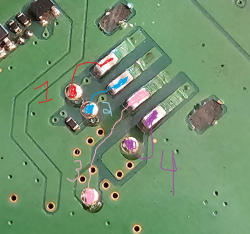
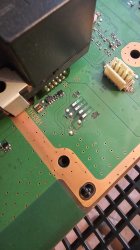
Hi, I have tried to reflow this morning my RLOD PS3 Fat using the oven method and during the reassembly I have notice that I ripped off the connector from the motherboard during the disassembly. The one that is connected to the PSU and is 4-wires. How hard can it be to repair that? I do have some soldering equipment and wires but I need to be certain about what to connect where. I don't mind to glue the connector or leave it free and use wires to bypass the original tracing. Any help would be appreciated. The Bluray-drive has been opened before and need proper reassembly as well.

I'd rather look stupid for asking than confirm that I am stupid by doing a mistake

I have 4 PS3, this fat has overheated last night while downloading games and my other one has bricked due to overclocking, it freezes fast, a 3001B with Hen and 2501A (750/1000) and I have ordered another 2501A last night from Ebay. I want to save my Fatties no matter what
 

Attachments

  • 20240721_081141.jpg
    20240721_081141.jpg
    906.8 KB · Views: 58
  • 20240721_083001.jpg
    20240721_083001.jpg
    1 MB · Views: 54
Hi, I have tried to reflow this morning my RLOD PS3 Fat using the oven method and during the reassembly I have notice that I ripped off the connector from the motherboard during the disassembly. The one that is connected to the PSU and is 4-wires. How hard can it be to repair that? I do have some soldering equipment and wires but I need to be certain about what to connect where. I don't mind to glue the connector or leave it free and use wires to bypass the original tracing. Any help would be appreciated. The Bluray-drive has been opened before and need proper reassembly as well.

I'd rather look stupid for asking than confirm that I am stupid by doing a mistake

I have 4 PS3, this fat has overheated last night while downloading games and my other one has bricked due to overclocking, it freezes fast, a 3001B with Hen and 2501A (750/1000) and I have ordered another 2501A last night from Ebay. I want to save my Fatties no matter what
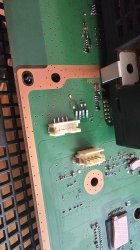
Do you have a multimeter? If so, you could look where the conductors go. You can easily trace them. In general, however, it looks as if you have been lucky and the pads themselves have remained intact and have only just been pulled off the top of the minboard. If the pads are really still intact, which you can easily test with a multimeter. You can simply solder the connector back onto the pads without having to lay any cables. As for the two larger pads that are torn off, these are only for stabilisation so that the connector does not come off so easily. They are not connected to anything, so you don't need to solder them back on, you can just use superglue when you have repaired the other wires. But be careful that no glue runs into the connector. Otherwise, if you don't want to use glue, you can simply scrape away a bit of the paint until you can see the copper and solder the mounting legs back on. As for the drive, what exactly is disassembled that you can't get back together? Do you have any photos?
 
Do you have a multimeter? If so, you could look where the conductors go. You can easily trace them. In general, however, it looks as if you have been lucky and the pads themselves have remained intact and have only just been pulled off the top of the minboard. If the pads are really still intact, which you can easily test with a multimeter. You can simply solder the connector back onto the pads without having to lay any cables. As for the two larger pads that are torn off, these are only for stabilisation so that the connector does not come off so easily. They are not connected to anything, so you don't need to solder them back on, you can just use superglue when you have repaired the other wires. But be careful that no glue runs into the connector. Otherwise, if you don't want to use glue, you can simply scrape away a bit of the paint until you can see the copper and solder the mounting legs back on. As for the drive, what exactly is disassembled that you can't get back together? Do you have any photos?

I can get a multimeter within the next few days, same for superglue. Do you have any example as a reference? How would I use the multimeter, from what point to what point? I am a bit bad for that but I know how to use one. What do you mean about scraping exactly?
Thanks for the help, I am patient
 
I can get a multimeter within the next few days, same for superglue. Do you have any example as a reference? How would I use the multimeter, from what point to what point? I am a bit bad for that but I know how to use one. What do you mean about scraping exactly?
Thanks for the help, I am patient
Could you tell me what kind of console it is, i.e. the model? Or even better, the model of the mainboard? Do you know where to find the model names? The points to which it must be connected are logically different for each board. By scraping, I mean removing the green paint that is on the entire mainboard and scratching it off with something sharp until you can see the copper. And are you sure that it was an RLOD and not a YLOD? Otherwise it wasn't a good idea to heat it up, you would have had to read out the Syscon first to find out exactly what was faulty. It could well be that 'baking' the mainboard did not help and it is still defective. But anyway, we first have to get the connector back on. If you tell me the model, I can send you a photo of what the pads should be connected to.
 
Could you tell me what kind of console it is, i.e. the model? Or even better, the model of the mainboard? Do you know where to find the model names? The points to which it must be connected are logically different for each board. By scraping, I mean removing the green paint that is on the entire mainboard and scratching it off with something sharp until you can see the copper. And are you sure that it was an RLOD and not a YLOD? Otherwise it wasn't a good idea to heat it up, you would have had to read out the Syscon first to find out exactly what was faulty. It could well be that 'baking' the mainboard did not help and it is still defective. But anyway, we first have to get the connector back on. If you tell me the model, I can send you a photo of what the pads should be connected to.
The console is a CECHL model and on the board where the BR drive is supposed to be it says "Ver 001 1-878-196-31"
Thanks. I don't mind to buy another motherboard BUT I wanna know if I could buy any other than a CECHL model and I do have a bricked CECHK for parts. I have ordered a fifth PS3 2 days ago, another 2501A - no stress for me
I'd be willing to send it to anyone willing to fix it

I have found a motherboard which is under 3.55 for less than $120 CAD
If the repair fails, should I buy the board or any other than a CECHL instead?
 
Last edited by a moderator:
The console is a CECHL model and on the board where the BR drive is supposed to be it says "Ver 001 1-878-196-31"
Thanks. I don't mind to buy another motherboard BUT I wanna know if I could buy any other than a CECHL model and I do have a bricked CECHK for parts. I have ordered a fifth PS3 2 days ago, another 2501A - no stress for me
I'd be willing to send it to anyone willing to fix it
I own a Ps3 L. I'll take it apart today and send you pictures of where the traces go. The Ps3 K has a different mainboard. The Ps3 L is the most stable of the Phat models. If the Ps3 does not work after you have repaired the port, I would read out the Syscon. There are now very good tutorials that explain this very easily. The parts you need for this only cost around 6-7$ and you only have to solder 3-4 cables. So it's very simple. You can then see why the Ps3 has failed and whether it is worth repairing.

I have found a motherboard which is under 3.55 for less than $120 CAD
If the repair fails, should I buy the board or any other than a CECHL instead?

If you want a Phat, the L is actually the best choice. Since it was the last one. Of course it depends on what you want to do with the Ps3 but I wouldn't buy the mainboard if you only want to put CFW or on it, one with the current firmware is enough, you don't need to pay extra for old firmware. But if you buy a mainboard, it is very important that you make sure that the drive board is included, because it is coupled to the mainboard, i.e. you can't just install another drive board.
 
Last edited by a moderator:
If you want a Phat, the L is actually the best choice. Since it was the last one. Of course it depends on what you want to do with the Ps3 but I wouldn't buy the mainboard if you only want to put CFW or on it, one with the current firmware is enough, you don't need to pay extra for old firmware. But if you buy a mainboard, it is very important that you make sure that the drive board is included, because it is coupled to the mainboard, i.e. you can't just install another drive board.

I have one on my wishlist and it does come with the HDD. Thanks for the info, I didn't know you needed the original HDD with it. I'd rather buy a new board than have a new console with a broken one sitting in my closet, same price.

I am convinced that my MoBo is actually dead anyway
 
I have one on my wishlist and it does come with the HDD. Thanks for the info, I didn't know you needed the original HDD with it. I'd rather buy a new board than have a new console with a broken one sitting in my closet, same price.

I am convinced that my MoBo is actually dead anyway
You don't need the original HDD, you can even swap it for an SSD, although that doesn't do much for a Ps3. You need the disc drive or rather just the drive board from it.
If you prefer to buy a single board, you can of course do so. But as I said, make sure that the disc drive board is included. Then put the old one as defective with the disc drive board on eBay or something and don't throw it away. Even if it is irreparable, there are still a lot of parts on it that you can't just buy and you can only get from dead boards.
 
You don't need the original HDD, you can even swap it for an SSD, although that doesn't do much for a Ps3. You need the disc drive or rather just the drive board from it.
If you prefer to buy a single board, you can of course do so. But as I said, make sure that the disc drive board is included. Then put the old one as defective with the disc drive board on eBay or something and don't throw it away. Even if it is irreparable, there are still a lot of parts on it that you can't just buy and you can only get from dead boards.


It is the picture from the one I want, will it be ok?
 

Attachments

  • Screenshot_20240722_064130_eBay.jpg
    Screenshot_20240722_064130_eBay.jpg
    648.1 KB · Views: 33
Yes, you seem to be getting half the console. Can you see the small circuit board next to the HDD? This is the drive board that is connected to the mainboard.

The motherboard and the smaller one are the two that must match each other no matter what, right? I need a new BR drive, mine needs all of its parts being reinstalled properly, can't insert discs, stuck
 
Yes, the two must always be taken over together. So if you buy a new drive, the old drive board still has to go in. But if you buy a new drive in addition to half the console you're buying, you can advertise the console as defective and buy a new used one. It's easier and certainly cheaper. You would then have replaced everything except the upper housing and the power supply unit, so you can buy a new console right away. And then sell the old one on eBay or here in the forum.
 
Repair or buy a new motherboard? Yes or No.

What kind of poll is this? o_O

Looks easy enough to repair if you can solder.
 
Repair or buy a new motherboard? Yes or No.

What kind of poll is this? o_O

Looks easy enough to repair if you can solder.
I never had to do such repair, I need to see clearly what are the connecting lines. even a mspaint edit would do

If these connections are the right one then I solder 4 wires to bypass the original broken circuit and superglue the connector back on, will it work? In fact, the information that I need is the proper pinout
 

Attachments

  • would this work.PNG
    would this work.PNG
    1.2 MB · Views: 35
Last edited by a moderator:
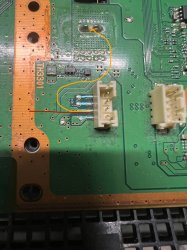
I have looked at a Ver-001 board. Your points are correct except for number 3, which is ground, so it is connected to the large ground pad.

You can solder the cables to the points. The red one is ground. You can either solder it on by removing a bit of the green paint (small blue line) or solder it directly to the exposed copper (red line) or any other ground point (for example the orange line).
 

Attachments

  • IMG_3956.jpeg
    IMG_3956.jpeg
    829.6 KB · Views: 37
Last edited by a moderator:
You can solder the cables to the points. The red one is ground. You can either solder it on by removing a bit of the green paint (small blue line) or solder it directly to the exposed copper (red line) or any other ground point (for example the orange line).

Thank you very much, if it fails I am buying a new motherboard. I was real close in my guessing
 
No problem. I'm glad I could help. Let me know if it worked, I wish you every success.

Thank you very much, if it fails I am buying a new motherboard. I was real close in my guessing
Wait before you start I made a huge mistake. The orange line is wrong, just don't connect the pad to the orange line. Use the red one. Do NOT use orange
 
Last edited by a moderator:
No problem. I'm glad I could help. Let me know if it worked, I wish you every success.


Wait before you start I made a huge mistake. The orange line is wrong, just don't connect the pad to the orange line. Use the red one. Do NOT use orange
red good, orange bad, alright - thanks
 
Last edited:

Similar threads

Back
Top