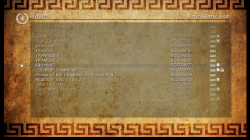
PS3 Apollo save tool (development thread)

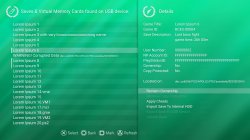
@bucanero I think it is also worth to add buttons to mark menu items (for multiply marking) and filters (to filter on list only PS3 saves, PSP saves, PS2 vmc, PSX vmc). Pressing square would mark item, pressing for i.e 3s mark all/unmark all.

I also added few options to context menu but do not suggest to much, as I forgot that Upload Save will not be existed (?) and Import option should contain ZIP word.

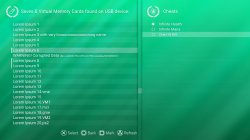
I'm not sure if in second layer we should have HEXes from those cheats displaying.

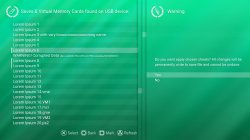
Third layer, for warnings, asks etc.

Anyway, new previews and new asset pack no.3: ^^
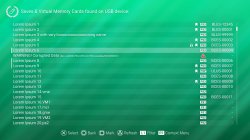
apollo_saves_1b.jpg apollo_saves_2b.jpg apollo_saves_3.jpg apollo_saves_4.jpg
 

Attachments

@bucanero
Asset Pack no.4
  • some files are replaced
  • added updated preview images
  • added settings and user backups menus
  • rename "list_bg.png" to "list_bg_1.png"
Still missing Online Database menu because I have no idea how it looks like and what is functionality. ^^" So it looks like that is the only one left to design.
 

Attachments

hi @Berion , just a quick update, I've been playing around with the first batch of assets, and I got the basic main menu working :)

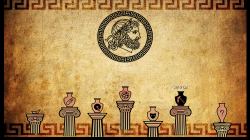
one thing though, the text circling around the Apollo head is really hard to read on the TV (testing on Samsung 49' HD LED), so I was thinking if you could provide me with a logo without text, like in the ICON0.PNG ?

notes: this shot is from last night, I already improved the positioning of the columns/jar to the bottom as the original design

screenshot_2020_02_18_01_12_58.png
 
I can but it is not a good idea (I'll send You it anyway). It think our "problem" is the background; to light for most of the f*ed TV screens (most of the peoples doesn't care about that, and using in a state what they bought; and common practices of producers is overcontrast/overbright the screen...). To be honest, I'm strongly against to tinkering it for low quality screens, even if they are majority of market, but I'll see what I can do. ;) Promise.

Meanwhile, if someone reading this, I'm welcome any feedback how Your screenshot from app looks like on their TVs/monitors.
@sandungas ?

I see few other problems. ^^
  1. Screen is somehow overscreen/downscreen. It shouldn't be any black borders.
  2. bg_water is scaled because I don't see crisp 1px water line.
  3. Shadow under text should be transparent and in opposite direction (because light is from right ^^), and if possible a little blured.
  4. And most thing which concern me and also is a flaw of Apollo and Artemis: all GFX are in 16bit mode, not 24 as it should be. This means colours are drastically reduced (from few millions to ~16000). If You zoomed in enough, You will see i.e on the Pantheon edges created distortions/dithering because of that. This also killing shadow under bitmaps, making it solid or even disappeared (like i.e in logo ;)).
  5. WWW address at the bottom killing a composition. ^^
  6. Another scaling problem are "*_hover.png", they should fit perfectly but on preview I see scaling artefacts which makes "borders" around them.
In summary, I don't want to be sounds like ranting. Just pointing bugs. I hope this gfx lib (Tiny3D?) is polished enough to make all this possible. Also I think, before we trying makes text more visible, most important here is fix bit depth, because this extremely falsify results.

unscaled 24bit on left, and scaled 16bit on right:
apollo_16bit_vs_24bit.png
 
Last edited:
quick note: yeah the Apollo code is using Tiny3D, (I haven't done any "changes" to the default tiny3d behaviour) so I assume most issues are related to tiny3d way of re-scaling everything to the virtual 848x512 coords. For example in the screenshot you see the black border, but when I see it on my TV, there's no black border at all.
Once I get all the screens built (as close as possible to the design) then I'll dig into tiny3d code and check for improvements there

about the 24bit /16bit thing, I had no idea about that... :confused3: I'm wondering if it's a tiny3d thing or it's just my screenshot code that did it (I also compressed the png before uploading so I'm not sure). Anyway, tonight I'll try to take another raw screenshot, and check again about the color stuff.

well if you have a chance to, send the "no-text" logo version and I'll do some additional test with it. thanks again for your help!
cheers

edit: added raw screenshot (saved from the video buffer memory) if you want to check
 

Attachments

Last edited:
Attached screen is much better and we can eliminate 16bit conversion. But this news is even worst because border still exist and shadows are still broken, which means not proper alpha channel support (on top of that scaling ;]). I have bad feelings about this...

BTW: For screenshots, on CFW is the best XMB Screenshot functionality or (if it is not possible for hombrews on HEN) a plugin named VSH Menu. I don't know if it works on HEN but provide lossless (almost...) quality everywhere where XMB option doesn't work or is blocked.
 

Attachments

notes: this shot is from last night, I already improved the positioning of the columns/jar...
Cheers to that :D
yQlbz2A.jpg


Meanwhile, if someone reading this, I'm welcome any feedback how Your screenshot from app looks like on their TVs/monitors.
@sandungas ?
Im a bit lost at which point you are now with the interface design, but i agree with bucanero, the texts inside the circle are hard to read, maybe moving them to the outside of the circle could help, but not sure is it would be a bad approach
Anoter solution could be to make that texts shorter, this allows you to use a bigger font (or font effects in bold, or add and "stroke" efect all around the characters with photoshop layer effects)

Another detail i would change is that "celestial ray lights" effect that are located in diagonal all over the screen
In my oppinion it would be better to reduce his intensity, just for comparison purposes... compare the intensity of them with the intensity of the horizontal bars used with the save names... the horizontal bars are more important but the diagonal rays are more notables


Edit:
Instead of reducing the intensity of the light rays you could do a filter "gausian blur"... this way they will become more blurry
Actually i would try to do both things, first the gausian blur, then reduce his intensity
 
Last edited:
@sandungas Try previews from asset pack 4 because those are not crippled by Tin3D.

Anyway, if my tests confirm those problems. I see two possible solutions: making bg more dim and/or less glowy on upper part, and/or as You said, less visible rays.
 
Attached screen is much better and we can eliminate 16bit conversion. But this news is even worst because border still exist and shadows are still broken, which means not proper alpha channel support (on top of that scaling ;]). I have bad feelings about this...

BTW: For screenshots, on CFW is the best XMB Screenshot functionality or (if it is not possible for hombrews on HEN) a plugin named VSH Menu. I don't know if it works on HEN but provide lossless (almost...) quality everywhere where XMB option doesn't work or is blocked.

tiny3d has a lot of Alpha channel flags but I honestly don't have proper knowledge on how to use them (I'm just using whatever flags Dnawrkshp used with Artemis). For example, this is the current code:
Code:
        // Enable alpha Test
        tiny3d_AlphaTest(1, 0x0, TINY3D_ALPHA_FUNC_GEQUAL);

        // Enable alpha blending.
        tiny3d_BlendFunc(1, TINY3D_BLEND_FUNC_SRC_RGB_SRC_ALPHA | TINY3D_BLEND_FUNC_SRC_ALPHA_SRC_ALPHA,
            TINY3D_BLEND_FUNC_SRC_ALPHA_ONE_MINUS_SRC_ALPHA | TINY3D_BLEND_FUNC_SRC_RGB_ONE_MINUS_SRC_ALPHA,
            TINY3D_BLEND_RGB_FUNC_ADD | TINY3D_BLEND_ALPHA_FUNC_ADD);

there might be a different setting or combination that improves the alpha blending, but again, I lack the graphic and Tiny3d knowledge to "connect the dots".

The XMB screenshot function is available on HEN and it works fine for games, but it never worked (PS3 crashes) when I tried with my homebrews, no idea why. :confused3: (that's the reason I used my own code to get the raw data from the video buffer)

btw, I tried the "clean logo" (no text) and at least on my TV it looks much better, as I my eyes don't try to focus on the text they can't read.

@sandungas thanks for your ideas and feedback, :encouragement: I like your suggestion about reducing the "heaven ray lights" intensity/blur so the horizontal bars for the items are more clear to the user.

@Berion now I'm working on the save list pages, I still have a few issues trying to match the horizontal lines with the text and stuff, but I have a few ideas to try. When I have a chance I'll send additional screenshots.
 
BTW: For screenshots, on CFW is the best XMB Screenshot functionality or (if it is not possible for hombrews on HEN) a plugin named VSH Menu. I don't know if it works on HEN but provide lossless (almost...) quality everywhere where XMB option doesn't work or is blocked.
Off topic, but its worth noting that this webpage that xps3riments created is great for grabbing screens shots from the PS3. It relies on webMAN Mod, but it does work in lots of places where vsh menu will not work like in settings menus and browser download screens etc. Also it is much more convenient as you can preview the images on the webpage, then just right click and copy and paste.


Just put your ps3s local IP in here and click the red button
https://codepen.io/xps3riments/full/qGradv
 
@bucanero Trying fit in "rows"/"cells" (40px high) would be hard when Apollo still scalling gfx. And if You find a way to force him not scale, all those positions would require again fixing.

You could try every flag here and after that making screenshot. ^^ I wonder what 0x0 means.
tiny3d_AlphaTest(1, 0x0, TINY3D_ALPHA_FUNC_GEQUAL);
 
@bucanero Trying fit in "rows"/"cells" (40px high) would be hard when Apollo still scalling gfx. And if You find a way to force him not scale, all those positions would require again fixing.

yes, I spend like a whole day trying to fit the rows and it didn't work :( ... I mean, it shows up, but ended up always a bit off, because of the scaling and the virtual coordinates (so 40px in in the file is like 17.6666666 px in Tiny3d)

anyways, I kept playing around with the UI files you sent, and I thought about going really "ancient greek" with the design. Since we were playing around with the amphoras, I thought about using the yellow/orange/black (terracota?) colors. (I hope you don't hate me for what I did to your files :sem blush: )
I'm attaching some mock-ups, I honestly really like the ancient style, if I could add a "greeky" letter font for the titles that would be really funny. :D

screenshot_2020_02_21_00_00_22.png screenshot_2020_02_21_00_52_17.png

p.s.: pls don't shoot me for my hacky gfx edit :sfun tomato:
 
In current state with probably unfixable look (because broken by design Tiny3D lib) I lost any hope. Scaling is unacceptable killing blow to the artist soul. I have hope after @Zar commentary about predefined xy for bitmaps in opposite for this stupid block system, that it is possible to make normal good looking GUI like i.e on PS2 or PSX, or... C64, but it looks like it still somehow transition screen. If @bucanero didn't find anything for fix it, it means we must live with it and with whatever theme is applied it will be broke. I must drink something for bitterness of this situation. :D
 
I'm pretty sure it can be fixed (either by setting up tiny3d properly or by just replacing the lib with something else), but it will surely take time until I can figure it out, as my experience with PS3 gfx code is quite "short".
(the amount of time I spent this week just to build the first main menu screen taught me that I'll need lots of hours in that department)

anyways, for now I'll park the UI stuff and get back to the new features I want to add, as I can make many improvements there. I'm already able to parse the Bruteforce Data "ps3patch" files, so next I want to see if I can properly handle the BSD script language and apply those patches.
Also the licenses and trophy export backup seems to work properly; license stuff is exported to "licenses.zip" , and trophy folders are copied in bulk. No import feature for now, mainly to avoid data corruption issues, and to avoid mistakes by unaware users. If you really want to import stuff back, for now you'll need to use ftp, multiman or another manager to overwrite files.
 
Some notes about the "Game Genie" patch codes for future reference:

Code:
Standard Code types 
0TXXXXXX 000000YY
1TXXXXXX 0000YYYY
2TXXXXXX YYYYYYYY
  XXXXXX = Offset to write to
               YY = 8-Bit value to write
             YYYY = 16-Bit value to write
         YYYYYYYY = 32-Bit value to write
 T = Offset Type
     0 = From start of the data
     8 = From found from a search
___________________________________________________
Multi Write/Value
4TXXXXXX YYYYYYYY
4NNNWWWW VVVVVVVV
  XXXXXX = Offset to start with
         YYYYYYYY = 8/16/32-Bit value to start with
 NNN = Number of times to repeat
    WWWW = Increase address by (in bytes)
         VVVVVVVV = Increase value by
 T = Bit Size
     0 = 8-Bit from start of the data
     1 = 16-Bit from start of the data
     2 = 32-Bit from start of the data
     8 = 8-Bit from found from a search
     9 = 16-Bit from found from a search
     A = 32-Bit from found from a search
Copy Bytes
5TXXXXXX ZZZZZZZZ
5TYYYYYY 00000000
  XXXXXX = Offset to copy from
  YYYYYY = Offset to copy to
         ZZZZZZZZ = Number of bytes to copy
 T = Bit Size
     0 = From start of the data
     8 = From found from a search
Search Type
8ZZZXXXX YYYYYYYY
 ZZZ = Number of times to find data
    XXXX = Size of data to be found
         YYYYYYYY = Raw data to search for
Last edited by SkillerCMP; 02-18-2013 at 01:14 AM

Code:
Here is the decryption process for game genie codes so once you decrypt a game save you know what to change. All the known game codes are at game genie's web site.

example code
28BF4FD5 646951FB
^
negates 32bit
28BF4FD5 646951FB
..^
offset from pointer

28BF4FD5646951FB
....^^^^^
address
28BF4FD5 646951FB
.................^^^^^^
value to change too

Code Types

0TXXXXXX 000000YY = 8Bit Write
1TXXXXXX 0000YYYY = 16Bit Write
2TXXXXXX YYYYYYYY = 32Bit Write

X= Address/Offset
Y= Value to write
T=Address/Offset type (0 = Normal / 8 = Offset From Pointer

Multi Write
4TXXXXXX YYYYYYYY
4NNNWWWW VVVVVVVV

X= Address/Offset
Y= Value to write (Starting)
N=Times to Write
W=Increase Address By
V=Increase Value By
T=Address/Offset type
Normal/Pointer
0 / 8 = 8bit
1 / 9 = 16bit
2 / A = 32bit

Search Type
8ZZZXXXX YYYYYYYY

Z= Amount of times to find before Write
X= Amount of data to Match
Y= Seach For (note can be xtended for more just continue it like YYYYYYYY YYYYYYYY under it)
Once u have your Seach type done then place one of the standard code types under it with setting T to the Pointer type

Special Code Types
Mega Code

6T?????0 YYYY
AAAAAAAA CCCC
FFFFFFFF 0011
22334455 6677
8899

?=Don't care
AA= Break address
YY= Count in bytes to insert at location 40
CC= Coprocessor break type (upper half)
FF= Breakpoint mask (usually FFFFFFFF)
00= bytes of code in address order
11
 
I implemented all the Game Genie code types, except "type 6" (couldn't find if it's actually used in any game) and "type 9" (9XXXXXXX).

type 9 are used in a few games like Batman Arkham City but they're tagged as "not working" in Bruteforce Data

I'm thinking about running some tests and then I might release a new version with "game genie" patch support.
 
Last edited:
I implemented all the Game Genie code types, except "type 6" (couldn't find if it's actually used in any game) and "type 9" (9XXXXXXX).

type 9 are used in a few games like Batman Arkham City but they're tagged as "not working" in Bruteforce Data

I'm thinking about running some tests and then I might release a new version with "game genie" patch support.

oops, I actually found information about Type 9 codes in aldo's source code. I also found a few code types I missed (type 7, and type A). Type 6 codes are quite weird and I'm still trying to understand them.

Code:
'7TXXXXXX YYYYYYYY = Add Write (T: 0=1byte/1=2byte/2=4byte)

'Move pointer to offset in address XXXXXXXXX (CONFIRMED CODE)
'90000000 XXXXXXXX

'Step Forward Code (CONFIRMED CODE)
'92000000 XXXXXXXX

'Step Back Code (CONFIRMED CODE)
'93000000 XXXXXXXX

'Step Back From End of File Code (CONFIRMED CODE)
'94000000 XXXXXXXX

'Multi-write
'Axxxxxxx 0000yyyy  (xxxxxxxx = address, yyyy = size)
'zzzzzzzz zzzzzzzz  <-data to write at address

      '--------------------------------
      '6TWX0Y0Z VVVVVVVV <- Code Type 6
      '--------------------------------
      '6 = Type 6: Pointer codes
      'T = Data size of VVVVVVVV: 0:8bit, 1:16bit, 2:32bit, search-> 8:8bit, 9:16bit, A:32bit
      'W = operator:
      '      0 = Read "address" from file
      '      1X = Move pointer from obtained address ?? (X = 0:add, 1:substract, 2:multiply)
      '      2X = Move pointer ?? (X = 0:add, 1:substract, 2:multiply)
      '      4X = Write value: X=0 at read address, X=1 at pointer address
      'Y = flag relative to read add (very tricky to understand)
      'Z = flag relative to current pointer (very tricky to understand)
      'v = Data
 
I did a bit of research and got the source code for "offzip" and "packzip" tools (https://aluigi.altervista.org/mytoolz.htm), used by Bruteforce data to unpack some savegames after decryption. I'm quite confident that the source can be ported to PS3 and have the functions available to Apollo.

But before I jump into that rabbit hole (decrypt -> unzip -> patch -> zip -> encrypt), I'll try to clean up the Gamegenie code, do some tests and then release to see how it works.
Apollo already has an option to copy/export to USB, so hopefully users will do some backups before applying cheats :D (just in case!)
 

Similar threads

Back
Top