PS2 Apollo Save Tool PS2 (development thread)

bucanero

Developer
As you might have noticed on twitter, I've started working on a PS2 port of Apollo Save Tool. :)
https://github.com/bucanero/apollo-ps2
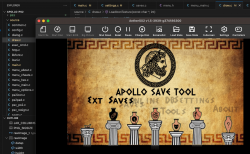
Screenshot 2023-07-08 at 19.19.57.png

I'm opening this thread to keep track of the process, and get some feedback while I work on it.

Btw, I'd really need to get some testers with real PS2 hardware, to test different setups like FAT PS2s and different brands of memcards. (I only have a slim ps2 and 3 or 4 memcards)
So if you're available to do some tests, feel free to get in touch.
 
Salut @bucanero

Je peux t'aider, il faut que tu me fournisses le ELF prêt à l'emploi pour qu'il fonctionne sur ma PS2 SCPH-39004R (Fat) voire sur ma SCPH-50004 (Fat). Ces deux consoles sont sous le FMCB-v1.966 et je possède aussi une SCPH-70004b (Slim). Les 2 Fat sont équipées de DD interne voire peuvent lancer des jeux sur TOUTES les interfaces que peuvent gérer le FMCB voire le OPL. Je possède aussi un MX4SIO qui fonctionne parfaitement.

A très bientôt.


In English via G-Trad :

I can help you, you have to provide me with the ready-to-use ELF so that it works on my PS2 SCPH-39004R (Fat) or even on my SCPH-50004 (Fat). These two consoles are under FMCB-v1.966 and I also have an SCPH-70004b (Slim). The 2 Fat are equipped with internal DD or even can launch games on ALL the interfaces that the FMCB or even the OPL can manage. I also have an MX4SIO which works perfectly.

See you soon.

Algol "le papy".
 
Salut @bucanero

I can help you, you have to provide me with the ready-to-use ELF so that it works on my PS2 SCPH-39004R (Fat) or even on my SCPH-50004 (Fat). These two consoles are under FMCB-v1.966 and I also have an SCPH-70004b (Slim). The 2 Fat are equipped with internal DD or even can launch games on ALL the interfaces that the FMCB or even the OPL can manage. I also have an MX4SIO which works perfectly.

See you soon.

Algol "le papy".

oh that's great Algol! thanks for helping out! having someone with a bunch of different PS2s is great so you can test many combinations at the same time.

For sure I'll ping you and send you a beta .ELF ready to run once I complete a few details. :)

In this first version I'm aiming to handle:
- import/export PSU saves
- import/export PSV saves (official format from ps3)
- import CBS saves
- import XPS saves
- import MAX saves
- export saves to ZIP

I might also add an option to export to CBS saves if needed, as I have some code to generate that format too.
 
Je possède aussi l'interface officielle $ony CECHZM1 qui peut être utile dans certains cas.
J'ai aussi une PS1 de modèle SCPH7502 qui est encore fonctionnelle et Hackée par une puce que j'ai posée il y a très très longtemps (dans mon jeune âge).

@+++
 
link sent, check your forum Inbox
boot Fine by internal hdd " hdd0:/__common/apollo.elf " and fat32 USB " mass:/apollo.elf "

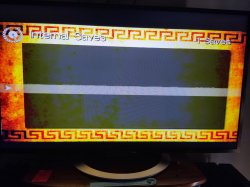
1 - When MC is not inserted, even so apollo enter into saves screen with -1 count and freeze If press " X ".


2 - background music not playing.

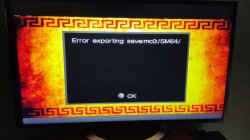
3 - error to Export save psu, psv, cbs Formats to mass:/, ok Export to zip.

4 - user tools > Extract Archives cant find data from mass.
 

Attachments

  • IMG_20230716_105736_989.jpg
    IMG_20230716_105736_989.jpg
    124.8 KB · Views: 110
  • IMG_20230716_110639_385.jpg
    IMG_20230716_110639_385.jpg
    812.9 KB · Views: 69
boot Fine by internal hdd " hdd0:/__common/apollo.elf " and fat32 USB " mass:/apollo.elf "

1 - When MC is not inserted, even so apollo enter into saves screen with -1 count and freeze If press " X ".


2 - background music not playing.

3 - error to Export save psu, psv, cbs Formats to mass:/, ok Export to zip.

4 - user tools > Extract Archives cant find data from mass.

thanks for testing and sharing reports

1. I need to validate if memcard is actually connected or not

2. Music is not implemented (so it's Ok the app is silent)

3. From what I see, you tried to export a homebrew save SM64 . Could you try with a regular game save, like BASLUS-12345etc . I ask because the export methods for PSU/PSV/CBS assume that the save follows the game standard, with 12 characters for folder, icon.sys, etc+++, to gather the required information to build the exported format.

4. I haven't spent much time on that method, I think that it should list saves from root folder of mass:/ , so mass:/*.zip should show up on the list, but I might have missed something. I'll check.

Thanks a lot for testing!, it's great to hear that it's working from HDD, USB, and things are mostly working as expected. For a 2-week development I think I'm on the right track. :)

Once I have a new beta build I'll send a link to your inbox.

Edit: about the export, could you create a folder mass:/PS2/SAVEDATA/ and try again? I think I totally forgot about creating the folder if it doesn't exist. That would explain that all the formats are giving error to export. I feel that if you create the folder, some of those exports could work Ok.

Edit 2: for external saves (USB or host), the path is /PS2/SAVEDATA/ and there you can put any saves in MAX, CBS, PSU, PSV or XPS formats. Then you can import those saves to a memory card.
 
thanks for testing and sharing reports

1. I need to validate if memcard is actually connected or not

2. Music is not implemented (so it's Ok the app is silent)

3. From what I see, you tried to export a homebrew save SM64 . Could you try with a regular game save, like BASLUS-12345etc . I ask because the export methods for PSU/PSV/CBS assume that the save follows the game standard, with 12 characters for folder, icon.sys, etc+++, to gather the required information to build the exported format.

4. I haven't spent much time on that method, I think that it should list saves from root folder of mass:/ , so mass:/*.zip should show up on the list, but I might have missed something. I'll check.

Thanks a lot for testing!, it's great to hear that it's working from HDD, USB, and things are mostly working as expected. For a 2-week development I think I'm on the right track. :)

Once I have a new beta build I'll send a link to your inbox.

Edit: about the export, could you create a folder mass:/PS2/SAVEDATA/ and try again? I think I totally forgot about creating the folder if it doesn't exist. That would explain that all the formats are giving error to export. I feel that if you create the folder, some of those exports could work Ok.

Edit 2: for external saves (USB or host), the path is /PS2/SAVEDATA/ and there you can put any saves in MAX, CBS, PSU, PSV or XPS formats. Then you can import those saves to a memory card.

After create a folder into fat32 USB " mass:/PS2/SAVEDATA/ "

its ok to Export/import files with psu, psv, cbs Formats from a regular save " God of War 1 - SCUS_973.99 ". And even with a save from a homebrew SM64 game.
 
Last edited:
The import/Export process freeze a while but works.

A progressbar or something would be Nice too.

Yes, right, I need to add a progress bar to these import/export methods. I forgot that memcard access can be slow compared to other devices (like USB) so better to keep the user aware of the progress.

(The progress bar code is there, I just need to "connect the dots" :) )
 

Similar threads

Back
Top