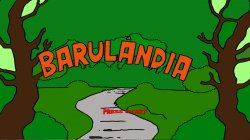
BARULANDIA

PS3 Barulandia painting game v3

JMGK

Developer

Attachments

  • image-0.jpg
    image-0.jpg
    278.2 KB · Views: 1,229
  • image-1.jpg
    image-1.jpg
    28.2 KB · Views: 85
  • image-2.jpg
    image-2.jpg
    282.1 KB · Views: 1,235
  • image-3.jpg
    image-3.jpg
    191.4 KB · Views: 1,266
I forgot to mention...

You can move the cursor with L joystick.

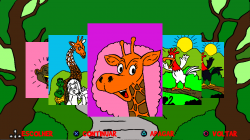
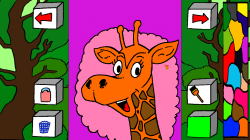
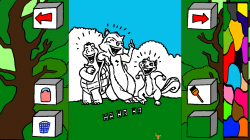
You can change de drawing (there are 10) using L1 or R1, or moving the cursor to the arrow buttons and pressing X button.

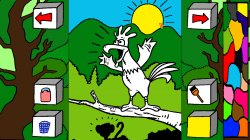
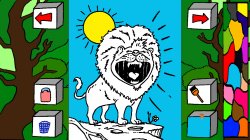
Move to the color palette at far right, and press X to choose color, move to drawing and press X to paint.

At left, there's a "erase" button (paint with white) and a "trash" button (clear current drawing) and at right, there's a button to choose paint tool, and below, one that show the current color.

At below its the instalable PKG
 

Attachments

nice work bringing new homebrews to the PS3! :encouragement:

probably you did it already, but my dbglogger library can be discarded when you're building a release binary, as probably end-users won't be listening to debug messages over the network.
(one useful option of the library, if you keep it for release binaries, is to configure it to log to file, e.g. "/dev_hdd0/tmp/myapp.log" so any user could send you a log from a crash or error)
 
Hi bucanero,

In fact, i didnt remove the dbglogger lib in release... :sem blush: i will fix it in future releases. I also didnt explain that :but start: exit the game, nor put a confirmation screen to exit (important in a game suposed to be played by little kids). Will fix.

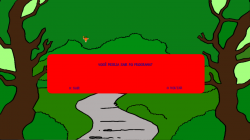
The version above had (as everybody should have noticed) a very slow fade in/out - coz i coulnd make SDL_SetAlpha() work in PS3 (altought it worked fine on Linux). I had to go pixel by pixel changing alpha...

I am now porting it to sdl2, but had problems with sergiou87's ps3 port (not accel hardware support - so fade in/out now work fast as it should, but startscreen anim was very slow) and had to change to bgk's ps3 port (used in scummvm for ps3), but then i had to make a pull request to make it compatible with latest psl1ght. I had to make another pull request to Spork-Schivago's sdl-libs for same reason too...

Well, in next release it will be sdl2 based, work fast, have some form of in-screen help and exit confirmation, and no dangling debug code :smug:
 
Hi,

Here's a SDL2 version of previous code. Its functionally equivalent to previous version, but for sdl2, faster and better coded.

Music, in-game help and exit-confirmation are next steps...

nice to see new versions coming! :D

if you want to add music, you have a few options:
- using ps3soundlib : the lib supports mp3, ogg, mod and runs on a SPU thread, so you leave the PPU for the game. You can find an example in my Apollo and Artemis sources.
- mikmod library : the lib supports all the tracker formats, like s3m, mod, xm, 669, etc; the player runs on the PPU. You can find an example in my PKGi source.
- sdl: I never used it, so I can't provide any details

a simple way to add the Exit confirmation, is using the default PS3 message dialog, with a "Yes / No" option. (check any of my projects for an example)

a simple in-game help could be a static screen, with the typic "PS3 gamepad" design and some icon/text explaining each button
 
Hi,

I had a slow problem when starting the game on xmb, while using ps3load / ps3loadx gave me normal speed. After some advice from bucanero, I tried to use his toolchain, new ways to generate the package, etc., without success, but using a very verbose debug version, I found the cause.

I will left it registered here, in case others face the same problem... I asked to SDL maximum resolution, and used "virtual resolution" 1280x720 in game, using SDL_RenderSetLogicalSize(), letting SDL do the scaling...

It worked flawless in linux. Under ps3, while starting the game via ps3load/ps3loadx, i already got 1280x720, and no scaling was necessary. But when starting via xmb, i got 1920x1080, and scaling should take place... and this slowdown the game to the crawl

The problem seens to be the lack of hw accell support. So i forced the resolution to 1280x720, skipping all of this virtual resolution stuff, and now it work at normal speed.

It seems that each SDL port for PS3 has its set of issues related to accelerated hardware support.

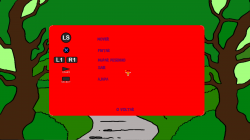
For the output / help screen, I chose the static screen option. It doesn't look very pretty, but I feel like I've already spent a lot of time on this silly game.

I tried to use SDL music extensions, but got only white noise on the PS3 (while it worked perfectly on Linux). Maybe it's something related to the little endianess of my WAV (as `file *.wav` informed me) while the PS3 is big endian, or another problem with the SDL port. I will try to use ps3soundlib / mikmod and call it done.

The updated code is on github. I'll post here only the final version, not to spam the thread with half-baked versions.
 

Attachments

  • exit.png
    exit.png
    3.5 MB · Views: 61
  • help.png
    help.png
    7.9 MB · Views: 66
oh I totally forgot about it, but indeed the ps3load host app runs on 720p, so when your .self gets loaded it will use that resolution.
but if your TV support 1080p, then when you execute from XMB you'll get your homebrew running in 1920x1080.

Good to know that you found the issue after all. I guess you could also force the 720p resolution with PARAM.SFO , but if you do it from within your code it's probably safer

as mentioned, I never used SDL so I have no clue about sdl audio support. I remember that @blckbear_ was working with SDL, so perhaps he can give you some info about the audio

ps: I forgot to mention, in my ANSi viewer app you can also find another mikmod library example, that actually builds a "playlist" with all the mod-tracker songs available on a folder, and plays them in a loop.
 
The issue I faced with audio on SDL was solved compiling SMW under a psl1ght toolchain inside docker as it was older (compiling SMW on a freshly compiled toolchain under Ubuntu broke the game). But I ended up not having to modify anything related to audio, I just changed the toolchain.

The SMW code is on GitHub so if you want to take a look at that music implementation you may find something useful. I wasn't the one that coded the game so I don't really know much about it and I didn't try anything new with SDL so I don't really know much about SDL either.
 
Hi,

More info for future homebrew SDL2 devs...

In my first attemps at SDL2, i used the sergiou87 port, but as the intro animation was terrible slow, i changed to bgK port - judging that the problem was "lack of hardware accel" on the first SDL2 port. It fixed the problem.

I was plagued by slow animation once again becoz XMB/PS3LOAD different start resolutions, and it was fixed by forcing 1280x720 instead of using SDL_RenderSetLogicalSize() - as explained above.

Since sergiou87's SDL port is 2.0.13 (very recent) and bgK's os 2.0.3 (very old), i tried once again the most current port, hoping the fix above will speed up it, but it continued slow.

Further debugging showed that sergiou87's port loaded the game data as SDL_PIXELFORMAT_RGBA32 and bgK's port as SDL_PIXELFORMAT_ARGB32 - that seens to be (or nearer) the PS3 "native format".

So, a call to SDL_ConvertSurface() resolved the problem. Now it work fast as it should using the latest version of SDL2.

The lesson learned is to avoid all kind of convertions, since SDL2 in PS3 seens to work with software rendering only.
 
Further debugging showed that sergiou87's port loaded the game data as SDL_PIXELFORMAT_RGBA32 and bgK's port as SDL_PIXELFORMAT_ARGB32 - that seens to be (or nearer) the PS3 "native format".

yes, the PS3 video memory buffer uses ARGB8888 (32 bits).

(RGBA is used for example by the PNG format)
 
@seanp2500 as far i know, it should work in any ps3, but i only tested it on a Ps3 Slim Cech 2501b with latest REBUG.

Do you installed the PKG or used PS3LOAD? This white screen seens like it couldnt load the game resources (/dev_hdd0/game/SDL20BARU/USRDIR/LOGO.PNG). You should copy them manually if you execute the .self directly.

New versions of github will crash on "old pkg installs" due to the lack of new resources (like music or fonts) or different install dir (SDL1.3 or SDL2)
 
Last edited:
@sandungas As far as i remember, the lion is Diego, the monkey is Zé, and the giraffe is Gioconda

But that is all I know. I am no longer allowed to give ideas about the book after suggesting using the characters to warn about the dangers of loan sharking, Blue November, etc. My wife wants to do it only about the dangers of children screaming and losing their voices and these 'fonoaudiologia' stuffs... :(
 
Hi,

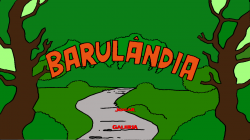
Here's the version 3 of Barulandia, and should be the final version (unless somebody find a bug). Its code is cleaner, more features, etc. Is so more polished that almost make me fell ashamed to have released the previous two version...

It now let you save your ongoing paintings, and have a gallery option that allow you to continue from where you left. Has sound and a in-game help (acessible using SELECT).

https://github.com/jmgk77/BARULANDIA.PS3

It only uses SDL2 for video, sound (Mikmod support was commited, and later removed, in favor of a pure SDL port), joystick and kbd / mouse. I decided to use the SDL2 port sergious87, as mentioned above.

The code is portable, and compile fine for PS3 using PSL1GHT SDK and toolchain, for linux using gcc and clang, and for windows using msvc. Makefiles/projects included.

The linux/win versions support kbd (wasz for triangle, square, circle, cross, and arrows for ljoy/dpad) and mouse (rclick to paint), altought mouse movement is a bit 'clumsy'. They where mean as development help (windows version was barely tested, but compile and seens to work). If someone wants to play on linux/win better use the html5 version.
 

Attachments

  • SCREENSHOT_2020_11_15_01_28_34.PNG
    SCREENSHOT_2020_11_15_01_28_34.PNG
    202.3 KB · Views: 62
  • SCREENSHOT_2020_11_15_01_29_22.PNG
    SCREENSHOT_2020_11_15_01_29_22.PNG
    146 KB · Views: 55
  • SCREENSHOT_2020_11_15_01_29_44.PNG
    SCREENSHOT_2020_11_15_01_29_44.PNG
    154.7 KB · Views: 51
  • SCREENSHOT_2020_11_15_01_30_10.PNG
    SCREENSHOT_2020_11_15_01_30_10.PNG
    156.2 KB · Views: 53

Similar threads

Back
Top