BDMAssault

PS2 BDMAssault v1.0.0

El_isra

Developer
BDM Assault

A homebrew project for PS2 that aims to bring EXFAT USB support to those old closed source homebrew apps that can load external USB drivers that people still use today (POPStarter, FreeMcBoot).​


Usage
To use this project you have to place the two IRX binaries provided into the path that your app looks for them.

POPStarter
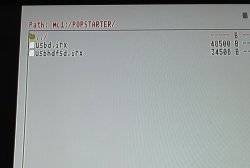
  • bdm_assault.irx must be pasted into mc?:/POPSTARTER/usbd.irx
  • usbd_bd_assault.irx must be pasted into mc?:/POPSTARTER/usbhdfsd.irx
MX4SIO OPEN BETA TEST Pre-release:
https://github.com/israpps/BDMAssault/releases/tag/mx4sio.
These IRX drivers will make POPStarter read PS1 games from an MX4SIO card located on memory card port 2 (the right one).

Put the IRX files at mc0:/POPSTARTER/ and everything should work.

MMCEMAN for POPSTARTER [TEST BUILD]:
https://github.com/ps2-mmce/mmceman/releases/tag/popstarter.

Put usbd.irx & usbhdfsd.irx files on the POPSTARTER/ directory of the memory card.
Doing so, will make POPStarter read games from MMCE SDCard on port 0.
All same rules and requirements from POPStarter for USB apply!

FreeMcBoot
  • bdm_assault.irx must be pasted into mc?:/SYS-CONF/USBD.IRX
  • usbd_bd_assault.irx must be pasted into mc?:/SYS-CONF/USBHDFSD.IRX
FreeHdBoot
  • bdm_assault.irx must be pasted into hdd0:__sysconf/FMCB/USBD.IRX
  • usbd_bd_assault.irx must be pasted into hdd0:__sysconf/FMCB/USBHDFSD.IRX
old wLaunchELF versions
  • bdm_assault.irx must be pasted into the path you configured for USBD.IRX
  • usbd_bd_assault.irx must be pasted into the path you configured for USBHDFSD.IRX
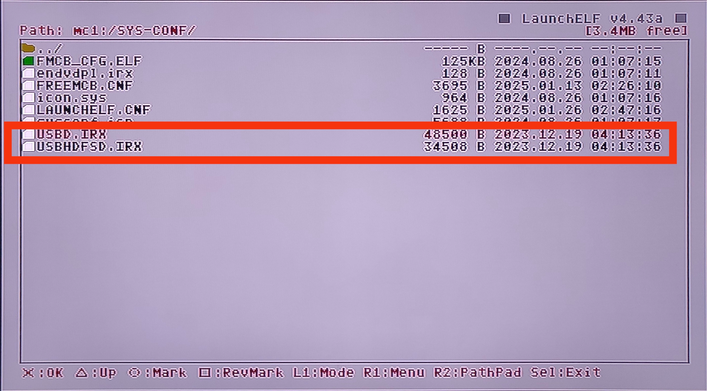
1. Copy your BDM Assault drivers to a memory card.
I choose to copy them into mc1:/SYS-CONF and replace the original drivers that comes with FMCB:
BDM-0A.png


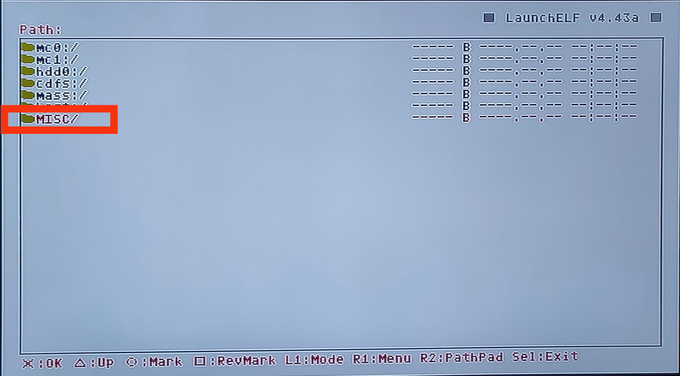
2. Now go back to the main screen and look for MISC/*:
BDM-0B.png


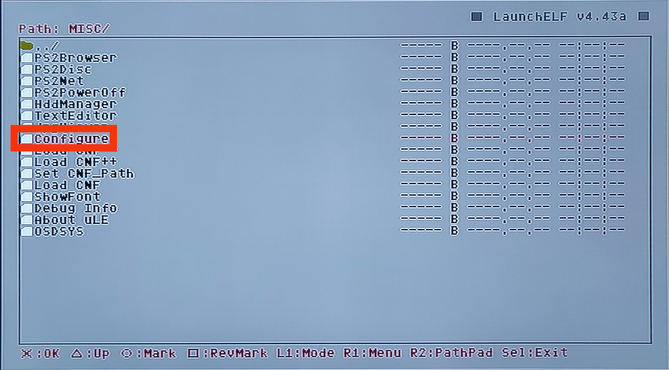
3. Look for Configure and enter it:
BDM-0C.png


4. Look for Startup Settings... and enter it:
BDM-2.png


5. Look for USB IRX and enter it:
BDM-3.png


6. Now browse through your memory card to search for USBD.IRX:
BDM-4.png


7. Look for USB Mass and enter it:
BDM-5.png


8. Now browse through your memory card to search for USBHDFSD.IRX:
BDM-6.png


9. Once you set these files you can press RETURN:
BDM-7.png


10. Press OK:
BDM-8.png


11. Your config should be saved:
BDM-9.png


* Or Configure:
BDM-1.png
Warning: If external USB mass driver is used multi USB browsing is disabled.
So you can only use one USB at the time.

Additionally these drivers do not work with uLaunchELF 4.42d.
Works with wLaunchELF 41e4ebe (14\01\2019).
Checkout: https://www.psx-place.com/resources/wlaunchelf-4-43x_isr.1112/.

FunTuna Fork
  • bdm_assault.irx must be pasted into mc?:/BOOT/USBD.IRX
  • usbd_bd_assault.irx must be pasted into mc?:/BOOT/USBHDFSD.IRX
Simple Media System (SMS)
  • bdm_assault.irx must be pasted into mc?:/SMS/USBD.IRX
  • usbd_bd_assault.irx must be pasted into mc?:/SMS/USBM.IRX
Simple Media System (SMS): incompatible due to usage of custom USB drivers and practices which are not common amongst the homebrew devs. support not planned (and most likely not even possible).

Other devices
When I was making BDMAssault, I realized I could do the same thing with iLink and UDPBD drivers. if you are interested (for whatever reason) in overriding USB support of some homebrew, and replacing it with iLink or UDPBD support, take a look here.

iLink assault:
https://www.psx-place.com/threads/bdmassault.42352/#post-377738.
upload_2023-12-21_9-39-42-png.46950

Why do we need this?
In order to make this happen, we had to fuse 4 IRX modules into 2 IRX modules. because before BDM, USB access was splitted into 2 IRX drivers, but with BDM we have 4.

Original design:
upload_2023-12-20_10-35-16-png.41938


BDM Design:
upload_2023-12-20_10-35-42-png.41939


BDMAssault design:
upload_2023-12-20_10-1-9-png.41937
 

Attachments

So, these files helped stop a problem with my PS2, it always freezed when a usb pen was formatted exfat. So now the console goes past the fmcb logo at the start
But popstarter doesn't work with this, as game show up on OPL but just take me back to ulaunch
Thanks
 
So, these files helped stop a problem with my PS2, it always freezed when a usb pen was formatted exfat. So now the console goes past the fmcb logo at the start
But popstarter doesn't work with this, as game show up on OPL but just take me back to ulaunch
Thanks

It works for me
You have to place both IRX files to the memory card inside the POPSTARTER directory and must be renamed accordingly
 
Last edited:
It works for me
You have to place both IRX files to the memory card inside the POPSTARTER directory and must be renamed accordingly
I pasted the folder POPSTARTER found in the link onto my memory
This is my mc, I did copied the sys file folder the same and that worked
Which version of OPL are you using?
I'm using one from the initial versions of OPL compatible with exfat, found here on psx place
 

Attachments

  • IMG_20231220_185444.jpg
    IMG_20231220_185444.jpg
    868.7 KB · Views: 269
I pasted the folder POPSTARTER found in the link onto my memory
This is my mc, I did copied the sys file folder the same and that worked
Which version of OPL are you using?
I'm using one from the initial versions of OPL compatible with exfat, found here on psx place

I'm using the latest beta from github which is v1.2.0-Beta-2065-c0da23a
 
I used windows explorer as normal, I Rufus now and it doesn't work
It still works with the old OPL version I mentioned, in that one I can see the ps2 games

What's the cluster size? When reformatting it try using default sizes
Also make sure it's on MBR and not GPT.
 
Last edited:
What's the cluster size? When reformatting it try using default sizes
Also make sure it's MBR.
I'm using the default size and the MBR option was selected
I was worried the game.vcd and popstarter.ELF was wrong. But I copied the whole POPS folder to a fat32 usb and the game works. As seen in the image
 

Attachments

  • IMG_20231220_201625.jpg
    IMG_20231220_201625.jpg
    789.5 KB · Views: 108
I asked a pal of mine to lend me one 64gb usb pen he had, it is some random taiwanese brand
And now that usb is recognized by the newest OPL and works with POPSTARTER while being in exfat format
The other usb were kingston 4 and 8 gb and both did work as exfat to load ps2 games with the oldest OPL I mentioned
Kinda weird
 
In addition to the initial release, WIP builds of IRX modules to also make BDMAssault compatible with iLink and UDPBD are already in place, waiting for testers.

Also, due to the creation of the UDPBD driver for BDMAssaul (which basically fuses it with DEV9) now devs can use it to have standalone equivalent to UDPTTY.IRX.
For that, just clone the repo and do

Code:
make -C __udp_bd_assault/ NO_UDPBD=1

For the curious:

UDPBD_Assault:
upload_2023-12-21_9-36-45.png


iLink assault:
upload_2023-12-21_9-39-42.png
 
@El_isra The instructions says that to use with POPStarter I should put the modules inside de memory card.
But would it work if I put inside my USB in the POPS folder? I used your POPS-VCD-Manager to manage my games.

Keep up the good work! Congrats!
 
For testers:
If you have issues with UDPBD, you can access the logs by running on your PC:
Code:
ps2client.exe listen

IMPORTANT NOTES:
The UDPBD variant of BDMAssault is actually DEV9.IRX fused with UDPBD driver.
Which implies the following:
  • It will not work if the app loads dev9 driver BEFORE BDMAssault divers are loaded
  • If the app loads DEV9 AFTER BDMassault, it may trigger some error handling (if the app was coded to do so) because the dev9 driver will not load (because a copy of it, BDMAssault itself, is already loaded)
 

Attachments

due to the tremendous ammount of people asking for MX4SIO i'll leave the explanation of why it will not happen while POPStarter is closed source.

We have a driver conflict due to MX4SIO driver depending on specific versions of SIO2MAN.IRX

something like this
upload_2023-12-26_13-28-15.png
 

Similar threads

Back
Top