BDMAssault

PS2 BDMAssault v1.0.0

Finally a great project, i can't get it work with SMS, i don't know what i'm doing wrong any suggestion ? I only managed to work popstarter with exfat, If anyone try it with simple media player (github/ps2homebrew/SMS) and work, please can write here how. PS2 Slim (SCPH-77004_BIOS_VX_PAL_220).Thanks
 
Last edited:
Consider adding to POPSLoader a check for this on the Memory Card and, if it isn't there, ask the user if he wants to install it.
 
Any chance for DS3\DS4 bluetooth support?
Not really, to do so I guess I would need some custom module that requests the loading of more modules from the IOP directly, I'm not sure if it's possible.

But such thing is in my TODO list, for injecting IOP modules to arcade games on the security dongle directly
 
Which info is more recent?

Simple Media System (SMS)
  • bdm_assault.irx must be pasted into mc?:/SMS/USBD.IRX
  • usbd_bd_assault.irx must be pasted into mc?:/SMS/USBM.IRX
israpps / BDMAssault -> GitHub said:
Incompatible programs
  • Simple Media System (SMS): incompatible due to usage of custom USB drivers and practices wich are not common amongst the homebrew devs. support not planned (and most likely not even possible)
 
The second one

SMS uses custom shitty USB driver with the dive named different (not mass)

Also, the USB plug detection is done with some soft cmds/events or whatever they were called. Wich our driver doesn't support, and I couldn't implement when trying to make SMS work with EXFAT
 
FreeMcBoot
  • bdm_assault.irx must be pasted into mc?:/SYS-CONF/USBD.IRX
  • usbd_bd_assault.irx must be pasted into mc?:/SYS-CONF/USBHDFSD.IRX

These USB drivers are brilliant!
They are more compatible that the original one that comes with FMCB:
https://github.com/ps2homebrew/Open-PS2-Loader/issues/1312#issuecomment-2610812711,
https://github.com/pcm720/nhddl/issues/30.

BDMAssault -> GitHub -> El_isra said:
old wLaunchELF versions

  • bdm_assault.irx must be pasted into the path you configured for USBD.IRX
  • usbd_bd_assault.irx must be pasted into the path you configured for USBHDFSD.IRX
Now even with an old wLaunchELF I can browse previously incompatible\undetected devices.
Thanks!
 
These USB drivers are brilliant!
They are more compatible that the original one that comes with FMCB:
https://github.com/ps2homebrew/Open-PS2-Loader/issues/1312#issuecomment-2610812711,
https://github.com/pcm720/nhddl/issues/30.


Now even with an old wLaunchELF I can browse previously incompatible\undetected devices.
Thanks!
Big problem with wLaunchELF is that the multi-USB browser gets disable if you load and external driver for usbmass

EDIT: reminds me that I should disable that on wle isr
 
Last edited:
I have added a little tutorial how to change drivers for u\wLaunchELF.

If anybody wants to check it view the spoiler:
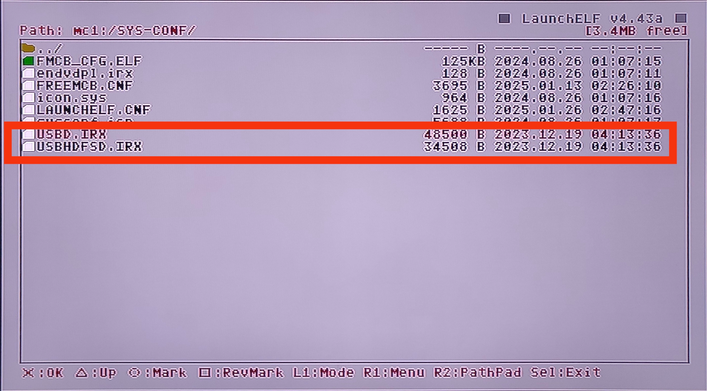
1. Copy your BDM Assault drivers to a memory card.
I choose to copy them into mc1:/SYS-CONF and replace the original drivers that comes with FMCB:
BDM-0A.png


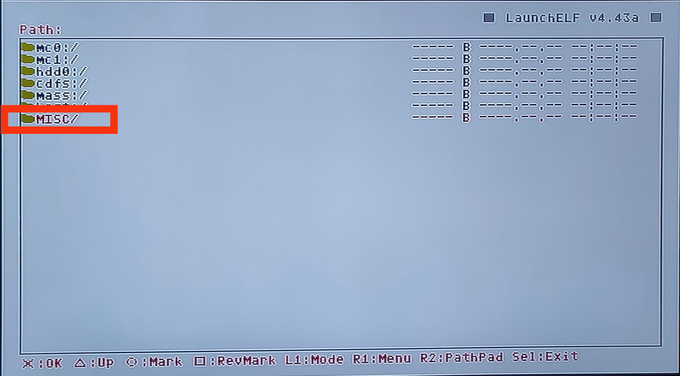
2. Now go back to the main screen and look for MISC/*:
BDM-0B.png


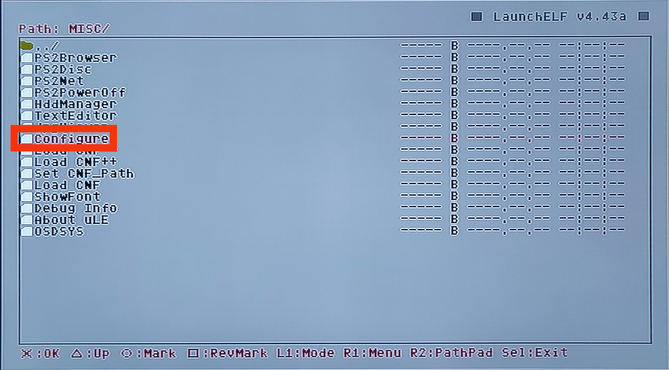
3. Look for Configure and enter it:
BDM-0C.png


4. Look for Startup Settings... and enter it:
BDM-2.png


5. Look for USB IRX and enter it:
BDM-3.png


6. Now browse through your memory card to search for USBD.IRX:
BDM-4.png


7. Look for USB Mass and enter it:
BDM-5.png


8. Now browse through your memory card to search for USBHDFSD.IRX:
BDM-6.png


9. Once you set these files you can press RETURN:
BDM-7.png


10. Press OK:
BDM-8.png


11. Your config should be saved:
BDM-9.png


* Or Configure:
BDM-1.png
Warning: If external USB mass driver is used multi USB browsing is disabled.
So you can only use one USB at the time.
 
Last edited:
I have added a little tutorial how to change drivers for u\wLaunchELF.

If anybody wants to check it view the spoiler:
1. Copy your BDM Assault drivers to a memory card.
I choose to copy them into mc1:/SYS-CONF and replace the original drivers that comes with FMCB:
BDM-0A.png


2. Now go back to the main screen and look for MISC/*:
BDM-0B.png


3. Look for Configure and enter it:
BDM-0C.png


4. Look for Startup Settings... and enter it:
BDM-2.png


5. Look for USB IRX and enter it:
BDM-3.png


6. Now browse through your memory card to search for USBD.IRX:
BDM-4.png


7. Look for USB Mass and enter it:
BDM-5.png


8. Now browse through your memory card to search for USBHDFSD.IRX:
BDM-6.png


9. Once you set these files you can press RETURN:
BDM-7.png


10. Press OK:
BDM-8.png


11. Your config should be saved:
BDM-9.png


* Or Configure:
BDM-1.png
Thanks!

Please add a little warning

Since a long time ago, wLaunchELF is coded to disable multi USB browsing if external USB mass driver is used
 
POPStarter

MMCEMAN for POPSTARTER [TEST BUILD]:
https://github.com/ps2-mmce/mmceman/releases/tag/popstarter.

Put usbd.irx & usbhdfsd.irx files on the POPSTARTER/ directory of the memory card.
Doing so, will make POPStarter read games from MMCE SDCard on port 0.
All same rules and requirements from POPStarter for USB apply!

IRX drivers to trick POPSTARTER into loading files and games from MMCE devices (SD2PSX / PSXMemCard Gen1/Gen2 / MCPRO2):
https://github.com/ps2-mmce/mmceman/releases/tag/popstarter

It works!
These drivers for POPStarter work with MMCE!

I wonder can we have similar drivers for FMCB?
I mean to support MMCE (mmce0:/, mmce1:/), memory cards (mc0:/, mc1:/) and a USB device (mass:/)?
 
Target application don't see "mmce0:/" but "mass:/". That's why wrapper was needed in the first place.

You can try, in theory at least two should working (BDMA for USB with exFAT and USBD for MMCE). FMCB is obsolete anyway. Just use PS2BBL+OSDM or OSDM alone.
 
I understand this transition (wrapper).
But I was wondering can we have both or even triple devices support with this driver?
I mean to access USB (mass), MMCE (mmce) and memory cards (mc?).
Or maybe an additional code is required for that in FMCB Configurator?
 
For FreeMcBoot is different

The ideal thing will be to leave USBD.IRX as is and replace USBHDFSD.IRX with a module that will read a config file from the same location and load IRX modules listed inside, that way we load EXFAT USB, MMCE and whatever you like
 

Similar threads

Back
Top