PS3 Can't play PSX/PS2 backups anymore after SSD upgrade

Shower24

Member
Hi guys, I have a problem.
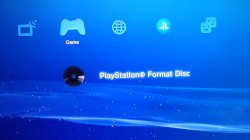
I recently upgraded my PS3 BC from 60gb HDD to 1tb SSD. Everything worked fine, until I discovered that I am now unable to play my PSX and PS2 burned discs. They are in fact detected only as "Data Disc" and no longer as games. This problem occurs only with burned backups, not with the original discs. Is this an issue with SSDs? Has anyone experienced the same problem? What is wrong with it?
I'm on Evilnat 4.90 CEX
 
Last edited:
Hi guys, I have a problem.
I recently upgraded my PS3 BC from 60gb HDD to 1tb SSD. Everything worked fine, until I discovered that I am now unable to play my PSX and PS2 burned disks. They are in fact detected only as "Data Disk" and no longer as games. This problem occurs only with burned backups, not with the original discs. Is this an issue with SSDs? Has anyone experienced the same problem? What is wrong with it?
I'm on Evilnat 4.90 CEX

The CD/DVD backup support is done by Cobra payload.

Confirm that Cobra is really enabled.
 
I can confirm that cobra is enabled
https://imgur.com/a/1Wpul7y

For context, this is how Crash Bandicoot backup disc look now (before the drive swap it showed and played correctly as a PS1 game)
https://imgur.com/a/bjZQByh

One of the possible reasons of Data Disc could be when the *hash* of VSH, explore_plugin, explore_category_plugin, game_ext_plugin, etc. don't match with the values hardcoded in modulepatch.h of Cobra payload. This could happen is some homebrew or store replaced some system files in /dev_flash.

You could try installing Evilnat 4.90 PEX to check if you get different results.
 
Okay, tried Evilnat [PEX] [CEX], [D-PEX] [DEX] and even [DEX], but nothing to do, same results

If after reinstalling the CFW you still get the same results, then probably it's a hardware issue.

I would try to revert all the changes to the same state when everything was working properly:
- Put the previous HDD and check if your games work again.
- Also you could try downgrading to Rebug 4.84.2 REX or Rebug 4.86 LITE.
- Also check if your PS1 / PS2 games work as ISO image and other physical CD/DVD (maybe the ones you're testing got damaged)
 
I have already tried running other backups and nothing, only the original games are recognized.
I'll try rebug 4.86 lite or 4.84.2 REX befor tryng to put back the old HDD.
Just wondering if anyone else who has upgraded to ssd had a similar problem with disks on backups
 
Last edited:
I have the exact same issue with my CECHA01 ps3, it doesn't matter what SSD (samsung 870 evo, crucial mx500) or even SSHD (seagate hybrid drive), it will always break psx/ps2 backup disc support. Unfortunately you have to live with the plain old hdd to have backup disc support.

This is an issue going back to the original 4.46 rogero cobra cfw for me at least.
 
I have the exact same issue with my CECHA01 ps3, it doesn't matter what SSD (samsung 870 evo, crucial mx500) or even SSHD (seagate hybrid drive), it will always break psx/ps2 backup disc support. Unfortunately you have to live with the plain old hdd to have backup disc support.

This is an issue going back to the original 4.46 rogero cobra cfw for me at least.


And, in fact, voilà
I put back the old drive, and at first try here is the game.
But why it appen? Any clue?
Now I am torn whether to keep the SSD and just have ISOs or use the PS4 pro's hard drive, which I replaced with another SSD... the idea of having a backward-compatible PS3 and not being able to use it to play backups leaves me unsatisfied :/
 

Attachments

  • photo_2023-12-22_01-47-26.jpg
    photo_2023-12-22_01-47-26.jpg
    56.5 KB · Views: 65
Last edited:
And, in fact, voilà
I put back the old drive, and at first try here is the game.
But why it appen? Any clue?
Now I am torn whether to keep the SSD and just have ISOs or use the PS4 pro's hard drive, which I replaced with another SSD... the idea of having a backward-compatible PS3 and not being able to use it to play backups leaves me unsatisfied :/

Well this is what I don't understand, a different hdd will not break backup disc support as chucking in the old blank 60gb hdd will keep the feature working so it doesn't matter what is or isn't on the hdd/ssd. It's the moment any ssd or even a sshd gets put in makes every backup disc show up as a data disc, I've asked Evilnat and Joonie years ago and they're not sure why this issue pops up, I didn't want to keep badgering them or any developer for that matter as I don't have a clue about programming.

I'd love if this issue gets resolved now as 1tb and 2tb ssds are cheap as chips now (sometimes even cheaper than laptop hdds now) whereas years ago they were still very expensive compared to hdds. I'd honestly donate to any developer if they could solve this issue.
 
I think that it's a hard drive controller issue. SSDs controllers are supposed to be compatible with the SATA interface, but those drives are not obliged to implement or interpret every command used by HDDs.

In other words, as the PS3 "doesn't know" how to communicate with SSDs, it will send the commands "thinking" that it is an HDD, but the SSD can interpret said commands in other ways entirely, even returning another response value or none at all.

This idea would also explain why some SSDs work, and some don't.
 
I'd love if this issue gets resolved now as 1tb and 2tb ssds are cheap as chips now
Not so fast. :D You cannot used storage above 1TiB safely (1TB is fine for sure). So for larger, You need set up HPA or DCO to limit them to that value. Also cheap SSDs aren't good as You could thinking. Those which using QLC quickly slowing down, sometimes for plenty of tiny files, even below HDD speed!

Until someone will do hell of a job on kernel reversing and fixing Sony bugs, we will stay with that problems. IMO better is focusing on mounting and playing from remote storage (eg. via NBD, far better and wildly supported than some custom protocols but that's my opinion ^^).
 
Not so fast. :D You cannot used storage above 1TiB safely (1TB is fine for sure). So for larger, You need set up HPA or DCO to limit them to that value. Also cheap SSDs aren't good as You could thinking. Those which using QLC quickly slowing down, sometimes for plenty of tiny files, even below HDD speed!

Until someone will do hell of a job on kernel reversing and fixing Sony bugs, we will stay with that problems. IMO better is focusing on mounting and playing from remote storage (eg. via NBD, far better and wildly supported than some custom protocols but that's my opinion ^^).
You also need one that self-trims.
tbh it would be nice if we had a list of recommended models.
 
None SSD "self-trims". TRIM is related to filesystem and none SSD is aware of logic structure on it. This is OS job, not SSD fw job.
All SSDs handling wear leveling control which in theory should be sufficient.

Nail to the coffin is that producers changing their products specification without consumers notice like eg. by changing model number. So it could happen that the same model could work and not work fine with PS3, depend from which series came.
 
Last edited:
And, in fact, voilà
I put back the old drive, and at first try here is the game.
But why it appen? Any clue?
Now I am torn whether to keep the SSD and just have ISOs or use the PS4 pro's hard drive, which I replaced with another SSD... the idea of having a backward-compatible PS3 and not being able to use it to play backups leaves me unsatisfied :/
Just wanna add to this btw, I have the SAME exact issue. Not only am I having the same issue, but I've noticed that it doesn't even matter if I put in a different HDD OR SSD into my PS3, the results are the same. ANY drive that's not the original 60GB HDD that came with the system will NOT work. Despite the hard drive i tested this with being from another fat PS3 as well. I'm running on the same exact firmware (4.90 CEX Evilnat, Cobra enabled) with a CECHC04. I can't for the life of me figure this out :c
Guess we'll have to wait for a solution from the devs themselves if they find out how to fix it some way.
Someone told me to clone the original hard drive onto the SSD or another HDD and see if that'll work, but I have no clue how to clone PS3 drives so I'm still trying to find a way how to do it atm lol
If you do manage to clone it yourself and try it out, please do let me know of your results ^^
 
Just wanna add to this btw, I have the SAME exact issue. Not only am I having the same issue, but I've noticed that it doesn't even matter if I put in a different HDD OR SSD into my PS3, the results are the same. ANY drive that's not the original 60GB HDD that came with the system will NOT work. Despite the hard drive i tested this with being from another fat PS3 as well. I'm running on the same exact firmware (4.90 CEX Evilnat, Cobra enabled) with a CECHC04. I can't for the life of me figure this out :c
Guess we'll have to wait for a solution from the devs themselves if they find out how to fix it some way.
Someone told me to clone the original hard drive onto the SSD or another HDD and see if that'll work, but I have no clue how to clone PS3 drives so I'm still trying to find a way how to do it atm lol
If you do manage to clone it yourself and try it out, please do let me know of your results ^^

I had this issue a few years ago when I tried to swap my 60GB HDD for a 240GB WD SSD - no matter what I tried I couldn't get burned discs to work with the SSD; I tried cloning the original drive to the SSD but it made no difference, but if you want to know how I did it, I used a Windows tool called HDD Raw Copy.

I think I remember messing about with the files on the NAND (which wasn't a good idea lol) to try and get it to work but didn't get anywhere.

In the end I just settled on using an HDD. I tried multiple during the process and noticed similar issues to you where only the original 60GB drive consistently worked; sometimes (some of) the replacements worked and sometimes they didn't, it was basically random.

I've found the most success with Hitachi / HGST drives over the years and I eventually settled on a 500GB HGST drive which I've used since with no issues. I can't remember how I got it to work, I think it just randomly decided to start working one day.

I recently took an old 525GB Crucial SSD out of my PC and thought I'd try this again to see if it would work this time but still had no luck.

I thought I'd search to see if anyone has found a solution yet, but looks like we're still waiting for a fix. There's a lot more people discussing this nowadays compared to when I first brought it up though so hopefully we can figure this out eventually.
 
I had this issue a few years ago when I tried to swap my 60GB HDD for a 240GB WD SSD - no matter what I tried I couldn't get burned discs to work with the SSD; I tried cloning the original drive to the SSD but it made no difference, but if you want to know how I did it, I used a Windows tool called HDD Raw Copy.

I think I remember messing about with the files on the NAND (which wasn't a good idea lol) to try and get it to work but didn't get anywhere.

In the end I just settled on using an HDD. I tried multiple during the process and noticed similar issues to you where only the original 60GB drive consistently worked; sometimes (some of) the replacements worked and sometimes they didn't, it was basically random.

I've found the most success with Hitachi / HGST drives over the years and I eventually settled on a 500GB HGST drive which I've used since with no issues. I can't remember how I got it to work, I think it just randomly decided to start working one day.

I recently took an old 525GB Crucial SSD out of my PC and thought I'd try this again to see if it would work this time but still had no luck.

I thought I'd search to see if anyone has found a solution yet, but looks like we're still waiting for a fix. There's a lot more people discussing this nowadays compared to when I first brought it up though so hopefully we can figure this out eventually.
I really hope one day it'll be fixed. Probably an issue with Cobra or something. Maybe Evilnat can cook something up? Guess we'll just have to wait.
 
Back
Top