
Well thank you for your time,concern and effort, but actually i expected for a different answer.Firstly i tell you that you can use HEN it simple,easy,no much steps but i will go with you here
After CFW2OFW Helper complete the operation two folder called BXXX,NPXX will be there.
BXXX folder Could be (Only for Update,Update+Aditional Content) :
NPXX folder Could be (in this case is the Converted PS3_GAME to NPXX, cause NPXX could be homebrew,video app,digital psn games):
- BLES
- BLUS
- BCES
- BCUS
- BLJM
The three create PKGs done by PKG Creator bat file are :
- NPEA
- NPEB
- NPUA
- NPUB
- NPJM
- NPTA (in case of Blood Drive MRTC00011)
but for CFW2OFW converted games no need to resign them using rifgen-master or with act.dat/idps.hex as they are encrypted as free licence content so they can be used by any user/any console you can just create PKG and install them directly with HAN or HEN as they are Debug and not HAN Signed no problem as HAN/HEN can install them both but why make it for you more complicated HEN comes with most of CFW features and additions to HAN
- Update PKG
- Game PKG
- Licence PKG (contain LICDIR along with LIC.EDAT)
You can just do those simples steps and choose between the two Methods :
Method 1
- Maintain CFW2OFW game (BXXX folder + NPXX folder) and copy them to External FAT32 HDD with MBR partition
- Install HEN (see this tutorial) into your PS3 ,Enable it
- just one diffrence instead of making devil303.com/i/ as homepage make **ps3xploit.com >Domain no Longer owned by team** (ps3xploit.me =new)/hen/installer/manual/index.html
- Install multiMan ,do Select + Start Combo ,Click on root then copy the two folders from
- dev_usb000 (if you plug USB into most right port)
- dev_usb001 (if you plug USB into left port in super slim or 3XXX slim)
- dev_usb006 (if you plug USB into left port in fat PS3)
- Paste the two folder in /dev_hdd0/game/ after copy operation complete then exit multiMan
- Navigate to Network Columns->Hybrid Firmware Tools->Service Tools->Rebuild database ,PS3 will reboot
- Press the PS button to open your Controller then press X to start rebuilding database after it completes PS3 will reboot to XMB normaly and now you can see your CFW2OFW converted game and you can play it without HAN/HEN Enabled
Method 2
- Maintain CFW2OFW game (BXXX folder + NPXX folder) and copy them to External FAT32 HDD with MBR partition
- Install HEN (see this tutorial) into your PS3 ,Enable it
- just one diffrence instead of making devil303.com/i/ as homepage make **ps3xploit.com >Domain no Longer owned by team** (ps3xploit.me =new)/hen/installer/manual/index.html
- Install multiMan ,setup ftp service to no timeout
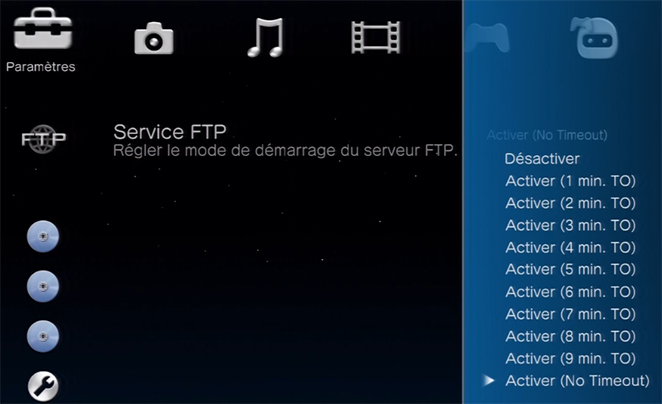
- Install any FTP Client (FileZilla or FlashFXP)
- Make Sure PC and PS3 are connected to Routeur through Ethernet cable and not Wi-Fi for better transfert speed
- Put PS3 IP Adress in FileZilla or FlashFXP (Sites->Site Manager)
FileZilla :
View attachment 21274
FlashFXP :
View attachment 21275- Click on /dev_hdd0 then game folder
- Drag the two folder in /dev_hdd0/game/ after FTP transfert operation complete then exit multiMan
- Navigate to Network Columns->Hybrid Firmware Tools->Service Tools->Rebuild database ,PS3 will reboot
- Press the PS button to open your Controller then press X to start rebuilding database after it completes PS3 will reboot to XMB normaly and now you can see your CFW2OFW converted game and you can play it without HAN/HEN Enabled
you see when you install CFW2OFW game it doesn't say to renew licence cause the only thing that show that is paid game that doesn't have activation licence yet
View attachment 21276
Details :
When you convert a CFW Game to OFW using CFW2OFW Helper make_npdata do an encrypt operation with this command :
make_npdata -e "Input FileSource" "Output FileDestination" 0 1 3 0 16
make_npdata (Tool to encrypt/decrypt/bruteforce EDAT/SDAT)
-e (Encryption mode)
0 (SDAT Format)
1 (Finalized data)
3 (EDAT/SDAT version 3)
0 (Without compression)
1 6 (Block size in KB)


Last edited:


