PS3 Compatibility List - PS2 on PS3

Thanks to the soft emu I discovered the cmd 0x19 is not used in gx emu.
Great, that one was tricky hidden in between others but it was surrounded XD

I will update the table in talk page in wiki tomorrow after a calmly look at the info generated by your app, thx
 
- Final Fantasy XII and IZJS

problematic sound


[minute (1,32),(1,55),(2,49)]

normal sound


[minute (0,28),(14,26)]

- Kingdom Hearts 2 and Final Mix

Problematic sound


[minute (4,32) with barrier,(4,37) with kill the Heartless]

Normal Sound


(minute (16,35),(16,49)]

More bug Space Paranoids "Hostile Program" boss who does not advance in the game

I know it may sound strange, but I prefer this PS2 version of that 2.5 HD
because of the original music :D
 
Last edited:
  • Like
Reactions: Zar
Sorry to disappoint you @Zar but your CONFIGs aren't correct.
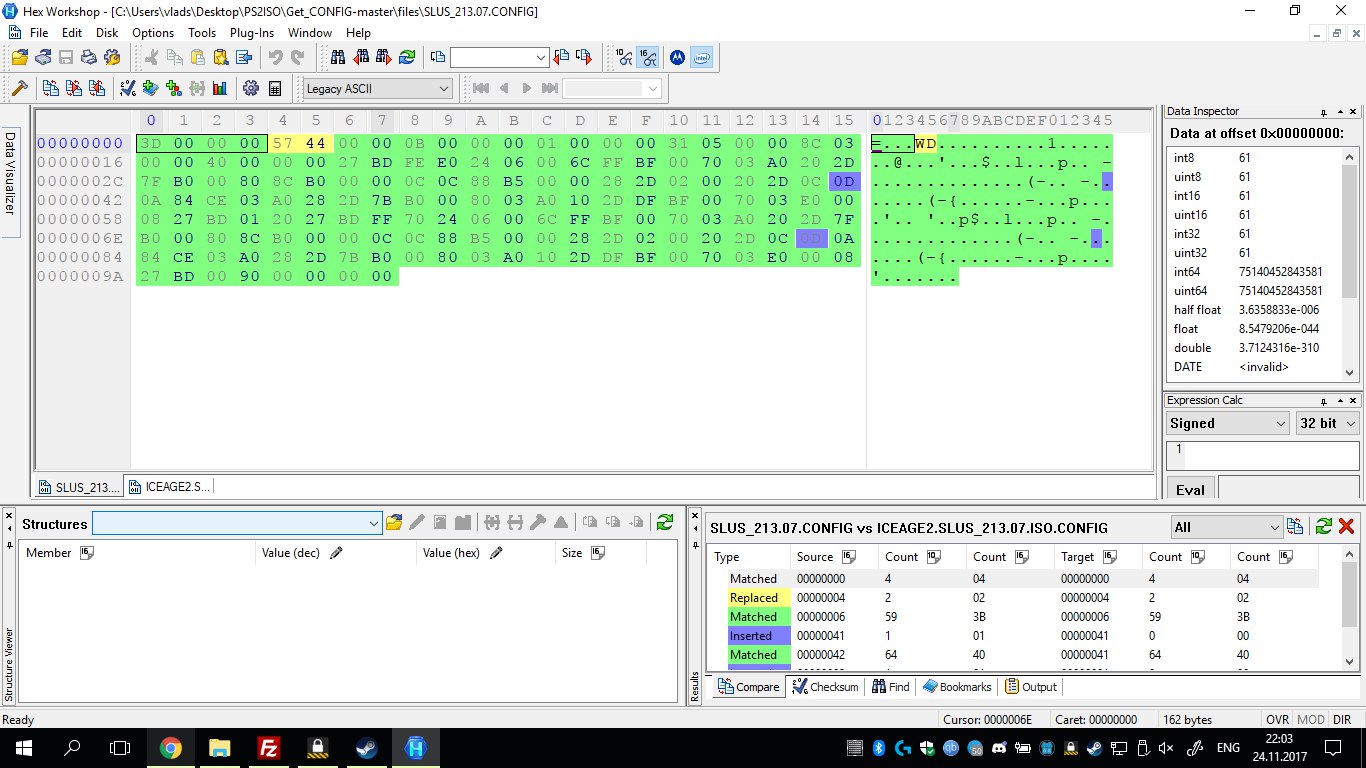
I just compared Ice Age 2 CONFIG with the one that @mysis posted and something wrong with endianness in your CONFIG. That is the reason why CONFIGs for Ace Combat series didn't work for me.

UPDATE:
Not exactly the endianness problem in Ice Age 2 case, there 2 extra bytes. Check this out. First image is yours CONFIG, second is @mysis CONFIG . I have cropped the GameID, do not pay attention to this.
OhD3oyS_VOg.jpg
Prcz07-rSIk.jpg

P.S. But it has endianness problem in 24:The Game(SLUS_212.68) case.
 
Last edited:
  • Like
Reactions: Zar
Hey guys new around here

Sorry to trouble you

I keep reading on the comparability lists that Ghosthunter works 100 percent, but every version I have tried the game sticks on a ladder in a swamp, if you ever manage to get past this bit by dumping a save it freezes instantly

Is there a config or certain version etc I can use to play this in the full, I've waited so long to play it again
 
Sorry to disappoint you @Zar but your CONFIGs aren't correct.
I just compared Ice Age 2 CONFIG with the one that @mysis posted and something wrong with endianness in your CONFIG. That is the reason why CONFIGs for Ace Combat series didn't work for me.

UPDATE:
Not exactly the endianness problem in Ice Age 2 case, there 2 extra bytes. Check this out. First image is yours CONFIG, second is @mysis CONFIG . I have cropped the GameID, do not pay attention to this.
OhD3oyS_VOg.jpg
Prcz07-rSIk.jpg

P.S. But it has endianness problem in 24:The Game(SLUS_212.68) case.

the 2 bytes different of Ice age 2 are config revision. I don't know how to find it, so, I'm using the latest revision for every CONFIG

@sandungas @kozarovv @mysis any idea how I can find the config revision ?

I'll try to fix the endian issues :p


@lexa where did u find ace combat config files ?
 
Last edited:
P.S. But it has endianness problem in 24:The Game(SLUS_212.68) case.

24 from devwiki
Code:
3D 00 00 00 65 3D 00 00 12 00 00 00 0D 00 00 00
00 00 00 04 00 00 00 00 02 00 03 00 E7 00 00 00
45 AD 6E AA EF 02 00 00 02 00 03 00 F3 00 00 00
E4 A0 6E 47 FA 02 00 00 03 00 02 00 B0 55 41 10
68 56 41 10

24 from my github
Code:
3D 00 00 00 57 44 00 00 12 00 00 00 0D 00 00 00
00 00 00 04 00 00 00 00 02 00 03 00 E7 00 00 00
45 AD 6E AA EF 02 00 00 02 00 03 00 F3 00 00 00
E4 A0 6E 47 FA 02 00 00 03 00 02 00 B0 55 41 10
68 56 41 10 00 00 00 00

Th differences come from the config revision and the command 0x0 I added in the end of the file... perhaps, I underestimated the use of the config revision :s
 
the 2 bytes different of Ice age 2 are config revision. I don't know how to find it, so, I'm using the latest revision for every CONFIG
I'm speaking about these extra 0x0D bytes. I know about config revision.
 
Last edited:
Yes, that config revision is something i was mentioning before, is based in the emulator revision, you need to check this table mysis made, the one most at right for ps2_netemu.sef
http://www.psdevwiki.com/ps3/Talk:PS2_Emulation#PS2_Emulator_Types_and_Revisions

In netemu you can see the revision literally by opening the decrypted file in a hexeditor, it seems mysis was looking at the different revisions for several firmwares and listed them

In the table it can be seen how many commands are supported by that revision of netemu, that value represents the biggest command ID

Compare wit the other table, the first time ps2_netemu.self was included in retail firmwares was in 3.70 and that revision of netemu is 15686 and supports up to command ID 0x41

The other bigger command IDs was added later
So basically, to choose a revision you need to check which commands are used in your config, and then reduce the revision the most posible, this way you allow your config file to work in older firmwares

The official configs for PS2 classics though doesnt seems to use the exact same values than the emulator revisions, what happened is that games was converted to "PS2 classics" at a later time, when there was a newer revision of netemu included in the firmware

Imagine they releases a new PS2 classics game today... then they are going to use a revision very high (17495 is latest) and even bigger because it looks they starts with that value and for every change while testing they increases the revision, they does this even if the game is using low commands ID
So basically, lets say they releases a PS2 classics today so they are going to provide a config that works only in latest firmwares, but maybe the config uses only command ID 0x00 so it can be lowered
Officially they doesnt cares in lowering the revision, but unnoficially i think we should lower it the most posible, because two reasons:
-it allows the config to work in older firmwares
-your config is definitive, no need to modify it, so is good to add it to databases, collections, etc...


Edit:
Ops, the 0x0D bytes you mean, sorry im a bit distracted, i was watching TV right now while writing that stuff

 
Last edited:
24 from devwiki
Code:
3D 00 00 00 65 3D 00 00 12 00 00 00 0D 00 00 00
00 00 00 04 00 00 00 00 02 00 03 00 E7 00 00 00
45 AD 6E AA EF 02 00 00 02 00 03 00 F3 00 00 00
E4 A0 6E 47 FA 02 00 00 03 00 02 00 B0 55 41 10
68 56 41 10

24 from my github
Code:
3D 00 00 00 57 44 00 00 12 00 00 00 0D 00 00 00
00 00 00 04 00 00 00 00 02 00 03 00 E7 00 00 00
45 AD 6E AA EF 02 00 00 02 00 03 00 F3 00 00 00
E4 A0 6E 47 FA 02 00 00 03 00 02 00 B0 55 41 10
68 56 41 10 00 00 00 00

Th differences come from the config revision and the command 0x0 I added in the end of the file... perhaps, I underestimated the use of the config revision :s
Oops, sorry. It is just my CONFIG got messed up. :D

-it allows the config to work in older firmwares
Honestly, I don't see a reason for this. Those guys should just update their firmware.

@lexa where did u find ace combat config files ?
I found it in your github. But it does not work, even after removing extra 0x0D bytes. Ace Combat 4 still has texture issues and small screen shaking. :(
My ISO is MD5 perfect - http://redump.org/disc/626/ and of course I'm using CONFIG for SLUS_201.52.
Same with Ace Combat 5 and Ace Combat Zero
 
Last edited:
sorry to disturb,but why you launch ps2 games this way?why not webman or some other launcher?i'm asking because i'm using webman and i would really like to be able to launch ps2 backups from external ntfs drive,it would make messing with ps3 and internal hdd much easier.
 
sorry to disturb,but why you launch ps2 games this way?why not webman or some other launcher?i'm asking because i'm using webman and i would really like to be able to launch ps2 backups from external ntfs drive,it would make messing with ps3 and internal hdd much easier.
Because ManaGunZ is much better, much cleaner and much faster than Webman........
Most of the retro fans like me prefer ManaGunZ instead of Webman or Multiman.
 
how can it be faster than webman?on webman it's basically three buttons straight from xmb to game...and can managunz launch ps2 iso from external ntfs?

again,sorry to disturb,i'm just very interested in all ntfs solution...
 
Honestly, I don't see a reason for this. Those guys should just update their firmware.
Is mostly because the other reason, we are creating config files and are being added as collections or apps and all that config files will be like legacy, so i think is needed to make them the best way posible so everyplace that collects them will have the same exact files

And for that is needed to follow a strict rule with the config revisions, specially now zar app needs to "invent" one and is able to create hundreds of configs
the actual version is just using the higest value posible, this locks the configs to high firmwares, and also allows people to appear eventually and start modifying the config files in the different databases and collections to lower the versions, and this will create confusion and problems

Yeah, im picky but when posible i like to aim to perfection and with this is posible XD
Also, because i like the idea of having a specific file for every game i suggest to add the game ID at the end with the 0x00 command
 
how can it be faster than webman?on webman it's basically three buttons straight from xmb to game...and can managunz launch ps2 iso from external ntfs?

again,sorry to disturb,i'm just very interested in all ntfs solution...
You can use this config files with webman too :)
The external usb support for PS2 games doesnt works in any backup manager
In managunz there are some unique features related with PS2 backups, are the kind of things needed to make from inside a program (traditional backup managers distributed in PKG format) because in a plugin (.sprx) are not so easy to do
A plugin needs to be light, while inside a program there is more room to add features, a plugin is an enviroment more restrictive in that sense
 
The issue came from the text mode used to create the file... when it see a new line (0xA) it add a carriage return (0xD)...

I think it's fixed now : https://github.com/Zarh/Get_CONFIG

I found this : http://www.psx-place.com/threads/compatibility-list-ps2-on-ps3.1306/page-29#post-88051 mysis said all of this hashes use the cmd 0x19 but where can i find the offset of the param value ?
I guess are "switches" so doesnt stores any data, and because are together in a table specific for them maybe the command ID is not even specifyed, so maybe that chunk from 0x51DD30 up to 0x51DF7F is all the info, just the title_id hashed 0x8 bytes each
 
You can use this config files with webman too :)...

i don't have any problems with games that i like this way.yes,it's not some big list (mostly classic horror games of ps2 era) but they all work as retail games on ps3.what kind of features does managunz offer besides standard upscaler and smoothing?

again,i'm sorry if i disturb and bore you with my questions.
 
i don't have any problems with games that i like this way.yes,it's not some big list (mostly classic horror games of ps2 era) but they all work as retail games on ps3.what kind of features does managunz offer besides standard upscaler and smoothing?

again,i'm sorry if i disturb and bore you with my questions.
The installation includes all this config files, the latest version had around 30 or 40 but the next one im guessing is going to have hundreds, you can select the config file to use, and it has a config editor to create configs in a easy way for that problematic games that noone knows how to fix... with that config editor you can play the "lottery game" by creating configs with the values you want just if you are lucky and find the value correct that makes the game work fine, there are some commands that doesnt allows this, but some does, and this config editor is still in development
One of the best features imo related with PS2 is to apply (and remove to restore to original) widescreen and pnach patches
Also, if your worry is to have an icon of the game in XMB it has an option that allows you to create a "shorcut PKG" for the game that will appear on main XMB like if it was installed as an standalone game
Maybe im forgiving to mention some more features, and zar continues adding surprising new ideas in every new release, you can read about it here http://www.psx-place.com/threads/managunz-ps3-backup-manager-by-zar.1198/
The thread is outdated though, nowadays is better and looks better than that thread
 

Similar threads

Back
Top