
PS3 Delete [Brackets] from webman Ps3 game list

johnc123

Member
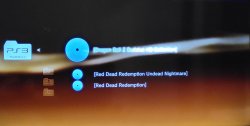
I like to have the ps3 games in folders, but they start to get brackets in the webman xmb menu because of that.

How can I delete the brackets from the ps3 game name and still have folders?

The Ps1 and Ps2 games dont have brackets even though they're also in folders.

Thanks
 

Attachments

  • 20231013_211113.jpg
    20231013_211113.jpg
    1.4 MB · Views: 97
I couldn't reproduce your scenario. Anyway I added a text filter that should remove the first and last brackets [...]

Can you test this build? Extract the zip, put the sprx in /dev_hdd0/plugins, restart and rescan your games.

EDIT: removed download
 
Last edited:
Thanks for the reply.

That didn't work out. The brackets are still there and I have another folder in the XMB menu over the webmanGames folder named /app_home/PS3_Game

When I delete the folders and put the isos right in the ps3isos folder the brackets are gone.

But then for example I have two isos named the same "Red Dead Redemption" and when I use folders I have "Red Dead Redemption Undead Nightmare" and "Red Dead Redemption", the name of my folders, but brackets attached to the names in the xmb, while on the file explorer I don't have any brackets.
 
Last edited:
Okay, so I realized I don't need folders and the .cue and .png files of the PS3isos.

I have two isos in the ps3iso folder named "Red Dead Redemption" and "Red Dead Redemption Undead Nightmare", but in the webman xmb they're both displayed as "Red Dead Redemption".

How can I change the displayed isos name in the xmb? Because that would be possible with folders, but then they're displayed with brackets in the xmb :madd:
 
Only PS1 ISOs require CUE/BIN files. You can place all PS3 ISOs in /PS3ISO without sub folders.

If you have a PARAM.SFO with the same file name of the iso (e.g. red_dead_redemption.SFO), webMAN MOD will use the title in the file.

If the SFO file doesn't exists, it will use the file name of the ISO as the title. If the ISO is placed sub folder, the brackets are added.
 
Only PS1 ISOs require CUE/BIN files. You can place all PS3 ISOs in /PS3ISO without sub folders.

If you have a PARAM.SFO with the same file name of the iso (e.g. red_dead_redemption.SFO), webMAN MOD will use the title in the file.

If the SFO file doesn't exists, it will use the file name of the ISO as the title. If the ISO is placed sub folder, the brackets are added.

Oh okay, thanks for the reply and nice to know.

So the .ISO files takes the name of param.sfo that is placed in the game folder with BLES and BLUS subfolders and when i edit the param.sfo the ISO will also change the name?
 
So the .ISO files takes the name of param.sfo that is placed in the game folder with BLES and BLUS subfolders and when i edit the param.sfo the ISO will also change the name?
Yes the ISO takes the name from the PARAM.SFO if the option is marked in /setup.ps3

If you modify PARAM.SFO or make changes tothe settings, you have to refresh the XML to see the changes.
 
Yes the ISO takes the name from the PARAM.SFO if the option is marked in /setup.ps3

If you modify PARAM.SFO or make changes tothe settings, you have to refresh the XML to see the changes.

Thanks for the reply. That did it for me. I just unticked the param.sfo box and I got the isos Name in the webman folder!

Thanks for the help, topic is solved!
 

Similar threads

Back
Top