PS3 Edit "The Legend of Korra"'s EBOOT for ISO version

Arch91

Member
Hello. I am trying to rebuild the game «The Legend of Korra» to BD version. But when the EBOOT.BIN is not located in /dev_hdd0/game/NPEB02082/USRDIR/ — then the variable «boot path» for it is not sets. «boot path» is needed for the path to data000.edat and to data001.edat. Can anyone edit the EBOOT.ELF for to change the «boot path» to some another path OR at least to set it some way manually?
I would like to have that game in it's ISO version because my console is SuperSlim OFW v4.50 with a soldered Cobra ODE which is still alive. I am not able to launch NPDRM games which needs .rap->.rif encryption cause I have no the real act.dat for my console.

From the words of some person, it use cellGameBootCheck to check if it's an hdd game and cellGameContentPermit to get the usrdir path. It is not necessary to change the path from /dev_hdd0/... to /dev_bdvd/... , the files can be keeped on /dev_hdd0/... as game data.
 
From the words of some person, it use cellGameBootCheck to check if it's an hdd game and cellGameContentPermit to get the usrdir path.
It was me, you don't need to hide it ;)

If you are ok to install a pkg, plz try PSN liberator. I just tested it on RPCS3 and it works. You don't need to give any any information; the pkg and the rap are enough. As expected it doesn't work if you convert it to iso, but if you convert it to a 'liberated' pkg it works.


I uploaded you a version where I replaced PS3P_RPKG_Ripper.exe by PS3PKG GUI.exe because the original exe is triggering lot of antivirus : https://www.mediafire.com/file/qyl63nu4pqey6ik/PSN_LIBERATOR_V1.0.rar/file

it still have 4 alerts on the main exe...
https://www.virustotal.com/gui/file...255484bb912dcea40fab5e2dc4daa887a16/relations

If you don't want to use it just resign the EBOOT.BIN and the edat with a free license, it will probably be enough.
 
Last edited:
resign the EBOOT.BIN and the edat with a free license,
Because I have OFW, it accepts the free .edats resigned, but it do not the EBOOT.BIN resigned any way.
So, I hope that someone will assemble EBOOT.ELF with a goal as to workaround that "boot path" for the case when the game is rebuilt to iso.
 
  • Like
Reactions: Zar
Well... I don't hoped that some people whose nicknames are beginning from the letter 'z' (not you Zar of course) or 'f' ever cares about the problems of the usual users in need. It could be a guide for the ps3 .elf disassembling/assembling exist written by someone at least. I think this thread may be closed.
 
@Arch91

I'm learning RE, slowly (very slowly). I didn't want to give you hope that's why I told you to ask someone else. I took your wish as one of my goals (to learn). Lucky you, I made some progress and I was able to read the eboot more clearly thanks to ghidra

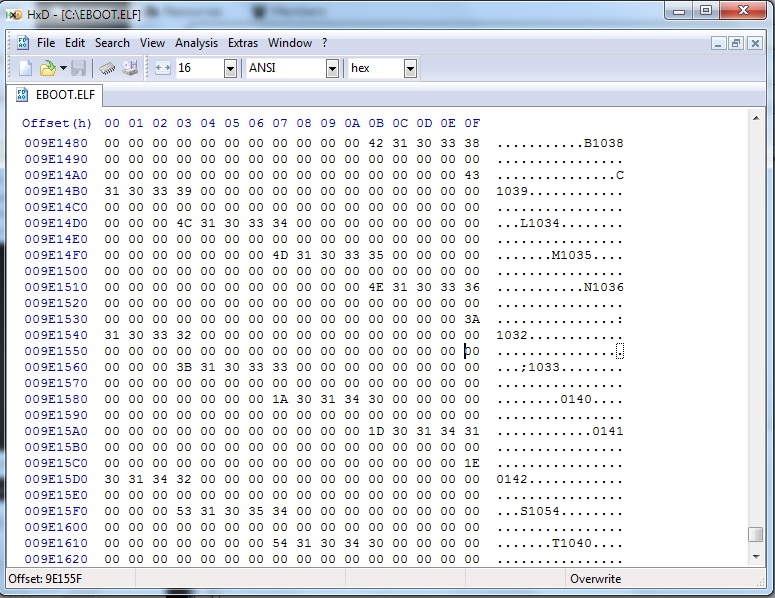
I made a little discovery, if you go to offset 0x9E155F change 01 to 00 inside the EBOOT. it will search for data000.cpk and data001.cpk instead of data000.edat and data001.edat
You just have to decrypt them with make_npdata.

Maybe more will come....ghidra is really powerfull ;)
 
I do not have any hope at all))
Ehm... EBOOT.ELF has 00 on the exact offset 0x9E155F and nearbies...
miss.jpg

Or you mean EBOOT.BIN ? - then, please, note which one - maybe you mean the original one from the original pkg?.. Note, that I need that EBOOT.BIN be resigned to NON-DRM, so I supposed that the changes should be applied into EBOOT.ELF... But if you applied the changes to EBOOT.BIN instead, then, please, make a screenshot in the HEX-editor the place where do you made it - I'll try to search the related in the resigned EBOOT.BIN
Nevertheless, this way it will be searching for the decrypted files instead, right? But, in case of when EBOOT.BIN is NON-DRM, where?!? - nowhere again?)
 
this way it will be searching for the decrypted files instead, right? But, in case of when EBOOT.BIN is NON-DRM, where?!? - nowhere again?)
As I assumed, even when you set to not check the encryption of data000.cpk archive, when the case the EBOOT.BIN is of NON-DRM type encryption, the path, now for that .cpk archive, is not set either.
Also, please, note, that with that edit the proccess now searches for data000.cpk and still for data001.edat .
However... you've found something intrigue... remember that experience.
Anyway, Korra still awaits for her adventure)) Those archives loading unavailability denies that.
 
- patch to use cpk instead of edat

file : data000.cpk offset : 0x9EA55C original_data : 0x00000001 patch_data : 0x00000000
file : data001.cpk offset : 0x9EA568 original_data : 0x00000001 patch_data : 0x00000000

- patch to change CELL_GAME_GAMETYPE_HDD to CELL_GAME_GAMETYPE_DISC

offset : 0x41D7CC original_data : 0x2C030002 patch_data : 0x2C030001

I didn't test yet, I don't think it will work (you can test it if you want) I just write it here before I forgot the offset.
They are maybe useless... I don't know yet when i'll be able to play with ghidra next time :p
 
@Arch91

I just tested it on RPCS3, it's working.

How to convert to ISO :
  1. extract the pkg
  2. extract the EBOOT.BIN to EBOOT.ELF and delete the EBOOT.BIN (you'll need the rap file)
  3. bruteforce the dev_klicensee
  4. extract data000.edat to data000.cpk and delete the data000.edat (you'll need the rap & the dev_klicensee)
  5. extract data001.edat to data001.cpk and delete the data001.edat (you'll need the rap & the dev_klicensee)
  6. apply these patches : https://www.psx-place.com/threads/e...ra-s-eboot-for-iso-version.33989/#post-298847 to the EBOOT.ELF
  7. resign the EBOOT.ELF to EBOOT.BIN and delete EBOOT.ELF
  8. move all the content to PS3_GAME folder
  9. change the category in the PARAM.SFO
  10. create a PS3_DISC.SFB, I don't know if it's absolutely necessary but RPCS3 need it.
  11. build the ISO

Have fun ;)
 
Last edited:
I congratulate you with your success, however, these are too soon words :S

The game is launched on my PS3. I see 4 startup videos, menu (without sound/music. Are they should be there?.. I don't know, I did not play that game earlier, but I hear nothing. The startup videos are with sound). I see a menu where I can choose some options. I begin a new game, watch 2 videos. Then there are lot of demons. If I move - the game freezes. If to restart the game (like eject the disc, start it from XMB again) and continue the game from the last save - the game will not be loaded from that save and the load will be freezed on the black screen.
And I can't even imagine what's wrong... I can't load to that moment on RPCS3 to debug it cause it is veeeery slow...
Note that I tested either an iso alone and with the game's pkg installed (with it's EBOOT.BIN removed from /dev_hdd0/game/... folder).
Zar, is this situation same for you? Are you able to test iso games on the real console? Are you able to load games fast enough in RPCS3?
 
  • Like
Reactions: Zar
I didn't play, I only launched it until the main menu and my sound was turned off.

I'm sry I cried victory too soon.

I'll have to investigate more...
 
I think there is a folder named 'sound' inside usrdir can you check if you have it. I'kk test it tonight when i'll come back home...
 
I have every files in their structure as they are originally in .pkg .
Because it is not possible for me to load to that moment in rcps3, I can only guess what is going wrong.
I have the files both in /dev_bdvd and /dev_hdd0 as data, so the possibility that it searches them from /dev_hdd0 is excluded. The sound files are not in .cpk archives, they are in the folder.
According to the logs,
bgm/BGM.bnk
WwiseInfo.wai
Init.bnk
SeFootstep.bin
are successfully loaded from the sound folder. As well as every folder is prepared.
That's undebuggable, so we are the blind cats. I think this is a dead end... Unless you can start a new game in rpcs3...
 
It's too laggy on RPCS3, my computer isn't powerfull enough. I can launch it. I hear sounds. But it's slow and the sound is crackling.

So, I just tested it on my PS3 and it's perfectly working. I don't think it use the path /dev_hdd0 as I explained previously the usrdir path isn't hardcoded it use cellGame functions to get it. But just in case remove it.

I'm going to double check the patches.

Edit : The patches are correct...
 
Last edited:
I used makeps3iso on the folder I was creating the iso with genps3iso, and the result is 80010009 error when launch. Moreover, the size of the iso created with makeps3iso is smaller than the size of the iso created with genps3iso. Is there a chance that in the moment when you was successfully testing the iso, the game was launching from this /dev_hdd0/game/NPEB02082/USRDIR/EBOOT.BIN ?
 
Last edited:
AFAIK, this error come from the version of the eboot, you probably signed the eboot with too recent keys, try patchps3iso on the iso
 
Back
Top