PS3 Fault finding YLOD with the SYSCON - First steps and Error reporting

Write "w 39fe 50 73" after typing eepcsum again show that again here.
Felix I never judge only by vddc measurements, that is first line affected. Always lower in defective rsx, rest can be measured as well but always asking to that because is faster.
I've finally finished one dia001 with your tantal pcb, it looks fine but board is still bended, bit rusty as it was before reflowed or to much heat was used when removing caps, but it starts. Need to wash, dry, bound back rsx and cell.
db047ec59cc0540f12e7ed698c1487ac.jpg
 
Last edited:
Thanks. Now it's:
Code:
w 39fe 50 73
w complete!
[mullion]$
>$ eepcsum
eepcsum
Addr:0x000032fe should be 0x56b6
Addr:0x000034fe should be 0x985b
Addr:0x000039fe should be 0x7350
Addr:0x00003dfe should be 0x00ff
sum:0xfffe
Addr:0x00003ffe should be 0xffff0101
r3900 100:
Code:
r 3900 100
+0 +1 +2 +3 +4 +5 +6 +7 +8 +9 +A +B +C +D +E +F
-----------------------------------------------
FF BF FF FF FF FF FF FF FF FF FF FF FF FF FF FF
40 50 21 FF FF FF FF FF FF FF FF FF FF FF FF FF
FF FF FF FF FF FF FF FF FF FF FF FF FF FF FF FF
FF FF FF 00 FF FF FF FF FF FF FF FF FF FF FF FF
FF 03 C8 78 FF FF FF FF FF FF FF FF FF FF FF FF
FF FF FF FF FF FF FF FF FF FF FF FF FF FF FF FF
02 00 FF FF FF FF FF FF FF FF FF FF FF FF FF FF
FF FF FF FF FF FF FF FF FF FF FF FF FF FF FF FF
FF FF FF FF FF FF FF FF FF FF FF FF FF FF 50 73
Does'nt seem right according to the guide, since the sum value is not gone?
 
Thanks for your replies guys :) and sorry for disturbing your more advanced analysis

I did the ERRLOG GET 00 to 1F in external mode (thought external mode would be enough for just the error codes)
I am getting the same results as before (and in the windows program as well):

Code:
XX@XX-MBP ps3syscon-master % python ps3_syscon_uart_script.py /dev/tty.usbserial-A10L97SK CXR
>$ auth
Auth successful
>$ ERRLOG GET 00
ERRLOG GET 01
ERRLOG GET 02
ERRLOG GET 03
ERRLOG GET 04
ERRLOG GET 05
ERRLOG GET 06
ERRLOG GET 07
ERRLOG GET 08
ERRLOG GET 09
ERRLOG GET 0A
ERRLOG GET 0B
ERRLOG GET 0C
ERRLOG GET 0D
ERRLOG GET 0E
ERRLOG GET 0F
ERRLOG GET 10
ERRLOG GET 11
ERRLOG GET 12
ERRLOG GET 13
ERRLOG GET 14
ERRLOG GET 15
ERRLOG GET 16
ERRLOG GET 17
ERRLOG GET 18
ERRLOG GET 19
ERRLOG GET 1A
ERRLOG GET 1B
ERRLOG GET 1C
ERRLOG GET 1D
ERRLOG GET 1E
ERRLOG GET 1F
>$ 00000000 FFFFFFFF FFFFFFFF

I tried to enter internal mode but I'm stuck at changing the checksum. It's a bit advanced for me so I thought it's better to ask before changing anything.

My output at eepcsum is the following:
Code:
eepcsum
Addr:0x000032fe should be 0x56b6
Addr:0x000034fe should be 0x985b
sum:0x0100
Addr:0x000039fe should be 0x7350
Addr:0x00003dfe should be 0x00ff
sum:0xfffe
Addr:0x00003ffe should be 0xffff0101
r 3900 100 gives me:
Code:
r 3900 100
+0 +1 +2 +3 +4 +5 +6 +7 +8 +9 +A +B +C +D +E +F
-----------------------------------------------
FF BF FF FF FF FF FF FF FF FF FF FF FF FF FF FF
40 50 21 FF FF FF FF FF FF FF FF FF FF FF FF FF
FF FF FF FF FF FF FF FF FF FF FF FF FF FF FF FF
FF FF FF 00 FF FF FF FF FF FF FF FF FF FF FF FF
FF 03 C8 78 FF FF FF FF FF FF FF FF FF FF FF FF
FF FF FF FF FF FF FF FF FF FF FF FF FF FF FF FF
02 00 FF FF FF FF FF FF FF FF FF FF FF FF FF FF
FF FF FF FF FF FF FF FF FF FF FF FF FF FF FF FF
FF FF FF FF FF FF FF FF FF FF FF FF FF FF 50 74
What should I change? Don't want to mess up anything

Thanks so much for your replies

All F's means you don't have any errors in the errorlog.

Did you thoroughly read my tutorial? The instructions on how to change the internal bit are quite clear. Be sure you are only changing the bit at the correct spot and only for A - K models (mullion SYSCONs). Sherwood SYSCONs don't have internal/external modes.
 
Thanks. Now it's:
Code:
w 39fe 50 73
w complete!
[mullion]$
>$ eepcsum
eepcsum
Addr:0x000032fe should be 0x56b6
Addr:0x000034fe should be 0x985b
Addr:0x000039fe should be 0x7350
Addr:0x00003dfe should be 0x00ff
sum:0xfffe
Addr:0x00003ffe should be 0xffff0101
r3900 100:
Code:
r 3900 100
+0 +1 +2 +3 +4 +5 +6 +7 +8 +9 +A +B +C +D +E +F
-----------------------------------------------
FF BF FF FF FF FF FF FF FF FF FF FF FF FF FF FF
40 50 21 FF FF FF FF FF FF FF FF FF FF FF FF FF
FF FF FF FF FF FF FF FF FF FF FF FF FF FF FF FF
FF FF FF 00 FF FF FF FF FF FF FF FF FF FF FF FF
FF 03 C8 78 FF FF FF FF FF FF FF FF FF FF FF FF
FF FF FF FF FF FF FF FF FF FF FF FF FF FF FF FF
02 00 FF FF FF FF FF FF FF FF FF FF FF FF FF FF
FF FF FF FF FF FF FF FF FF FF FF FF FF FF FF FF
FF FF FF FF FF FF FF FF FF FF FF FF FF FF 50 73
Does'nt seem right according to the guide, since the sum value is not gone?
That's because you had 2 checksum mismatches. Why? I have no idea!
 
Thanks. Now it's:
Code:
w 39fe 50 73
w complete!
[mullion]$
>$ eepcsum
eepcsum
Addr:0x000032fe should be 0x56b6
Addr:0x000034fe should be 0x985b
Addr:0x000039fe should be 0x7350
Addr:0x00003dfe should be 0x00ff
sum:0xfffe
Addr:0x00003ffe should be 0xffff0101
r3900 100:
Code:
r 3900 100
+0 +1 +2 +3 +4 +5 +6 +7 +8 +9 +A +B +C +D +E +F
-----------------------------------------------
FF BF FF FF FF FF FF FF FF FF FF FF FF FF FF FF
40 50 21 FF FF FF FF FF FF FF FF FF FF FF FF FF
FF FF FF FF FF FF FF FF FF FF FF FF FF FF FF FF
FF FF FF 00 FF FF FF FF FF FF FF FF FF FF FF FF
FF 03 C8 78 FF FF FF FF FF FF FF FF FF FF FF FF
FF FF FF FF FF FF FF FF FF FF FF FF FF FF FF FF
02 00 FF FF FF FF FF FF FF FF FF FF FF FF FF FF
FF FF FF FF FF FF FF FF FF FF FF FF FF FF FF FF
FF FF FF FF FF FF FF FF FF FF FF FF FF FF 50 73
Does'nt seem right according to the guide, since the sum value is not gone?
But you fixed one of the checksum mistmatchs, see how it matches the llast 2 bytes of the area you readed with the value that appears in the line ?
Code:
Addr:0x000039fe should be 0x7350
The cheksum of this area (after the byte you wrote to unlock internal mode) is 0x7350... is just syscon stores it in the EEPROM in little endian (from right to left)

So one problem solved... but you still have another broken cheksum
Code:
sum:0xfffe
Addr:0x00003ffe should be 0xffff0101
And the way to solve is different, take a look at this table https://www.psdevwiki.com/ps3/Template:Syscon_checksums

Syscon is telling you the problem is in the range 0x3E00 - 0x3FFD
This range is always filled completly with FF's... but it seems you wrote something in it by mistake
So the solution is not to update the checksum (to match with the new data you wrote by mistake)
What you need to do is to restore the original data in the range 0x3E00 - 0x3FFD and after that the checksum of it (currently broken) will be valid
You are lucky the area is completly filleed with FF's btw, because we know very well what we need to write in it (lot of FF's)

Before doing anything else... run this command, we need to see what you wrote
Code:
r 3E00 200

The result should be this (only one zero at the end):
Code:
r 3E00 200
+0 +1 +2 +3 +4 +5 +6 +7 +8 +9 +A +B +C +D +E +F
-----------------------------------------------
FF FF FF FF FF FF FF FF FF FF FF FF FF FF FF FF
FF FF FF FF FF FF FF FF FF FF FF FF FF FF FF 00

Yours is going to be different... but you need to make it look like that
After the changes the output of the eepcsum command should display this:
Code:
>$ eepcsum
eepcsum
Addr:0x000032fe should be 0x56b6
Addr:0x000034fe should be 0x985b
Addr:0x000039fe should be 0x7350 <--- new data written to unlock internal mode (so is a new checksum)
Addr:0x00003dfe should be 0x00ff
Addr:0x00003ffe should be 0x00ff <--- restored data (to match with the original checksum)
 
Last edited:
Another SEM-001
Instant 3 beeps.

ERRLOG (external)
A0404422 -> step 40, Data error, BE or RSX Error (IC1001 or IC2001)
A0403034 -> step 40, Fatal Booting Error, BE Error (IC1001)

Do you bet it's the BGA?

I cannot switch to internal mode.
Shall I already short the DIAG line to GND, or after EEPGET?

Either way... it does not return 00000...
>$ EEPGET 3961 01
F0000003
 
Another SEM-001
Instant 3 beeps.

ERRLOG (external)
A0404422 -> step 40, Data error, BE or RSX Error (IC1001 or IC2001)
A0403034 -> step 40, Fatal Booting Error, BE Error (IC1001)

Do you bet it's the BGA?

I cannot switch to internal mode.
Shall I already short the DIAG line to GND, or after EEPGET?

Either way... it does not return 00000...
>$ EEPGET 3961 01
F0000003

If you have to ask, then it's probably bga... :D No, seriously. These are the famous errors from bga/rsx issues, yes.
 
Hello,
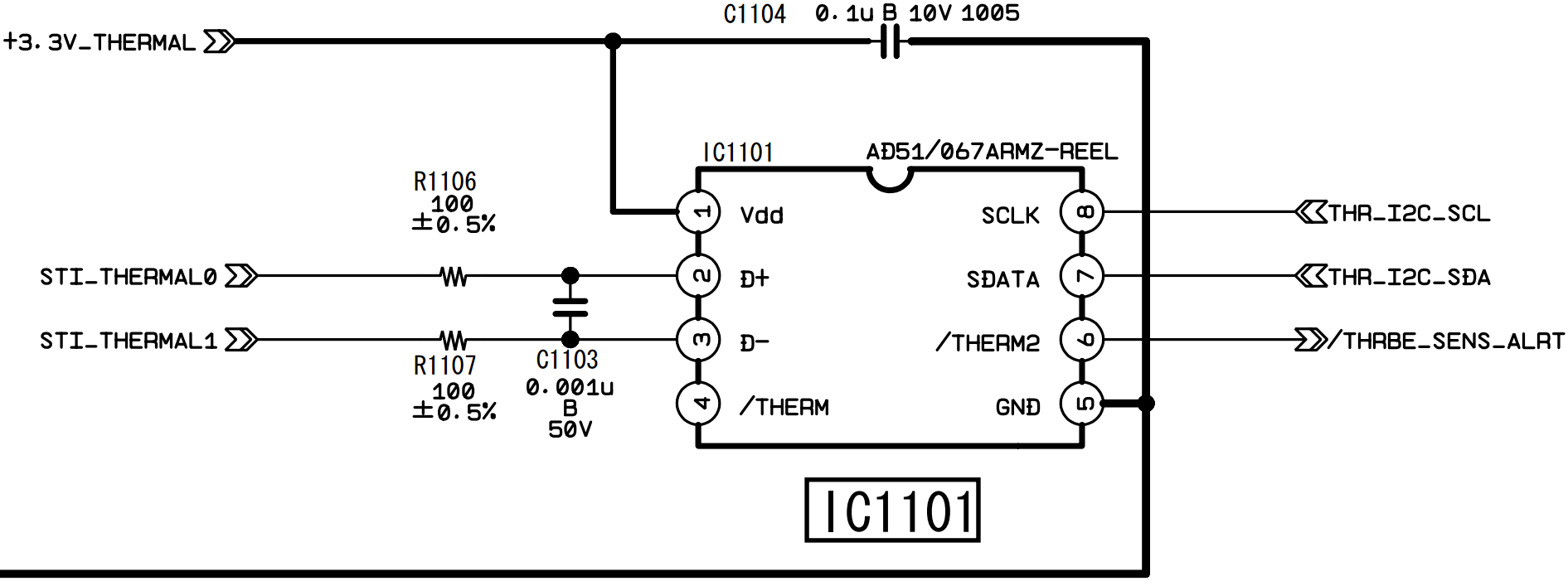
I have a console that overheats and turns off after 1 min, the diagnostics showed only those errors that are for temp. sensors - A0802030, A0802131
Is the problem in the heat transfer from the chips to the radiator (delid?) or in the sensors?
 
Hello,
I have a console that overheats and turns off after 1 min, the diagnostics showed only those errors that are for temp. sensors - A0802030, A0802131
Is the problem in the heat transfer from the chips to the radiator (delid?) or in the sensors?

A0802030 -> step 80, Fatal Error, Thermal Sensor Error IC1101
A0802131 -> step 80, Fatal Error, Thermal Sensor Error IC2101

Did you attempt to delid the CELL/BE IHS and RSX IHS?
NOTE! If you don't have necessary tools and know-how -> DO NOT ATTEMPT DELID yourself...
You will most likely kill your PS3...
 
Hello,
I have a console that overheats and turns off after 1 min, the diagnostics showed only those errors that are for temp. sensors - A0802030, A0802131
Is the problem in the heat transfer from the chips to the radiator (delid?) or in the sensors?
Overheat problem is a different one, error 1200, if memory serves right. You had 2030 and 2131 and all at 80 stage, which probably means it's the thermal sensor issue. I have a DIA-001 which had 2031 and 2131 long YLOD and was fixed by replacing the thermal sensor next to RSX. If you have a rework station with preheater, the easier way to check is to first desolder the thermal IC in question. If it's the thermal IC's problem, you'll get a much shorter YLOD but with same error code at different stage, because the thermal IC talks to syscon even 12V hasn't turned on. If that's the case, then you can just replace thermal IC and your PS3 should be good to go.
 
Mine is CXD2991CGB

I just ordered two CXD2982GB, as they should be compatible with
  • CXD2991GB
  • CXD2991BGB
  • CXD2991GGB
  • CXD2991CGB

Shipping... 2 days...
I will get back to you once I have it and measure it first.


I soldered a refurbished RSX onto the board and it ended up with instant 3 beeps.

ERRLOG:

>$ errlog
00000000
# CODE CLOCK

New (refurbished) RSX soldered in:
# A0093004 FFFFFFFF
# A0093004 FFFFFFFF
# A0093004 FFFFFFFF
# A0093004 FFFFFFFF
# A0093004 FFFFFFFF
# A0093004 FFFFFFFF
# A0093004 FFFFFFFF
# A0093004 FFFFFFFF
# A0093004 FFFFFFFF
# A0093004 FFFFFFFF

Original RSX before swap:
# A0801601 0B49D885
# A0801701 0B49D884
# A0801601 0B49D84C
# A0801701 0B49D84B
# A0801601 0B49D818
# A0801701 0B49D817
 
Last edited:
The problem is not YLOD.

After about a minute, the fans start blowing loudly, an overheating message appears and the console turns off, flashing a red light.

The motherboard is VER-001.
 
The problem is not YLOD.

After about a minute, the fans start blowing loudly, an overheating message appears and the console turns off, flashing a red light.

The motherboard is VER-001.
But are you checking the values of the real temperatures when is happening that ?, to me it looks a real overheat because as far i understand from the thermal config the overheating message in GameOS is displayed only if the temperature exceeds a setting named "trp"... in other words it seems syscon is reading the current temperature fine
Also... im not sure if someone reported before errors in both temperature monitors for CELL and RSX but this smells fishy to me too
The point is... one of the temperature monitors could start malfunctioning eventually... but 2 of them malfunctioning at the same time is very unprobable unless the problem is something that could affect both
As example... the line "+3.3_V_THERMAL" is the responsible to feed all the temperature monitor chips, a problem in it could make all them to malfunction

IC1101_CELL_BE_Temperature_Monitor.png

Edit:
Try this command and post the results here, this gives some info about sensors
Code:
> tzone

Try also the commands "powerstate"... or keep an eye at the last info lines of the command "bringup"... they should display a line for every sensor, something like this:
Code:
powerstate
ATA Power          : OFF
PCI Power          : OFF
RSX Power          : OFF
XDR Power          : OFF
Eurus Power        : OFF
SB Power           : OFF
RSX Thermal Sensor : UNAVAILABLE
BE Thermal Sensor  : UNAVAILABLE
 
Last edited:
Motherboard VER-001 can access "Internal Access Mode"?
I use this tutorial, which says that it is not supported?
No, but you can use all this commands after the intitial authentification
https://www.psdevwiki.com/ps3/Syscon_Firmware#Sherwood
VER-001 is the first syscon sherwood... most of the rules applyes to all the other motherboards with newer sherwoods released after it

Only the commands with red color are not availables (requires an additional exploit), but are not much important, the only ones i miss is the "hversion" because it displays some hardware info, and the "buzz" and "buzzduty" to configure the beep sounds
So is not so bad... in sherwoods there is no internal mode, but most of the commands are availables after a default auth
 
Motherboard VER-001 can access "Internal Access Mode"?
I use this tutorial, which says that it is not supported?
Hmm... I should make it clearer in the tutorial.

Maybe I should have 2 sections, one for Mullion and another for Sherwood SYSCONs. Then only introduce the idea of external/internal access inside the Mullion section. This way people with VER-001 and later MB's wont be bothered with unnecessary complexity.

Thanks for the feedback!
 
Thank you too!

Code:
>$ tzone
00000000
# 00:1st BE Primary
# 01:RSX Primary
>$ powerstate
00000000
# ATA  :OFF
# PCI  :OFF
# PCIex:OFF
# RSX  :OFF
# GDDR :OFF
# XDR  :OFF
# EURUS:OFF
# SB   :OFF
>$ bringup
00000000
# [SSM] Bringup Start.
# [SSM] PS0 ok.
# [SSM] PS1 ok.
# [SSM] PS2 ok.
>$ powerstate
00000000
# [SSM] PS3 ok.
# [SSM] PS4 ok.
# (PowerOn State)
OK 00000000
#!
#!Boot Loader SE Version 2.4.5
#!(Build ID: 3163,33519,
#!Build Data: 2008-07-14_20:31:16)
#!
#!Copyright(C) 2007 Sony Computer Entertainment Inc.All Rights Reserved.
#!
#![INFO]: Connecting to Debug Device (SB UART)
# ATA  :ON
# PCI  :OFF
# PCIex:OFF
# RSX  :ON
# GDDR :ON
# XDR  :ON
# EURUS:ON
# SB   :ON
>$ tmp get 0
F0000006
# [UCMD] Invalid Argument.
>$ tmp get 1
F0000006
# [UCMD] Invalid Argument.
>$ tmp get 0
F0000006
# [UCMD] Invalid Argument.
>$ duty get 0
00000000
# GetDuty(0x00):40%(0x66)

"tmp get" not working

EDIT: Now error A0801200 comes out, but before that I don't remember seeing it.
 
Last edited:
Thank you too!

Code:
>$ tzone
00000000
# 00:1st BE Primary
# 01:RSX Primary
>$ powerstate
00000000
# ATA  :OFF
# PCI  :OFF
# PCIex:OFF
# RSX  :OFF
# GDDR :OFF
# XDR  :OFF
# EURUS:OFF
# SB   :OFF
>$ bringup
00000000
# [SSM] Bringup Start.
# [SSM] PS0 ok.
# [SSM] PS1 ok.
# [SSM] PS2 ok.
>$ powerstate
00000000
# [SSM] PS3 ok.
# [SSM] PS4 ok.
# (PowerOn State)
OK 00000000
#!
#!Boot Loader SE Version 2.4.5
#!(Build ID: 3163,33519,
#!Build Data: 2008-07-14_20:31:16)
#!
#!Copyright(C) 2007 Sony Computer Entertainment Inc.All Rights Reserved.
#!
#![INFO]: Connecting to Debug Device (SB UART)
# ATA  :ON
# PCI  :OFF
# PCIex:OFF
# RSX  :ON
# GDDR :ON
# XDR  :ON
# EURUS:ON
# SB   :ON
>$ tmp get 0
F0000006
# [UCMD] Invalid Argument.
>$ tmp get 1
F0000006
# [UCMD] Invalid Argument.
>$ tmp get 0
F0000006
# [UCMD] Invalid Argument.
>$ duty get 0
00000000
# GetDuty(0x00):40%(0x66)

"tmp get" not working

EDIT: Now error A0801200 comes out, but before that I don't remember seeing it.
Yeah, you need to delid the CPU and re-paste.

It's easy to do once you make the proper tool. Just be sure to glue it down. Most people think the CPU is more difficult to delid than the GPU (RSX), but with that tool it's a breeze. I don't recommend delidding the RSX unless temps are out of control. The RSX is more difficult and risky. But if you do, use a high quality thermal paste on the die and use thermal adhesive on the VRAM like it had before. That stiffens the package, making it last longer before a BGA/Bump defect forces a reball or replacement GPU (inevitable for 90nm RSX I'm afraid).
 
There is no need to add the "get" at the ending of the "tmp" commands, you just need to tell the Tzone identifyer
Code:
>$ tzone
00000000
# 00:1st BE Primary
# 01:RSX Primary

So... if you want to see the current temperature of CELL you need to do:
Code:
>$ tmp 0
And 1 for RSX

Try to do it with the console in standby (im not sure if syscon is going to display the temperatures in standby)
And try to do it also while the PS3 is booting... just to be sure that the temperature is increasing a lot and very fast

In your thermal config for VER-001 the thermal shutdown happens at CELL=91ºC ...or... RSX=97ºC (you can see it with the output of the command "tshutdown")
And the XMB shutdown warning notification (the output of command "trp") at CELL=90ºC ...or... RSX=96ºC

When you are testing this try to see by syscon UART if the PS3 is shutting down at the temperatures i mentioned, if they matches it means the sensors are working fine and syscon can read them normally
Also keep attention at which one is overheating, either CELL or RSX
 

Similar threads

Back
Top