
You are using an out of date browser. It may not display this or other websites correctly.
You should upgrade or use an alternative browser.
You should upgrade or use an alternative browser.
PS3 Fault finding YLOD with the SYSCON - First steps and Error reporting

marciolsf
Member
No... IIRC, you only need to connect RX-> RX, TX -> TX and then GND to the "copper line that goes around the edge". You shouldn't need to connect power to anything (at least on the COK-001, you didn't)Quick question - COK-002 needs USB TTL 3.3V pin connected to the outer copper line that goes round the board, and I can use ground off usb pin legs?

IronStar
Forum Noob
That's where I'm getting confused, as schematics on GitHub says 3.3v for COK-001 / COK-002 but table under the images says don't connect 3.3v to anything.No... IIRC, you only need to connect RX-> RX, TX -> TX and then GND to the "copper line that goes around the edge". You shouldn't need to connect power to anything (at least on the COK-001, you didn't)
https://imgur.com/a/oswr3QO

IronStar
Forum Noob
Double post as there's no edit function. Rx pin is not outputting any voltage, and as console was opened before, is it safe to assume that syscon is dead and therefore console is beyond repair? Tx and Diag are outputting 3.3v as they should. Is there an alternative point to connect to Rx?
You have a git link in 1st post, there is a pdf guide that describes the process in more detali.
Can someone help me out on what I need/am supposed to be doing to do all this? All I'm seeing is the download to the syscon program itself, not what I physically need to do or any of that.
You have a git link in 1st post, there is a pdf guide that describes the process in more detali.

M13k0_27
Forum Noob
Double post as there's no edit function. Rx pin is not outputting any voltage, and as console was opened before, is it safe to assume that syscon is dead and therefore console is beyond repair? Tx and Diag are outputting 3.3v as they should. Is there an alternative point to connect to Rx?
You have a git link in 1st post, there is a pdf guide that describes the process in more detali.
Double post as there's no edit function. Rx pin is not outputting any voltage, and as console was opened before, is it safe to assume that syscon is dead and therefore console is beyond repair? Tx and Diag are outputting 3.3v as they should. Is there an alternative point to connect to Rx?
You have a git link in 1st post, there is a pdf guide that describes the process in more detali.
Are you sure that the pin is not damaged and is really connected to the syscon? (assuming that there is not a mistake about the correct pin).
I don't know the schematic too much but, maybe there is another pin that you could test for being sure or not about your thesis...
Inviato dal mio iPhone utilizzando Tapatalk
IronStar
Forum Noob
Are you sure that the pin is not damaged and is really connected to the syscon? (assuming that there is not a mistake about the correct pin).
I don't know the schematic too much but, maybe there is another pin that you could test for being sure or not about your thesis...
Inviato dal mio iPhone utilizzando Tapatalk
Well pin certainly seems fine, and I'm not sure how to check connection to syscon. It's going to 25th pin from the bottom on the left side of the syscon chip, but legs of the chip are not exposed and I can't connect there. As per service manual, that pin is going to JL9401, but I have no idea where that is on the board, as it's not marked on the board schematics, or at least I couldn't find it.
Maybe someone can clarify or provide alternative place to connect?
Honestly I am in camp 2 and 3Yeah don't forget about camp 3... Where most of the problems really are.
Those who "start" hunting for YLOD consoles hoping it will be an easy fix, because they were told (over and over) that "90%" of the YLOD is caused by a certain type of capacitors.
And not only that, they will be so sure of this that they will sell afterwards and repeat. Not just for personal use.
Not really caring to realize that the console probably just revived collaterally and nothing was actually fixed. Eventually they do and become part of camp 2. But most of the times it's a bit late.
Which reminds me @db260179 please (and sorry hehehe) edit the first page. It is misleading to associate power error 1001 with tokins. You don't have to simply listen to me, you can test this yourself.
Also 3001 is most likely just the 12v from PSU. (Anyone can test this as well).
I understand that ultimately the reader is responsible for what they make from the information (which I'm not saying it's wrong. Far from it), but we have to be particularly careful because we know somebody will come and read this the wrong way (as it has already happened).
Cheers
 I know repairing PS3 isn't very easy and PS3 have a lot of chips/condensators/fuses/etc. that can make an YLOD. But I am really enjoying repairing those great consoles. And I am honest with people, I write what I did, and show photos, because I want to be honest with people. Even when you bougt a console with YLOD, and when you ask a seller did he use heat gun or "bake" console, a lot of sellers will say that they didn't, and when you dissasemble that PS3 and you will see a lot of flux all around you will be dissapoint. Here is my example: I bought 9 PS3 since february. All of them supposed to be not baked. In 5 of them i found flux on the motherboard, mostly in RSX area. In this 3 PS3 were 4 CECHC04 consoles: one with broken motherboard between RSX and CELL, one with broken core on the CELL (propably by the coin method), one baked in the oven (that is that COK-002 which i have posted about. Until the CPU and NAND are ok I will try to revive it and that PS3 will stay with me), and fourth console was really ok.
I don't understand why people are lying so much. Really...
Anyway, in one CECHG04 model I got 1002 error, and I replaced one nec tokin at RSX side and it's working fine
Anybody maybe know what is 3032 error ? I am suspecting bad BGA under CELL, because i did RSX reball with 3034, and now I have 3032 error.
In last CECHC model I also repaired 3034 problem with reballing, and now it has GLOD with 2203 error issue, so unfortunately I won't do anything with this console

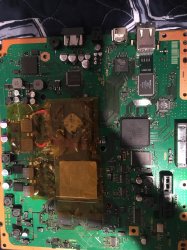
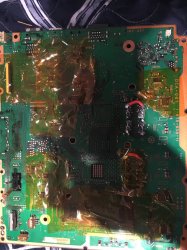
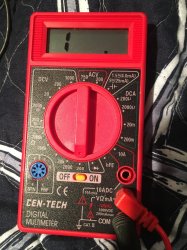
M13k0_27
Forum Noob
So how do I check the fuses . What setting for my multimeter and what points do I check?
you need to set it in diode mode ( ->|- ), you'll hear a bip while shorting the two points.
When a fuse is good, multimeter will bip (try it more than once, cleaning a little bit fuse surface for better contact).
Inviato dal mio iPhone utilizzando Tapatalk
M13k0_27
Forum Noob
Honestly I am in camp 2 and 3
I don't understand why people are lying so much. Really...
Anyway, in one CECHG04 model I got 1002 error, and I replaced one nec tokin at RSX side and it's working fine
Anybody maybe know what is 3032 error ? I am suspecting bad BGA under CELL, because i did RSX reball with 3034, and now I have 3032 error.
In last CECHC model I also repaired 3034 problem with reballing, and now it has GLOD with 2203 error issue, so unfortunately I won't do anything with this console
I don't know where is IC 3001 located but, maybe there is another issue with it.
Inviato dal mio iPhone utilizzando Tapatalk

Kleon1876
Member
Does my multimeter have diode mode? I see --> + but not -->|-you need to set it in diode mode ( ->|- ), you'll hear a bip while shorting the two points.
When a fuse is good, multimeter will bip (try it more than once, cleaning a little bit fuse surface for better contact).
Inviato dal mio iPhone utilizzando Tapatalk
Kleon1876
Member
i had the same thing 4432 and 3034. I think they come together when you have a bad bga connection under RSX. I did a proper reflow with my preheater and liquid flux. Console came back both errors gone.I get this output on a SEM-001:
>$ lasterrlog
[SSM] state: 0000 -> 0101
Bringup Mode #0 (0xFF)
[SSM] ssmCb_OnStartingBePowOn() called.
[SSM] First Boot.
[SSM] Bringup mode : syspm_stat=00000000/00000000
[POWSEQ] PowerSeq_Setup called.
[SSM] state: 0101 -> 0201
[POWSEQ] AV Backend Setup
[SSM] state: 0201 -> 0102
[SSM] state: 0102 -> 0202
[SSM] state: 0202 -> 0103
[SSM] state: 0103 -> 0203
[SSM] ssmCb_BeforeBeOn() called.
[SSM] state: 0203 -> 0104
Psbd_SbTransMode_Half:0x20e7
[POWERSEQ] Error : BitTraining RSX:RRAC:RX3:GLOBAL1:RX_STATUS
[SSM] state: 0104 -> 0304
[SSM] ssmCb_AfterBeOn2() called.
[SSM] PowSeq Fail : Detected !
[SSM] state: 0304 -> 0700
[POWSEQ] AV Backend Letup
[SSM] Shutdown mode : syspm_stat=00000000/00000000
[ERROR]: 0xa0404432
[ERROR]: 0xa0403034
[POWSEQ] PowerSeq_Letup called.
[SSM] state: 0700 -> 0600
(PowerOff State) (Fatal)
does anyone know what it is related to?
Edit: so 403034 is related to bad RSX connection as i found in this post.
any idea on 0xa0404432
Kleon1876
Member
There is no leaked DIA-001 diagrams, so you will be out of luck.
What im doing at the moment is recording a working DIA-001,002 board testpoints - voltages and resistance. So i can add to the repo to help diag further.
Any wishful thinking on you dropping the DIA-001 board testpoints any time soon ?
M13k0_27
Forum Noob
i had the same thing 4432 and 3034. I think they come together when you have a bad bga connection under RSX. I did a proper reflow with my preheater and liquid flux. Console came back both errors gone.
Hi, I've written something about my errors before, could you give me any advice?
Thank you... (I'm waiting for someone help/suggestion).
Inviato dal mio iPhone utilizzando Tapatalk
Hey ! If you have a 3034 error unfortunately it is a BGA issue. When I got a 3034 error I am doing RSX reballing and it's gone, but in that 4001 I don't know that is caused by RSX or CELL. I reballed a CECHG04 RSX with 3034 error, and now I have 3032 error. I am doing reflow of CELL right now and if this error will dissapear that I can think that 3034 will be a RSX issue and 3032 will be CELL issue. We will see. In your case I reccomand to do a RSX reflow and you will see that this error will dissapear. That would be great if you have preheater, it's always more safe with it.Hi, I've written something about my errors before, could you give me any advice?
Thank you... (I'm waiting for someone help/suggestion).
Inviato dal mio iPhone utilizzando Tapatalk
Kleon1876
Member
Hi, I've written something about my errors before, could you give me any advice?
Thank you... (I'm waiting for someone help/suggestion).
Do a proper reflow. Use an ir preheater and flux. It should come back to life. Mine did with same errors.
Inviato dal mio iPhone utilizzando Tapatalk
do a proper reflow and it should come back to life.
M13k0_27
Forum Noob
You'll see the diode symbol (I've seen it on your image), anyway, do you think that error 1004 needs another reflow?Does my multimeter have diode mode? I see --> + but not -->|-
Kleon1876
Member
sounds good. I dont think 1004 can be solved by reflow. I have read that it might be bad necs.You'll see the diode symbol (I've seen it on your image), anyway, do you think that error 1004 needs another reflow?
Similar threads
-

-
PS3 CECHA00 with several SYSCON errors (3004, 1001,1002, 2120,3011)
- Started by LSL
- Replies: 7
-
 PS3 Interesting PS3 Errors (1802, 1701, 1601) and Capacitor Replacement
- Started by Cheshire UK
- Replies: 2
-