PS3 Fault finding YLOD with the SYSCON - First steps and Error reporting

I don't have to convince you of anything, Im just sharing what I know and what fixes these issues.

So, as you claim to know everything, I will leave it to your capable hands...
Sure you don't have to.
But if you can, as it seems to be the case, please do.
I must be missing something, if you are so convinced.

Still, I think I know enough to ask you again to please edit the first page. I don't want new people to come and get wrong impressions. And there's new people coming.

Like it has happened in the past, some guy will come in the future with perfectly good Tokins, go through the trouble of reading the SYSCON, see an error log containing 1001 errors... And still replace them for nothing because they read the first page and didn't know better...

Is this what we are here for?

Because I don't know everything, I'm not saying that error 1001 can never be a result of a real tokin fault. Your information isn't necessarily wrong, but is still certainly misleading.

You can simply put an asterisk or something saying that it's probably meaningless.
A non-error that is known to occur in working systems when they are cut from AC power unexpectedly (and is therefore typically known to be there in case of GLOD for example)

To get any possible meaning out of 1001 error, seeing it in the log is not enough.
It is a must to catch it with bringup or otherwise watch it happen live in the form of a YLOD or something.

Cheers
 
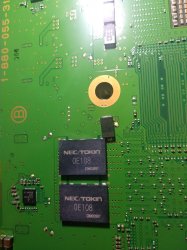
If you are seeing them alot in the errlog, it gives an indication of failed or failing nec tokins.

Lets just say, 90% of the time I was right, 1001 and 1002 are VRAM power fails, which is associated to power issues near the CELL or RSX = NEC tokins or power ICs.
Hmm, let's put it like this then.

I can show you a number of instances of error 1001 in the log... Where it has nothing to do with Nec Tokin.

Can you show me a higher number of instances where error 1001 in the log... Actually was because of Nec tokin?

Unless your number is at least 10 times bigger than mine, don't you think it makes sense to at least mention the other likely possibility?

Again, this has nothing to do with you or me. It's about the way the information is presented.
 
Just signed up to get some opinions, so I gave reading the syscon on a ps3 phat a go, however I am not able to extract anything from it (internal mode only without the diag pin, haven't tested external).
I have got the data lines correct as I able to auth and get a successful response, however no matter what command I use I am met with the response
f0000003

From looking up here there was one reply here where they described that response as "command not found" and another guy asking if having this response is enough to come to the conclusion that syscon is dead.

So asking here if anyone is using this method of diagnosis has come across this, is there a way to get proper reporting back? If the syscon is dead, I've seen ways to remarry another syscon which includes blanking out sections of it, could this be done through the UART interface as well?
Thanks
 
Have you tried "com X CXR" then "AUTH"? Only rx, Tx and gnd connected. First stage EEP GET 3961 01 00000000 FF
Then EEP SET 3961 01 00 should see EEP GET 3961 01 00000000 00.
Now turned everything off, connect diag pin to gnd, turn on again should see ylod signals.
Now com X CXRF then "auth" report eepcsum or correct it if you reached this point.
There is a big difference between big letters and small letters.
Have you read the hole pdf?
http://s.go.ro/zqnqfufq
At least 5 power supply cable should be connected to provide 5v to motherboard.
 
Last edited:
Just signed up to get some opinions, so I gave reading the syscon on a ps3 phat a go, however I am not able to extract anything from it (internal mode only without the diag pin, haven't tested external).
I have got the data lines correct as I able to auth and get a successful response, however no matter what command I use I am met with the response
f0000003

From looking up here there was one reply here where they described that response as "command not found" and another guy asking if having this response is enough to come to the conclusion that syscon is dead.

So asking here if anyone is using this method of diagnosis has come across this, is there a way to get proper reporting back? If the syscon is dead, I've seen ways to remarry another syscon which includes blanking out sections of it, could this be done through the UART interface as well?
Thanks
Hmm, not sure I understand.
Maybe you mean you tried "external" only,
and haven't tested "internal" instead of the other way around?
Because you can't just go to internal directly without going through external mode first to enable it.

Are there any other things that make you suspect a dead syscon?
What is the behavior of the console?
Your adapter is 3.3v right

(Also as vyktor mentions it could simply be a matter of using capital (big) letters instead of lowercase letters) You need uppercase in external mode always.

If you get auth successful it should mean you did it OK.
Hopefully it's nothing serious.
 
Hello, sorry yes I got internal and external mixed up, I am only looking to use external mode to just get the error log.

I did get a successful authentication (in lowercase "auth"), but no commands would run, however they were in lowercase and had not realised that uppercase must be used in external mode. This likely is my error if the syscon can only respond to commands issued as capitals. Thanks for the info.
 
I think this has to do with whether you're using CMD as administrator or not. For some reason I could only get commands to work if typed in all CAPS, other times only lowercase. Same with AUTH or auth. I just always run CMD as administrator, to avoid funny business. I don't remember which one it is, but if lowercase isn't working try all caps. And don't forget the "GET 0" or "GET 1" command if you're trying to retrieve information specific to the CPU or RSX respectively. Originally I foolishly thought the TMP command didn't work, when I was supposed to tyupes out "TMP GET 0" for the current CPU temp. Same with fan tables commands.
 
Hello! i just found this thread and think this is awesome! Thanks for all the effort to make it possible to see the error codes, it certainly will help to save several PS3 from being destroyed!

Talking about destroyed by pig hands, i will post the error codes i got from a VER-001, did it just for fun and to see what was happening with the PS3 before they did what they did with it, to have some history...
The processor in this board was completly torn out, beyond repair as it is missing pads both in the processor itself and the board, will try to post a pic.
Symptons: Instant YLOD/RLOD

Ef2kYl2.jpg


Just out of curiosity, how can i convert the info in the clock to usable date/time?

===================================
ERR 00: 00000000 A0093003 FFFFFFFF
ERR 01: 00000000 A0093003 FFFFFFFF
ERR 02: 00000000 A0093003 FFFFFFFF
ERR 03: 00000000 A0093003 FFFFFFFF
ERR 04: 00000000 A0802131 0B4C7654
ERR 05: 00000000 A0802030 0B4C7652
ERR 06: 00000000 A0802130 0B4C7650
ERR 07: 00000000 A0802130 0B4C764E
ERR 08: 00000000 A0802131 0B4C764A
ERR 09: 00000000 A0802030 0B4C7649
ERR 10: 00000000 A0802131 0B7D9B7E
ERR 11: 00000000 A0802130 0B7D9B7A
ERR 12: 00000000 A0802130 0B7D9B76
ERR 13: 00000000 A0802131 0B7D9B73
ERR 14: 00000000 A0802131 0B7D9B6E
ERR 15: 00000000 A0802131 0B55F368
ERR 16: 00000000 A0802031 0B55F362
ERR 17: 00000000 A0802130 0B55F360
ERR 18: 00000000 A0802131 0B55F35C
ERR 19: 00000000 A0802131 0B4A13AE
===================================

I will also post some codes from other 2 units im working on in a separeted post.
 
Hello! i just found this thread and think this is awesome! Thanks for all the effort to make it possible to see the error codes, it certainly will help to save several PS3 from being destroyed!

Talking about destroyed by pig hands, i will post the error codes i got from a VER-001, did it just for fun and to see what was happening with the PS3 before they did what they did with it, to have some history...
The processor in this board was completly torn out, beyond repair as it is missing pads both in the processor itself and the board, will try to post a pic.
Symptons: Instant YLOD/RLOD

Ef2kYl2.jpg


Just out of curiosity, how can i convert the info in the clock to usable date/time?

===================================
ERR 00: 00000000 A0093003 FFFFFFFF
ERR 01: 00000000 A0093003 FFFFFFFF
ERR 02: 00000000 A0093003 FFFFFFFF
ERR 03: 00000000 A0093003 FFFFFFFF
ERR 04: 00000000 A0802131 0B4C7654
ERR 05: 00000000 A0802030 0B4C7652
ERR 06: 00000000 A0802130 0B4C7650
ERR 07: 00000000 A0802130 0B4C764E
ERR 08: 00000000 A0802131 0B4C764A
ERR 09: 00000000 A0802030 0B4C7649
ERR 10: 00000000 A0802131 0B7D9B7E
ERR 11: 00000000 A0802130 0B7D9B7A
ERR 12: 00000000 A0802130 0B7D9B76
ERR 13: 00000000 A0802131 0B7D9B73
ERR 14: 00000000 A0802131 0B7D9B6E
ERR 15: 00000000 A0802131 0B55F368
ERR 16: 00000000 A0802031 0B55F362
ERR 17: 00000000 A0802130 0B55F360
ERR 18: 00000000 A0802131 0B55F35C
ERR 19: 00000000 A0802131 0B4A13AE
===================================

I will also post some codes from other 2 units im working on in a separeted post.
In SW mode (which you are using), the command "errlog" will just list all errors at once, and with the dates on readable format.
Same command is available in CXRF mode in older models.

But yeah, I also wonder how to decode those dates into a readable format. It should be possible, maybe somebody knows.

About your errors, (2130,2131) were those happening before or after the
destruction? Thermal sensor errors during ON state. Maybe non-errors. Not sure.
 
Hello guys. I have some question, hope someone can give me a direction to begin.
I have a SEM-001 board. The symptomps are YLOD -1 sec I guess. The standby led is burned up. But when I press the power button the power led go green for sec and the problem beeps.So i try the regular stuff, another PSU . everything disconected that is not needed, but the same YLOD appears.
So i connect my uart to the board. In external mode I got ERRLOG error 3004 , and by the number of 14 to 19 error they are 1002 error and a single 1001 error. I didint clear the ERRLOG yet. I check some fuses I found on the board. I check the TX looking fuses. I am not sure they are fuses, because they are not on the board with F, but with TH instead. Green and brown collor . for instance TH 4001
I am using windows 10 cmd/powershell/ is there a way to get the full errlog, because now I am typing ERRLOG GET 00 , ERRLOG GET 01 etc manually?
 
Hello guys. I have some question, hope someone can give me a direction to begin.
I have a SEM-001 board. The symptomps are YLOD -1 sec I guess. The standby led is burned up. But when I press the power button the power led go green for sec and the problem beeps.So i try the regular stuff, another PSU . everything disconected that is not needed, but the same YLOD appears.
So i connect my uart to the board. In external mode I got ERRLOG error 3004 , and by the number of 14 to 19 error they are 1002 error and a single 1001 error. I didint clear the ERRLOG yet. I check some fuses I found on the board. I check the TX looking fuses. I am not sure they are fuses, because they are not on the board with F, but with TH instead. Green and brown collor . for instance TH 4001
I am using windows 10 cmd/powershell/ is there a way to get the full errlog, because now I am typing ERRLOG GET 00 , ERRLOG GET 01 etc manually?
Yes, you need to get into internal CXRF mode and run the errlog command as suggested in the post above.
And don't forget to run bringup for more details about your current error.

Friend, try this:
IMG_20210306_201323.jpg
And nothing else that is not reversible for now.

Cheers
 
If you are seeing them alot in the errlog, it gives an indication of failed or failing nec tokins.

Lets just say, 90% of the time I was right, 1001 and 1002 are VRAM power fails, which is associated to power issues near the CELL or RSX = NEC tokins or power ICs.
I actually had a system which threw error 1001 every time i was flipping the power switch behind the console during operation. Not saying this error can't indicate something else, but i can definitely attest to the fact that it shows up during a sudden power loss.
Here's the error codes i extracted from said system (all 1001 errors at the top were me purposely cutting power). This particular console also did not have YLOD, but did have overheating issues. There was a couple 1001's on that list before i messed with it, and i'm not sure if those were due to the previous owner cutting power off suddenly or not.

Code:
Auth successful
>$ ERRLOG GET 00
00000000 A0801001 FFFFFFFF
>$ ERRLOG GET 01
00000000 A0801001 0B5C231E
>$ ERRLOG GET 02
00000000 A0801001 0B5C17EF
>$ ERRLOG GET 03
00000000 A0801001 0B5C1421
>$ ERRLOG GET 04
00000000 A0801200 0BE00A50
>$ ERRLOG GET 05
00000000 A0801001 0B6A7836
>$ ERRLOG GET 06
00000000 A0801001 0B4C7261
>$ ERRLOG GET 07
00000000 A0801601 0B4C5F3A
>$ ERRLOG GET 08
00000000 A0801701 0B4C5F3A
>$ ERRLOG GET 09
00000000 A0801200 141DA961
>$ ERRLOG GET 10
00000000 A0801200 13FD724D
>$ ERRLOG GET 11
00000000 A0801200 13F9BF51
>$ ERRLOG GET 12
00000000 A0801200 13F9BF18
>$ ERRLOG GET 13
00000000 A0801200 13F9BEE3
>$ ERRLOG GET 14
00000000 A0801200 13F507AD
>$ ERRLOG GET 15
00000000 A0801200 13F36B97
>$ ERRLOG GET 16
00000000 A0801200 13ECE7DB
>$ ERRLOG GET 17
00000000 A0801200 13ECBD0D
>$ ERRLOG GET 18
00000000 A0801200 13EA51CB
>$ ERRLOG GET 19
00000000 A0801200 13D243AB
 
Last edited:
I actually had a system which threw error 1001 every time i was flipping the power switch behind the console during operation. Not saying this error can't indicate something else, but i can definitely attest to the fact that it shows up during a sudden power loss.
Here's the error codes i extracted from said system (all 1001 errors at the top were me purposely cutting power). This particular console also did not have YLOD, but did have overheating issues. There was a couple 1001's on that list before i messed with it, and i'm not sure if those were due to the previous owner cutting power off suddenly or not.

Code:
Auth successful
>$ ERRLOG GET 00
00000000 A0801001 FFFFFFFF
>$ ERRLOG GET 01
00000000 A0801001 0B5C231E
>$ ERRLOG GET 02
00000000 A0801001 0B5C17EF
>$ ERRLOG GET 03
00000000 A0801001 0B5C1421
>$ ERRLOG GET 04
00000000 A0801200 0BE00A50
>$ ERRLOG GET 05
00000000 A0801001 0B6A7836
>$ ERRLOG GET 06
00000000 A0801001 0B4C7261
>$ ERRLOG GET 07
00000000 A0801601 0B4C5F3A
>$ ERRLOG GET 08
00000000 A0801701 0B4C5F3A
>$ ERRLOG GET 09
00000000 A0801200 141DA961
>$ ERRLOG GET 10
00000000 A0801200 13FD724D
>$ ERRLOG GET 11
00000000 A0801200 13F9BF51
>$ ERRLOG GET 12
00000000 A0801200 13F9BF18
>$ ERRLOG GET 13
00000000 A0801200 13F9BEE3
>$ ERRLOG GET 14
00000000 A0801200 13F507AD
>$ ERRLOG GET 15
00000000 A0801200 13F36B97
>$ ERRLOG GET 16
00000000 A0801200 13ECE7DB
>$ ERRLOG GET 17
00000000 A0801200 13ECBD0D
>$ ERRLOG GET 18
00000000 A0801200 13EA51CB
>$ ERRLOG GET 19
00000000 A0801200 13D243AB

Lots of 1200 errors, there is another cause to overheating CELL, and thats the IC buck chips. These regulate the power.
When these go bad, can cause overvoltage - causing the CELL to overheat.
 
Hmm, let's put it like this then.

I can show you a number of instances of error 1001 in the log... Where it has nothing to do with Nec Tokin.

Can you show me a higher number of instances where error 1001 in the log... Actually was because of Nec tokin?

Unless your number is at least 10 times bigger than mine, don't you think it makes sense to at least mention the other likely possibility?

Again, this has nothing to do with you or me. It's about the way the information is presented.

So far i've only seen 1001 and 1002 in the log, when the nec tokins are near failed state.

Its possible a trigger point for power fluctuation?, don't know as of yet.
 
Lots of 1200 errors, there is another cause to overheating CELL, and thats the IC buck chips. These regulate the power.
When these go bad, can cause overvoltage - causing the CELL to overheat.
Very interesting! Though this console would actually shut down within about 5 minutes due to running too hot. I remember someone added new thermal paste to the IHS, but didn't bother cleaning the old paste off beforehand... I was quite amazed. I properly cleaned the heatsink and delidded both chips and that error was to never be seen again.
 
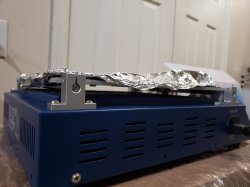
Btw @RIP-Felix i was curious if you cover the open areas underneath the motherboard on the preheater with aluminum as well? I'll share an image of the area in question.
 

Attachments

  • 20210425_212632.jpg
    20210425_212632.jpg
    2.9 MB · Views: 229
Last edited:
In SW mode (which you are using), the command "errlog" will just list all errors at once, and with the dates on readable format.
Same command is available in CXRF mode in older models.

But yeah, I also wonder how to decode those dates into a readable format. It should be possible, maybe somebody knows.

About your errors, (2130,2131) were those happening before or after the
destruction? Thermal sensor errors during ON state. Maybe non-errors. Not sure.

Thanks.
I got this PS3 with the board in this state, and was just looking for the erros as a test to see what it will say in this case... looks like it was having problems with the termal sensors and they tried a reflux/reball and endedup messing it up...

Just sharing a case to confirm the error codes: FAT with DIA-001 board i got, was like 1sec YLOD and was showing the errors:

A0403034
A0404422

As others have mentioned, looks like it needs a reballing... I just did a quick reflow on RSX to confirm, actually just heated a little to diagnose, and the errors changed to:

A0801002
A0801002

After seeing the 1002, installed tantalum alongside NEC/TOKINs and now it boots up... Cant do a reball righ now but its now confirmed it needs one on RSX.
 
Last edited by a moderator:
Very interesting! Though this console would actually shut down within about 5 minutes due to running too hot. I remember someone added new thermal paste to the IHS, but didn't bother cleaning the old paste off beforehand... I was quite amazed. I properly cleaned the heatsink and delidded both chips and that error was to never be seen again.

On rare occasions the heatsink will warp so bad, that you either replace or shave down a bit to even it out.

I've experimented with the best way to transfer heat from the CELL and RSX, and so far:

1. Keep to the factory method - Delid, remove old thermal paste and rubber, use a pea size of thermal paste using 12km+ thermal paste rating. Then glue back the heatsinks.
2. Add thermal heat pads underneath the two heat plates of the motherboard - this helps with transfer of heat to the metal chassis and adds pressure to bind and transfer heat.

Tweak the syscon factory fan settings to sane settings - raising the default 20% to 25% minimum on first turn on. Then tweak the rest of the table with a 2% margin. More aggressive settings for the old fat models and less for the new fat models.
My fan tables are in my git repo.

The end result for example, is my CECHL i bought in 2008, now runs at full steam:

60c CELL and 62c RSX

When idling,

55c CELL and 58c RSX at XMB screen

In a spring day, in summer might raise a little, but not by much.

Before any of this, it would regularly reach 70c when hitting hard games. Now, doesn't even break a sweat!
 
Btw @RIP-Felix i was curious if you cover the open areas underneath the motherboard on the preheater with aluminum as well? I'll share an image of the area in question.

I wouldnt use aluminum!

If really needed, use heat tape for the plastic parts. Otherwise you will need a IR heater that does heat profiling.

Manual way, is just gentle heat on the bottom - In the old days, I set to 150c on the bottom and 215c on the top heater.
But monitor the process.

Now, i just use heat profiles and let it do its thing.
 
On rare occasions the heatsink will warp so bad, that you either replace or shave down a bit to even it out.

I've experimented with the best way to transfer heat from the CELL and RSX, and so far:

1. Keep to the factory method - Delid, remove old thermal paste and rubber, use a pea size of thermal paste using 12km+ thermal paste rating. Then glue back the heatsinks.
2. Add thermal heat pads underneath the two heat plates of the motherboard - this helps with transfer of heat to the metal chassis and adds pressure to bind and transfer heat.

Tweak the syscon factory fan settings to sane settings - raising the default 20% to 25% minimum on first turn on. Then tweak the rest of the table with a 2% margin. More aggressive settings for the old fat models and less for the new fat models.
My fan tables are in my git repo.

The end result for example, is my CECHL i bought in 2008, now runs at full steam:

60c CELL and 62c RSX

When idling,

55c CELL and 58c RSX at XMB screen

In a spring day, in summer might raise a little, but not by much.

Before any of this, it would regularly reach 70c when hitting hard games. Now, doesn't even break a sweat!
Those temperatures are good!

Could you please elaborate on the process of tweaking the syscon fan tables?
What about the SW syscons like L model? The checksums behave differently don't they?

This is something that can help anybody. Not just technicians
Until now I've been more or less OK with webman fan control, but syscon is way superior
 

Similar threads

Back
Top