PS3 Fault finding YLOD with the SYSCON - First steps and Error reporting

Hmm, Ok. So I was actually right? Mystery solved then.
@M4j0r probably was trying to say the same thing in a different way?

"Setini" modifying the "initial/default" table that is stored in the EEPROM and is loaded everytime at the beginning (initially).

"Set" modifying only for the current session, on the fly (the table that is already loaded into volatile RAM).


Because the fan spinup at the first seconds has nothing to do. This probably is just something for reliability on all kinds of devices and fans. In general in order for a fan to begin spinning from a stationary position, it needs more power than to simply remain spinning at a lower speed.
So they normally give the fan a powerful spin first, to make sure it doesn't stay jammed.

With that mystery solved I'm ready now to modify the fan curves manually.

Setini is really the important one and the only one you need to edit. The changes will take effect not on the fly, but after power off and on as expected.
I already tested this on a funny board I have.

Still would have been nice a 1 operation solution

Cheers
I have been wanting to change the fantables manually using the SYSCON, so that we don't have to jailbreak and install webMAN. I would love to see a tutorial for it. Would you mind copy/pasting the string on the CMD prompt after you change the fantables? I'd like to see the commands and such (kinda like a tutorial).

So when you change the ini are you not changing the eeprom? I was under to impression that changing the fantbls would cause the eeprom checksum to fail and then you would have go back in and fix it one by one.
 
I have been wanting to change the fantables manually using the SYSCON, so that we don't have to jailbreak and install webMAN. I would love to see a tutorial for it. Would you mind copy/pasting the string on the CMD prompt after you change the fantables? I'd like to see the commands and such (kinda like a tutorial).

So when you change the ini are you not changing the eeprom? I was under to impression that changing the fantbls would cause the eeprom checksum to fail and then you would have go back in and fix it one by one.
Yes, when you change with setini you are changing the eeprom. (And breaking the checksum every time) That's the whole point.

But you only need to fix the checksum mismatch of the thermal config area at the end, when you are done changing the eeprom.
In theory if we were to do it the other brute way, overwriting the whole area, we would also be able to skip this step, because a correct checksum could also be contained as well in the distributed patch.

Don't worry, if I figured it out (while db was there laughing) everyone should be able to do it too. Perhaps eventually include it in another video with NSC.
It's not difficult really the manual way, even if the other way would be easier. The manual way will also be more customizable individually.

Tomorrow I'll give examples and I'll also try other models
 
Hmm, Ok. So I was actually right? Mystery solved then.
@M4j0r probably was trying to say the same thing in a different way?

"Setini" modifying the "initial/default" table that is stored in the EEPROM and is loaded everytime at the beginning (initially).

"Set" modifying only for the current session, on the fly (the table that is already loaded into volatile RAM).


Because the fan spinup at the first seconds has nothing to do. This probably is just something for reliability on all kinds of devices and fans. In general in order for a fan to begin spinning from a stationary position, it needs more power than to simply remain spinning at a lower speed.
So they normally give the fan a powerful spin first, to make sure it doesn't stay jammed.

With that mystery solved I'm ready now to modify the fan curves manually.

Setini is really the important one and the only one you need to edit. The changes will take effect not on the fly, but after power off and on as expected.
I already tested this on a funny board I have.

Still would have been nice a 1 operation solution

Cheers
Yes you was right, the dangerous ones are the "setini" subcommands variants that writes in EEPROM
Btw, additionaly to the 5 commands i mentioned (fanconpolicy, fantbl, hyst, trp, and tshutdown) probably there are others that writes individual settings in the thermal config area too, is just nobody documented them or found, if you want to search a bit remember you can use the subcommand "help" in combination with any other command, this is going to display some help messages in screen about how to use the command, also keep in mind maybe some commands doesnt have any help texts (but they could acept subcommands like "setini" etc...)
For reference... check in the graphs i made, it contains some (i guess partially) official codenames from a code structure published by m4j0r time ago, and the names that matches with the command name
-fanconpolicy changes the value named "policy" (in dark pink) for the fantable of every thermal sensor (CELL/RSX/other)
-fantbl allows to change "TempD", "TempU", and "Duty" of every fan step
-trp changes the value named "ini_trp_cell" or "ini_trp_rsx" (or the other)
-hyst changes the value named "ini_hyst_cell" or "ini_hyst_rsx" (or the other)
-tshutdown changes the value named "shutdown_temp_cell" or "shutdown_temp_rsx" (or the other)

In this list im missing some more to change the "minduty", "maxduty", "select" (this is the one that indicates if is loaded from ROM or RAM, still a bit unknown), "active"
And "thermal_shutdown_time", "initial_fan_duty", "initial_fan_time"... and 3 unkowns
Are a few, but thats all, im guessing there are commands to change most of that values (or all them)

Remember to make a copy of the original thermal config area before changing anything, i dont think that is much risky because incase of corruption in the thermal config area of the EEPROM, at the next reset you are going to power the PS3 in standby (only) so the fan is stopped, this means syscon is not really doing any "logic" with the values for the fantable... in other words it doesnt really matters if the thermal config area is corrupted because syscon is not using it yet when the PS3 is in standby

------------
That idea of giving the fan an initial "boost" just as a safety meassure to prevent it being stucked with lower speeds worths to be considered, i always thought that boost is because the processors have an instant notable increment of temperature inmediatly when you boot them (is like a violent temperature change, but relative to the ambient temperature)

What i mentioned in my previous post is something i just imagined when i was writing that post... lets say... maybe what happens is that syscon needs some time to complete all his boot sequence, and along that time is not able to "monitor" the thermal sensors and compare the values of the sensors with the tables in the thermal config to find the fan speed following some "logic"
maybe the "brain" of the syscon is busy in that initial times (checking info from CELL, RSX, etc...) so the fan is working in "stupid mode" for 2 seconds :D
We could try to change the value of "initial_fan_time" to zero and see what happens, but meh, doesnt matters much, i admit i hated it since years ago, but now i realized that is a "feature" implemented in the syscon firmware on purpose and i tend to think that is there for some good reason

-----------------------
For me, right now is clear that the best way to do this is automated with a program/script because typing the commands several times sucks. There is too much room for human errors by repating things consecutivelly, is easy to lost the concentration because is boring
The "r" command doesnt have that restriction of chunks of 0x40 bytes in mullion syscons but sherwoods have it, and i believe @M4j0r when he says that using the "EEP" command is more relliable
So... oki, incase of doing this with some assistance (script or program) is easyer to do it with the EEP command

Next thing that would be a great feature (for writing purposes) would be if that program is able to do a comparison of the entire thermal config area in syscon EEPROM (0x200 bytes) with the file we are going to write (another 0x200 bytes) and write only the bytes that differs
The point is... for us is a lot more convenient to share that "thermal config" settings as a single file... but there are lot of bytes filled with 0xFF, and the file we want to write have that same bytes filled with 0xFF too
Overwriting a byte with the same value is pointless, it would be awesome if the program minimizes the writes operations to syscon EEPROM
Lets say... you make a dump of the complete thermal config (0x200 bytes), then you change only 3 bytes located at different offsets , and then you ask to the program to write it entirelly (0x200 bytes) but the program is smarter than us and realizes that only is needed to use the command EEP 3 times with a length of 1 byte each (3 bytes written in total, at different offsets)

 
Last edited:
@sandungas One reason might be so that you'll notice the lack of a revving sound at boot if a fan stops working. Most computers have PWM control on the CPU fan now, so it checks RPM at boot and gives an audible buzz or refuses to boot if the CPU fan breaks. The PS3 fan is 3pin, which I'm not sure can communicate back to the console it's RPM, like four pin fans can. I'f I'm not mistaken, won't the console will work fine if you unplug it? Sure it'll overheat, but as far as the PS3 is concerned it just assumes the fan is working and doing as told. So if you turn on a PS3 and don't hear it rev, then you have immediate feedback that something is wrong.

Another reason is possibly to clear thermal spikes. For example, the residual heat from a previous shutdown. There is a bit of lag time between when a hot spot forms and when that heat evenly distributes through the heatsink, and again to transfer into the air. So at shutdown the fans usually run a little faster for a few seconds longer, to lower the heatsink temp enough to absorb the last bit from the hotspot around the processor, so that it doesn't actually increase. But if you start the console up right away after a shutdown while the console is still hot, there is going to be a few seconds where the temperature sensors are blind and the processors are working hard to startup the console. So it probably revs hard there too, just to be sure there is sufficient airlow flow to clear out any residual heat in that specific case.

Perhaps another reason is that if the PSU is failing, you want to be able to capture the error codes at startup. So working the console reasonably hard at boot for a few seconds during the POST check ensure that if the PSU is teetering on the edge, it'll trigger a warning then.

It's probably a combination of these and other factors. Perhaps a carryover from earlier times before 4-pin fans and things have just remained the same because they have always been done that way by habit.
 
I have been wanting to change the fantables manually using the SYSCON, so that we don't have to jailbreak and install webMAN. I would love to see a tutorial for it. Would you mind copy/pasting the string on the CMD prompt after you change the fantables? I'd like to see the commands and such (kinda like a tutorial).

So when you change the ini are you not changing the eeprom? I was under to impression that changing the fantbls would cause the eeprom checksum to fail and then you would have go back in and fix it one by one.

My git repo has always had the fantables and commands used - https://github.com/db260179/ps3syscon/tree/master/Fantables

Im still tinkering on these, so reason haven't gone into more technical detail.

These txt files, show the factory default values and tweaked values at the end, depending on the model of motherboard.

COK-001,002 to DIA-001,002 boards can control the fantable profiles of p0 to p9.

Later ps3 motherboard models DYN-001 onwards restricts what profiles can be changed

In terms of fan control, using PWM to control the RPM speed of the fan cycle, usually a 3pin fan would be voltage controlled, but sony being sony, opted to modify it slightly, and reduce the 4pin to 3pin.

I havent checked, but believe the external mode still allows to change fantables etc. Tricky part is to fix the checksum when setting the setini = initial setting.

The most important setting to change before fantables, is to set the thermal shutdown level to 91.0c, from its 95c or a bit lower, maybe 85c.
 
My git repo has always had the fantables and commands used - https://github.com/db260179/ps3syscon/tree/master/Fantables
Yes, they were there all the time, but nobody knew how to use them.

The most important setting to change before fantables, is to set the thermal shutdown level to 91.0c, from its 95c or a bit lower, maybe 85c.
Makes sense. Although it seems you were trying to do it with

tshutdown set 1 85 (for example).

This does nothing because next time you power off and on, the setting will revert to the initial one. You want to use setini for this too:

tshutdown setini 1 85

(And yes it will break the eep checksum, but that's the whole point)
I havent checked, but believe the external mode still allows to change fantables etc. Tricky part is to fix the checksum when setting the setini = initial setting.
Yeah, because the checksum gets broken, this can't really be done in external mode. At least in this way.

In theory, it could still be done in external but by overwriting the entire area with a preconfigured patch which already contains a correct checksum.
But otherwise internal is needed yes

(Btw I still haven't forgotten about the 1001 error hehehehe)
 
@db260179 I see you went and edited your github with the setini tshutdown. Good. (Even if you could have edited other things too hehe, but oh well)

Actually this made me realize something else:
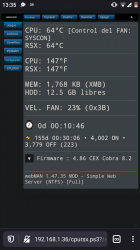
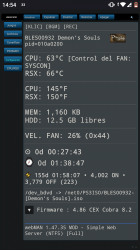
The end result for example, is my CECHL i bought in 2008, now runs at full steam:
Is your CECH "L" system actually a DIA-002 board as if it were a K model?
With a Mullion syscon?

Because I thought L models should have a VER-001 board inside, like mine has. (With a Sherwood syscon)

I remember @sandungas mentioning something about this...

Which is significant because I find that the process of editing the fan settings... Indeed works differently with the SW syscons. In fact I haven't been able to edit them at all.

Among other differences, it seems like in SW there is no setini/getini at all. So even if I managed to change for example

tshutdown set 1 5500
(Rsx 85c (0x5500) down from 97c. SW doesn't understand decimal numbers like Mullion)

The change will revert next power off.
If I try setini, it just doesn't work, as if the command didn't exist or work like that. Probably it requires internal permissions. Still not sure because I couldn't get information about that with help.

So SW just can't currently be edited like the older models. I suppose it's still possible with a pre configured patch EEP brute overwrite.

Does anybody know more about this?

Good news is that the older models (DIA 002 and earlier) can really be edited in a friendly way actually. It may be many commands but it's actually possible to copy them all and hit enter just once. I can elaborate on this later, it's easy and quite safe I think.
 
I have lot of doubts so maybe some of the things im going to say are not much accurate, but just to keep this talk active...

The sherwood syscons doesnt contains a checksum at the end of the "thermal config" area. And the UART interface doesnt have either a "internal mode "or "external mode" (there is only one mode)... so in that matter is easyer to deal with them
I've been messing around a bit and I can confirm that changing data in the thermal config area on the sherwoods does break the checksum and the console will refuse to work afterwards (pipipi).

The difference seems to be that instead of separate checksums for the different areas, there is a single checksum for everything. But it still breaks of course.

(Because I don't know how to fix it yet (I don't know where the 2 bytes are located) I reverted the changes I made manually for now hehehe)
 
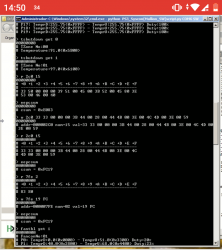
Ok, after some digging I found the checksum address on sherwood (VER 001). Can be checked with:

r 7fe 2

And being able to write to it and fix it means I could successfully modify the thermal settings on sherwood too.
It's not as friendly as mullion but It's certainly possible, and very needed on VER 001 of all boards I think.

(I don't advise copying my settings yet because these are probably not final. More like a first test. But it was enough to make the fan curve reasonable and the process is valid)

Cheers
 

Attachments

  • Screenshot_20210502-133504.png
    Screenshot_20210502-133504.png
    255.8 KB · Views: 68
  • Screenshot_20210502-145438.png
    Screenshot_20210502-145438.png
    316.1 KB · Views: 70
  • Screenshot_20210502-145038~2.png
    Screenshot_20210502-145038~2.png
    167.3 KB · Views: 75
Last edited:
Ok, after some digging I found the checksum address on sherwood (VER 001). Can be checked with:

r 79fe 2

And being able to write to it and fix it means I could successfully modify the thermal settings on sherwood too.
It's not as friendly as mullion but It's certainly possible, and very needed on VER 001 of all boards I think.

(I don't advise copying my settings yet because these are probably not final. More like a first test. But it was enough to make the fan curve reasonable and the process is valid)

Cheers
For some reasons I can't read over 1400 on SW.
Hope you are right about "r 79fe".
 
For some reasons I can't read over 1400 on SW.
Hope you are right about "r 79fe".
In my case I was right, but you can check to make sure.
"r" is just a read command so is completely safe.

First run eepcsum, and it will tell you what the checksum "should be".
And if the address is the same and there is no mismatch,
r 7fe 2 should return the same as eepcsum (but swapped)

It's all safe because it's reading. The adventurous part is writing.

I can't promise that 7fe is the checksum address for ALL sherwood boards. But I guess it should be the same for VER 001. Check yourself to be sure.
(To find the 7fe address, what I did was to manually look for it in hex dump of entire syscon EEPROM)
But I still think it should be the same, so you don't need to do what I did.
 
Last edited:
Ok had before that automatic script from M4j0r and thought I'm limited to that address 1400 This is last part of script to read syscon automatically


ps3 = PS3UART(sys.argv[1], 'SW')
print('Version: ' + ps3.command('VER')[1][0])
print(ps3.auth())
f = open(sys.argv[2], 'wb')
block_size = 0x40
print('Dumping NVS')
for i in range(0x0, 0x1400, block_size):
print('Reading 0x{:04X}'.format(i))
data = ps3.command('EEP GET {:08X} {:02X}'.format(i, block_size))
ret = data[0]
temp = ''
if ret == 0:
for i in range(2, len(data[1])):
temp += data[1][2:-2].replace(' ', '')
f.write(bytearray.fromhex(temp))
else:
print('Failed: ' + str(ret))

f.close()


So that every checksum it should be reading address on SW models.
That full file for automatically dump is in github link of first page thread.
To be honest I was afraid to play around those as this is not likely hardware side and quite risky if I don't properly understand those swapping bytes, nor there are many tests done.
 
Last edited:
Ok had before that automatic script from M4j0r and thought I'm limited to that address 1400 This is last part of script to read syscon automatically


ps3 = PS3UART(sys.argv[1], 'SW')
print('Version: ' + ps3.command('VER')[1][0])
print(ps3.auth())
f = open(sys.argv[2], 'wb')
block_size = 0x40
print('Dumping NVS')
for i in range(0x0, 0x1400, block_size):
print('Reading 0x{:04X}'.format(i))
data = ps3.command('EEP GET {:08X} {:02X}'.format(i, block_size))
ret = data[0]
temp = ''
if ret == 0:
for i in range(2, len(data[1])):
temp += data[1][2:-2].replace(' ', '')
f.write(bytearray.fromhex(temp))
else:
print('Failed: ' + str(ret))

f.close()


So that every checksum it should be reading address on SW models.
That full file for automatically dump is in github link of first page thread.
To be honest I was afraid to play around those as this is not likely hardware side and quite risky if I don't properly understand those swapping bytes, nor there are many tests done.
Hahaha, I admit I was also a bit nervous when I was doing it, especially since as you say nobody seemed to have done it successfully before. So I took some risks but the result is satisfactory.

I am thinking about making a separate thread more focused on this. Because currently there is not enough information so nobody is willing to take the step.
(Or maybe move over to @sandungas fan curve thread? After all, I learned most of it thanks to his graphs)

But it really is working and is not that hard. Yes these sherwoods are not so easy but still doable of course. And the older boards is even easier.
 
Ok, after some digging I found the checksum address on sherwood (VER 001). Can be checked with:

r 79fe 2

And being able to write to it and fix it means I could successfully modify the thermal settings on sherwood too.
It's not as friendly as mullion but It's certainly possible, and very needed on VER 001 of all boards I think.

(I don't advise copying my settings yet because these are probably not final. More like a first test. But it was enough to make the fan curve reasonable and the process is valid)

Cheers
This screenshot of the UART terminal is from a VER-001, right ?, please can you confirm it have a syscon model SW-302 ?
Also, can you enter in the More System Information for a confirmation of the SoftID ? (the SoftID is an identifyer of his firmware)
Im asking because research purposes, the syscon model SW-302 has not been dumped yet and we dont know his SoftID (please talk with m4j0r in private to ask him about how to "hide" your per-console info in the dump and share it with him)

Long story short... i think the SoftID is a checksum, your screenshot is really disturbing because is displaying checksum 0x83E
And the value 0x83E appears in the official syscon patch named SYS_CON_FIRMWARE_S1_00010002083E0832.pkg
For more info about this mistery take a read at this section in wiki, i was brainstorming about it a couple of days ago
Uv3DCvv.jpg


Take a look at that @M4j0r it looks like an unicorn :rolleyes:


Edit:
Well... maybe i went too much excited so soon, the output of your eepcsum command is 0xE083... if we flip the endianess the result is 0x83E0 (instead of the 0x083E i was looking for that made me trigger all my alarms)
So.. maybe is just a coincidence... im not sure
 
Last edited:
@sandungas
Yes, it is a VER-001 board inside a CECHL-04.

I did make a complete dump of the syscon EEPROM before I modified anything, so that should be no problem.
Although yeah, maybe it's not really an unicorn. Just a really cool horse.

Can I check if the syscon model is SW-302 without opening the console?

(I can open it if necessary, but all this time I just had Rx and Tx wires poking out of the closed shell)
 
Oops, Sorry I meant
r 7fe 2
In the screenshot it can be seen.
I don't know why I typed 79fe here.

But don't worry as I said it was just a read command, so nothing bad can happen.
Ah OK. Thanks for clarification. Though you got like whole dump over UART.
You are right nothing will happen for that not even if someone tries to write 79fe.
 
Ok, after some digging I found the checksum address on sherwood (VER 001). Can be checked with:

r 7fe 2
This piece of info is really interesting, good work in finding it :encouragement:
I knew the area named "thermal config" in sherwoods doesnt have any checksum because i have some official samples of a few of them, but i had doubts if there was other checksums
Now is clear, as you mentioned, there is only a checksum (and includes the "thermal config" area + some more areas)
So... we really need to do this process you made that can be resumed pretty much like this:
1) make a complete dump of the whole syscon eeprom with the python script specific for this task
2) run eepcsum before modifying anything (to find the original checksum value)
3) modify something insidide the "thermal config" area
4) run eepcsum again (to find the value that needs to be written)
5) write the value from step 4 (byteswapped) at offset 0x7FE

*steps 1 and 2 are optional... but yeah better do it... is what allowed you to find the position of the checksum by searching for it in the dump in a hexeditor in PC
By now we could assume the 2 bytes of the checksum are stored at offset 0x7FE for all sherwood models... but we dont really know, so be careful
I am thinking about making a separate thread more focused on this. Because currently there is not enough information so nobody is willing to take the step.
(Or maybe move over to @sandungas fan curve thread? After all, I learned most of it thanks to his graphs)
For me is fine if we use the thread i made with the thermal config graphs for talking about customizing them, that was the one of the goals of it, and also:
-document all the "thermal config" changes for the whole PS3 familly
-allow us to "share" or custom profiles in the easyest way posible
-expose sony retardation for prioritizing low noise levels at the cost of high temperatures

@sandungas
Yes, it is a VER-001 board inside a CECHL-04.

I did make a complete dump of the syscon EEPROM before I modified anything, so that should be no problem.
Although yeah, maybe it's not really an unicorn. Just a really cool horse.

Can I check if the syscon model is SW-302 without opening the console?

(I can open it if necessary, but all this time I just had Rx and Tx wires poking out of the closed shell)
Well... i guess is needed to open the PS3 because we dont have any other dump of SW-302... so by looking at the dump we are not going to be able to tell "yeah, this looks like the firmware of SW.-302" :D
Anyway... i think m4j0r could deduce it because he have dumps of the "previous" and the "next" syscon models... and your SW-302 is going to be "something in between" them
Also, as i mentioned your SoftID should be an unique identifyer of SW-302

By now just use the button combo to enter in the secret "system information" screen, make a photo of it (and edit the photo to either crop or remove your MAC adrress at the background)... then upload the photo to the forum

Like the photos that can be seen in this page, we need a sample of your PS3 https://www.psdevwiki.com/ps3/Talk:More_System_Information


Edit:
Also, run this command, if you share the dump with m4j0r he is going to be able to see it, but in the meantime im curious about it
Code:
> version
This is going to tell the syscon firmware version... if the syscon model is really a SW-302 i guess the version is going to be bigger than 0.17 and smaller than 1.11
 
Last edited:
This piece of info is really interesting, good work in finding it :encouragement:
I knew the area named "thermal config" in sherwoods doesnt have any checksum because i have some official samples of a few of them, but i had doubts if there was other checksums
Now is clear, as you mentioned, there is only a checksum (and includes the "thermal config" area + some more areas)
So... we really need to do this process you made that can be resumed pretty much like this:
1) make a complete dump of the whole syscon eeprom with the python script specific for this task
2) run eepcsum before modifying anything (to find the original checksum value)
3) modify something insidide the "thermal config" area
4) run eepcsum again (to find the value that needs to be written)
5) write the value from step 4 (byteswapped) at offset 0x7FE

*steps 1 and 2 are optional... but yeah better do it... is what allowed you to find the position of the checksum by searching for it in the dump in a hexeditor in PC
By now we could assume the 2 bytes of the checksum are stored at offset 0x7FE for all sherwood models... but we dont really know, so be careful

For me is fine if we use the thread i made with the thermal config graphs for talking about customizing them, that was the one of the goals of it, and also:
-document all the "thermal config" changes for the whole PS3 familly
-allow us to "share" or custom profiles in the easyest way posible
-expose sony retardation for prioritizing low noise levels at the cost of high temperatures


Well... i guess is needed to open the PS3 because we dont have any other dump of SW-302... so by looking at the dump we are not going to be able to tell "yeah, this looks like the firmware of SW.-302" :D
Anyway... i think m4j0r could deduce it because he have dumps of the "previous" and the "next" syscon models... and your SW-302 is going to be "something in between" them
Also, as i mentioned your SoftID should be an unique identifyer of SW-302

By now just use the button combo to enter in the secret "system information" screen, make a photo of it (and edit the photo to either crop or remove your MAC adrress at the background)... then upload the photo to the forum

Like the photos that can be seen in this page, we need a sample of your PS3 https://www.psdevwiki.com/ps3/Talk:More_System_Information


Edit:
Also, run this command, if you share the dump with m4j0r he is going to be able to see it, but in the meantime im curious about it
Code:
> version
This is going to tell the syscon firmware version... if the syscon model is really a SW-302 i guess the version is going to be bigger than 0.17 and smaller than 1.11
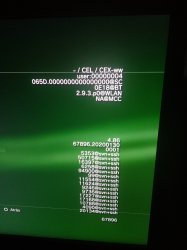
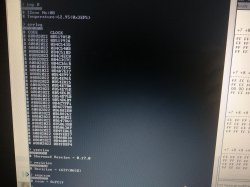
Here is the photo of the screen, sorry for the delay.
Also the "version" command rerurns 0.17.0

Btw the errlog has been getting full of 80 2022 errors over time I noticed. Whatever that means. (Nothing to do with the fan settings btw)
This system has apparently been running perfectly though for a fair amount of time. So not sure if it's something significant. Probably meaningless.
 

Attachments

  • IMG_20210502_193734.jpg
    IMG_20210502_193734.jpg
    1.2 MB · Views: 63
  • IMG_20210502_194554.jpg
    IMG_20210502_194554.jpg
    5.7 MB · Views: 76
Here is the photo of the screen, sorry for the delay.
Also the "version" command rerurns 0.17.0

Btw the errlog has been getting full of 80 2022 errors over time I noticed. Whatever that means. (Nothing to do with the fan settings btw)
This system has apparently been running perfectly though for a fair amount of time. So not sure if it's something significant. Probably meaningless.
Hmmm... that values of version=0.17 and revision=065D (what we used to call "SoftID" since years ago) are from a SW-301
His firmware was dumped, shared with m4j0r and documented before, is a known one, so my excitation about your syscon was a false alarm, sorry :crybaby:
 

Similar threads

Back
Top