RIP-Felix
Senior Member
So an app that could be used on unmodified consoles? I mean, yeah that would be ideal for accessibility reasons alone.I think coding an app...would allow all users...to use it, a CFW would only work on hackable consoles.

So an app that could be used on unmodified consoles? I mean, yeah that would be ideal for accessibility reasons alone.I think coding an app...would allow all users...to use it, a CFW would only work on hackable consoles.

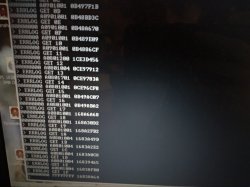
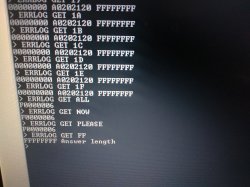
ERRLOG GET 00
ERRLOG GET 01
ERRLOG GET 02
ERRLOG GET 03
ERRLOG GET 04
ERRLOG GET 05
ERRLOG GET 06
ERRLOG GET 07
ERRLOG GET 08
ERRLOG GET 09
ERRLOG GET 0A
ERRLOG GET 0B
ERRLOG GET 0C
ERRLOG GET 0D
ERRLOG GET 0E
ERRLOG GET 0F
ERRLOG GET 10
ERRLOG GET 11
ERRLOG GET 12
ERRLOG GET 13
ERRLOG GET 14
ERRLOG GET 15
ERRLOG GET 16
ERRLOG GET 17
ERRLOG GET 18
ERRLOG GET 19
ERRLOG GET 1A
ERRLOG GET 1B
ERRLOG GET 1C
ERRLOG GET 1D
ERRLOG GET 1E
ERRLOG GET 1F
tmp 14
 But I did confirm it's available in external mode, at least.
Yes, it would work on <=3.55 OFW; CFW and HEN. I can create some sort of prototype to get this started (attached file).So an app that could be used on unmodified consoles? I mean, yeah that would be ideal for accessibility reasons alone.
Sony does have an app for it which sends it over the network to the diag PC (done using lv2diag.self).About the potential app for the SYSCON. Something that would be useful is an errlog database file written to the HDD. It could hold more errors than the 32 the syscon can and be accessable from the HDD if the console dies. Isn't there a PS3 tool that allws you to read the contents of the PS3's HDD format? Perhaps I'm getting confused with the OG XBox. Anyway, perhaps it could partition a small sector in NTFS that would be readable...IDK. Again I'm not a programmer. Just food for thought.
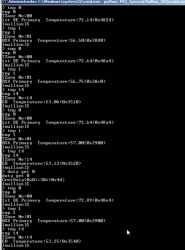
It tells you at which stage it failed in the power up process:Has anyone tried disp_err? How is it different than errlog? I haven't tried it.
CheckStop:     None
PLLUnlock:     0
RSX Int:       None
PowerSeq:      00
ThermalAlert:  None
This identifyers depends of the syscon model btw, is still a bit under research, we was talking about it and i tryed to add comments about wat we know so far in the C structure i posted here:The identifier of the southbridge is 14 for this tmp command and tshutdown. But 3 for the fantbl.
ps3_syscon_eeprom_thermal_config_region.c ---> https://pastebin.com/Pt2nLHih
If you take a PS3 hdd fully compilant with the official PS3 firmware, connect to a PC (and dont initialize it or format), then you use a hexeditor like HxD to "open device" (to take a look at the hdd data in "raw")... you are going to see that there are areas at the begining that are filled with zeroesAbout the potential app for the SYSCON. Something that would be useful is an errlog database file written to the HDD. It could hold more errors than the 32 the syscon can and be accessable from the HDD if the console dies. Isn't there a PS3 tool that allws you to read the contents of the PS3's HDD format? Perhaps I'm getting confused with the OG XBox. Anyway, perhaps it could partition a small sector in NTFS that would be readable...IDK. Again I'm not a programmer. Just food for thought.
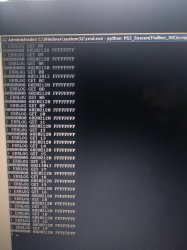
Ok, this is a bit confusing.its GET ERRLOG, and you can totally do it in external mode. I definitely see the appeal of getting it in external mode, because then you don't have to do the checksum fix.
EDIT: I had to go double check my own memory... And you were right and I was wrong! It's ERRLOG GET. Sorry
Here's the full list from the dev wiki -- https://www.psdevwiki.com/ps3/System_Controller_Firmware
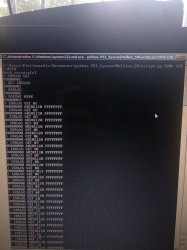
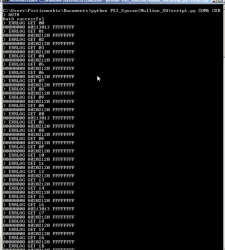
C:\Users\Pistismonkis\Documents>python PS3_Syscon(Mullion_SW)script.py COM6 CXRF

> auth
Auth successful
> becount
becount
Bringup : 595 times
Shutdown: 540 times
Power-on: 21day 22hour 44min 36sec
[mullion]$
> lasterrlog
lasterrlog
Last Error Code:0xa0213013, Time:0xffffffff
[mullion]$
> errlog
errlog
ofst[ 80]:err_code:0xffffffff, clock:0xffffffff
ofst[ 84]:err_code:0xa0202120, clock:0xffffffff
ofst[ 88]:err_code:0xa0202120, clock:0xffffffff
ofst[ 92]:err_code:0xa0202120, clock:0xffffffff
ofst[ 96]:err_code:0xa0202120, clock:0xffffffff
ofst[100]:err_code:0xa0202120, clock:0xffffffff
ofst[104]:err_code:0xa0202120, clock:0xffffffff
ofst[108]:err_code:0xa0202120, clock:0xffffffff
ofst[112]:err_code:0xa0202120, clock:0xffffffff
ofst[116]:err_code:0xa0213013, clock:0xffffffff
ofst[120]:err_code:0xa0202120, clock:0xffffffff
ofst[124]:err_code:0xa0202120, clock:0xffffffff
ofst[  0]:err_code:0xa0202120, clock:0xffffffff
ofst[  4]:err_code:0xa0202120, clock:0xffffffff
ofst[  8]:err_code:0xa0202120, clock:0xffffffff
ofst[ 12]:err_code:0xa0202120, clock:0xffffffff
ofst[ 16]:err_code:0xa0202120, clock:0xffffffff
ofst[ 20]:err_code:0xa0202120, clock:0xffffffff
ofst[ 24]:err_code:0xa0202120, clock:0xffffffff
ofst[ 28]:err_code:0xa0202120, clock:0xffffffff
ofst[ 32]:err_code:0xa0213013, clock:0xffffffff
ofst[ 36]:err_code:0xa0202120, clock:0xffffffff
ofst[ 40]:err_code:0xa0202120, clock:0xffffffff
ofst[ 44]:err_code:0xa0202120, clock:0xffffffff
ofst[ 48]:err_code:0xa0202120, clock:0xffffffff
ofst[ 52]:err_code:0xa0202120, clock:0xffffffff
ofst[ 56]:err_code:0xa0202120, clock:0xffffffff
ofst[ 60]:err_code:0xa0202120, clock:0xffffffff
ofst[ 64]:err_code:0xa0202120, clock:0xffffffff
ofst[ 68]:err_code:0xa0202120, clock:0xffffffff
ofst[ 72]:err_code:0xa0202120, clock:0xffffffff
ofst[ 76]:err_code:0xa0213013, clock:0xffffffff
[mullion]$
> bringup
bringup
[SSM] state: 0000 -> 0101
Bringup Mode #0 (0xFF)
[SSM] ssmCb_OnStartingBePowOn() called.
[SSM] First Boot.
[SSM] Bringup mode : syspm_stat=00000000/00000000
[POWSEQ] PowerSeq_Setup called.
[SSM] state: 0101 -> 0201
[POWSEQ] AV Backend Setup
[SSM] state: 0201 -> 0102
[SSM] state: 0102 -> 0302
[SSM] PowSeq Fail : Detected !
[SSM] state: 0302 -> 0700
[POWSEQ] AV Backend Letup
[SSM] Shutdown mode : syspm_stat=00000000/00000000
[ERROR]: 0xa0202120
[ERROR]: 0xa0202120
[ERROR]: 0xa0202120
[ERROR]: 0xa0202120
[ERROR]: 0xa0202120
[ERROR]: 0xa0202120
[ERROR]: 0xa0202120
[ERROR]: 0xa
> shutdown
0202120
[ERROR]: 0xa0202120
[ERROR]: 0xa0202120
[ERROR]: 0xa0213013
[POWSEQ] PowerSeq_Letup called.
[SSM] state: 0700 -> 0600
(PowerOff State) (Fatal)
shutdown
[SSM] state: 0600 -> 0000
[SSM] Error state is cleared.
(PowerOff State)
> bringup
bringup
[SSM] state: 0000 -> 0101
Bringup Mode #0 (0xFF)
[SSM] ssmCb_OnStartingBePowOn() called.
[SSM] Bringup mode : syspm_stat=00000000/00000000
[POWSEQ] PowerSeq_Setup called.
[SSM] state: 0101 -> 0201
[POWSEQ] AV Backend Setup
[SSM] state: 0201 -> 0102
[SSM] state: 0102 -> 0302
[SSM] PowSeq Fail : Detected !
[SSM] state: 0302 -> 0700
[POWSEQ] AV Backend Letup
[SSM] Shutdown mode : syspm_stat=00000000/00000000
[ERROR]: 0xa0202120
[ERROR]: 0xa0202120
[ERROR]: 0xa0202120
[ERROR]: 0xa0202120
[ERROR]: 0xa0202120
[ERROR]: 0xa0202120
[ERROR]: 0xa0202120
[ERROR]: 0xa0202120
> shutdown
[ERROR]: 0xa0202120
[ERROR]: 0xa0202120
[ERROR]: 0xa0213013
[POWSEQ] PowerSeq_Letup called.
[SSM] state: 0700 -> 0600
(PowerOff State) (Fatal)
shutdown
[SSM] state: 0600 -> 0000
[SSM] Error state is cleared.
(PowerOff State)
> bringup
bringup
[SSM] state: 0000 -> 0101
Bringup Mode #0 (0xFF)
[SSM] ssmCb_OnStartingBePowOn() called.
[SSM] Bringup mode : syspm_stat=00000000/00000000
[POWSEQ] PowerSeq_Setup called.
[SSM] state: 0101 -> 0201
[POWSEQ] AV Backend Setup
[SSM] state: 0201 -> 0102
[SSM] state: 0102 -> 0302
[SSM] PowSeq Fail : Detected !
[SSM] state: 0302 -> 0700
[POWSEQ] AV Backend Letup
[SSM] Shutdown mode : syspm_stat=00000000/00000000
[ERROR]: 0xa0202120
[ERROR]: 0xa0202120
[ERROR]: 0xa0202120
[ERROR]: 0xa0202120
[ERROR]: 0xa0202120
[ERROR]: 0xa0202120
[ERROR]: 0xa0202120
[ERROR]: 0xa0202120
> shutdown
[ERROR]: 0xa0202120
[ERROR]: 0xa0202120
[ERROR]: 0xa0213013
[POWSEQ] PowerSeq_Letup called.
[SSM] state: 0700 -> 0600
(PowerOff State) (Fatal)
shutdown
[SSM] state: 0600 -> 0000
[SSM] Error state is cleared.
(PowerOff State)
> bringup
bringup
[SSM] state: 0000 -> 0101
Bringup Mode #0 (0xFF)
[SSM] ssmCb_OnStartingBePowOn() called.
[SSM] Bringup mode : syspm_stat=00000000/00000000
[POWSEQ] PowerSeq_Setup called.
[SSM] state: 0101 -> 0201
[POWSEQ] AV Backend Setup
[SSM] state: 0201 -> 0102
[SSM] state: 0102 -> 0302
[SSM] PowSeq Fail : Detected !
[SSM] state: 0302 -> 0700
[POWSEQ] AV Backend Letup
[SSM] Shutdown mode : syspm_stat=00000000/00000000
[ERROR]: 0xa0202120
[ERROR]: 0xa0202120
[ERROR]: 0xa0202120
[ERROR]: 0xa0202120
[ERROR]: 0xa0202120
[ERROR]: 0xa0202120
[ERROR]: 0xa0202120
> shutdown
[ERROR]: 0xa0202120
[ERROR]: 0xa0202120
[ERROR]: 0xa0202120
[ERROR]: 0xa0213013
[POWSEQ] PowerSeq_Letup called.
[SSM] state: 0700 -> 0600
(PowerOff State) (Fatal)
shutdown
[SSM] state: 0600 -> 0000
[SSM] Error state is cleared.
(PowerOff State)
> lasterrlog
lasterrlog
Last Error Code:0xa0213013, Time:0xffffffff
[mullion]$
> errlog
errlog
ofst[  0]:err_code:0xa0202120, clock:0xffffffff
ofst[  4]:err_code:0xa0202120, clock:0xffffffff
ofst[  8]:err_code:0xa0202120, clock:0xffffffff
ofst[ 12]:err_code:0xa0202120, clock:0xffffffff
ofst[ 16]:err_code:0xa0202120, clock:0xffffffff
ofst[ 20]:err_code:0xa0202120, clock:0xffffffff
ofst[ 24]:err_code:0xa0202120, clock:0xffffffff
ofst[ 28]:err_code:0xa0202120, clock:0xffffffff
ofst[ 32]:err_code:0xa0202120, clock:0xffffffff
ofst[ 36]:err_code:0xa0213013, clock:0xffffffff
ofst[ 40]:err_code:0xa0202120, clock:0xffffffff
ofst[ 44]:err_code:0xa0202120, clock:0xffffffff
ofst[ 48]:err_code:0xa0202120, clock:0xffffffff
ofst[ 52]:err_code:0xa0202120, clock:0xffffffff
ofst[ 56]:err_code:0xa0202120, clock:0xffffffff
ofst[ 60]:err_code:0xa0202120, clock:0xffffffff
ofst[ 64]:err_code:0xa0202120, clock:0xffffffff
ofst[ 68]:err_code:0xa0202120, clock:0xffffffff
ofst[ 72]:err_code:0xa0202120, clock:0xffffffff
ofst[ 76]:err_code:0xa0202120, clock:0xffffffff
ofst[ 80]:err_code:0xa0213013, clock:0xffffffff
ofst[ 84]:err_code:0xa0202120, clock:0xffffffff
ofst[ 88]:err_code:0xa0202120, clock:0xffffffff
ofst[ 92]:err_code:0xa0202120, clock:0xffffffff
ofst[ 96]:err_code:0xa0202120, clock:0xffffffff
ofst[100]:err_code:0xa0202120, clock:0xffffffff
ofst[104]:err_code:0xa0202120, clock:0xffffffff
ofst[108]:err_code:0xa0202120, clock:0xffffffff
ofst[112]:err_code:0xa0202120, clock:0xffffffff
ofst[116]:err_code:0xa0202120, clock:0xffffffff
ofst[120]:err_code:0xa0202120, clock:0xffffffff
ofst[124]:err_code:0xa0213013, clock:0xffffffff
[mullion]$
> becount
becount
Bringup : 599 times
Shutdown: 544 times
Power-on: 21day 22hour 44min 40sec
Yes, it would work on <=3.55 OFW; CFW and HEN. I can create some sort of prototype to get this started (attached file).
Sony does have an app for it which sends it over the network to the diag PC (done using lv2diag.self).

Interesting. Okay so a companion app could be made in windows to "read" this area of the HDD and present the codes to the user! A neat, sweet GUI....If you take a PS3 hdd fully compilant with the official PS3 firmware, connect to a PC (and dont initialize it or format), then you use a hexeditor like HxD to "open device" (to take a look at the hdd data in "raw")... you are going to see that there are areas at the begining that are filled with zeroes
Are "gaps" in between the master boot record (sony custom), the partition tables, etc...
The point is... that areas are always filled with zeroes because the operative system is ignoring them, the only time when the operative system acccesses that bytes is when you format the hdd to fill them with zeroes, but other than that we have that areas "availables" to store custom data
And yeah, some error codes are not going to take much space, specially if we stick to the syscon format, i dont remember the lenght of each error but are short, in total the error codes only takes 0x100 bytes (are located at eeprom offset 0x3700 for retail syscons of the mullion series)
Ok, this is a bit confusing.
My commands are tested and they work perfectly. And as far as I'm aware it's "the" way to do it. But Felix says there's a better way available? Or you are just saying that it's OK like I'm doing it. (What I thought)
Haha.
I had to test again, I hope this clears the confusion.
View attachment 33509...
I would suggest BE count. Had one slim with 3010 that I could not save, even though I can with reball, it didn't, ported another syscon, cpu and nor board is fine, I didn't had any previous hdmi errors on logs so I assume Cell is not working properly with 3010 with 2.2 ohms. Like back one week I had one 2500 with Cell working fine and 1.6 ohms (on board and out);board in glod and giving response to sequence of recovery beeps. No image on any port and no error logs so I'm afraid to say to anyone if a low resistance is low you should not attempt to fix. I rather say investigate UART and do a proper reball on both. It's getting better now with uart but without delid, new thermal paste and proper reball, getting same resistance before and after reball I don't really know what more to say.Ok, this is a bit confusing.
My commands are tested and they work perfectly. And as far as I'm aware it's "the" way to do it. But Felix says there's a better way available? Or you are just saying that it's OK like I'm doing it. (What I thought)
Haha.
I had to test again, I hope this clears the confusion.
View attachment 33509
For the example, here is an interesting board:
Error 3013 followed by 10x error 2120.
It's a short YLOD that spits out these 11 errors all at once, every time.
The board seems is very young (about 20 days use)
I checked all the fuses and they are OK, (to my disappointment)
CPU reads 2.9 Ohm and Rsx 2.4ohm. Both seemingly getting proper core voltage.
I found no obvious shorts after quick inspection.
I remember this is the kind of error that @patricksouza472 and some others were so happy to fix due to a shorted ceramic capacitor and blown F6302 fuse.Code:C:\Users\Pistismonkis\Documents>python PS3_Syscon(Mullion_SW)script.py COM6 CXRF > auth Auth successful > becount becount Bringup : 595 times Shutdown: 540 times Power-on: 21day 22hour 44min 36sec [mullion]$ > lasterrlog lasterrlog Last Error Code:0xa0213013, Time:0xffffffff [mullion]$ > errlog errlog ofst[ 80]:err_code:0xffffffff, clock:0xffffffff ofst[ 84]:err_code:0xa0202120, clock:0xffffffff ofst[ 88]:err_code:0xa0202120, clock:0xffffffff ofst[ 92]:err_code:0xa0202120, clock:0xffffffff ofst[ 96]:err_code:0xa0202120, clock:0xffffffff ofst[100]:err_code:0xa0202120, clock:0xffffffff ofst[104]:err_code:0xa0202120, clock:0xffffffff ofst[108]:err_code:0xa0202120, clock:0xffffffff ofst[112]:err_code:0xa0202120, clock:0xffffffff ofst[116]:err_code:0xa0213013, clock:0xffffffff ofst[120]:err_code:0xa0202120, clock:0xffffffff ofst[124]:err_code:0xa0202120, clock:0xffffffff ofst[ 0]:err_code:0xa0202120, clock:0xffffffff ofst[ 4]:err_code:0xa0202120, clock:0xffffffff ofst[ 8]:err_code:0xa0202120, clock:0xffffffff ofst[ 12]:err_code:0xa0202120, clock:0xffffffff ofst[ 16]:err_code:0xa0202120, clock:0xffffffff ofst[ 20]:err_code:0xa0202120, clock:0xffffffff ofst[ 24]:err_code:0xa0202120, clock:0xffffffff ofst[ 28]:err_code:0xa0202120, clock:0xffffffff ofst[ 32]:err_code:0xa0213013, clock:0xffffffff ofst[ 36]:err_code:0xa0202120, clock:0xffffffff ofst[ 40]:err_code:0xa0202120, clock:0xffffffff ofst[ 44]:err_code:0xa0202120, clock:0xffffffff ofst[ 48]:err_code:0xa0202120, clock:0xffffffff ofst[ 52]:err_code:0xa0202120, clock:0xffffffff ofst[ 56]:err_code:0xa0202120, clock:0xffffffff ofst[ 60]:err_code:0xa0202120, clock:0xffffffff ofst[ 64]:err_code:0xa0202120, clock:0xffffffff ofst[ 68]:err_code:0xa0202120, clock:0xffffffff ofst[ 72]:err_code:0xa0202120, clock:0xffffffff ofst[ 76]:err_code:0xa0213013, clock:0xffffffff [mullion]$ > bringup bringup [SSM] state: 0000 -> 0101 Bringup Mode #0 (0xFF) [SSM] ssmCb_OnStartingBePowOn() called. [SSM] First Boot. [SSM] Bringup mode : syspm_stat=00000000/00000000 [POWSEQ] PowerSeq_Setup called. [SSM] state: 0101 -> 0201 [POWSEQ] AV Backend Setup [SSM] state: 0201 -> 0102 [SSM] state: 0102 -> 0302 [SSM] PowSeq Fail : Detected ! [SSM] state: 0302 -> 0700 [POWSEQ] AV Backend Letup [SSM] Shutdown mode : syspm_stat=00000000/00000000 [ERROR]: 0xa0202120 [ERROR]: 0xa0202120 [ERROR]: 0xa0202120 [ERROR]: 0xa0202120 [ERROR]: 0xa0202120 [ERROR]: 0xa0202120 [ERROR]: 0xa0202120 [ERROR]: 0xa > shutdown 0202120 [ERROR]: 0xa0202120 [ERROR]: 0xa0202120 [ERROR]: 0xa0213013 [POWSEQ] PowerSeq_Letup called. [SSM] state: 0700 -> 0600 (PowerOff State) (Fatal) shutdown [SSM] state: 0600 -> 0000 [SSM] Error state is cleared. (PowerOff State) > bringup bringup [SSM] state: 0000 -> 0101 Bringup Mode #0 (0xFF) [SSM] ssmCb_OnStartingBePowOn() called. [SSM] Bringup mode : syspm_stat=00000000/00000000 [POWSEQ] PowerSeq_Setup called. [SSM] state: 0101 -> 0201 [POWSEQ] AV Backend Setup [SSM] state: 0201 -> 0102 [SSM] state: 0102 -> 0302 [SSM] PowSeq Fail : Detected ! [SSM] state: 0302 -> 0700 [POWSEQ] AV Backend Letup [SSM] Shutdown mode : syspm_stat=00000000/00000000 [ERROR]: 0xa0202120 [ERROR]: 0xa0202120 [ERROR]: 0xa0202120 [ERROR]: 0xa0202120 [ERROR]: 0xa0202120 [ERROR]: 0xa0202120 [ERROR]: 0xa0202120 [ERROR]: 0xa0202120 > shutdown [ERROR]: 0xa0202120 [ERROR]: 0xa0202120 [ERROR]: 0xa0213013 [POWSEQ] PowerSeq_Letup called. [SSM] state: 0700 -> 0600 (PowerOff State) (Fatal) shutdown [SSM] state: 0600 -> 0000 [SSM] Error state is cleared. (PowerOff State) > bringup bringup [SSM] state: 0000 -> 0101 Bringup Mode #0 (0xFF) [SSM] ssmCb_OnStartingBePowOn() called. [SSM] Bringup mode : syspm_stat=00000000/00000000 [POWSEQ] PowerSeq_Setup called. [SSM] state: 0101 -> 0201 [POWSEQ] AV Backend Setup [SSM] state: 0201 -> 0102 [SSM] state: 0102 -> 0302 [SSM] PowSeq Fail : Detected ! [SSM] state: 0302 -> 0700 [POWSEQ] AV Backend Letup [SSM] Shutdown mode : syspm_stat=00000000/00000000 [ERROR]: 0xa0202120 [ERROR]: 0xa0202120 [ERROR]: 0xa0202120 [ERROR]: 0xa0202120 [ERROR]: 0xa0202120 [ERROR]: 0xa0202120 [ERROR]: 0xa0202120 [ERROR]: 0xa0202120 > shutdown [ERROR]: 0xa0202120 [ERROR]: 0xa0202120 [ERROR]: 0xa0213013 [POWSEQ] PowerSeq_Letup called. [SSM] state: 0700 -> 0600 (PowerOff State) (Fatal) shutdown [SSM] state: 0600 -> 0000 [SSM] Error state is cleared. (PowerOff State) > bringup bringup [SSM] state: 0000 -> 0101 Bringup Mode #0 (0xFF) [SSM] ssmCb_OnStartingBePowOn() called. [SSM] Bringup mode : syspm_stat=00000000/00000000 [POWSEQ] PowerSeq_Setup called. [SSM] state: 0101 -> 0201 [POWSEQ] AV Backend Setup [SSM] state: 0201 -> 0102 [SSM] state: 0102 -> 0302 [SSM] PowSeq Fail : Detected ! [SSM] state: 0302 -> 0700 [POWSEQ] AV Backend Letup [SSM] Shutdown mode : syspm_stat=00000000/00000000 [ERROR]: 0xa0202120 [ERROR]: 0xa0202120 [ERROR]: 0xa0202120 [ERROR]: 0xa0202120 [ERROR]: 0xa0202120 [ERROR]: 0xa0202120 [ERROR]: 0xa0202120 > shutdown [ERROR]: 0xa0202120 [ERROR]: 0xa0202120 [ERROR]: 0xa0202120 [ERROR]: 0xa0213013 [POWSEQ] PowerSeq_Letup called. [SSM] state: 0700 -> 0600 (PowerOff State) (Fatal) shutdown [SSM] state: 0600 -> 0000 [SSM] Error state is cleared. (PowerOff State) > lasterrlog lasterrlog Last Error Code:0xa0213013, Time:0xffffffff [mullion]$ > errlog errlog ofst[ 0]:err_code:0xa0202120, clock:0xffffffff ofst[ 4]:err_code:0xa0202120, clock:0xffffffff ofst[ 8]:err_code:0xa0202120, clock:0xffffffff ofst[ 12]:err_code:0xa0202120, clock:0xffffffff ofst[ 16]:err_code:0xa0202120, clock:0xffffffff ofst[ 20]:err_code:0xa0202120, clock:0xffffffff ofst[ 24]:err_code:0xa0202120, clock:0xffffffff ofst[ 28]:err_code:0xa0202120, clock:0xffffffff ofst[ 32]:err_code:0xa0202120, clock:0xffffffff ofst[ 36]:err_code:0xa0213013, clock:0xffffffff ofst[ 40]:err_code:0xa0202120, clock:0xffffffff ofst[ 44]:err_code:0xa0202120, clock:0xffffffff ofst[ 48]:err_code:0xa0202120, clock:0xffffffff ofst[ 52]:err_code:0xa0202120, clock:0xffffffff ofst[ 56]:err_code:0xa0202120, clock:0xffffffff ofst[ 60]:err_code:0xa0202120, clock:0xffffffff ofst[ 64]:err_code:0xa0202120, clock:0xffffffff ofst[ 68]:err_code:0xa0202120, clock:0xffffffff ofst[ 72]:err_code:0xa0202120, clock:0xffffffff ofst[ 76]:err_code:0xa0202120, clock:0xffffffff ofst[ 80]:err_code:0xa0213013, clock:0xffffffff ofst[ 84]:err_code:0xa0202120, clock:0xffffffff ofst[ 88]:err_code:0xa0202120, clock:0xffffffff ofst[ 92]:err_code:0xa0202120, clock:0xffffffff ofst[ 96]:err_code:0xa0202120, clock:0xffffffff ofst[100]:err_code:0xa0202120, clock:0xffffffff ofst[104]:err_code:0xa0202120, clock:0xffffffff ofst[108]:err_code:0xa0202120, clock:0xffffffff ofst[112]:err_code:0xa0202120, clock:0xffffffff ofst[116]:err_code:0xa0202120, clock:0xffffffff ofst[120]:err_code:0xa0202120, clock:0xffffffff ofst[124]:err_code:0xa0213013, clock:0xffffffff [mullion]$ > becount becount Bringup : 599 times Shutdown: 544 times Power-on: 21day 22hour 44min 40sec
Doesn't seem to be exactly my case though.
Anybody has some suggestions? Because I think it's a broad error.
Could this time actually be the HDMI IC?
Hell, or perhaps yet another flavour of RSX problems. (After all it sits between CPU and HDMI IC)
Yeah, looks like I skipped first error 00 (Latest error, the most important). Just a typo. You can see I was mentioning 32 errors but without 00 is just 31.Try ERRLOG GET 00 I'm almost sure I got it to wor with some combination like that when I first did the syscon. I remember not liking that the timestamps were encrypted, so I proceed onto to internal access and have been doing that first thing ever since. And since I only work on BC models, I've not had to deal with SW.
ERRLOG GET 00
ERRLOG GET 01
ERRLOG GET 02
ERRLOG GET 03
ERRLOG GET 04
ERRLOG GET 05
ERRLOG GET 06
ERRLOG GET 07
ERRLOG GET 08
ERRLOG GET 09
ERRLOG GET 0A
ERRLOG GET 0B
ERRLOG GET 0C
ERRLOG GET 0D
ERRLOG GET 0E
ERRLOG GET 0F
ERRLOG GET 10
ERRLOG GET 11
ERRLOG GET 12
ERRLOG GET 13
ERRLOG GET 14
ERRLOG GET 15
ERRLOG GET 16
ERRLOG GET 17
ERRLOG GET 18
ERRLOG GET 19
ERRLOG GET 1A
ERRLOG GET 1B
ERRLOG GET 1C
ERRLOG GET 1D
ERRLOG GET 1E
ERRLOG GET 1FERRLOG GET ALL? I'm grasping now, maybe I'm mistaken.Yeah, looks like I skipped first error 00 (Latest error, the most important). Just a typo. You can see I was mentioning 32 errors but without 00 is just 31.
Good catch.
But the idea is the same, I don't know where the confusion is coming from.
That's how to get the errors from external mode.
Code:ERRLOG GET 00 ERRLOG GET 01 ERRLOG GET 02 ERRLOG GET 03 ERRLOG GET 04 ERRLOG GET 05 ERRLOG GET 06 ERRLOG GET 07 ERRLOG GET 08 ERRLOG GET 09 ERRLOG GET 0A ERRLOG GET 0B ERRLOG GET 0C ERRLOG GET 0D ERRLOG GET 0E ERRLOG GET 0F ERRLOG GET 10 ERRLOG GET 11 ERRLOG GET 12 ERRLOG GET 13 ERRLOG GET 14 ERRLOG GET 15 ERRLOG GET 16 ERRLOG GET 17 ERRLOG GET 18 ERRLOG GET 19 ERRLOG GET 1A ERRLOG GET 1B ERRLOG GET 1C ERRLOG GET 1D ERRLOG GET 1E ERRLOG GET 1F
becount is very low. 21 days of use, so It's strange to have the typical problems so soon. Maybe the chips could be fine.I would suggest BE count. Had one slim with 3010 that I could not save, even though I can with reball, it didn't, ported another syscon, cpu and nor board is fine, I didn't had any previous hdmi errors on logs so I assume Cell is not working properly with 3010 with 2.2 ohms. Like back one week I had one 2500 with Cell working fine and 1.6 ohms (on board and out);board in glod and giving response to sequence of recovery beeps. No image on any port and no error logs so I'm afraid to say to anyone if a low resistance is low you should not attempt to fix. I rather say investigate UART and do a proper reball on both. It's getting better now with uart but without delid, new thermal paste and proper reball, getting same resistance before and after reball I don't really know what more to say.
ERRLOG GET ALL? I'm grasping now, maybe I'm mistaken.