PS3 Fault finding YLOD with the SYSCON - First steps and Error reporting

Found this : https://ae01.alicdn.com/kf/H2dea11c91de64681971e3b4c79831b2cu.jpg

Iphone 12 might have something really close for what you're looking for.
Not a big chip but handplacing 144 balls is long :')

I'll check with some phone repair about their stencil and let you know.

About my PS3, I got a bad A/V to HDMI converter when she's working on 720p the game got his black destroy (way too much dark) just to let people know.
You best option is to go on OSSC from what I've found but this thing cost a bit too much just for this PS3. I'l lkeep an eye open about the cheap thing I've bough from aliexpress. (Working flawlessly on 1080p tho, a shame really)
 
I was just about to suggest hand placing the balls. Sometimes you can find a stencil that matches the pin pitch, but you'll still have to hand place/remove balls. At least it's not that big a chip. So it shouldn't take too long.

As for what happened, I guess that something placed too high a load on the 5v pin of the HDMI. Anyway, it drew too much current. Looks like that VRM couldn't handle the load and failed short allowing 12 volts down the line. That blew out the HDMI encoder and fuse (thermistor). That fuse (thermistor) protected the TV or whatever device was connected! Otherwise that would have died too!

I know some devices are not safe to plug into. For example, you can safely use an RCA Y splitter on audio, but NOT video! The voltage isn't sufficient to drive 2 video signals. This is exactly the kind of thing that can happen if you try. If someone tried to capture gameplay they might want to try that, not knowing the danger. However, I would have expected it to take out the AV encoder, not the HDMI encoder. Who knows what they plugged the HDMI into. There are alot of devices out there. HDMI splitters, switches, and cheap TV's with unknown protection.

Another possability is that the HDMI connector itself bent and shorted to GND. DId you inspect it? Or they knocked the console while it was on and the cord got yanked, causing the connector to short. That was a problem with one of those GameCube HDMI adapters, I forget which.

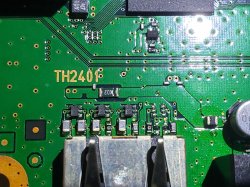
Edit: Check R2471 and TH2401. They are connected to the same line on the AV side. If the HDMI side burned out they might have too. And the AV encoder possibly too.

EDIT2: just noticed some white powder. That could be liquid residue. Perhaps it's a short due to liquid damage.

I can't take a clear photo of the HDMI port's pins but you can take my word for it that they're all perfectly intact. TH2401 doesn't look burned in any way, I'll share a photo of that anyway. I also can't seem to find any component labeled R2471 in the service manual, I found it in my CECH-A service manual but this is a CECH-G that i'm working with here.

You also may be right about the liquid damage. I assumed that stuff was just material that used to be part of the HDMI encoder and basically exploded out of the chip. But who knows, maybe that stuff is a foreign substance that had no business being there.

The theory that the console got knocked over is plausible since there are is exterior damage on the body of the console from the front side. But that could be due to carelessness of the repair shop that I bought this console from, not necessarily the original owner.
 

Attachments

  • 20210802_145539.jpg
    20210802_145539.jpg
    2.3 MB · Views: 91
I can't take a clear photo of the HDMI port's pins but you can take my word for it that they're all perfectly intact. TH2401 doesn't look burned in any way, I'll share a photo of that anyway. I also can't seem to find any component labeled R2471 in the service manual, I found it in my CECH-A service manual but this is a CECH-G that i'm working with here.

You also may be right about the liquid damage. I assumed that stuff was just material that used to be part of the HDMI encoder and basically exploded out of the chip. But who knows, maybe that stuff is a foreign substance that had no business being there.

The theory that the console got knocked over is plausible since there are is exterior damage on the body of the console from the front side. But that could be due to carelessness of the repair shop that I bought this console from, not necessarily the original owner.
Just look inside my link you can see cechg pdf service manual http://s.go.ro/ax49drsu
 
...best option is to go on OSSC from what I've found but this thing cost a bit too much just for this PS3.
Yes, the OSSC is great. I like mine, but it's not plug n'play like the RetroTink products are. If you just need composite --> HDMI, then I'd recommend the RT2x Mini. It upscales 240p/480i --> 480p with zero lag, the most important consideration IMO. It supports composite & s-video. If you want a bump in video quality the 2x-pro supports Component or 2x-SCART supports RGB, depending on which model you get. And, if you want the ultimate, the 5x just came out, which upscales to 1080p/1440p with automatic phase. This way you don't have to dial in optimal timings manually like you do with the OSSC. It's just friendlier. It also has motion adaptive deinterlacing, looks better than the flickering Bob deinterlacing the previous RetroTink products and OSSC use. The biggest feature IMO is framelock and tripple buffering, which prevent sync dropout when the resolution switches between 240p/480i, like the pause menu in chrono cross. Again, the previous RetroTink procucts and OSSC don't have these features and drop sync in some games. It's actually a deal breaker for me, because it renders games like resident evil and dino crisis unplayable. You can get hit by an enemy when the camera shifts and sync drops!

Framelock only adds 4ms of lag. It cuts down on drop outs alot, but some might get through. If that's not good enough, you can turn on triple buffering which absolutely will prevent sync dropouts. It does add 4-20ms of lag, but that's all. That's usually unnoticeable. I'm sensitive to lag and absolutely hate it! However, 1 frame of lag is acceptable to me. I can feel it, but my brain will get used to it quickly. What I can't get used to is variable lag of 2+ frames. That's common in cheap upscalers and it renders retro games unplayable!

Still, nothing beats a CRT. Hands down it's the way to play any retro game that was designed with it in mind. Even on composite it's a great experience. S-video is a nice upgrade. Component is cool, but not really needed. If you can find a cheap CRT and have the space, it's by far the best and cheapest solution to playing retro games.

On a side note. I bought a G-Comp switch so that I could split my analog consoles to a CRT and upscaler for the HDTV. This way I can play on either one or both at the same time. For you european SCART users there is a G-SCART switch too. I thought about going that route, but decided to go with component since we never got SCART TV's in North America (I'm jealous). I could mod a TV's OSD for RGB and put a SCART port on it, but component is almost as good and readily available. That and getting cables for the consoles was easier. So I wet for an all component setup instead. The G-Comp switch accepts 8 component/Composite in devices and auto switches them out 2 component/composite ports. I use HDRetrovision component cables on any console that supports component and a few that don't (I RGB modded my N64 and SNES jr. I have the kits, but haven't yet modded the NES and Atari 2600). I have one hooked to my CRT's component input and the other goes to my OSSC (Currently). I will be getting the RT5x as soon as I can get my hands on one just because it doesn't drop sync and 1080p/1440p automatic phase is next level. And I like that it's plug and play.

To tell you the truth, I don't really use the OSSC that much anymore. It's just a pain to set it up compared to the CRT. And the CRT feels more authentic. From the OSSC it goes to an HDMI splitter to a capture device and my HDTV TV. With this setup the CRT and HDTV are in near perfect sync. I can play off either one with less than a frame of lag between them. And even my capture window is legless (Startech USB3HDCAP). But the capture device doesn't accept anything above 480p from the OSSC and the retrotink is more HDMI compliant. So it should play nice!

 
Yes, sounds like a CPU power issue. Check the voltages coming to it.

It is possible that your "lab psu" can't keep up. Remember the APS 227 is 32Amps.

It could be a short in the CPU vcore, check resistance there too. Anything from the PSU to the CPU could be responsible for this error.
And... yes this includes the NEC Tokin capacitors on the CPU side.
But it is rare to have this error as a result of a tokin fault if the tokins are untouched. Normally other errors appear first, instead of suddenly 3003.

So don't go straight to remove tokins yet, even if you have more excuses to do so than 99% of the newbies that do this hehehe.

Thanks for the reply Paco!

Well, as an update, I got a little too excited with this project of mine, so I attempted a quick diy reflow for the cell only, and didn't change a thing, I still get the same errors from the Syscon.

I liked what you said about this Lab PSU not capable of handling the 32A, since it's rated at 5-10A, and also now I noticed that for a brief moment I get a voltage drop to 10V right before I turn it on, and other thing that I'm not actually sure about last time it's that now I hear the fan spinning at least for half a second.

So tomorrow I'm going to try with a good Desktop PSU, since I only tried with an old one that I have for scrap. ¿Do you know where I can find a good guide about testing the voltages around the board? Because I found the service manual for this PS3 revision, but it's hasn't a good troubleshot procedure in it.

Thanks again!
 
After removing various components (including the whole AV encoder) i finally found the source of my short. This little damn capacitor. Now i just need to reattach everything i removed. Definitely feel silly removing the whole AV encoder, but i did replace my PS1's GPU before so this shouldn't be too bad. Im dreading the HDMI encoder more than anything. I'll revisit this in about a month or so when i get my new reballing jig in. I still currently have only the blue POS one which can't even hold this IC.
 

Attachments

  • 20210803_015245.jpg
    20210803_015245.jpg
    2.1 MB · Views: 87
Last edited:
Hallo Friends
GLOD problem, the causes are many,
1. Ram CellBe
2. RSX Ram
3. OS software
4. IC AV/HDMI
5. HDD
Each cause has characteristics of damage that can be checked. Usually I use an analog tester through the "CLK" point, and each cause needs to be explained as well.
CellBe RAM:
a. RAM Problem
b. CellBe Problem
c. Connection RAM To CellBe
d. Power Input To RAM and Cellbe
and bla...bla...bla..., so if you are interested in learning it, you must have equipment that supports it, such as an analog tester.
I've taken pictures for "Pulse Clk" but I don't have the skills to edit the pictures well, so I can only write by hand (I owe it to my friend RIP-Felix) so forgive me if my pictures aren't very clear
Sem-001
IMG_20210625_174624.jpg
Cok-001
IMG_20210618_114327.jpg
Dia-001/002
IMG_20210618_114128.jpg
All Slim
IMG_20210618_113446.jpg
All Super Slim
IMG_20210618_113126.jpg
Incidentally, I haven't got the cok-002 motherboard and the ver-001 motherboard I'll attach later, but for the "CLK" point, you can estimate yourself for a while, thank you, I pray that all are in good health, for a special analysis method to determine the cause of GLOD I will make later.
note: some of the causes of GLOD I have explained before
 
Last edited:
@botakompong Glad to hear you are back!
Hello friends, happy to be active again on the forum, the condition of Indonesia is still Lockdown lv4, my family is also exposed to covid (but now everything is healed), sorry if I not active. I want to chat with you, do you have whatapps? There are many things I want to ask,
I'm new to syscon error, so I need some guidance
thank you.
 
Hey everyone, so I just scanned a CECH-E01 for errors with the SysconReader program for Windows.

These are the results:

Code:
===================================
ERR 00: 00000000 A0403034 27FCFAF8
ERR 01: 00000000 A0404421 27FCFAF8
ERR 02: 00000000 A0403034 27F7EEAE
ERR 03: 00000000 A0404421 27F7EEAE
ERR 04: 00000000 A0403034 27F7EE9C
ERR 05: 00000000 A0404421 27F7EE9C
ERR 06: 00000000 A0403034 27F6AB3A
ERR 07: 00000000 A0404421 27F6AB3A
ERR 08: 00000000 A0403034 27F6640A
ERR 09: 00000000 A0404421 27F6640A
ERR 10: 00000000 A0403034 27F6480B
ERR 11: 00000000 A0404421 27F6480B
ERR 12: 00000000 A0403034 27F64797
ERR 13: 00000000 A0404421 27F64797
ERR 14: 00000000 A0801601 27F64769
ERR 15: 00000000 A08014FF 27F64769
ERR 16: 00000000 A0801701 27F64769
ERR 17: 00000000 A0801200 199A754B
ERR 18: 00000000 A0801200 13905007
ERR 19: 00000000 A0801200 107300C9
===================================

I'm familiar with the 3034 error, and am assuming this is another likely BGA issue, but I have never seen the 4421 error.

Are Data errors random? I've seen another PS3 (CECH-H01) with a 3034 + 4401 which was a BGA issue confirmed, and a another CECH-E01 which has 3034 + 4412, which I have not attempted to repair yet.

Hi everyone, I have been trying to fix a COK-002 for a long time now, I'm no technician but I love my old ps3, I just found out about this site 3 months ago and I wanted to say thank you all for all the hard work, I have learnt a lot, I managed to read the error log from syscon and it looks similar to what @Sampsonay had, I was wondering 2 things.

1.- Did you got it running again?
2.- Reballing is the only option? or is reflow valid as well?

Thanks again.
 
...if you are interested in learning it, you must have equipment that supports it, such as an analog tester.

I've taken pictures for "Pulse Clk" but I don't have the skills to edit the pictures well, so I can only write by hand (I owe it to my friend RIP-Felix) so forgive me if my pictures aren't very clear...
First, I'm glad to hear from you! It's been a while and I've been following the covid-19 statistics coming out of Indonesia. It was very bad! When I heard you went on lockdown and I hadn't heard from you in awhile, I was a worried for you. I'm relieved to hear you and your family are okay!

Second, those pictures are great. Thank you! It finally allows us to see what signals you're probing. I edited the pictures to make them easier to find and updated the summary/guide I made here. Please have a look and verify I got the locations correct on the edited pictures. Some of the spots were hard to make out. I assumed you were pointing to the resistor that had a dot next to it. So I put an arrow pointing to it. I can easily edit these again if I got something wrong, so let me know and I'll fix it.

Checking the schematic for COK-001 and SEM-001 the name of the signals are different.
  • COK-001 = R3160 (SB_SPI_ID)
  • SEM-001 = R3852 (SB_EBUS_CE0)
Since COK-001 and COK-002 are similar and we have the schematics, I figured I could find the location on it too. The resistor is the same number, R3160, but it's in a slightly different location. Not a big deal. I just used a picture of the Schematic instead.

I find it interesting that you are using the south bridge to diagnose the PS3. @vyktormvmpay25 has been digging around in the Southbridge UART. I wonder if there is a way to merge your "Pulse CLK" method with the southbridge UART diagnostics. @vyktormvmpay25 have you found any logs or commands that could help us correlate problems that cause GLOD/YLOD? I wonder how the SB UART lines up with @botakompong's Rules/Kicks?
 
Last edited:
Checking the schematic for COK-001 and SEM-001 the name of the signals are different.
  • COK-001 = R3160 (SB_SPI_ID)
  • SEM-001 = R3852 (SB_EBUS_CE0)
Hello friends, you have edited it very quickly, thank you.
for the SEM-001 "CLK" pulse I will confirm again later.
Thank you also for making the guide, can you include a video of the movement of the analog meter, because it will explain more.
The method that I have is very dependent on the movement of the analog tester needle, our foresight in seeing the movement is important. because there are some movements that are similar but show different areas of damage.
example (GLOD)
1. step1 end
step 2 only goes up a little then keep quiet
RSX RAM problem
2. step1 end
step 2 doesn't go up at all, just stays still
OS software problem (need to re-patch)
I will try to record the movements later, later I will share along with the solution, everyone
those who try it can also help to add them later when they get used to it.
thank you very much friend, for your time and attention.
keep it up everyone...
 
Is there any recommended pcb type for getting basic components like caps, resistances, fuses from? While i'm trying to fix a COK-001 maybe is better to get a newer pcb or even a slim one so components may be in better shape.
 
SB debugging is more helpful to monitor temperatures after unit already loaded(Mullion) .
SB is loaded only if unit is fine, no fatal errors/power/heat/flash problems.
At software loading on Mullion will show automatically temperatures, nothing more.
Or at least putty not capable to show more than that.
Not sure how to get them related right now.
Edit
Just a bit of humour
This is how it looks when reflow is made from outside unit.
I should do those kind of videos, it was a rumour about towel and hairdryer but didn't got any until now "I've seen on YouTube"
e3163e03cbf90076b30c0ad6e5108773.jpg
3d26986235e41d8b738af85da2da408b.jpg
CECHC03
Oh and "seal is intact "
63aad44d983de764d78dbb4dc1aca3dc.jpg
 
Last edited:
Hello friends, you have edited it very quickly, thank you.
for the SEM-001 "CLK" pulse I will confirm again later.
Thank you also for making the guide, can you include a video of the movement of the analog meter, because it will explain more.
I linked to the video showing Rule 4, but that's the only one you posted on youtube. The rest you shared VIA google drive and I can't embed them. Can you upload them to youtube? Then I will link them to the tutorial. I agree that would be the ideal solution, because it's hard to conceptualize without an example video to see what the explanation looks like. Especially subtle differences that can be the difference between a Rule 4 or 6, for example.
 
Hi everyone, I have been trying to fix a COK-002 for a long time now, I'm no technician but I love my old ps3, I just found out about this site 3 months ago and I wanted to say thank you all for all the hard work, I have learnt a lot, I managed to read the error log from syscon and it looks similar to what @Sampsonay had, I was wondering 2 things.

1.- Did you got it running again?
2.- Reballing is the only option? or is reflow valid as well?

Thanks again.

Hey there, this specific system went from YLOD to GLOD after reflowing the GPU. At the time I concluded that the GPU needs replacing. However I can't help but wonder if I may have fell short by not cleaning the flux residue from underneath the chip very well, which I assume could have messed with a signal or something. You can only go so far with isopropyl, a toothbrush and an air compressor... Not that these cleaning tools won't work, they have worked for me... I just can't help but wonder if they were insufficient when things don't end up working.

Anyways, last month I got myself a gigantic ultrasonic cleaner with some distilled water and branson EC solution to pretty much rule out any human error in the cleaning process. I have yet to use it on a PS3 that's been reflowed, but on all the other boards so far it has been a huge time saver, and the boards look MINT afterwards. I wish I got myself an ultrasonic cleaner the day i picked up soldering!

Also I have been keeping records of every system i've been working on still, I haven't forgotten about that. I'd like to share all of that information in one go later on. I'm just curious to see how much better my success rates can get after putting my boards through the cleaner. I'm also looking to try my hand at reballing again when my non-POS reballing jig arrives, but it's coming from China so who knows how long that'll take.
 
@Sampsonay every board it should work even with cheap AMTECH flux right after reball board is cooled. Pcb cleaning can be washed after, I have tested many times. I have Allendale PCB cleaning 5l (concentrate 1 to 10). Usually after cleaning I leave board inside oven 2 hours at 100. Board will eventually reach 125 from absorption of temperature. Oven is a old sterilizer modified with ir6000 controller.
 
Hmm, if you are getting 0 ohms short on the RSX... It sounds more like it already was "reflowed" or something.
I don't think a reflow will help. Especially if it's reading short in the core.
Might as well remove it completely and check out of board. Then you will clearly see how your short is internal to the chip.
Ok I had a electronics board company remove the RSX and they said its reading 1000ohms without the chip. They are waiting for my confirmation to solder the new RSX chip on as it will be additional cost. Please advise whether we think the board is good or not and warrants a new RSX chip - all and @RIP-Felix @Pacorretaco
 
Last edited:
That sound fine. It should read quite high, meaning there are no shorts. Most likely the board if fine (if the RSX is the issue). It's rare for 2 faults to occur simultaneously. However, it's always a gamble reballing a PS3. There are no guarantees.

I know that's not reassuring, since you are paying them to do this repair work for you. I'm sure you would like to know it would work 100% before laying money on the table, but that's not something anyone can know for sure. Anyone who tells you otherwise better be a SONY tech, otherwise they're lying!

Hope that helps.

Oh, and ask them for pictures of the RSX removed! Just as proof they actually did reball it, not just a reflow!
 
That sound fine. It should read quite high, meaning there are no shorts. Most likely the board if fine (if the RSX is the issue). It's rare for 2 faults to occur simultaneously. However, it's always a gamble reballing a PS3. There are no guarantees.

I know that's not reassuring, since you are paying them to do this repair work for you. I'm sure you would like to know it would work 100% before laying money on the table, but that's not something anyone can know for sure. Anyone who tells you otherwise better be a SONY tech, otherwise they're lying!

Hope that helps.

Oh, and ask them for pictures of the RSX removed! Just as proof they actually did reball it, not just a reflow!

Awesome yeah no worries! I'm having them rechip 2 boards just for fun. I went ahead and told then to do it so fingers crossed. Thanks for the help.
 

Similar threads

Back
Top