PS3 Fault finding YLOD with the SYSCON - First steps and Error reporting

Ok, first steps good so far.

Second step is correct, the reason for the red flashing is because the eeprom checksum has now changed. This will be corrected once the internal mode is working ok for you.

Could you upload photos of your connections to imgur.com

Also type in the terminal shell, 'dmesg' as i like to see what serial lead you are using and if any issues are occuring

One last thing, the thickness and length of the wire can affect the opertion. AWG 30 is probably the best, jumper wires works but i've found it to be too thick.

Also what i do, is turn off ps3 from mains switch, exit out of the python script, then re enter again, then power back on making sure the gnd from the serial lead is joined to the diag lead pin, then wait for a 10 seconds then try 'auth', serveral times it will get there eventually. Just keep trying several times

I havent tested on ubuntu 20.04, shouldnt be an issue, but maybe get a 18.04 livecd and try there, you can install packages on a livecd, just for testing purposes

So, my process goes as follows:
  1. Solder RxD, TxD to respective pins, cover with kapton tape and then electrical tape
  2. Attach GND to ground point. In this instance, I used the exposed edge of the PCB
  3. Power board
  4. Run Python script in CXR
  5. auth -> auth successful
  6. EEP GET 3961 01 -> 00000000 FF
  7. EEP SET 3961 01 00
  8. EEP GET 3961 01 -> 00000000 00
  9. Power off
Now here's where I begin to get the errors
  1. Solder GND to DIAG
  2. Power board
  3. No flicker, just RLOD with three beeps (even on the first time. This didn't happen on the last board I diagnosed, flickered as per usual)
  4. Run Python script in CXRF
  5. I either get "scopen response invalid" or various "ascii...decode bye 0xXX" error
I was, just one time, able to authorize myself during the CXRF script, but I got an ascii error before being able to check the checksum.
 
So, I ended up just changing the eeprom value from 00 to FF and booting it back up. YLOD was gone, for some reason. Everything seems to be peachy keen with this particular unit.

Just for reference I had the RxD, TxD and GND all soldered on the correct pins. I'm using 26 AWG jumper wires. It seemed to work perfectly fine on the defective unit with the RSX error.

I'll be working on a unit for a friend later today, so I'll report back with any new updates. I'll pick up some 30 AWG wires later today when I pick up components for my PC build, just in case that's in fact the problem.

Strange. Obviously I'm pretty new to all of this but the recurring ascii errors was odd. I ended up using screen to see if I indeed did have the RxD and TxD swapped incorrectly, and I got nothing back but � (which I assume means non-UTF character) each time I swapped the cables.

Ok, first steps good so far.

Second step is correct, the reason for the red flashing is because the eeprom checksum has now changed. This will be corrected once the internal mode is working ok for you.

Could you upload photos of your connections to imgur.com

Also type in the terminal shell, 'dmesg' as i like to see what serial lead you are using and if any issues are occuring

One last thing, the thickness and length of the wire can affect the opertion. AWG 30 is probably the best, jumper wires works but i've found it to be too thick.

Also what i do, is turn off ps3 from mains switch, exit out of the python script, then re enter again, then power back on making sure the gnd from the serial lead is joined to the diag lead pin, then wait for a 10 seconds then try 'auth', serveral times it will get there eventually. Just keep trying several times

I havent tested on ubuntu 20.04, shouldnt be an issue, but maybe get a 18.04 livecd and try there, you can install packages on a livecd, just for testing purposes
 
So in external mode, setting back to FF is just switching diag mode to off.

So you screen, CXR and CXRF work at different serial speeds, CXR = 57600, CXRF= 115200

So if you want to verify correct RX and TX for CXRF in screen, make sure to do like this - screen /dev/ttyUSB0 115200

You should get a [mullion] prompt, garbage screen means poor connection or wrong way round.


So, I ended up just changing the eeprom value from 00 to FF and booting it back up. YLOD was gone, for some reason. Everything seems to be peachy keen with this particular unit.

Just for reference I had the RxD, TxD and GND all soldered on the correct pins. I'm using 26 AWG jumper wires. It seemed to work perfectly fine on the defective unit with the RSX error.

I'll be working on a unit for a friend later today, so I'll report back with any new updates. I'll pick up some 30 AWG wires later today when I pick up components for my PC build, just in case that's in fact the problem.

Strange. Obviously I'm pretty new to all of this but the recurring ascii errors was odd. I ended up using screen to see if I indeed did have the RxD and TxD swapped incorrectly, and I got nothing back but � (which I assume means non-UTF character) each time I swapped the cables.
 
Once again I am back with two different units. Another COK-002 and a DIA-002.

The DIA-002 error code is as follows: A0201B02 and A0A02031. This follows the dead RSX line, correct? Not really much of a fix if this is the case.

The COK-002 is as follows: A0801002, A0611011, A0101001. Not entirely sure what the third and fourth characters mean in the error code to begin with, so I'm not entirely certain what these error codes are.

Also never figured out why the ascii error codes occurred. I've tested these two boards since then, and it's been fine. The board boots as if nothing happened. The only problem it exhibits now is needing to marry the BR drive with the board.
 
So your first few errors are RSX related - 2 0 3 1Thermal Sensor Error (IC2101), the previous error is related to this error (A0201B02).

So this is an interesting issue, because its two possible issues, the thermal sensor near the RSX is either faulty or not getting power or thermal signals? - I dont have the schematics for that board, but with a multimeter you could check the pins on the sensor and see if there are any 3.3v readings. Otherwise you can check the capacitors or resistors around that area for shorts -

pro tip: shorts will show low ohm readings (0.2 ohms) on both sides of the capacitors.

Your second errors for the COK-002 are power issues for both CELL and RSX - could be interlinked. Look at my github repo for the COK-002 test points, and check every point and see if the voltage readings are wrong, that gives you an indication of where the issue lies.

Do this a few times and you will get experience, and will become second nature, it also gives you a good mental picture of how this all fits together when things go wrong.

Draw some diagrams and block charts will help in the future.

Once again I am back with two different units. Another COK-002 and a DIA-002.

The DIA-002 error code is as follows: A0201B02 and A0A02031. This follows the dead RSX line, correct? Not really much of a fix if this is the case.

The COK-002 is as follows: A0801002, A0611011, A0101001. Not entirely sure what the third and fourth characters mean in the error code to begin with, so I'm not entirely certain what these error codes are.

Also never figured out why the ascii error codes occurred. I've tested these two boards since then, and it's been fine. The board boots as if nothing happened. The only problem it exhibits now is needing to marry the BR drive with the board.
 
Now we ground the DIAG pin cable to a GND or the GND pin on the usb cable
Can you explain how to do this step for me? Do I have to solder the DIAG pin to the GND pin on the USB cable while that GND pin is still connecting to the GND pin on the motherboard? I don't have any knowledge about this.
 
Can you explain how to do this step for me? Do I have to solder the DIAG pin to the GND pin on the USB cable while that GND pin is still connecting to the GND pin on the motherboard? I don't have any knowledge about this.
Yes, when you connect 2 devices to each other is good to connect the grounds of both devices together, this way both devices shares the same ground, this is a safety meassure to prevent problems
In this case you can connect the ground of the USB programmer to the ground of the PS3 motherboard permanently

And additionally, the DIAG pin of the PS3 motherboard needs to be connected to a ground only temporally (either in the PS3 motherboard, in the PC, or the USB cable... because all this grounds are the same ground)
The DIAG pin belongs to the syscon, and indicates 2 operation modes... think in it as a switch/button
Button pressed = syscon diag pin connected to GND

You are going to need to change his state several times while working with it... so if you have some button in your toolkit/junkyard at home is better to use it, this way you can change syscon operation modes just by pressing the button (instead of messing around with cables)


Edit:
Another option is to solder a wire to the diag pad, and at the other side of the wire an "alligator clip"... this way you can "grab" the copper border of the PS3 motherboard (all that border is ground) with the alligator clip easilly when needed
 
Last edited:
And additionally, the DIAG pin of the PS3 motherboard needs to be connected to a ground only temporally (either in the PS3 motherboard, in the PC, or the USB cable... because all this grounds are the same ground)
Do I have to connect my laptop to a socket that have ground hole and do actual grounding to do this? In my country, grounding is not popular so the socket in my house doesn't have it.
 
Do I have to connect my laptop to a socket that have ground hole and do actual grounding to do this? In my country, grounding is not popular so the socket in my house doesn't have it.
Is not needed, dont worry about it
What i mentioned is related with connections in between devices, is the same that happens in all standard connectors (HDMI, USB, SD card, audio jack, etc...). All the connectors have a ground, and when you connect the device to your laptop you are "sharing" the grounds in between the devices

In this case we are using a USB UART serial programmer, so the programmer itself have ground (taken from the PC USB connector), and we connect it to the PS3 with the Tx + Rx wires... and additionally another wire for ground to serve that purpose
 
So as an example of pics for a DIA-001 board

https://imgur.com/a/wmJwCsZ

Just an example, just connect the leads to the ps3 motherboard as shown, then take the GND lead from the ps3 board side and connect together to the DIAG lead - only once the internal mode is activated, doing this when the internal mode is not set to on, will make the standby led (red) not show on power on

Its all in the guide on my github site!

Do I have to connect my laptop to a socket that have ground hole and do actual grounding to do this? In my country, grounding is not popular so the socket in my house doesn't have it.
 
So, in order to read the voltage of the power points on the COK-002 it needs power running to it, correct?
How do I achieve this? A scientific power supply? Just wing it with the PSU that is provided with the unit? Pardon me if this seems rudimentary, but I'm just confused as to how to read the voltage of these points without power running through the unit.
 
So the way i do this is use the existing PSU, but you will need - https://www.amazon.co.uk/VASI4KO-banana-plugs-crocodile-clips/dp/B004J6MX6U
or similiar types of lead.

The crocodile end clips onto the ps3 motherboard 12V pins and the other end the banana points push into the psu points. Then plug the 5v white lead also to the motherboard

Then you will need a multimeter to test the testpoints for the supplied voltage readings expected.

So, in order to read the voltage of the power points on the COK-002 it needs power running to it, correct?
How do I achieve this? A scientific power supply? Just wing it with the PSU that is provided with the unit? Pardon me if this seems rudimentary, but I'm just confused as to how to read the voltage of these points without power running through the unit.
 
You were right marciolsf! It was the PS6001 fuse.

I replaced it with one from a scrap board and after I cleared the errors it now shows this:
Code:
nyislander:~/Desktop/PS3_Files$ python ps3_syscon_uart_script.py /dev/ttyUSB0 CXRF
>$ auth
Auth successful
>$ disp_err
disp_err
CheckStop:     None
PLLUnlock:     0
RSX Int:       None
PowerSeq:      00
[mullion]$
>$ clearerrlog
clearerrlog
ERRLOG CLEARED
[mullion]$
>$ errlog
errlog
ofst[  0]:err_code:0xffffffff, clock:0xffffffff
ofst[  4]:err_code:0xffffffff, clock:0xffffffff
ofst[  8]:err_code:0xffffffff, clock:0xffffffff
ofst[ 12]:err_code:0xffffffff, clock:0xffffffff
ofst[ 16]:err_code:0xffffffff, clock:0xffffffff
ofst[ 20]:err_code:0xffffffff, clock:0xffffffff
ofst[ 24]:err_code:0xffffffff, clock:0xffffffff
ofst[ 28]:err_code:0xffffffff, clock:0xffffffff
ofst[ 32]:err_code:0xffffffff, clock:0xffffffff
ofst[ 36]:err_code:0xffffffff, clock:0xffffffff
ofst[ 40]:err_code:0xffffffff, clock:0xffffffff
ofst[ 44]:err_code:0xffffffff, clock:0xffffffff
ofst[ 48]:err_code:0xffffffff, clock:0xffffffff
ofst[ 52]:err_code:0xffffffff, clock:0xffffffff
ofst[ 56]:err_code:0xffffffff, clock:0xffffffff
ofst[ 60]:err_code:0xffffffff, clock:0xffffffff
ofst[ 64]:err_code:0xffffffff, clock:0xffffffff
ofst[ 68]:err_code:0xffffffff, clock:0xffffffff
ofst[ 72]:err_code:0xffffffff, clock:0xffffffff
ofst[ 76]:err_code:0xffffffff, clock:0xffffffff
ofst[ 80]:err_code:0xffffffff, clock:0xffffffff
ofst[ 84]:err_code:0xffffffff, clock:0xffffffff
ofst[ 88]:err_code:0xffffffff, clock:0xffffffff
ofst[ 92]:err_code:0xffffffff, clock:0xffffffff
ofst[ 96]:err_code:0xffffffff, clock:0xffffffff
ofst[100]:err_code:0xffffffff, clock:0xffffffff
ofst[104]:err_code:0xffffffff, clock:0xffffffff
ofst[108]:err_code:0xffffffff, clock:0xffffffff
ofst[112]:err_code:0xffffffff, clock:0xffffffff
ofst[116]:err_code:0xffffffff, clock:0xffffffff
ofst[120]:err_code:0xffffffff, clock:0xffffffff
ofst[124]:err_code:0xffffffff, clock:0xffffffff
[mullion]$

I partially reassembled it and connected to my TV. Front panel power on and the green led stays on but there is no video using HDMI/component cable. The fan starts slow then steps up high - I only have it on for ~30secs.

Could it be a corrupt NAND? I believe the last person to work on this board was trying to marry a BD to it. Would it be possible to read the NANDs with a Teensy++ and repair them? If repairing the NANDs is possible - it might be easier to remove them from the board to flash because some of the solder points are hard to reach on the COK-001. I always had problems using the X360 clip. I would use a TSOP48 to DIP48 adapter connected to the Teensy++.

I welcome all your comments/suggestions.
I previously had a CECHB that did the exact same thing from what I can recall, I tried testing it again another time and heard a small POP and it then began to YLOD. Sure enough when I opened it up the exact same fuse had a tiny little crack in it. I've still got that PS3 so hopefully I can replace that soon. I've also got another 5 CECHA/B/E units that all have YLOD, about half of them still have the warranty seal too.
 
Alright, my banana plug/alligator clip connectors came in earlier today. I've got the banana plugs in the PSU, the clips on the leads on the board, and the lead from the PSU plugged into the port. It gets power just fine, which is good. However, when I go to check the test points, I'm not really getting anything on any of them. Some normal oscillation from my cheapo little multimeter, but that's really about it.

https://imgur.com/YAIo2pO

On the multimeter, I place the negative lead on ground, and positive on the test point, and vice versa, still nothing each time. Not really sure if that's the proper way to test the points or not. I assume it's not since I get no reading.

So the way i do this is use the existing PSU, but you will need - https://www.amazon.co.uk/VASI4KO-banana-plugs-crocodile-clips/dp/B004J6MX6U
or similiar types of lead.

The crocodile end clips onto the ps3 motherboard 12V pins and the other end the banana points push into the psu points. Then plug the 5v white lead also to the motherboard

Then you will need a multimeter to test the testpoints for the supplied voltage readings expected.
 
Ok, verify the red standby is on?

Near the syscon there will be live 5v and 3.3v for standby mode.

Only certain testpoints will have voltage on standby, the rest will be the 12v,3.3v and 5v lines that require to press the silver button (pwr)

Make sure its in voltage mode on the multimeter!

As it has a fault, you will need to stick the gnd lead of the multimeter on any ground (psu chassis) or motherboard gnd. Then with the positive mulitmeter lead on the test point one at a time, as you press the pwr button to come out of standby, it will be brief but give u an indication of the voltage it showed.

Alright, my banana plug/alligator clip connectors came in earlier today. I've got the banana plugs in the PSU, the clips on the leads on the board, and the lead from the PSU plugged into the port. It gets power just fine, which is good. However, when I go to check the test points, I'm not really getting anything on any of them. Some normal oscillation from my cheapo little multimeter, but that's really about it.

https://imgur.com/YAIo2pO

On the multimeter, I place the negative lead on ground, and positive on the test point, and vice versa, still nothing each time. Not really sure if that's the proper way to test the points or not. I assume it's not since I get no reading.
 
Last edited:
Hi people!

I'm new with this and need some more information to get started.
I need to buy the correct serial port adapter. I was thinking about getting a USB one since they are easy. But, I want to make sure I get the right voltage and such. Is it 3.3V TTL for the signal or some other voltage? Is there anything else I should look out for? Do they all support the required baud rates?

Any tips for keeping the wires in place, but not breaking it? I'm thinking about using electric tape or kapton tape and tying it to something like a screw or mount to prevent pressure on the wires.

For running it. What all do I need connect to it? Just the motherboard and power supply? Or do I need the hard drive and optical drive connected? I don't want to loose the pairing to either, especially HDD because I don't want to lose my saved games.

Do you run it with heat sink and cover connected to it, or just leave it off to diagnose YLOD?
Can you share any pictures of what your setup looks like with cables and wires plugged in so I can get an idea?

Thanks!
 
Hi people!

I'm new with this and need some more information to get started.
I need to buy the correct serial port adapter. I was thinking about getting a USB one since they are easy. But, I want to make sure I get the right voltage and such. Is it 3.3V TTL for the signal or some other voltage? Is there anything else I should look out for? Do they all support the required baud rates?

Any tips for keeping the wires in place, but not breaking it? I'm thinking about using electric tape or kapton tape and tying it to something like a screw or mount to prevent pressure on the wires.

For running it. What all do I need connect to it? Just the motherboard and power supply? Or do I need the hard drive and optical drive connected? I don't want to loose the pairing to either, especially HDD because I don't want to lose my saved games.

Do you run it with heat sink and cover connected to it, or just leave it off to diagnose YLOD?
Can you share any pictures of what your setup looks like with cables and wires plugged in so I can get an idea?

Thanks!

I was actually hoping someone would post a picture, since I was in the same boat as you a few days ago haha! I actually figured it out and managed to get connected! I will share my experience and parts with you to hopefully get a successful connection.

I used this adapter on Amazon for the USB: JBtek Windows 8 Supported Debug Cable for Raspberry Pi USB Programming USB to TTL Serial Cable
It says in the description below that the Red cable is 5V (the guide says to leave the power one disconnected anyways), but that the TX/RX are 3.3V? I'm not really sure how it works, but it works for this application haha! I think for the most part, all serial adapters support the required ranges. But again, this one has proven to work for me.

So my wires were decently solid when I soldered them down. However, I know that they could easily be ripped up and damage the board if something were to happen. This being the case, I isolated each wire with electrical tape so that they wouldn't short against the board or the shield. Then I grouped the wires together and taped them down as well. They are decently secure and should withstand regular use.

As mine is running, I have only the PSU connected, CMOS battery, and the cooling system. No HDD, so the saves are unaffected. I would be hard pressed to believe they would be affected anyways as this is a tool only for the board and I don't think there are any options in either External/Internal commands to interact with the HDD anyways. Either way, it's not necessary for this process. Also I didn't attach the BD, card readers (CECHA01), cover, or wifi/bluetooth module. I did re-install the shield so that I could wire the ground for the PSU and use that as a ground for my UART adapter/DIAG pins.

As far as pics go, I will try to remember to post them tonight when I get home!
 
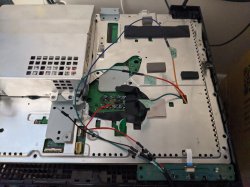
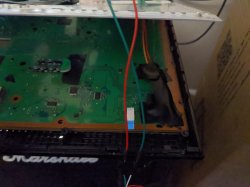
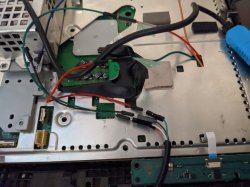
@Josh French Here are some pics of how mine is setup. Hope this helps!
 

Attachments

  • PXL_20200925_213127002.jpg
    PXL_20200925_213127002.jpg
    4.1 MB · Views: 151
  • PXL_20200925_213232221.jpg
    PXL_20200925_213232221.jpg
    4.7 MB · Views: 155
  • PXL_20200925_213145570.jpg
    PXL_20200925_213145570.jpg
    4.2 MB · Views: 154
upload_2020-9-25_22-38-45.png


Hello gentlemen, last night i did the connection between motherboard and my windows laptop, my ps3 has a glod problem, still green light but no output video, when i try to go online on normal mode (rear swith on -> power on) i get auth1 invalid, then switch off the console but when i go on the fan test mode (switch on & eject disc button pressed) i can auth successful, but only have 10-20 seconds to obtain the image I upload, any ideas why cannot set 3961 01 to 00?
 
Hello again, today I think I get finally fixed another ps3 fat (dia 002 motherboard), originally when I turn on I got ylod, thanks to this topic using syscon communication I can get the error log: 0xa0002120 for hdmi error & 0xa0801002 for rs power fail, so it took many hours checking what was the problem with the IC2502 for the 2120 hdmi error, i check all fuses but after read many datasheet of ptc thermistor positive, i have a measure of 1.5 ohm on both thermistors on the hdmi/av ports, but datasheet and another thermistors said that minimum value was 0.01 ohm (the first i did was check that on continuity and diode mode and i thought they was ok) so i remove both and replace with 2 pieces of 30awg cable (0.02 ohm on multimeter) and finally boot normally (screen saying hdmi port was detected and system didn't turn off correctly last time) so after 1 hour of test I just need order a new pair of thermistors in order to remove and replace the temporary cable. I don't know exactly if that is the best solution, I just need an osciloscope in order to check voltage and waveform and all the electronic stuff doing the comparison with sem-001 old board i have. I hope this would usefull for anyone here.

i let some pictures here:

Hr4f91W


YtcR6Sy

2KW8Tsb


on my youtube channel i will upload all videos i have of this day
 

Similar threads

Back
Top