PS3 Fault finding YLOD with the SYSCON - First steps and Error reporting

don't know if this is off topic or not so...
I'm hoping the spreadsheet will do the talking for me in the future once it has enough results to be a little less anecdotal.

But prior to all the new diagnostics and information we have now, I'd say in general on a warranty sealed system (excluding disc drive problems) is very roughly 2/3 RSX, and 1/3 anything else. I'd guess once I narrow it down to a suspected RSX problem, warranty sealed are maybe a 65% win rate, and previously tampered with are like 25% or less.

Of course there's no way without x-ray to tell if I accidentally fixed a bump or temporarily revived a dead chip, but that's why I stress test them so long and include a generous warranty.

This is good work, as its a working journal. My advice from fixing lots of ps3 thats come my way, is invest in a good BGA heater machine. Even a preheater oven will do for reflowing.

Makes replacing the RSX or reballing so much easier and safer.

Even to this day - ir6500 bga rework station machine is great and reliable and fits the fat boards well.

Your A0403034 errors wont all ways be fixed by just using a heatgun, you need a pre heater to get the board flowing the solder.

One last thing , some of the PS3 FAT models, especially the CECHG03 has a terrible shielding design, basically it can short out the caps on the top board, sometimes causing YLOD. so make sure to use heat thermal tape to insulate and prevent the shorts!
 
Sorry but this should be reported otherwise people will kill units
https://www.ifixit.com/Store/Game-C...low-Light-of-Death-YLOD-Fix-Kit/IF213-028?o=5
c06b466dd91c7c854424e1181a6a6bf0.jpg
 
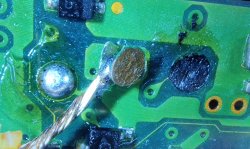
Hey, figured I'd post here since I'm struggling to figure out what else I can do, or if this is salvageable. I soldered wires to the Diag syscon point on my COK-002 and I wasn't careful enough with the wires while getting the TXD point ready and ripped off the pad. My Diag pad is now just black, and the pad is soldered to the wire. Is there anyway I can reconnect the pad to its original point, solder a wire somewhere else to bridge the connection or am I fucked? Hope I have any just bricked this board

Just showing the broken off pad attached to the wire on the left, and the black pad on the right. Was hoping someone here would have a better understanding of anywhere i might be able to bridge on this board if possible
 

Attachments

  • IMG20210203141502.jpg
    IMG20210203141502.jpg
    4.1 MB · Views: 513
Last edited by a moderator:
I do this for a living. I'm well equipped, if ya know what I mean... ;)
When you have declared the RSX "dead" from heatgun//RSX – bump / die//delidded by moron, would it be worth taking a chance/experiment by getting a (hopefully) working replacement RSX to revive the mobo?

Aliexpress has used RSX chips "100% Tested" for less than $20:
https://www.aliexpress.com/item/328...earchweb0_0,searchweb201602_,searchweb201603_

ebay has "new" chips for less than $30:
https://www.ebay.com/itm/Playstatio...673767?hash=item2657da2e67:g:1KkAAOSw5J5gGg8q
 
Dumb question: Can I do this without soldering wires? Like just touching the head of the wires to the pins and then use tape to hold it?
 
Just showing the broken off pad attached to the wire on the left, and the black pad on the right. Was hoping someone here would have a better understanding of anywhere i might be able to bridge on this board if possible

It doesn't need repaired or bridged anywhere, those are just test points that are meant for easier access. I would avoid scraping the mask off the via and soldering directly to it as you've already done some damage there and you don't want to pull out the eyelet (edit: whatever it's called, the internal stuff) if you rip the via pad off. You got lucky, it's not a blind via going directly to the syscon, so here is an alternate point:

NtMWkT8.jpg
 
Last edited:
When you have declared the RSX "dead" from heatgun//RSX – bump / die//delidded by moron, would it be worth taking a chance/experiment by getting a (hopefully) working replacement RSX to revive the mobo?

Aliexpress has used RSX chips "100% Tested" for less than $20:
https://www.aliexpress.com/item/328...earchweb0_0,searchweb201602_,searchweb201603_

ebay has "new" chips for less than $30:
https://www.ebay.com/itm/Playstatio...673767?hash=item2657da2e67:g:1KkAAOSw5J5gGg8q

To my knowledge, there have never been publicly available new RSX chips. They're all cleaned up pulls from boards with random problems, and the sellers don't accept returns, so since there is no way to test them prior to install, it's your responsibility/fault once installed and they don't work. It's a scam / gambling.

Since each rework cycle makes the board / chip more likely to popcorn/delaminate/otherwise catastrophically fail, it's just not worth it to keep at it over and over again on the same board. Even if something could be salvaged after a dozen rework cycles swapping things around, I'd be hard pressed to trust it enough to warranty it.
 
so another 3034 candidate :
[SSM] Bringup mode : syspm_stat=00000000/00000000
[POWSEQ] PowerSeq_Setup called.
[SSM] state: 0101 -> 0201
[POWSEQ] AV Backend Setup
[SSM] state: 0201 -> 0102
[SSM] state: 0102 -> 0202
[SSM] state: 0202 -> 0103
[SSM] state: 0103 -> 0203
[SSM] ssmCb_BeforeBeOn() called.
[SSM] state: 0203 -> 0104
Psbd_SbTransMode_Half:0x20e2
[POWERSEQ] Error : BitTraining BE:RRAC:RX0:GLOBAL1:RX_STATUS
[SSM] state: 0104 -> 0304
[SSM] ssm

I heated the RSX for 5.5 min or 420 with a heat station (no bottom heat) and no I get this:
>$ bringup
bringup
[SSM] state: 0000 -> 0101
Bringup Mode #0 (0xFF)
[SSM] ssmCb_OnStartingBePowOn() called.
[SSM] First Boot.
[SSM] Bringup mode : syspm_stat=00000000/00000000
[POWSEQ] PowerSeq_Setup called.
[SSM] state: 0101 -> 0201
[POWSEQ] AV Backend Setup
[SSM] state: 0201 -> 0102
[SSM] state: 0102 -> 0202
[SSM] state: 0202 -> 0103
[SSM] state: 0103 -> 0203
[SSM] ssmCb_BeforeBeOn() called.
[SSM] state: 0203 -> 0104
Psbd_SbTransMode_Half:0x20e2
>$ [mullion]$ [SSM] state: 0104 -> 0204
[SSM] state: 0204 -> 0105
[SSM] state: 0105 -> 0400
(PowerOn State)
[SERV NVS] READ CMD
Boot Loader SE Version 1.0.0 (Build ID: 1673,16934, Build Data: 2006-10-30_12:39:57)
Copyright(C) 2006 Sony Computer Entertainment Inc.All Rights Reserved.
[SERV SETCFG] XDR (CH0,CH1) ASSERT
[SERV SETCFG] XDR (CH0,CH1) DEASSERT
[INFO]: Connecting to Debug Device (SB UART)
[SERV NVS] READ CMD
[SERV NVS] READ CMD
[SERV NVS] READ CMD
[SERV NVS] READ CMD
[SERV NVS] READ CMD
[SERV NVS] READ CMD
[SERV NVS] READ CMD
[SERV NVS] READ CMD
[SERV NVS] READ CMD
[SERV NVS] READ CMD
[SERV NVS] READ CMD
[SERV NVS] READ CMD
[SERV NVS] READ CMD

still it beeps after 5.5 seconds on green and then after 1-2 more seconds it ylods and 3 beeps so progress!Is this what it does when diag is to ground? looks like it needs a reball! question is who still does em? The attached picture are the readings of all caps after heating all are good except 113 one it is 86? so I guess my reheat wasn't perfect. What othger things should I put my multimeter on to check voltage etc
 

Attachments

  • mine.jpg
    mine.jpg
    317.5 KB · Views: 951
Have you tried only to delid without heat that much cpu/gpu. Just exchange thermal paste under ihs will tell exactly if cpu is your problem, from what I see cpu is what it have, and yes I still reball.
fd70502dbe80f768fd751383bb7d7d56.jpg

I do reball because is quite hard to remove ihs rsx from slim models on board. They have used stronger glue on slim models but they forget ic die must be renewed or accidentally they did not want us to fix them anymore.
 
Wonderful terrible news! 3 second YLOD A0403034 reballed to fixed started crashing during GT6, and gave A0801001 and A0801002. Caps show the bad waveforms from my signature, but I haven't replaced them yet to 100% verify fix since I want to see if anyone has any more tests they want me to run. Check the TOKIN thread for more info.
 
Wonderful terrible news! 3 second YLOD A0403034 reballed to fixed started crashing during GT6, and gave A0801001 and A0801002. Caps show the bad waveforms from my signature, but I haven't replaced them yet to 100% verify fix since I want to see if anyone has any more tests they want me to run. Check the TOKIN thread for more info.
1001 and 1002 are VRAM power fail errors, for those that don't have the sony error log codes doc. That might mean that those are the true error codes for bad tokins (though it could potentially be anything leading up to that line too, but i think that in this case we'd get a 1004, an AC/DC error, or even a 3000-3004 -- power fail)

EDIT:

And we have confirmation that 1001 and 1002 error codes can come up from verified bad caps.

I just re-read your post on the other thread, turns out you already answered my question :) This is great news, and it makes a great deal more sense for bad caps to spit out 1001 and 1002 than 3034.
 
Last edited:
1001 and 1002 are VRAM power fail errors, for those that don't have the sony error log codes doc. That might mean that those are the true error codes for bad tokins (though it could potentially be anything leading up to that line too, but i think that in this case we'd get a 1004, an AC/DC error, or even a 3000-3004 -- power fail)
when I had all necs off and no tantalums on I got 801002 and 801001
 
when I had all necs off and no tantalums on I got 801002 and 801001
I performed a similar test at one point, but I remember what the error codes were :) I'm sure they were 1002 and 1001 as well, but at that point I wasn't that it wasn't related to the gpu/solder joints. Now we can be certain, though.
 
I performed a similar test at one point, but I remember what the error codes were :) I'm sure they were 1002 and 1001 as well, but at that point I wasn't that it wasn't related to the gpu/solder joints. Now we can be certain, though.
any idea what would cause be attention signal?
[mullion]$ [SERV NOTIF] RING_BUZZER
[SERV NOTIF] CONTROL_LED
[SERV NVS] READ CMD
[SERV NVS] READ CMD
[SERV NVS] READ CMD
[SERV NVS] READ CMD
[SERV NVS] READ CMD
[SERV NVS] READ CMD
[SERV NVS] READ CMD
[SERV NVS] READ CMD
[SSM] Attention BE : Detected !
[SSM] BE Attention signal is detected !!
[SSM] state: 0400 -> 0700
[POWSEQ] AV Backend Letup
[SSM] ssmCb_AfterBeOn() called.
[SSM] Shutdown mode : syspm_stat=00000000/00000000
[ERROR]: 0xa0801701
 
POWER Button released
[SERV NVS] READ CMD
[SERV NVS] READ CMD
[SERV NVS] READ CMD
[SERV NVS] READ CMD
[SERV NVS] READ CMD
[SERV NVS] READ CMD
[SSM] Attention BE : Detected !
[SSM] BE Attention signal is detected !!
[SSM] state: 0400 -> 0700
[POWSEQ] AV Backend Letup
[SSM] ssmCb_AfterBeOn() called.
[SSM] Shutdown mode : syspm_stat=00000000/00000000
[SSM] *** FATAL EVENT received while fataldown/fataloff, ignored. ***
[ERROR]: 0xa0801701
[ERROR]: 0xa0901001
apparently it is going off because I have CPU ram power fail in the static off state hmm maybe a delid and reflow? why would it have a power fail in the static off state
 
So some testing and updates originally I had some 3034 errors and 1002 errors. The gpu was at 1.2v +~ 10% now after a reflow or two of the gpu(I'm using top heat only so I probably didn't get it the first time) the 3034 and 1002 errors are gone and the nec pads with tantalum on, go to 2v upon power button press and settle in at about 1.8v and I no longer have immediate ylod 3-5 seconds now. And as per schematics I think they are supposed to be at 1.8v solid at least on the gpu necs.
However my cpu was and still is at 1.14v I think it's supposed to be 1.5v according to schematics can anyone measure that for me on a working cecha01? now that the gpu errors are gone a cpu error seems to have showed up 901001 and 1701 be ram power fail in static state and be attention flag. So I did a delid that went well I did a reflow.
Did some tests but same error 901001 and 1701 funny thing is the xdr be ram is definitely getting power in the proper voltage too, two 1.2v and 2 1.8v on their tantalums the bottom of the xdr also receives voltage only rail I didn't check was 1.0v rail.
My cpu still pulls 1.14v so either the reflow didn't reflow or something else is wrong. After Takin it apart again I noticed a cap was gone (I may have knocked this off on cpu delid but it may have been gone earlier I didn't notice it) on the vdd so I have to order one of those before further testing lol

I do have a bit of damage by the cpu positive nec pad by the cpu I hope this 901001 is not related to that. Does the ps3 have multiple layers other than front and back? I can't see them putting anything right under there because of interference tho.
 
Last edited:
Found out that for 40gb models cechg03 the error code (80010201) is the board infront of the power supply for the antenna it can be either the cable or cap gone bad
 
Has anyone ever tried replacing the ps3 ram and did it fix ylod, as for the ps4 the blod cause is sometimes the ram chips needing replaced or reballed.
 

Similar threads

Back
Top