PS3 Fault finding YLOD with the SYSCON - First steps and Error reporting

Has anyone ever tried replacing the ps3 ram and did it fix ylod, as for the ps4 the blod cause is sometimes the ram chips needing replaced or reballed.

Removing them is straight forward, but you need to reball them. Its a possible fault, but identifying the faulty one is tricky.
 
Hi ive replaced my nec tokin capacitors and it turns on fine but no display and just green light was working when i heated the nec tokin caps any idea on whats the problem thanks
 
It could be HDMI encoder, or other problems, but the first place to start is the SYSCON codes. From how you describe it, my guess would be a BGA defect. The reason is because you said it was working when you heated the tokins. That test warps the board and can cause BGA defects to mechanically reconnect, temporarily allowing the console to boot. Once the stress relaxes, the defect dissconnects again. It has nothing to do with the tokins.

You should perform the SYSCON to find out. If you get a bitraining error it's probably BGA, you need a reball.
 
thanks for the tutorial of this syscon method. I manage to fix my faulty CECHL and CECHG.

Because of that, i try to fix other PS3. And 2 days ago, i bought my friend faulty ps3 for 10$, is a slim version 2000. DYN-001 motherboard and i try to find the fix with syscon method.

Its refurbished or gameshop repaired, with fake sony sealed sticker, there is some missing screw, the bd drive and power button flex is not original very thin, the rsx delided, but the board is clean, no flux, and both rsx and cpu still on its original postition.

When i check the errlog, "A0093004 RSX_POW_FAIL" show.

Then i try the powerstate command and got this all power to "off".

I checked the power supply, 5v and 12v are ok.

But i still think it was the power supply, today i bought a cloned power supply but the result still the same.

So what the problem with this ps3 ? And what about the other errlog code ? Sould i replace the tokin with the tantalum?

Here i put the screenshot of the errlog and powerstate command.

Thanks, and sorry for my bad english.

C3F6RAL.jpg


HEiAJRs.jpeg
 
thanks for the tutorial of this syscon method. I manage to fix my faulty CECHL and CECHG.

Because of that, i try to fix other PS3. And 2 days ago, i bought my friend faulty ps3 for 10$, is a slim version 2000. DYN-001 motherboard and i try to find the fix with syscon method.

Its refurbished or gameshop repaired, with fake sony sealed sticker, there is some missing screw, the bd drive and power button flex is not original very thin, the rsx delided, but the board is clean, no flux, and both rsx and cpu still on its original postition.

When i check the errlog, "A0093004 RSX_POW_FAIL" show.

Then i try the powerstate command and got this all power to "off".

I checked the power supply, 5v and 12v are ok.

But i still think it was the power supply, today i bought a cloned power supply but the result still the same.

So what the problem with this ps3 ? And what about the other errlog code ? Sould i replace the tokin with the tantalum?

Here i put the screenshot of the errlog and powerstate command.

Thanks, and sorry for my bad english.

C3F6RAL.jpg


HEiAJRs.jpeg

The 09 prefix indicates that this is an early failure in the power up sequence, with 80 being "fully powered and booted". You also have quite a few other errors, including a 90-2024 (that's not even in the error doc!).

As far as 09-3004, it indicates issues with the tokins for the RSX. We're actually talking about that very error in the tokin repair thread, so I'd suggest you take a look over there and see what comes up in the next little bit.
 
The 09 prefix indicates that this is an early failure in the power up sequence, with 80 being "fully powered and booted". You also have quite a few other errors, including a 90-2024 (that's not even in the error doc!).

As far as 09-3004, it indicates issues with the tokins for the RSX. We're actually talking about that very error in the tokin repair thread, so I'd suggest you take a look over there and see what comes up in the next little bit.

Thanks for the reply, that why i confused because in the pdf or in this thread my error is not listed in there.

since reflow the tokin not working for me, Maybe ill try the tokin replace or swap it with tantalum. I will try both of them. Thank you...
 
thanks for the tutorial of this syscon method. I manage to fix my faulty CECHL and CECHG.

Because of that, i try to fix other PS3. And 2 days ago, i bought my friend faulty ps3 for 10$, is a slim version 2000. DYN-001 motherboard and i try to find the fix with syscon method.

Its refurbished or gameshop repaired, with fake sony sealed sticker, there is some missing screw, the bd drive and power button flex is not original very thin, the rsx delided, but the board is clean, no flux, and both rsx and cpu still on its original postition.

When i check the errlog, "A0093004 RSX_POW_FAIL" show.

Then i try the powerstate command and got this all power to "off".

I checked the power supply, 5v and 12v are ok.

But i still think it was the power supply, today i bought a cloned power supply but the result still the same.

So what the problem with this ps3 ? And what about the other errlog code ? Sould i replace the tokin with the tantalum?

Here i put the screenshot of the errlog and powerstate command.

Thanks, and sorry for my bad english.

C3F6RAL.jpg


HEiAJRs.jpeg
Hello there, and thank you for posting.
You mean you diagnosed L model with VER board?
I didn't know this was possible yet.
It doesn't appear in the guide.

Also btw... Could you be more specific about what symptoms did these systems show? YLOD, but how many seconds?

Slim error 3004 can very well be the NEC/Tokin capacitors of the RSX.
09 prefix... Was the YLOD happening under 3 seconds, or instant?

It is probably fixable, so Cheers
 
Thanks for the reply, that why i confused because in the pdf or in this thread my error is not listed in there.

Yes this is an early leaked sony pdf, so wont have all of the error codes.
Update us if changing the tokins fixes your issue. Then we can record for all
 
Hello there, and thank you for posting.
You mean you diagnosed L model with VER board?
I didn't know this was possible yet.
It doesn't appear in the guide.

Also btw... Could you be more specific about what symptoms did these systems show? YLOD, but how many seconds?

Slim error 3004 can very well be the NEC/Tokin capacitors of the RSX.
09 prefix... Was the YLOD happening under 3 seconds, or instant?

It is probably fixable, so Cheers

Sorry for my bad explanation, so i just try syscon my CECHG the sem-001 (the pin for it was on the pdf). And found that it was the rsx tokin. I swap it but it not work, because i missread the error, it not the rsx but the cpu actualy. So i swap the cpu and boot up.
Then i fix the HL by the same method. But when i turn on, the GLOD happen, no screen, no sound just green light. I try to find the ver-001 pin for rx and tx in the forum. And found this thread that it was on 78 and 79 SW 301 pin (the syscon on ver 001) https://www.psx-place.com/threads/s...oxao-what-does-it-mean.26148/page-17#comments
I didnt try that, because i dont have smal solder tip, and i dont know if that was the right rx and tx or i was wrong. And the side of the board underneath the syscon, it look like a tx and rx line on it. Sorry if im wrong, just my speculation, cause im not try that.
What i did for my GLOD HL was reflow both the rsx and cpu and it actually work. But i dont know how long it will last, because i think it need a proper reball.

And for this slim 2000 it a fast 2 second YLOD.
Today i order 108 tokin and 330 tantalum. Hope it will fix the problem.

Sorry for my bad english
 
People might hate me if i say this but why exactly is a syscon i know what it does and all but is it a usb cable that solders on the ps3 or is it some other device. Anylinks where i can get one and what they look like thanks as trying to fix my child hood ps3 thats be working since day one on launch thanks
 
People might hate me if i say this but why exactly is a syscon i know what it does and all but is it a usb cable that solders on the ps3 or is it some other device. Anylinks where i can get one and what they look like thanks as trying to fix my child hood ps3 thats be working since day one on launch thanks

https://www.psdevwiki.com/ps3/Syscon_Hardware

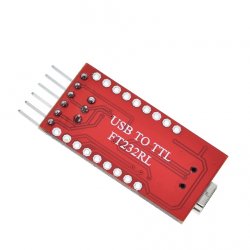
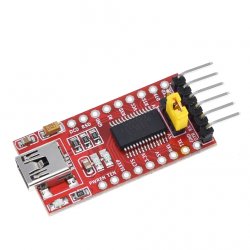
So this thread is explain on how we can connect a USB ttl cable (https://www.adafruit.com/product/954) to the required points on the PS3 motherboard, so that we can get a serial connection and talk to the syscon chip.

The guide on my git repo shows pictures for models of ps3 that can be achieve this operation.

Be advised this is just the first step, the actual fixing part will depend on the error messages you get from the syscon.

Its not for the faint hearted and will need some good basic electronic skills to continue!
 
So Ive just received a CECHG03 with YLOD of death. Symptoms are 3 beeps then off.

Connecting to the syscon points on the motherboard - USB serial lead >> RX to PS3 RX point, TX to PS3 TX point, GND to a nearest GND point on the motherboard. The DIAG pin on the PS3 motherboard I have soldered the AWG 30 cable, but not connected to GND yet - this comes later in internal mode.

So hooked up the lead to my laptop and the other end connected points as required TX to TX, RX to RX and GND to GND.

Opened a terminal on my linux laptop:

I first test to see if the lead is working correctly by using screen to see the output:

screen /dev/ttyUSB0 57600

Then flip the power switch on the back of the PS3 so RED led is on, looking back at the terminal i can see

OK

Great serial lead works! - if garbage or no output then connection is bad or wrong way round on the TX or RX - make sure the GND is good this affects it greatly.

So switch off ps3 power again. Kill the screen session.

Now we load up the python syscon script:

python ps3_syscon_uart_script23.py /dev/ttyUSB0 CXR

CXR is external mode, we use this mode to enable internal mode, you dont have to but internal mode is easier to read.

we have a prompt like this:

>$

I need to authorise myself to gain higher commands

>$ auth

Grrr i get this

Traceback (most recent call last):
File "ps3_syscon_uart_script23.py", line 190, in <module>
main(len(sys.argv), sys.argv)
File "ps3_syscon_uart_script23.py", line 174, in main
print(ps3.auth())
File "ps3_syscon_uart_script23.py", line 139, in auth
scopen = self.command('scopen')
File "ps3_syscon_uart_script23.py", line 77, in command
answer = self.receive().decode('ascii').strip()
UnicodeDecodeError: 'ascii' codec can't decode byte 0xf8 in position 21: ordinal not in range(128)

Usually this means several things, poor connection or bad GND. So i try a different GND - can the metal chassis.

Ok, try again, dam im getting this now

>$ auth
scopen response invalid

mmm, turned off ps3, turn ps3 power back on (back switch not front button)

Wait for a few seconds...

Now i get this: seems to have worked

>$ auth
Auth successful

Ok, now we can set the internal mode on

>$ EEP SET 3961 01 00
00000000

Confirm its set

>$ EEP GET 3961 01
00000000 00

Ok, now we have to turn off ps3 again. Now connect the DIAG lead from the ps3 motherboard to the GND connection, basically setting to low impedence as its a 3.3v line.

Exit out of the python script: CTRL + C or exit

Now run the python script in CXRF mode = internal mode

python ps3_syscon_uart_script23.py /dev/ttyUSB0 CXRF

Now power back on the ps3 again.

DONT worry if the red led flashes, its saying the eeprom checksum is incorrect and needs fixing!

At the shell, type auth again:

>$ auth
Auth successful

If you get errors again, make sure to check connection and GND. Really important. Keep trying it will work eventually.

Now we need fix the checksum of the syscon

>$ eepcsum
eepcsum
Addr:0x000032fe should be 0x1596
Addr:0x000034fe should be 0x86d6
sum:0x0100
Addr:0x000039fe should be 0x7360
Addr:0x00003dfe should be 0x00ff
Addr:0x00003ffe should be 0x00ff

Because we change 0x39fe, it has messed up the checksum of the syscon
Addr:0x000039fe should be 0x7360 <----- this is telling you what it should be!!

Now this is where it can be confusing, you think it should be 73 60, but because we are dealing with endian systems, the bytes are reversed. So what it should be is

>$ w 39fe 60 73
w 39fe 60 73
w complete!
[mullion]$

Now if i type eepcsum again

>$ eepcsum
eepcsum
Addr:0x000032fe should be 0x1596
Addr:0x000034fe should be 0x86d6
Addr:0x000039fe should be 0x7360
Addr:0x00003dfe should be 0x00ff
Addr:0x00003ffe should be 0x00ff

Its happy again. Hooray!

REMEMBER i'm showing you what this board needs to fix its checksum, you need to use the values that eepcsum gives you to fix your checksum, which could be different!!!
Usually the same boards type have the same checksum values i.e. SEM-001, usually the same as another SEM-001. But use the eepcsum command to fix it.

Ok, now we have the checksum fixed, let powercycle again and auth.

>$ auth
Auth successful

Run the lasterrlog and errlog

>$ lasterrlog
lasterrlog
Last Error Code:0xa0403034, Time:0xffffffff
[mullion]$
>$ errlog
errlog
ofst[ 60]:err_code:0xffffffff, clock:0x0d7c7bf2 2007/03/03 18:33:22
ofst[ 64]:err_code:0xa0403034, clock:0x0d7c7bf2 2007/03/03 18:33:22
ofst[ 68]:err_code:0xa0404432, clock:0x0d7c7bf9 2007/03/03 18:33:29
ofst[ 72]:err_code:0xa0403034, clock:0x0d7c7bf9 2007/03/03 18:33:29
ofst[ 76]:err_code:0xa0801001, clock:0x1144aff3 2009/03/07 04:09:23
ofst[ 80]:err_code:0xa0801701, clock:0x1144b024 2009/03/07 04:10:12
ofst[ 84]:err_code:0xa0801001, clock:0x1144b024 2009/03/07 04:10:12
ofst[ 88]:err_code:0xa0801001, clock:0x116d75e6 2009/04/07 02:24:38
ofst[ 92]:err_code:0xa0801701, clock:0x11801fd3 2009/04/21 06:10:27
ofst[ 96]:err_code:0xa0801601, clock:0x11801fd3 2009/04/21 06:10:27
ofst[100]:err_code:0xa0404432, clock:0x11801ff6 2009/04/21 06:11:02
ofst[104]:err_code:0xa0403034, clock:0x11801ff6 2009/04/21 06:11:02
ofst[108]:err_code:0xa0404432, clock:0x11801ffe 2009/04/21 06:11:10
ofst[112]:err_code:0xa0403034, clock:0x11801ffe 2009/04/21 06:11:10
ofst[116]:err_code:0xa0404432, clock:0x1180200b 2009/04/21 06:11:23
ofst[120]:err_code:0xa0403034, clock:0x1180200b 2009/04/21 06:11:23
ofst[124]:err_code:0xa0404432, clock:0x11802023 2009/04/21 06:11:47
ofst[ 0]:err_code:0xa0403034, clock:0x11802023 2009/04/21 06:11:47
ofst[ 4]:err_code:0xa0404432, clock:0x11811927 2009/04/21 23:54:15
ofst[ 8]:err_code:0xa0403034, clock:0x11811927 2009/04/21 23:54:15
ofst[ 12]:err_code:0xa0404432, clock:0xffffffff
ofst[ 16]:err_code:0xa0403034, clock:0xffffffff
ofst[ 20]:err_code:0xa0404432, clock:0xffffffff
ofst[ 24]:err_code:0xa0403034, clock:0xffffffff
ofst[ 28]:err_code:0xa0404432, clock:0xffffffff
ofst[ 32]:err_code:0xa0403034, clock:0xffffffff
ofst[ 36]:err_code:0xa0404432, clock:0xffffffff
ofst[ 40]:err_code:0xa0403034, clock:0xffffffff
ofst[ 44]:err_code:0xa0404432, clock:0xffffffff
ofst[ 48]:err_code:0xa0403034, clock:0xffffffff
ofst[ 52]:err_code:0xa0404432, clock:0xffffffff
ofst[ 56]:err_code:0xa0403034, clock:0xffffffff

As you can see from the errlog history, its had a few bumps in road along the way.
Continue to next page...
 
fst[ 64]:err_code:0xa0403034, clock:0x0d7c7bf2 2007/03/03 18:33:22
ofst[ 68]:err_code:0xa0404432, clock:0x0d7c7bf9 2007/03/03 18:33:29

Is frequently shown, which according to the syscon errlog logs.pdf means the following:

a0403034 - Step number 40 on powercycle, Category 3 Fatal booting error, BE Error (IC1001) - so at this point you are thinking, mmm must be the CELL processor is not happy?. Well its related to the next error

a0404432 - Step number 40 on powercycle, Category 4 Data error, BE or RSX Error (IC1001 or IC2001)

OK, so we have a possible faulty CELL or RSX. Lets try and bring the board up and see what the current status gives us.

>$ bringup
bringup
[SSM] state: 0000 -> 0101
Bringup Mode #0 (0xFF)
[SSM] ssmCb_OnStartingBePowOn() called.
[SSM] First Boot.
[SSM] Bringup mode : syspm_stat=00000000/00000000
[POWSEQ] PowerSeq_Setup called.
[SSM] state: 0101 -> 0201
[POWSEQ] AV Backend Setup
[SSM] state: 0201 -> 0102
>$
[SSM] state: 0102 -> 0202
[SSM] state: 0202 -> 0103
[SSM] state: 0103 -> 0203
[SSM] ssmCb_BeforeBeOn() called.
[SSM] state: 0203 -> 0104
Psbd_SbTransMode_Half:0x20e7
[POWERSEQ] Error : BitTraining RSX:RRAC:RX3:GLOBAL1:RX_STATUS
[SSM] state: 0104 -> 0304
[SSM] ssmCb_AfterBeOn2() called.
[SSM] PowSeq Fail : Detected !
[SSM] state: 0304 -> 0700
[POWSEQ] AV Backend Letup
[SSM] Shutdown mode : syspm_stat=00000000/00000000
[ERROR]: 0xa0404432
[ERROR]: 0xa0403034
[POWSEQ] PowerSeq_Letup called.
[SSM] state: 0700 -> 0600
(PowerOff State) (Fatal)

Mmmm, [POWERSEQ] Error : BitTraining RSX:RRAC:RX3:GLOBAL1:RX_STATUS this is interesting?

To me this is looking like an RSX issue, on a similiar board BE was showing instead of RSX. It had the CELL replaced and rejigged and worked again.

In this case it seems the RSX is having problems communicating to the CELL.

At the moment this is not a NEC tokin issue, because the power boot states are working fine as its getting to last boot state. Early code errors will be in the 1 or 2 category. BUT NEC tokins can manifest later on when in a running state under load. Then error codes 1 and 2 will come into play.

So based on what has been presented to me, I know from experience this will need a reflow or replace the RSX.

I can do some further multimeter testing in the RSX area and determine the resistance on the NEC tokins POSITIVE and GND.

The RSX is showing a reading of 1.4ohms and the CELL shows 4.5ohms. This is a measure of the core status (RSX = 1.4ohms, CELL = 4.5ohms) as a complete circuit. Removing the RSX or CELL will produce a high resistance in the millions because its no longer completing the circuit.

If the RSX and CELL are reading below 0.9ohms then they have died. If you are getting 0.6ohms below, you have a short.
Usually on the RSX the ram chips die and short out.

To me 1.4ohms on the RSX is kinda low, and the RSX will mostly fail sooner or later or the heat from reflow will kill it.

So for me I will replace the RSX..

Hope this run down helps?

https://imgur.com/a/YBJDsqa - showing how i connect the usb ttl cable and serial points on the SEM-001 motherboard.

Green = TX, Orange = RX, Yellow = Diag and Black = GND
The usb ttl lead is a 3.3v serial lead using a PL2303 chip. Its my permanent diag lead so have soldered leads with crocodile ends so i can just clip on the new awg 30 cables from the ps3 motherboard.

 
Last edited:
Soon I will add pinout to each ram of 40 nm, not sure if it helps after reball or for 90 nm but this model is easier to decap than other models. Nor that will be fixed back but I get traces on good condition on rsx pcb.
 
Hello, i got a CECHG with SEM-001 board, that powers up for 1 sec with green light, then the red light comes up along with the green. After that 3 beeps are heard and then the red light flashes while green goes off. I have connected to syscon and the errlog is filled up with 2 error codes 0xa0404402 and 0xa0403034. I tried to reflow the rsx without success.
Code:
>$ powerstate
powerstate
ATA Power  : OFF
PCI Power  : OFF
RSX Power  : OFF
XDR Power  : OFF
Eurus Power  : OFF
SB Power  : OFF
RSX Thermal Sensor : UNAVAILABLE
BE Thermal Sensor  : UNAVAILABLE
[mullion]$
>$ bringup
bringup
Do nothing. (FatalOff State)

Checking the voltages around the rsx, be and vrms, i get no measurable voltages. I checked all the fuses and are ok. Any idea where to start with? Measuring between the NEC-Tokin caps i get that there is short. Is that ok?
 
Hello, i got a CECHG with SEM-001 board, that powers up for 1 sec with green light, then the red light comes up along with the green. After that 3 beeps are heard and then the red light flashes while green goes off. I have connected to syscon and the errlog is filled up with 2 error codes 0xa0404402 and 0xa0403034. I tried to reflow the rsx without success.

Checking the voltages around the rsx, be and vrms, i get no measurable voltages. I checked all the fuses and are ok. Any idea where to start with? Measuring between the NEC-Tokin caps i get that there is short. Is that ok?

type errlog again, and output to this thread.

Measure the resistance on the RSX nec tokins - gives us the output
 
Hello, i got a CECHG with SEM-001 board, that powers up for 1 sec with green light, then the red light comes up along with the green. After that 3 beeps are heard and then the red light flashes while green goes off. I have connected to syscon and the errlog is filled up with 2 error codes 0xa0404402 and 0xa0403034. I tried to reflow the rsx without success.
Code:
>$ powerstate
powerstate
ATA Power  : OFF
PCI Power  : OFF
RSX Power  : OFF
XDR Power  : OFF
Eurus Power  : OFF
SB Power  : OFF
RSX Thermal Sensor : UNAVAILABLE
BE Thermal Sensor  : UNAVAILABLE
[mullion]$
>$ bringup
bringup
Do nothing. (FatalOff State)

Checking the voltages around the rsx, be and vrms, i get no measurable voltages. I checked all the fuses and are ok. Any idea where to start with? Measuring between the NEC-Tokin caps i get that there is short. Is that ok?
"Short" is a strong word.
If it's over 1 ohm, it is probably OK.
That's how these low voltage, high current circuits work.
If it's under 1 ohm, then yes something may be wrong.
 
By the way, I got this in the mail recently, and today I may have enough time to bang my head my head against the keyboard a little.

So, any headache-saving tips may come in handy.
If someone like me can get it working in a reasonably straight forward way, (Windows guy, no previous exposure to python stuff etc)
Then maybe a newbie friendly walkthrough could come out of this.

(Right now I am doing this mostly out of curiosity. I'm actually waiting for a bunch of consoles to fail again, right now working)

Cheers
 

Attachments

  • 24456284323485833.jpg
    24456284323485833.jpg
    190.7 KB · Views: 59
  • 116228726579960899.jpg
    116228726579960899.jpg
    239.8 KB · Views: 59

Similar threads

Back
Top