I can not say nek would not fail, only when ic is out of board(cpu/gpu), if capacity is less than 2500uf on board you can change it. Is quite difficult to get right value on board. Never had chance to get it done with only nek exchange. Did not tested more than few times then left it aside for this side of view. Example of good working slim 3000 on board cpu and gpu after reball both capacy have ~ 11 mili farads on both ic. I did not take to many measurements on last 4 phat models, just reballed and tested in games and giving back to costumer. If they fail I will change them with slims (1 year warranty) . Luckily nobody called until now so I will see in time.
In my case I know the RSX has been reballed, so dodgy solderballs are not the problem. In most other cases, I would still suspect BGA defects, especially if it's associated with artifacting, GLOD, or 3034 errors! We just know that bad tokins can cause 1002, 1004, & 1001 errors. That doesn't mean these errors are diagnostic of a bad tokin.
Those 1001/1002 errors are just indicating a power disruption. Something is causing noise spikes that are too high for the console to be stable and communicate without data errors. 1004 indicates a power failure. That could be bad tokins, VRM, dodgy solder balls, cumulative die damage from electromigration, etc. It's not diagnostic, it just narrows the list of problems to power distribution/filtering.
Working on dyn001, some of them may look like 2.2~2.5 mili farad on gpu where toking are and varies always and cpu 2.8~3 and varies. This is an working board with overheat after 10 minutes, may be fixed by delid only.
After a YLOD, I think what happens a lot of times is that people open the console to retrieve their game and then sell the console for parts.
Just be sure to test voltages and fuses before taking off the tokins (proper troubleshooting first). Also, please consider getting an oscilloscope and helping out. I'm very curious what the O-scope looks like on that 1001/1004.
Okay, internal mode is pretty easy.
AUTH in external CXR mode as normal.
EEP GET 3961 01 --> should return "00000000 FF"
EEP SET 3961 01 00 (changes the bit to allow internal access mode)
EEP GET 3961 01 (verify the change) --> Should now return "00000000 00".
Shut off console & close the CMD prompt/terminal. Connect the Diag wire to GND and turn console back on. It will beep 3 times and start flashing because the checksum doesn't match anymore. This is normal! We're going to fix that next...
You need to use internal command CXRF now. Here's an example of the commands I have to use every time I gain access for a test, but you'll have to change the "COM4" to whichever comm port your usb to serial device was assigned. You can find it under usb devices in the device manager.:
Code:
CD C:\Users\HTPC\Desktop\PS3\SYSCON
python ps3_syscon_uart_script.py COM4 CXRF
AUTH (Uppercase) or auth (lowecase) whichever works. I've had to use both and sometimes is just requires the one or the other. IDK why. Once you get "AUTH successful", you're in!
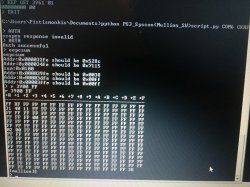
eepcsum --> will return addresses that "should be" somthing like "0x0038". The address you need to change is the line after the "sum:0x0100" line. The sum indicates the mismatch. Ignore the line before of after, the address you want to change is the one immediately following the sum line. So for example if the that line reads "Addr:0x000039fe should be 0x0038" then you do the following...
w 39fe 38 00 (don't use this command. yours will be different depending on the address that that didn't pass the checksum above. Just put it in like this example, based on your actual checksum mismatch. For example, if your address should be "0xff38" then your command should be "w 39fe 38 ff") --> should just go to the next line or say write successful, I don't remember (you only have to do this once per console). Notice that the 00 and 38 are swapped? That is endian byte swaping and the reason @squeept doesn't like doing this. Dyslexia make this type of thing more confusing than it already is. Anyway that's the hardest part.
r 39fe 02 (validate the change) --> if the checksums match now, then the "sum:0x0100" line will not be there anymore. That means the console will boot normally now.
Turn off the console and turn it on again. The standby led will be solid red and stop flashing. That's because the checksum matches and you successfully gained internal access. Now you need to use step 6 and 7 from now on. You can now use internal commands like "lasterrlog," "bringup," "powerstate," "errlog," and more. enjoy!
This is me trying to do the "endian byte swap" without having a clue what the hell is an endian byte, much less an endian byte swap.
Ok, there's always a first time for everything.
So... If the important line under "sumBlablabla" turns out to be the same as the one in the examples... (see picture) Does that mean I should actually write the same command? Is this coincidence?
w 39fe 38 00
Although I'm pretty sure I'm not getting it, so I ask before I blindly hit enter.
You would need to read about the concept of endianness.
Put simply, it's about how you store data in RAM. Let's say you have an integer like 0x12345678, you could store it in RAM like this 12 34 56 78 with the most significant byte first or you could store it like this 78 56 34 12 with least significant byte first. The first way is what big endian CPUs use, the latter is what little endian CPUs use.
In a machine like the PS3 you get both types of endianness, CellBE is big endian while the syscon processor is little endian.
An endian swap is just a byte swap to transform the data read in one type of endianness to the other.
eepcsum showed you that address 0x39fe should be 0038 based on the sum 0x100. So because the syscon is working on little endian, we need to swap that value to - 38 00
So yes, you would do:
w 39fe 38 00
duckduckgo or google is your friend. Try to do some research first, there are lots of info on this stuff, absorb the information and once thats done, don't be afraid to ask the question if you have done the homework first, then not sure.
People like myself, don't like people who just want to be spoon fed!!
Although there's a threshold between looking something up, and actually understanding it. I'm sure you are aware.
And I feel your pain, but remember, by answering me, you are not just being my third friend in the present. You are also helping those that will come in the future with the same question, and maybe even those that got stuck in the past but didn't know exactly what to do or ask. Or also those that didn't even bother because everything is so vague. (And took other destructive routes)
There are many of those. That's the real shame 15 years later.
Your errors show BE VRAM fail and DC power fail. On POWER ON state.
Its possible there is an issue with your 12V, 3.3V or 5V lines near the CELL processor. You will need to look at the motherboard schematics and do some multi meter checking on the voltages around the CELL area.
This will be no quick fix, and you will need to identify incorrect voltage readings to narrow down the fault.
Just a suggestion for the tutorials...
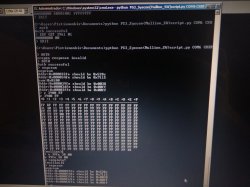
By using a length of 0xFF in the read command you are "missing" 1 byte... let me show it with this image:
The point is... you are not displaying the "csum" completly (but only half of it).
I know... this doesnt causes any problem because we are only using a "read" command, so is safe, but still... we are doing for informative purposes and it would be much better to use this command (with lenght 100 instead of FF... is one more byte)
Code:
>r 3900 100
Actually... you could do it by reading only the 2 bytes we need to know, using the same exact "addr" indicated in the output of the "eepcsum" command, and a lenght of 2 bytes, this way:
Just a suggestion for the tutorials...
By using a length of 0xFF in the read command you are "missing" 1 byte... let me show it with this image:
The point is... you are not displaying the "csum" completly (but only half of it).
I know... this doesnt causes any problem because we are only using a "read" command, so is safe, but still... we are doing for informative purposes and it would be much better to use this command (with lenght 100 instead of FF... is one more byte)
Code:
>r 3900 100
Actually... you could do it by reading only the 2 bytes we need to know, using the same exact "addr" indicated in the output of the "eepcsum" command, and a lenght of 2 bytes, this way:
Hmm, so this is why I couldn't see anything wrong in the table isn't it?
Well, that's one of the reasons why I'm documenting every step I take like a 5 year old, and I'm glad I did so that the next guy doesn't have to fall for the inadequacies of the current guide. With help of course.
Remember I'm not doing any of this as a business. It's just curiosity and for the sake of preservation. I already have a couple of these machines working, so I have 0 urgency to fix this and the other ones.
I still try anyway. I have a sealed slim 2000 from a family member I'll probably read next
Well, that's one of the reasons why I'm documenting every step I take like a 5 year old, and I'm glad I did so that the next guy doesn't have to fall for the inadequacies of the current guide. With help of course.
Hmm, so this is why I couldn't see anything wrong in the table isn't it?
Well, that's one of the reasons why I'm documenting every step I take like a 5 year old, and I'm glad I did so that the next guy doesn't have to fall for the inadequacies of the current guide. With help of course.
Remember I'm not doing any of this as a business. It's just curiosity and for the sake of preservation. I already have a couple of these machines working, so I have 0 urgency to fix this and the other ones.
I still try anyway. I have a sealed slim 2000 from a family member I'll probably read next
It was not meant to you only, is mostly because that procedure appears in the .pdf guide everybody is using, and i thought it was a nice timing to mention it because in the photo you made it can be seen well the sequence of commands and the logic we are following
When we run the eepcsum command the syscon is telling us if there is an incorrect csum, indicated with the line:
Code:
sum:0x0100
The line that comes next is the problematic csum, in your photo it can be seen that syscon is telling you that the csum should be 0x0038
This is a nice feature btw... we can deduce syscon is calculating the csum on runtime... in other words, syscon knows how to fix his own csums, lol
But in the next command, when you run the...
Code:
>r 3900 FF
You are not displaying the problematic csum entirelly... but only half of it... we can see one of the bytes was 0x38... but we dont know the other byte
The only thing we know about the other byte is that it was different than 0x00
You know... incase it was 0x00 the complete csum would be correct, and the output of "eepcsum" would not display any error
The simplifyed sequence of actions i would do is something like this:
Code:
>eepcsum
>r 39fe 2
>w 39fe 38 00
>eepcsum
The first command is going to tell you the problematic "csum", the correct value for it, and the "addr" where needs to be written
So... for curiosity sake, in the next command we read the problematic csum... just to verify that it differs from what syscon is telling
In next command we write whatever syscon is telling us to write (but with the 2 bytes swapped to change endianess)
And finally, we run the eepcsum command again to see if all the csum checks are passed successfully
If 5 years old are reading this, then they should stop right away!!!
The guide is an = AS IS!, if you don't like it, then tuff Sh***, do your own guide!!
I'm tired of people whining on about the guide, jeez.
Neither are you, so please accept my apologies If there was a misunderstanding. We are all grateful for what you provided with your spare time and you don't have to do anything else.
It's actually thanks to this that I thought I'd put a bit of my time as well to try to follow it and make it better if possible. Many good people have helped me, including yourself. And I got to the end.
This is not an attack. It never was. So please don't take it the wrong way.
Don't shoot the messenger.
No need to take any links down
Of course it's not my call.
Besides, the 5 year olds already have it a bit easier than before.
So I can already be happy
Btw I rectify:
Error 1001 is not just an old error. I got another one right now.
But... I think it's just what happens when the console is just switched off from mains...
Which is what people tend to do when there's a GLOD.
Oh well, I think this really points away from the tokins.
I will try to replicate this 1001 error with another console. But I think it's just that. A power cut. So not a very meaningful error.
I think somebody else had reported random 1001 error in between other errors. Really it may be just that.
Could you please detail this further? I'm very interested in what you mean by, "get noisy in a similar amount of time with similar temps." Do you have an oscilloscope? If so, would you please post images of the noise? Also the lasterrorlog if you can get the 1001 error to trigger again. This is something I have been hoping to see for awhile now. @squeept and I are wanting to find the error codes associated with tokins, as confirmed with the oscilloscope images to prove they are bad. We also want to define the Vpp that makes them unstable and/or trigger an error/YLOD.
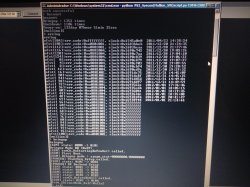
So, your picture of the errlog is nice. Good job getting this far!!! However, it doesn't say where in the startup sequences, or after, the YLOD occurred. I want to see the "lasterrlog" after you trigger a YLOD. Here's the procedure:
Be sure the battery and fan are plugged in.
Hook up SYSCON wires for CXRF mode (Diag to GND).
Flip PWR rocker on --> get red LED
Use bringup command to start console
If YLOD occurs during the startup sequence you'll get a YLOD pretty quick. If it boots and is stable in menu, then try to trigger a YLOD by playing a game or something.
Once the YLOD occurs, use the lasterrlog command to see the specific information about what happened. For example:
You can see that the boot loader starts and from then on ther's a bunch of read CMDs. That's normal operation. The console was running fine before the the YLOD occured. Then It'll actually tell you Power Fail RS or BE. From there, yeah troubleshooting to find why.
Neither are you, so please accept my apologies If there was a misunderstanding. We are all grateful for what you provided with your spare time and you don't have to do anything else.
It's actually thanks to this that I thought I'd put a bit of my time as well to try to follow it and make it better if possible. Many good people have helped me, including yourself. And I got to the end.
This is not an attack. It never was. So please don't take it the wrong way.
Don't shoot the messenger.
No need to take any links down
Of course it's not my call.
Besides, the 5 year olds already have it a bit easier than before.
So I can already be happy
The 09 prefix indicates that this is an early failure in the power up sequence, with 80 being "fully powered and booted". You also have quite a few other errors, including a 90-2024 (that's not even in the error doc!).
As far as 09-3004, it indicates issues with the tokins for the RSX. We're actually talking about that very error in the tokin repair thread, so I'd suggest you take a look over there and see what comes up in the next little bit.
Sorry for late reply, got to work hard to pay my college bill, lel.
So after waiting 4 days my tokin and tantalum is arrived. Ended swap tokin on back mobo and 330 tantalum on front (the rsx). And now the 3004 problem is gone. But it still YLOD. The error code same as before.
What the code refers to ? Hdmi ic ? Is there any people who had the same error code and fixed ?
Maybe i should wait for the error code to be update.