PS3 Fault finding YLOD with the SYSCON - First steps and Error reporting

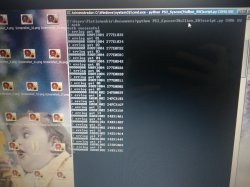
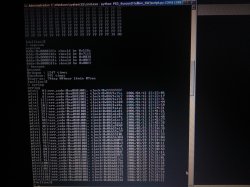
Here is another COK 002 with GLOD just for curiosity. This one did show matrix style artifacts regularly.

As suspected. It's just full of 1001 errors. Every GLOD will have 1001 errors because people cut the power when it's unresponsive.

So, be careful. Error 1001 is meaningless. It's just what happens when there's a power cut or somebody flips the switch from the back while the console is ON.
(The error does not appear when you long press the front power button until it powers off forcefully)

Again, here's the important bit:

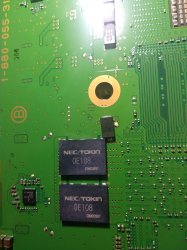
Do not associate error 1001 with NEC tokin capacitors as it is currently suggested. This is misleading. Even if it were actually a tokin fault... This error would not be a reliable way to diagnose anything.

(Edit: I guess the only exception is if the error happens in front of you and nobody cut the power. Maybe then it can indicate an actual power issue)

(I suspect error 1004 can also be the same thing, as suggested by the pdf too)

I'm glad I didn't touch the capacitors on the other one. Now it makes sense.
Mystery solved, no clue still.

(And btw, no I still haven't soldered anything hehehe, really now the hardest part is disassembling the console. Rest takes no time)
 

Attachments
  • IMG_20210301_195225.jpg
    IMG_20210301_195225.jpg
    4.5 MB · Views: 95
Last edited:
Does anyone know of a good video guide to do this? I found one for the ps4 on YouTube but nothing for ps3. Can someone please make one for the fat models? That would be fire. I read the guide but it's hella complicated. I know it says linux only but is windows possible and how?
 
Does anyone know of a good video guide to do this? I found one for the ps4 on YouTube but nothing for ps3. Can someone please make one for the fat models? That would be fire. I read the guide but it's hella complicated. I know it says linux only but is windows possible and how?
There are no silly questions.
Only silly answers.
...As for rude, both exist.

You want me to make a video?
Ok, maybe I can do it.

But I first I would appreciate that you read the small walkthrough (that I had already written). And tell me what you think about it before I make a video for you.
Your opinion will be appreciated.

I write this in addition to main guide (work in progress) done by db260179 with passion and free time.
https://www.psx-place.com/threads/f...syscon-first-steps-and-error-reporting.30100/


I will try explain step by step, as easy as I can explain it.
Really this can be done in 10 minutes.

First of all let's make clear what we are doing:
We are simply running a python script that will let us communicate with the PS3 SYSCON, using a serial (COM) port.

We can thank guys like 'Major' and 'zecoxao' for making this possible in the first place. We are just running their script.

So, what do we need in order to run this script?

Python 2.7.18, with additional modules pycryptodome and pyserial

For Windows users (most people) this is what you can do:

-First install python 2.7.18 (you can just google python for windows)
-When you run the installer, you can check the last box (it will make things easier; lets you run python commands from any location)
Once it's installed, you should already be able to run python commands and scripts. How? Directly from the windows command prompt, you can type: python script.py

But our particular script relies on two additional modules. (If you try without them, it will tell you the problem)
But don't worry,
-You can download and install them automatically by typing:
pip install pycryptodome
pip install pyserial

That's it. Now you should be able to run the magic script. Just specify the COM port and the syscon mode at the end.
-For example:

python uart_script.py COM4 CXR

What COM port?
This is where the USB to serial 3.3v adapter comes in handy.
When you plug it into your computer, it should show up in device manager as a COM port. If not, you need to install drivers for it.
This will depend on your particular computer and dongle.

What is CXR? This will depend on the syscon you are trying to communicate with. SW is for newer (SherWood) Syscons. CXR(F) for the older BGA models
Further details in the PDF

If all is correct, no errors will come up immediately. Even without anything physically connected.
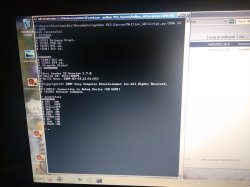
You can then type AUTH, and will get
"Auth1 response invalid"

Of course, to get past this, everything has to be connected and working properly. Even then it may take a couple tries in a row. Eventually you should get:
Auth successful

(If you are still getting "Auth1 response invalid", first simply try again a couple times, turn the ps3 power off and on, if not, swap Rx and Tx wire around and repeat. Check the connections etc... It should work in the end)


That's it for now

*But what serial adapter dongle should I get?

-This is the one I got and it works. 2$ worldwide.

US $1.14 | High Quality FT232RL FT232 FTDI USB 3.3V 5.5V to TTL Serial Adapter Module Mini Port
https://a.aliexpress.com/_vLbCPR

FT232RL is the name of the main IC.
But many others will work too. Get what's most available to you. These are widely used for many other applications. They are COMmon.
-Just make sure it's working at 3.3v. (Very important)
 
this is an amazing step by step! I'm going to attempt. If you make a video detailing this with success than you are awesome! I'm using an old fat board and windows.

There are no silly questions.
Only silly answers.
...As for rude, both exist.

You want me to make a video?
Ok, maybe I can do it.

But I first I would appreciate that you read the small walkthrough (that I had already written). And tell me what you think about it before I make a video for you.
Your opinion will be appreciated.

I write this in addition to main guide (work in progress) done by db260179 with passion and free time.
https://www.psx-place.com/threads/f...syscon-first-steps-and-error-reporting.30100/


I will try explain step by step, as easy as I can explain it.
Really this can be done in 10 minutes.

First of all let's make clear what we are doing:
We are simply running a python script that will let us communicate with the PS3 SYSCON, using a serial (COM) port.

We can thank guys like 'Major' and 'zecoxao' for making this possible in the first place. We are just running their script.

So, what do we need in order to run this script?

Python 2.7.18, with additional modules pycryptodome and pyserial

For Windows users (most people) this is what you can do:

-First install python 2.7.18 (you can just google python for windows)
-When you run the installer, you can check the last box (it will make things easier; lets you run python commands from any location)
Once it's installed, you should already be able to run python commands and scripts. How? Directly from the windows command prompt, you can type: python script.py

But our particular script relies on two additional modules. (If you try without them, it will tell you the problem)
But don't worry,
-You can download and install them automatically by typing:
pip install pycryptodome
pip install pyserial

That's it. Now you should be able to run the magic script. Just specify the COM port and the syscon mode at the end.
-For example:

python uart_script.py COM4 CXR

What COM port?
This is where the USB to serial 3.3v adapter comes in handy.
When you plug it into your computer, it should show up in device manager as a COM port. If not, you need to install drivers for it.
This will depend on your particular computer and dongle.

What is CXR? This will depend on the syscon you are trying to communicate with. SW is for newer (SherWood) Syscons. CXR(F) for the older BGA models
Further details in the PDF

If all is correct, no errors will come up immediately. Even without anything physically connected.
You can then type AUTH, and will get
"Auth1 response invalid"

Of course, to get past this, everything has to be connected and working properly. Even then it may take a couple tries in a row. Eventually you should get:
Auth successful

(If you are still getting "Auth1 response invalid", first simply try again a couple times, turn the ps3 power off and on, if not, swap Rx and Tx wire around and repeat. Check the connections etc... It should work in the end)


That's it for now

*But what serial adapter dongle should I get?

-This is the one I got and it works. 2$ worldwide.

US $1.14 | High Quality FT232RL FT232 FTDI USB 3.3V 5.5V to TTL Serial Adapter Module Mini Port
https://a.aliexpress.com/_vLbCPR

FT232RL is the name of the main IC.
But many others will work too. Get what's most available to you. These are widely used for many other applications. They are COMmon.
-Just make sure it's working at 3.3v. (Very important)
 
f05649b149f54971be24120e47c55904.jpg

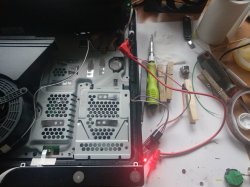
@vyktormvmpay25 What is the value of the MLCC cap your red probe is touching?

There are no schematics and I am assuming they are 10uF. However, they are important for the higher frequency noise component that tantalum doesn't filter, but that the tokins did. There are 12 of them where you are probing, but another 10 on the CPU substrate visible through the hole in the MB. They were not present before the switch to Tantalum/Aluminum Polymer. Over on the YLOD thread I found that my array of Tantalums wasn't sufficient on their own to clear up noise I suspect was from this higher frequency component.

I'd really apreciate it if you or someone would please remove one and confirm it's capacitance.
 
I will remove from scrap boards in next weekend and report back.
I also can get value from one dead cpu for 3000 which is showing 7 ohms but diag will say something about 185ff that I have reported on some earlier photos.
Edit
Found post 514 A0805fff
 
Last edited:
Please make a video with an old fat mobo using windows

Will it report an error code when I get an instant ylod?
 
Last edited by a moderator:
I will reply little bit later because it seems tapatalk is not working for me anymore with psxplace. Sorry for of topic but need to sort this first, something went wrong from my side, rest of forums are still on tapatalk. I can not see on real time notifications, so I will be kind absent without.
 
Last edited:
@Kleon1876 good news for your lazy ass, there's a video coming your way. And not just a video, but also an even more foolproof way.

(Also those wires may not be what you wanted to ask for. Those will be good for data transmission like we are doing here, but don't put them to bridge the power rails or they will burn because they are thin. Please write your questions carefully)

This still doesn't mean that people in general like those who want to be spoon fed, but hey.

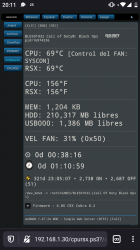
Btw the slim 2000 seems stable in games and all. I will try more demanding games but it's solid still. I attach webman screenshot. So it's a success.
 

Attachments

  • Screenshot_20210307-201115.png
    Screenshot_20210307-201115.png
    288.2 KB · Views: 66
Last edited:
Thank you. Looking forward to the video. I ordered the dongle and jumper cables. I'm running windows 7 for python.

@Kleon1876 good news for your lazy ass, there's a video coming your way. And not just a video, but also an even more foolproof way.

(Also those wires are not what you wanted to ask for. Please write your questions more carefully as well)

This still doesn't mean that people in general like those who want to be spoon fed, but hey.

Btw the slim 2000 seems stable in games and all. I will try more demanding games but it's solid still. I attach webman screenshot. So it's a success.
 
So me and a friend have developed a simple GUI for the uartscript, that allows for easier access to the error logs stored within the syscon. it does not require anything python related to be installed.

Currently it only allows for the reading of error codes, and nothing else is currently planned. it works for CXR and SW systems, The program it's self is pretty self expanitory and easy to use, i have uploaded a guide to youtube, which goes over everything for the program its self, so nothing over the soldering etc...
Link:
(the video isnt perfect, mainly because im not good at these kind of things, but it should do the job, there is also a readme file included in the download)


Screenshot_2021-03-07_at_22.36.31.png
Screenshot_2021-03-07_at_22.36.47.png


and the link to the program and source code:

Link to the download: https://drive.google.com/file/d/1INFEK7h2oCDDCavw-THuS3aIaYm5p9kG/view?usp=sharing
(I have uploaded it to virus total, however there are a few false positives: https://www.virustotal.com/gui/file...4b583cff66205567ac61c1b2b6a0a733efc/detection)

Link to the source code of this project: https://cdn.discordapp.com/attachme...242420603879425/SysconReader_-_Source_code.7z

Once the program has read all of the codes from the syscon it will dump them in a txt file, which it will open by its self allowing you to see errors 0 - 19

of course, all of the credit goes to the original creators 'Major' and 'zecoxao' for the python script its self, and pretty much all of the credit for the GUI goes too:Sweetdude26#4213

Hopefully people will find this helpful, and please report any bugs etc.. to either me or to Sweetdude26#4213 On discord, as he is the main person who created the GUI.

So far this has only been tested on windows 10, however it "should run" on windows 8.1,8 and 7 just fine.

If any of the script creators etc.. want this application removed or pulled from download, please message me and i will get to it as quick as possible

Disclamer: The Creator/developer of this application can not be held responsible for any damage to hardware or software caused by this. TL;DR you broke it, not me.
 
So me and a friend have developed a simple GUI for the uartscript, that allows for easier access to the error logs stored within the syscon. it does not require anything python related to be installed.

Currently it only allows for the reading of error codes, and nothing else is currently planned. it works for CXR and SW systems, The program it's self is pretty self expanitory and easy to use, i have uploaded a guide to youtube, which goes over everything for the program its self, so nothing over the soldering etc...
Link:
(the video isnt perfect, mainly because im not good at these kind of things, but it should do the job, there is also a readme file included in the download)


Screenshot_2021-03-07_at_22.36.31.png
Screenshot_2021-03-07_at_22.36.47.png


and the link to the program and source code:

Link to the download: https://drive.google.com/file/d/1INFEK7h2oCDDCavw-THuS3aIaYm5p9kG/view?usp=sharing
(I have uploaded it to virus total, however there are a few false positives: https://www.virustotal.com/gui/file...4b583cff66205567ac61c1b2b6a0a733efc/detection)

Link to the source code of this project: https://cdn.discordapp.com/attachme...242420603879425/SysconReader_-_Source_code.7z

Once the program has read all of the codes from the syscon it will dump them in a txt file, which it will open by its self allowing you to see errors 0 - 19

of course, all of the credit goes to the original creators 'Major' and 'zecoxao' for the python script its self, and pretty much all of the credit for the GUI goes too:Sweetdude26#4213

Hopefully people will find this helpful, and please report any bugs etc.. to either me or to Sweetdude26#4213 On discord, as he is the main person who created the GUI.

So far this has only been tested on windows 10, however it "should run" on windows 8.1,8 and 7 just fine.

If any of the script creators etc.. want this application removed or pulled from download, please message me and i will get to it as quick as possible

Disclamer: The Creator/developer of this application can not be held responsible for any damage to hardware or software caused by this. TL;DR you broke it, not me.

This is great! Are you/ your friend opposed to adding this to a github? This would make it easier to get/make changes/etc
 

Similar threads

Back
Top