
PS3 Fault finding YLOD with the SYSCON - First steps and Error reporting

Hell yes!!!!! Godss

So me and a friend have developed a simple GUI for the uartscript, that allows for easier access to the error logs stored within the syscon. it does not require anything python related to be installed.

Currently it only allows for the reading of error codes, and nothing else is currently planned. it works for CXR and SW systems, The program it's self is pretty self expanitory and easy to use, i have uploaded a guide to youtube, which goes over everything for the program its self, so nothing over the soldering etc...
Link:
(the video isnt perfect, mainly because im not good at these kind of things, but it should do the job, there is also a readme file included in the download)


Screenshot_2021-03-07_at_22.36.31.png
Screenshot_2021-03-07_at_22.36.47.png


and the link to the program and source code:

Link to the download: https://drive.google.com/file/d/1INFEK7h2oCDDCavw-THuS3aIaYm5p9kG/view?usp=sharing
(I have uploaded it to virus total, however there are a few false positives: https://www.virustotal.com/gui/file...4b583cff66205567ac61c1b2b6a0a733efc/detection)

Link to the source code of this project: https://cdn.discordapp.com/attachme...242420603879425/SysconReader_-_Source_code.7z

Once the program has read all of the codes from the syscon it will dump them in a txt file, which it will open by its self allowing you to see errors 0 - 19

of course, all of the credit goes to the original creators 'Major' and 'zecoxao' for the python script its self, and pretty much all of the credit for the GUI goes too:Sweetdude26#4213

Hopefully people will find this helpful, and please report any bugs etc.. to either me or to Sweetdude26#4213 On discord, as he is the main person who created the GUI.

So far this has only been tested on windows 10, however it "should run" on windows 8.1,8 and 7 just fine.

If any of the script creators etc.. want this application removed or pulled from download, please message me and i will get to it as quick as possible

Disclamer: The Creator/developer of this application can not be held responsible for any damage to hardware or software caused by this. TL;DR you broke it, not me.
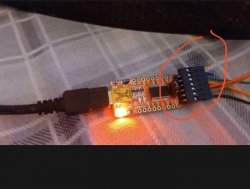
 
What's this black piece called?

So me and a friend have developed a simple GUI for the uartscript, that allows for easier access to the error logs stored within the syscon. it does not require anything python related to be installed.

Currently it only allows for the reading of error codes, and nothing else is currently planned. it works for CXR and SW systems, The program it's self is pretty self expanitory and easy to use, i have uploaded a guide to youtube, which goes over everything for the program its self, so nothing over the soldering etc...
Link:
(the video isnt perfect, mainly because im not good at these kind of things, but it should do the job, there is also a readme file included in the download)


Screenshot_2021-03-07_at_22.36.31.png
Screenshot_2021-03-07_at_22.36.47.png


and the link to the program and source code:

Link to the download: https://drive.google.com/file/d/1INFEK7h2oCDDCavw-THuS3aIaYm5p9kG/view?usp=sharing
(I have uploaded it to virus total, however there are a few false positives: https://www.virustotal.com/gui/file...4b583cff66205567ac61c1b2b6a0a733efc/detection)

Link to the source code of this project: https://cdn.discordapp.com/attachme...242420603879425/SysconReader_-_Source_code.7z

Once the program has read all of the codes from the syscon it will dump them in a txt file, which it will open by its self allowing you to see errors 0 - 19

of course, all of the credit goes to the original creators 'Major' and 'zecoxao' for the python script its self, and pretty much all of the credit for the GUI goes too:Sweetdude26#4213

Hopefully people will find this helpful, and please report any bugs etc.. to either me or to Sweetdude26#4213 On discord, as he is the main person who created the GUI.

So far this has only been tested on windows 10, however it "should run" on windows 8.1,8 and 7 just fine.

If any of the script creators etc.. want this application removed or pulled from download, please message me and i will get to it as quick as possible

Disclamer: The Creator/developer of this application can not be held responsible for any damage to hardware or software caused by this. TL;DR you broke it, not me.
 

Attachments

  • 0C935B46-D732-4A46-992A-926720C68291.jpeg
    0C935B46-D732-4A46-992A-926720C68291.jpeg
    79.1 KB · Views: 117
So me and a friend have developed a simple GUI for the uartscript, that allows for easier access to the error logs stored within the syscon. it does not require anything python related to be installed.

Currently it only allows for the reading of error codes, and nothing else is currently planned. it works for CXR and SW systems, The program it's self is pretty self expanitory and easy to use, i have uploaded a guide to youtube, which goes over everything for the program its self, so nothing over the soldering etc...
Link:
(the video isnt perfect, mainly because im not good at these kind of things, but it should do the job, there is also a readme file included in the download)


Screenshot_2021-03-07_at_22.36.31.png
Screenshot_2021-03-07_at_22.36.47.png


and the link to the program and source code:

Link to the download: https://drive.google.com/file/d/1INFEK7h2oCDDCavw-THuS3aIaYm5p9kG/view?usp=sharing
(I have uploaded it to virus total, however there are a few false positives: https://www.virustotal.com/gui/file...4b583cff66205567ac61c1b2b6a0a733efc/detection)

Link to the source code of this project: https://cdn.discordapp.com/attachme...242420603879425/SysconReader_-_Source_code.7z

Once the program has read all of the codes from the syscon it will dump them in a txt file, which it will open by its self allowing you to see errors 0 - 19

of course, all of the credit goes to the original creators 'Major' and 'zecoxao' for the python script its self, and pretty much all of the credit for the GUI goes too:Sweetdude26#4213

Hopefully people will find this helpful, and please report any bugs etc.. to either me or to Sweetdude26#4213 On discord, as he is the main person who created the GUI.

So far this has only been tested on windows 10, however it "should run" on windows 8.1,8 and 7 just fine.

If any of the script creators etc.. want this application removed or pulled from download, please message me and i will get to it as quick as possible

Disclamer: The Creator/developer of this application can not be held responsible for any damage to hardware or software caused by this. TL;DR you broke it, not me.
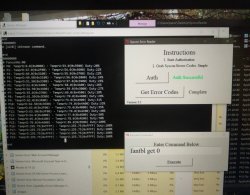
Ill mention myself as friend. You missed an additional feature introduced in v0.3
Which is the ability to type and run your own commands manually also. Like this:
IMG_20210307_002234~2.jpg

To do this, simply open the included execute.exe while using SysconReader_Debug.exe to see what's going on.

Especially useful with SW syscons, since there are many more useful commands available directly.

Credit for making the program goes to SweetDude26, who doesn't even have a PS3.

Of course it is still advised to understand and do everything the manual way. This just makes it even more accessible for newcomers.

Cheers
 
Last edited:
Also worth mentioning this is a 64bit application and it will not run on 32bit versions of Windows.

In those cases it will also be best to do it manually in the old fashion anyway. Following my small guide alongside the main one by db2601
I write this in addition to main guide (work in progress) done by db260179.
https://www.psx-place.com/threads/f...syscon-first-steps-and-error-reporting.30100/


I will try explain step by step, as easy as I can explain it.
Really this can be done in 10 minutes.

First of all let's make clear what we are doing:
We are simply running a python script that will let us communicate with the PS3 SYSCON, using a serial (COM) port.

We can thank guys like 'Major' and 'zecoxao' for making this possible in the first place. We are just running their script.

So, what do we need in order to run this script?

Python 2.7.18, with additional modules pycryptodome and pyserial

For Windows users (most people) this is what you can do:

-First install python 2.7.18 (you can just google python for windows)
-When you run the installer, you can check the last box (it will make things easier; lets you run python commands from any location)
Once it's installed, you should already be able to run python commands and scripts. How? Directly from the windows command prompt, you can type: python script.py

But our particular script relies on two additional modules. (If you try without them, it will tell you the problem)
But don't worry,
-You can download and install them automatically by typing:
pip install pycryptodome
pip install pyserial

That's it. Now you should be able to run the magic script. Just specify the COM port and the syscon mode at the end.
-For example:

python uart_script.py COM4 CXR

What COM port?
This is where the USB to serial 3.3v adapter comes in handy.
When you plug it into your computer, it should show up in device manager as a COM port. If not, you need to install drivers for it.
This will depend on your particular computer and dongle.

What is CXR? This will depend on the syscon you are trying to communicate with. SW is for newer (SherWood) Syscons. CXR(F) for the older BGA models
Further details in the PDF

If all is correct, no errors will come up immediately. Even without anything physically connected.
You can then type AUTH, and will get
"Auth1 response invalid"

Of course, to get past this, everything has to be connected and working properly. Even then it may take a couple tries in a row. Eventually you should get:
Auth successful

(If you are still getting "Auth1 response invalid", first simply try again a couple times, turn the ps3 power off and on, if not, swap Rx and Tx wire around and repeat. Check the connections etc... It should work in the end)


That's it for now

*But what serial adapter dongle should I get?

-This is the one I got and it works. 2$ worldwide.

US $1.14 | High Quality FT232RL FT232 FTDI USB 3.3V 5.5V to TTL Serial Adapter Module Mini Port
https://a.aliexpress.com/_vLbCPR

FT232RL is the name of the main IC.
But many others will work too. Get what's most available to you. These are widely used for many other applications. They are COMmon.
-Just make sure it's working at 3.3v. (Very important)
 
So me and a friend have developed a simple GUI for the uartscript, that allows for easier access to the error logs stored within the syscon. it does not require anything python related to be installed.

Currently it only allows for the reading of error codes, and nothing else is currently planned. it works for CXR and SW systems, The program it's self is pretty self expanitory and easy to use, i have uploaded a guide to youtube, which goes over everything for the program its self, so nothing over the soldering etc....

Feel free to do a pull request at my git repo - https://github.com/db260179/ps3syscon

Can add this tool for new windows users, as i'm mostly looking after linux users only.

PM if you wish?
 
Also worth mentioning this is a 64bit application and it will not run on 32bit versions of Windows.

In those cases it will also be best to do it manually in the old fashion anyway. Following my small guide alongside the main one by db2601
I write this in addition to main guide (work in progress) done by db260179.
https://www.psx-place.com/threads/f...syscon-first-steps-and-error-reporting.30100/


I will try explain step by step, as easy as I can explain it.
Really this can be done in 10 minutes.

First of all let's make clear what we are doing:
We are simply running a python script that will let us communicate with the PS3 SYSCON, using a serial (COM) port.

We can thank guys like 'Major' and 'zecoxao' for making this possible in the first place. We are just running their script.

So, what do we need in order to run this script?

Python 2.7.18, with additional modules pycryptodome and pyserial

For Windows users (most people) this is what you can do:

-First install python 2.7.18 (you can just google python for windows)
-When you run the installer, you can check the last box (it will make things easier; lets you run python commands from any location)
Once it's installed, you should already be able to run python commands and scripts. How? Directly from the windows command prompt, you can type: python script.py

But our particular script relies on two additional modules. (If you try without them, it will tell you the problem)
But don't worry,
-You can download and install them automatically by typing:
pip install pycryptodome
pip install pyserial

That's it. Now you should be able to run the magic script. Just specify the COM port and the syscon mode at the end.
-For example:

python uart_script.py COM4 CXR

What COM port?
This is where the USB to serial 3.3v adapter comes in handy.
When you plug it into your computer, it should show up in device manager as a COM port. If not, you need to install drivers for it.
This will depend on your particular computer and dongle.

What is CXR? This will depend on the syscon you are trying to communicate with. SW is for newer (SherWood) Syscons. CXR(F) for the older BGA models
Further details in the PDF

If all is correct, no errors will come up immediately. Even without anything physically connected.
You can then type AUTH, and will get
"Auth1 response invalid"

Of course, to get past this, everything has to be connected and working properly. Even then it may take a couple tries in a row. Eventually you should get:
Auth successful

(If you are still getting "Auth1 response invalid", first simply try again a couple times, turn the ps3 power off and on, if not, swap Rx and Tx wire around and repeat. Check the connections etc... It should work in the end)


That's it for now

*But what serial adapter dongle should I get?

-This is the one I got and it works. 2$ worldwide.

US $1.14 | High Quality FT232RL FT232 FTDI USB 3.3V 5.5V to TTL Serial Adapter Module Mini Port
https://a.aliexpress.com/_vLbCPR

FT232RL is the name of the main IC.
But many others will work too. Get what's most available to you. These are widely used for many other applications. They are COMmon.
-Just make sure it's working at 3.3v. (Very important)

Could you do a pull request to my repo - https://github.com/db260179/ps3syscon
Then i can add this as a guide for windows users?
Preferably store as a pdf.
 
just have some question, since I haven't done any tests with probing syscon. does syscon also notify on glod errors? my DECR-1400A definately has some broken solder joints, and it got artifacts in (pseudo)recovery. and if so, does anybody know how the error code would look like?

video output has worked, a few times, when I have put some pressure on rsx but also on cell
 
Oh ok. I bought the uart and hopefully it comes with it. Thank you for your reply.

In my country (spain) are called "terminals", i guess is the same name in english
But you dont need to buy them separatedly, are included (for free) when you buy the UART 2 USB board
 
What does below mean?
  1. Solder the jumper cables to the correct pins - RX, TX and GND go to the USB uart serial cable and DIAG get shorted to GND once the eeprom has set its mode to allow diag mode
 
what do you mean by this "leave the DIAG pin lead unconnected from the GND until you have done the change of diag mode in externalcommand mode".
I'm planning on using the new GUI (video posted above). Does that change what you said? Sorry I'm a noob been reading the posts trying to figure out.


As LSL has said, you dont need to take the ps3 out of standby, just flip the main power switch to on to bring up standby mode. Wait for a 10 or so seconds then try AUTH

Make sure the RX and TX are correct way around from ps3 board to ttl lead.

For the first step in external mode - just connect USB ttl lead RX,TX and GND to the ps3 board, leave the DIAG pin lead unconnected from the GND until you have done the change of diag mode in external command mode.

I've notice the quality of jumper cable affects the communication, try and use awg 30 cable, seems to work well.

Also make sure your are using python 2 and its modules are installed - serial and crypto
 
What does below mean?
  1. Solder the jumper cables to the correct pins - RX, TX and GND go to the USB uart serial cable and DIAG get shorted to GND once the eeprom has set its mode to allow diag mode
Ignore it, it's not crucial for just reading the basic error codes.

what do you mean by this "leave the DIAG pin lead unconnected from the GND until you have done the change of diag mode in externalcommand mode".
I'm planning on using the new GUI (video posted above). Does that change what you said? Sorry I'm a noob been reading the posts trying to figure out.
No. Same situation for the GUI version , just leave the diag/GND wire disconnected.
 
What does below mean?
  1. Solder the jumper cables to the correct pins - RX, TX and GND go to the USB uart serial cable and DIAG get shorted to GND once the eeprom has set its mode to allow diag mode

what do you mean by this "leave the DIAG pin lead unconnected from the GND until you have done the change of diag mode in externalcommand mode".
I'm planning on using the new GUI (video posted above). Does that change what you said? Sorry I'm a noob been reading the posts trying to figure out.
Basically, it means that you need 3 wires to stabilish a data connection (TX, RX, GND), usually what most people is doing is to solder them to the PS3 motherboard
But if you read back the thread you are going to see some drawings i made and some photos made by @Pacorretaco to do it without soldering

The other wire named DIAG should not be soldered permanently, because it works like a "switch" and allows syscon to operate in 2 different modes

If you dont do anything to the DIAG pad on the PS3 motherboard (in other words, DIAG disconnected) then syscon starts in external mode. This mode allows you to do a basic check of the error codes and other reduced selection of syscon commands

If you connect the DIAG pad to GND (both are points of the PS3 motherboard) then syscon starts in internal mode, this allows to run a bigger number of syscon commands

In few words... the internal mode allows to use more syscon commands and to do more things than the external mode, but to achieve this is needed to "unlock" syscon by writing a byte in it (and this is another story, easy to do, but better read about it)
 
For the record... the motherboards of the PS3 models with a syscon of the SW series doesnt have a DIAG pad... and the software inside syscon doesnt have 2 "internal" and "external" access modes
In syscon SW series there is only 1 access mode, we dont need the DIAG


Edit:
Also, we dont need to change the byte to unlock the "internal mode" because the "internal mode" doesnt exists
In some way it can be said that the SW syscons doesnt allows to be unlocked (or the other way around... we could say that are already unlocked)
 
Last edited:
Thank you for the detail reply. So I need to solder the rx tx and gnd wires to pcb and then connect those three to the uart? Leave diag alone. Run the gui (video tutorial mentioned about) and this will community with the ps3 and give me an error list for the ylod? I m trying to get the error list only with a basic method. So 3 connections, diag left alone on a dia-001 board?

Basically, it means that you need 3 wires to stabilish a data connection (TX, RX, GND), usually what most people is doing is to solder them to the PS3 motherboard
But if you read back the thread you are going to see some drawings i made and some photos made by @Pacorretaco to do it without soldering

The other wire named DIAG should not be soldered permanently, because it works like a "switch" and allows syscon to operate in 2 different modes

If you dont do anything to the DIAG pad on the PS3 motherboard (in other words, DIAG disconnected) then syscon starts in external mode. This mode allows you to do a basic check of the error codes and other reduced selection of syscon commands

If you connect the DIAG pad to GND (both are points of the PS3 motherboard) then syscon starts in internal mode, this allows to run a bigger number of syscon commands

In few words... the internal mode allows to use more syscon commands and to do more things than the external mode, but to achieve this is needed to "unlock" syscon by writing a byte in it (and this is another story, easy to do, but better read about it)
 
Thank you for the detail reply. So I need to solder the rx tx and gnd wires to pcb and then connect those three to the uart? Leave diag alone. Run the gui (video tutorial mentioned about) and this will community with the ps3 and give me an error list for the ylod? I m trying to get the error list only with a basic method. So 3 connections, diag left alone on a dia-001 board?
yep, that's the bare minimum you'll need to get the error messages.
 
Yes, for a basic check of the error log you only need 3 wires, works in all PS3 motherboard models

Btw, when i said in a previous post that the selller is going to include the wires with the plastic terminals for free is not a strict rule. I think most does it but maybe where you bought it doesnt includes the wires just to reduce manufacturing costs a bit... after all there is people selling the UART 2 USB boards by less than 1 $ so it would not surprise me if some of them doesnt includes the wires
But anyway... are the same connectors used in the PC motherboards for the "jumper" pins... probably you have some at home
From the case leds/buttons of a old PC... or from an expansion card from your actual PC, sometimes there are parts you buy that comes with that cables but we never use them
 
Thank you. I do have some of those wires on my old pc. I will let everyone know once I try getting the error codes off my dia-001. This thread is awesome.

Yes, for a basic check of the error log you only need 3 wires, works in all PS3 motherboard models

Btw, when i said in a previous post that the selller is going to include the wires with the plastic terminals for free is not a strict rule. I think most does it but maybe where you bought it doesnt includes the wires just to reduce manufacturing costs a bit... after all there is people selling the UART 2 USB boards by less than 1 $ so it would not surprise me if some of them doesnt includes the wires
But anyway... are the same connectors used in the PC motherboards for the "jumper" pins... probably you have some at home
From the case leds/buttons of a old PC... or from an expansion card from your actual PC, sometimes there are parts you buy that comes with that cables but we never use them
 
Thank you. I do have some of those wires on my old pc. I will let everyone know once I try getting the error codes off my dia-001. This thread is awesome.
By now you can advance some works, i have to insist in taking a read at what we was suggesting to do the connections without any soldering, this is the post where i mentioned it with a drawing
https://www.psx-place.com/threads/f...-and-error-reporting.30100/page-3#post-248523
kpFoP2U.png

My idea originally was to use a needle (with the tip a bit sandpapered), ive seen people doing it this way with a needle because it have lot of precission
The problem is the spring have a lot of strenght... so i was suggesting also to ·deform· a bit the spring to reduce his strenght
You know... because we dont want to make a hole in the motherboard with the needle :D

And this is the proof of concept made by @Pacorretaco :encouragement:
https://www.psx-place.com/threads/f...and-error-reporting.30100/page-30#post-282438
img_20210223_012146-jpg.31529


Im not sure if he used needles, nails, or copper pins (ripped from some PC hardware), probably it was a pain to make the holes in the wood, lol, but is easy

I guess it could be improved a bit by removing some wood before making the hole (with a knife or something)
That excess of wood is not a problem... but just an small annoyance that doesnt allows us to have a good view under it
 
Last edited:
just have some question, since I haven't done any tests with probing syscon. does syscon also notify on glod errors? my DECR-1400A definately has some broken solder joints, and it got artifacts in (pseudo)recovery. and if so, does anybody know how the error code would look like?

video output has worked, a few times, when I have put some pressure on rsx but also on cell

The only good way to diagnose GLOD, is enable the debug option for SB uart in the syscon, then connect up the RX and TX to the SB uart pins on the board (still alot of unknowns, where the pins are) then watch to boot log and see where it gets stuck at.

GLOD is varies issues that dont report any error logs. USB controller, bad FLASH, CELL faulty... the list goes on
 

Similar threads

Back
Top