vyktormvmpay25
Senior Member
Please don't do blind reflow/reball ,it becomes harder to fix.take uart log,resistance measurements ,voltages , etc.. First of all is a must read all around forum then you get more knowledge where to start.



Yes.Mine or his?
I'm just trying to build an understanding of these HDMI/DVE errors. It's obvious they can be caused by bad HDMI/DVE chip. It would be simple and clean if that were the only cause of 2024/2124. Be we 're seeing them in consoles that have bad Tokins. And we see them in consoles that have BGA/Bumps defects. Not just the RSX, but CPU too. They have been a confusing error for while now....we know that Bittraining errors don't always occur in damage to the FlexIO interface. Perhaps the only appear when they affect the SPI data line between RSX/CELL. If they affect the SB/CELL or RSX/VDDIO they manifest as a GLOD.
- Normal GLOD (RSX <--> VDDIO) = BGA/Bump defects that don't register a YLOD or syscon error during the Power On Sequence, but can register 2020/2120 or 2022/2122 errors (2024/2124 in Slim/SS models). First step is to rule out HDMI/DVE failures. Check TH2510/TH2401 and related SMDs. Measure voltages are good. If so, reball RSX to rule out BGA. If that doesn't work Replace with known good chip to rule out Bumps. At this point the RSX side is good.
- Special GLOD (CPU <--> SB) = BGA/Bump defects that don't register a YLOD or syscon error during the Power On Sequence, but can register 2020/2120 or 2022/2122 (2024/2124 in Slim/SS models) errors. Double check CPU voltages and nearby SMDs. Flash NAND/NOR to rule out FW corruption. If that fails reball CPU to rule out BGA. If that fails, GAME OVER. Well...you can swap the entire chipset from a donor board if you feel up to it. You'd need a board that's borked in some way that doesn't affect CPU, SYSCON, NAND/NOR, etc to harvest the married components. Or I suppose you could try to marry a CPU.
Well, @botakompong's been saying all along that RSXRAM can cause GLOD. Maybe that is what this is. Didn't you try reballing RSX ram (hynix) at one point? I vaguely remember a post, but not sure if I noted it in my spreadsheet. We'll see. I'm up to page 90 ATM. Hoping to finish my review of the thread this weekend.@RIP-Felix on last test DeadEnd was right, all this special glod was rsx all the time, two different models same rsx killed by myself in delid process. Before cases of special glod were most untouched boards. All were low resistance 1.8 ohms on vdd and since on board, I just desoldered and exchange. With this rsx I have was something tricky as vdd line is still perfect 3 ohms and FBvdd 220 ohms.
At least we can know now if we can see SB debugging starts in syscon uart not necessarily to go for SB uart.
I didn't know until today so as quick test reference recovery beeps work no image on any port, don't loose time, search another rsx.
Usually should work straight away not any doubt anymore.
Yeah, I noticed that the 40nm RSX's thermal adhesive is stronger than that used on COK-001. I worried about breaking a solder ball when I delidded the 40nm RSX, after I had already reballed it, I should have done it when it was off the board - like you say.Yes sure rsx can give that special glod no output very confident as I've resoldered it back to his work jsd that was starting fine with image, I didn't touch cell not even delid, board on jig straight, same glod type. So by now all those cases were cell is fine we should have that SB debugging connection on uart. Sometimes it happens, those 40nm very hard to delid even outside of board, even like that bending it with a space of rasor blade is still a bit tricky.

Yes.
Interested in both. But particularly interested to see if the GLOD issue was with the RSX BGA, CPU BGA, or was not resolved at all. In the end it could be bad CPU die, but seems unlikely. @SkaziChris looks to have good enough equipment and skill to find out. His tests are the most methodical we've seen at eliminating the variables. No offense to you vic, your tests on these codes and the special GLOD have been super useful too. It's just harder to follow the train of evidence in your posts because of the language barrier (google translate perhaps?). Anyway, I'm watching the errrlogs and tests carefully to see if we can finally pin these codes down to the causes. Like my post above...
I'm just trying to build an understanding of these HDMI/DVE errors. It's obvious they can be caused by bad HDMI/DVE chip. It would be simple and clean if that were the only cause of 2024/2124. Be we 're seeing them in consoles that have bad Tokins. And we see them in consoles that have BGA/Bumps defects. Not just the RSX, but CPU too. They have been a confusing error for while now.
Do the owners of these console mind if you share which user's they belong to?Here received today two packages from users in forum. We will see what we can get sorted and and later will see more Frankenstein units and hopefully more gaming tests.
Edit
@RIP-Felix got something nice to test.

Yeah, I noticed that the 40nm RSX's thermal adhesive is stronger than that used on COK-001. I worried about breaking a solder ball when I delidded the 40nm RSX, after I had already reballed it, I should have done it when it was off the board - like you say.
I wonder if the RSX RAM balls are being damaged by the process of delidding?
Honestly, I haven't seen very many RSX's that actually need to be delidded! It's always the CPU that overheats (1200). Not a single overheating RSX (1201)! We have never seen a 1201 (upto page 91 in this thread at least).
I'm just wondering if delidding is worth the risk. I'm always afraid the BGA will pop. Now I'm worried about the VRAM too.They probably won't overheat, but heavy weight of IHS would cause balls to merge during installation. In fact, it happens quite easily even without IHS on cok001 boards. Additionally, some will have dried up paste so the temps could still improve a bit.
I'm just wondering if delidding is worth the risk. I'm always afraid the BGA will pop. Now I'm worried about the VRAM too.
Man, I hate the RSX package! Terrible design.
I will continue the work after the weekend (occupied by my daily work at the moment).
Will post an update once reballing is done.
Been trying to find somewhere to this, sorry if this is off topic. I have been able to fix GLOD with extreme pressure on the CPU. I have tried a reflow on the RSX and CPU and this may work for a little while but would always eventually fail. So using the CPU pressure tick to lower temps on the CPU can also fix GLOD by simply adding additional pressure. I have achieved this now on 3 CECHC03 consoles with none of them showing any signs of failure after days of usage. Before the screen would freeze and show graphical glitches, now it runs flawlessly, no glitches nothing. I use thermal pads to create the mod. If it boots but fails I simply add more pads until it runs without failure.
@RIP-Felix
Reballing is done.
Console starts and works for 20s and then shuts down.
(I think I need to resolder tantals after bga process, as they were held only by capton tape).
Current errlog:
C:\Users\chris\Desktop\PS3_syscon>ps3_syscon_uart_script.py COM3 SW
>$ AUTH
Auth successful
>$ bringup
00000000
# [SSM] Bringup Start.
# [SSM] PS0 ok.
# [SSM] PS1 ok.
# [SSM] PS2 ok.
# [SSM] PS3 ok.
# [SSM] PS4 ok.
# (PowerOn State)
OK 00000000
#!
#!Boot Loader SE Version 2.5.0
#!(Build ID: 3318,35708,
#!Build Date: 2008-10-11_00:31:58)
#!
#!Copyright(C) 2008 Sony Computer Entertainment Inc.All Rights Reserved.
#!
#![INFO]: Connecting to Debug Device (SB UART)
# [UCMD] Unknown command.
>$ powerstate
00000000
# ATA :ON
# PCI :OFF
# PCIex:OFF
# RSX :ON
# GDDR :ON
# XDR :ON
# EURUS:ON
# SB :ON
# [SSM] Cond/Fatal received, msg=24AE.
# [SSM] Fataldown Start.
# [SSM] Fataldown ok.
# (PowerOff State) (Fatal)
# [SSM] Clearfatal Start.
# [SSM] Clearfatal ok.
# (PowerOff State)
>$ errlog
00000000
# CODE CLOCK
# A0801601 FFFFFFFF
# A0801701 FFFFFFFF
# A0801802 FFFFFFFF
# FFFFFFFF FFFFFFFF
# FFFFFFFF FFFFFFFF
# FFFFFFFF FFFFFFFF
# FFFFFFFF FFFFFFFF
# FFFFFFFF FFFFFFFF
# FFFFFFFF FFFFFFFF
# FFFFFFFF FFFFFFFF
# FFFFFFFF FFFFFFFF
# FFFFFFFF FFFFFFFF
# FFFFFFFF FFFFFFFF
# FFFFFFFF FFFFFFFF
# FFFFFFFF FFFFFFFF
# FFFFFFFF FFFFFFFF
# FFFFFFFF FFFFFFFF
# FFFFFFFF FFFFFFFF
# FFFFFFFF FFFFFFFF
# FFFFFFFF FFFFFFFF
# FFFFFFFF FFFFFFFF
# FFFFFFFF FFFFFFFF
# FFFFFFFF FFFFFFFF
# FFFFFFFF FFFFFFFF
# FFFFFFFF FFFFFFFF
# FFFFFFFF FFFFFFFF
# FFFFFFFF FFFFFFFF
# FFFFFFFF FFFFFFFF
# FFFFFFFF FFFFFFFF
# FFFFFFFF FFFFFFFF
# FFFFFFFF FFFFFFFF
>$
Adding CPU tantals did not help.
So the console starts, goes from PS0 to PS5 ok, then works for about 20s,
and I hear disk starting and spinning, and then it shuts down with these two error codes:
# CODE CLOCK
# A0801601 0B49D885
# A0801701 0B49D884
# A0801601 0B49D84C
# A0801701 0B49D84B
# A0801601 0B49D818
# A0801701 0B49D817
# FFFFFFFF FFFFFFFF
# FFFFFFFF FFFFFFFF
Unfortunately yes, I do have an explanation for this.I desoldered the RSX chip properly.
Mobo is still in good condition, all pads on mobo socket and on the RSX are perfectly fine.
Previous reballing was properly carried out...
Right now, the RSX VDDIO has 4 Ohms...
Previously it had 2.5 Ohm...
Anybody has an idea about these 601... 701... error codes?
Unfortunately yes, I do have an explanation for this.
If a YLOD turns into a GLOD after reball/reflow then we think 1601 (with or without 1701) means the RSX RAM was damaged and the chip needs replaced. This is a loose association based on user reports. But your results seem to suggest the same progression. Also the 2124 errors you previously had with the "Special GLOD" are another indicator of RSX RAM issues. That lone 1802 is a telling sign. That's an RSX initialization error. SYSCON Initializes the RSX at step 20. And the CPU/SB do some AV backend initialization/corrdination with the RSX (not sure what), which is where the 2120 errors come in if the RSX or VRAM is unhealthy. We know that a dead or missing RSX returns 20 1802.
You got an 1802, but it occurred at step no. 80, not 20. That could mean it's not completely dead. It did respond during initialization, but failed in the power on state with the 1601/1701. VRAM is still highly suspect, but I also suspect the Redwood FlexIO interface at the CPU, where the CPU/SB communicate/corrdinate with the RSX's VDDIO.
Did you reflow/reball the CPU? That would rule out a dodgy CPU/SB FlexIO connection. After that they RSX VRAM is probably dead. Try replacing the RSX. If that still doesn't work, the CPU is probably dead. You can try exchanging the entire married chipset if you feel like getting to the bottom of it and confirming the hypothesis. But most techs call it dead if the CPU dies.
That's what I'm currently thinking.
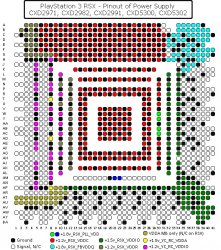
AQUAMARINE 25 Ohm
BLUE 0355 MOhm
RED 2.5 Ohm
HARLEQUIN 0.63 MOhm
GREEN 0.53 kOhm
YELLOW 0.264 MOhm
YELLOW/// OL
BROWN 0.815 kOhm
PURPLE 1.44 kOhm