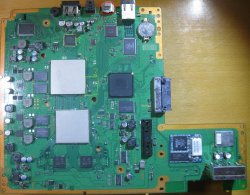
PS3 Fault finding YLOD with the SYSCON - First steps and Error reporting

Btw, you can label this specific CELL model as "CXD2964 Series", because there was 2 different models documented with a similar name:
https://www.psdevwiki.com/ps3/CXD2964GB
https://www.psdevwiki.com/ps3/CXD2964AGB

I dont know what means the suffix "GB" or "AGB", i guess is something related with the package, but the pad layout is the same
In the RSX models they uses the same suffixes, "GB", "AGB"... and also... "BGB", "CGB" and "DGB"
For the matter of pad layouts we dont care about that suffixes
I edited the Cell pinouts to remove the suffix.
 
First check that vreg have to go on pin 12 in a rush counting. I'll edit more this post to check.
83cdf66583b4e117ac2a830d9693e336.jpg

This is 5v or 5v5 cant remember.
OK so another areas to check if vregs are fine around those areas, I'll focus on those ic's, not having one board of this tipe is a pain without compared values.
6f144226da7aee16990b304bdab3ed67.jpg

I will assume red area is fine, if all seems fine, I will suggest av ic or, that cirrus ic I've found in many analog dvr cameras so I assume is analog output ic, Cxm 4027R would be as last resort.
Or start straight on Cxm 4027R as its a bit unknown how it works.
That ic under rsx I think is for video ram "ICS" with quartz beside with 24.546



So far, I have replaced all components in RED - no luck.
Console still displays info "Unsupported resolution" - so how does PS3 determine a correct resolution?

ver-001zzz.jpg

In laptops... it uses two wires (I2C) in the HDMI cable to read information (EDID) from the monitor about what resolutions it supports and picks the best match for what it can generate. The HDMI standard has a small number of mandatory modes that must be supported so it will always work even if it is not at the ideal mode.


So, based on this:
https://www.psdevwiki.com/ps3/MN8647091
it should be leg 27 and 29...


There are a few SMDs going out from 27 and 29 and reverting back to pin 26 (right side, at the bottom).
All of them were also replaced.

No further clues.

I guess the only thing left to do is to replace these two cirrus ICs, even though they do not show any sign of damage..
 
Hi,

My PS3 BC recently recently died with YLOD and had someone fix it with new nec tokins and did a reball. but still no luck. The syscon shows this error (image below). Is this still repairable?

Hope someone can help me out. Thank you!

271826405_786192295585503_5164341864549178058_n.png
Was that image before or after the "reball?"

I ask, because the A0403034 error is a BGA/bump defect. If they actually did a reball, and that's the error code afterward (not before), it didn't work. They may have just reflowed it (poorly). I doubt they actually did a reball, the error code usually changes.

Did you dump the errorlog, or did they?
 
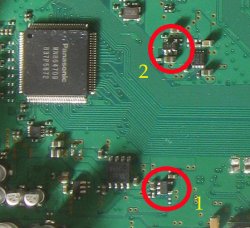
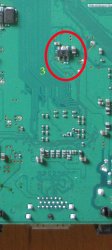
So far, I have replaced all components in RED - no luck.
Console still displays info "Unsupported resolution" - so how does PS3 determine a correct resolution?

View attachment 36009

In laptops... it uses two wires (I2C) in the HDMI cable to read information (EDID) from the monitor about what resolutions it supports and picks the best match for what it can generate. The HDMI standard has a small number of mandatory modes that must be supported so it will always work even if it is not at the ideal mode.


So, based on this:
https://www.psdevwiki.com/ps3/MN8647091
it should be leg 27 and 29...


There are a few SMDs going out from 27 and 29 and reverting back to pin 26 (right side, at the bottom).
All of them were also replaced.

No further clues.

I guess the only thing left to do is to replace these two cirrus ICs, even though they do not show any sign of damage..
So what I assume that dve (CXM4027R) port is first /primary, I will start and only change CXM4027R ic for av output even if it is working. If hdmi won't work then leave it aside for now. Sometimes they can be pain.
Edit.
Can you please exchange hdmi coils output with same 20 ohms group resistance ? Like 2000 models have something different, I have issues with those in ps4 to reuse them is a pain, they will get shorted inside coil between data plus /data minus on output, check that probably I'm wrong.
I did it in ps4, because every time one coil will blow.
cdd5ad0e83db596f7b12ee9eed89a8aa.jpg
389bc89a2fad6f180aef1536e705d3a7.jpg
After this modification keep power 10 seconds to reset image.
 
Last edited:
I have no idea where to post this so if someone could point me in the right direction I would be grateful. I am working with syscon on a COK-002 board. I was able to use external commands to edit the EEP table to try and gain internal commands. When I rebooted I got three beeps and am unable to run the internal command script (python ps3_syscon_uart_script.py /dev/ttyusb0 CXRF). I get error:

C:\Users\Desktop\ps3syscon-master>python ps3_syscon_uart_script.py /dev/ttyusb0 CXRF
Traceback (most recent call last):
File "C:\Users\Desktop\ps3syscon-master\ps3_syscon_uart_script.py", line 190, in <module>
main(len(sys.argv), sys.argv)
File "C:\Users\Desktop\ps3syscon-master\ps3_syscon_uart_script.py", line 169, in main
ps3 = PS3UART(argv[1], argv[2])
File "C:\Users\Desktop\ps3syscon-master\ps3_syscon_uart_script.py", line 37, in __init__
self.ser.open()
File "C:\Program Files\Python39\lib\site-packages\pyserial-3.4-py3.9.egg\serial\serialwin32.py", line 62, in open
serial.serialutil.SerialException: could not open port '/dev/ttyusb0': FileNotFoundError(2, 'The system cannot find the path specified.', None, 3)


If I try and run the external script that worked previously I get >$ but if I try AUTH I get errors and reverted back to command line. I have attached the diagnose wire to ground and tested for continuity. Any help would be greatly appreciated.
 
So far, I have replaced all components in RED - no luck.
Console still displays info "Unsupported resolution" - so how does PS3 determine a correct resolution?

View attachment 36009

In laptops... it uses two wires (I2C) in the HDMI cable to read information (EDID) from the monitor about what resolutions it supports and picks the best match for what it can generate. The HDMI standard has a small number of mandatory modes that must be supported so it will always work even if it is not at the ideal mode.


So, based on this:
https://www.psdevwiki.com/ps3/MN8647091
it should be leg 27 and 29...


There are a few SMDs going out from 27 and 29 and reverting back to pin 26 (right side, at the bottom).
All of them were also replaced.

No further clues.

I guess the only thing left to do is to replace these two cirrus ICs, even though they do not show any sign of damage..

Have you replaced all of these just in case? I have an L somewhere that received a ligthning discharge through the HDMI cable and had panasonic and transistor 1 totally fried. That console had black screen only, not enterly GLOD due the HDD doing readings, it seems the console was booting good. Btw, are we sure that RSX and Panasonic IC are the only ones managing the output signal video? There's not any CELL pad or Syscon pin doing something in the background?

----------------------------------

@RIP-Felix You should make a big thread merging all the content you're sharing, there's a lot that it's going to be lost through these pages for the majority of the scene, and maybe most technicians. I appreciate your work.
 

Attachments

  • 1 VER-001-fuses-thermisters.front.jpg
    1 VER-001-fuses-thermisters.front.jpg
    125.1 KB · Views: 92
  • 2 VER-001-fuses-thermisters.back.jpg
    2 VER-001-fuses-thermisters.back.jpg
    162.3 KB · Views: 86
I have no idea where to post this so if someone could point me in the right direction I would be grateful. I am working with syscon on a COK-002 board. I was able to use external commands to edit the EEP table to try and gain internal commands. When I rebooted I got three beeps and am unable to run the internal command script (python ps3_syscon_uart_script.py /dev/ttyusb0 CXRF). I get error:

C:\Users\Desktop\ps3syscon-master>python ps3_syscon_uart_script.py /dev/ttyusb0 CXRF
Traceback (most recent call last):
File "C:\Users\Desktop\ps3syscon-master\ps3_syscon_uart_script.py", line 190, in <module>
main(len(sys.argv), sys.argv)
File "C:\Users\Desktop\ps3syscon-master\ps3_syscon_uart_script.py", line 169, in main
ps3 = PS3UART(argv[1], argv[2])
File "C:\Users\Desktop\ps3syscon-master\ps3_syscon_uart_script.py", line 37, in __init__
self.ser.open()
File "C:\Program Files\Python39\lib\site-packages\pyserial-3.4-py3.9.egg\serial\serialwin32.py", line 62, in open
serial.serialutil.SerialException: could not open port '/dev/ttyusb0': FileNotFoundError(2, 'The system cannot find the path specified.', None, 3)


If I try and run the external script that worked previously I get >$ but if I try AUTH I get errors and reverted back to command line. I have attached the diagnose wire to ground and tested for continuity. Any help would be greatly appreciated.
You have the directory (filepath) and baud rate (CXRF) correct, but forgot to specify the USB Comm port (like COM4).
For example here mine:
Code:
CD C:\Users\HTPC\Desktop\PS3\SYSCON
python ps3_syscon_uart_script.py COM4 CXRF

If you just open the folder containing the script and place "CMD" into the filepath bar at the top of File Explorer it'll automatically be in that directory, so you can skip to the second line.
 
@RIP-Felix You should make a big thread merging all the content you're sharing, there's a lot that it's going to be lost through these pages for the majority of the scene, and maybe most technicians. I appreciate your work.
I'm in the research phase. At some point I will review all the information and attempt to make a troubleshooting guide that consolidates it into smaller, more appetizing chunks. At the moment, the reaction people have after experiencing a YLOD and seeing all the information in my posts is more like blowing chunks...
iu
 
You have the directory (filepath) and baud rate (CXRF) correct, but forgot to specify the USB Comm port (like COM4).
For example here mine:
Code:
CD C:\Users\HTPC\Desktop\PS3\SYSCON
python ps3_syscon_uart_script.py COM4 CXRF

If you just open the folder containing the script and place "CMD" into the filepath bar at the top of File Explorer it'll automatically be in that directory, so you can skip to the second line.


That was it, thank you so much.
 
So far, I have replaced all components in RED - no luck.
Console still displays info "Unsupported resolution" - so how does PS3 determine a correct resolution?

View attachment 36009

In laptops... it uses two wires (I2C) in the HDMI cable to read information (EDID) from the monitor about what resolutions it supports and picks the best match for what it can generate. The HDMI standard has a small number of mandatory modes that must be supported so it will always work even if it is not at the ideal mode.


So, based on this:
https://www.psdevwiki.com/ps3/MN8647091
it should be leg 27 and 29...


There are a few SMDs going out from 27 and 29 and reverting back to pin 26 (right side, at the bottom).
All of them were also replaced.

No further clues.

I guess the only thing left to do is to replace these two cirrus ICs, even though they do not show any sign of damage..
No, 27 and 29 are directly connected to syscon, is a data bus in between syscon and the panasonic chip, this is working for you because you can communicate with the panasonic chip when using syscon commands
What you need to check is the data bus in between the panasonic chip and the HDMI connector... but i dont know how is made
I made the table in wiki with the pinout but i was mostly interested to see how it was connected to syscon... then i added some more pins for voltages and gnd and stopped there
I was about to check the other pins that goes to the HDMI connector but it was a bit tricky and i was a bit lazy... are the pins of that same edge of the chip though... in between pin1-25... and a few more around the 2 corners of that same side... the corner with 31,32,33... and the other corner 93-98
If you identify some more advise me to add them to wiki
 
Have you replaced all of these just in case? I have an L somewhere that received a ligthning discharge through the HDMI cable and had panasonic and transistor 1 totally fried. That console had black screen only, not enterly GLOD due the HDD doing readings, it seems the console was booting good. Btw, are we sure that RSX and Panasonic IC are the only ones managing the output signal video? There's not any CELL pad or Syscon pin doing something in the background?

----------------------------------

@RIP-Felix You should make a big thread merging all the content you're sharing, there's a lot that it's going to be lost through these pages for the majority of the scene, and maybe most technicians. I appreciate your work.


Hymm...
Number one was replaced.
Number two... not yet - it looks good, nothing shorted.

"That console had black screen only"
Hah!!! Good lead!

Here is the thing...

When I start the console with only HDMI connected, it states unsupported resolution and then switches to component (which works fine).
But...
When I unplug HDMI and plug it back while the console is ON....
the TV goes into black screen (with backlight on - meaning there IS some data transmission going on between tv and ps3).


I will check/replace remaining SMDs...
 
So what I assume that dve (CXM4027R) port is first /primary, I will start and only change CXM4027R ic for av output even if it is working. If hdmi won't work then leave it aside for now. Sometimes they can be pain.
Edit.
Can you please exchange hdmi coils output with same 20 ohms group resistance ? Like 2000 models have something different, I have issues with those in ps4 to reuse them is a pain, they will get shorted inside coil between data plus /data minus on output, check that probably I'm wrong.
I did it in ps4, because every time one coil will blow.
cdd5ad0e83db596f7b12ee9eed89a8aa.jpg
389bc89a2fad6f180aef1536e705d3a7.jpg
After this modification keep power 10 seconds to reset image.

Many thx for suggestion.
All inductance filters were replaced and rechecked. None are blown - all ok.
 
I really wish to help you with this but really is over my head, never found one like this, usually all situation I've suggested should be fixed by now, I can't assume nothing right now. Miscommunication between hdmi and syscon seems to odd to think. Really over my head. Really to complex with Renesas ic SW models, unless something happened internal and really won't worth at this stage.
 
I really wish to help you with this but really is over my head, never found one like this, usually all situation I've suggested should be fixed by now, I can't assume nothing right now. Miscommunication between hdmi and syscon seems to odd to think. Really over my head. Really to complex with Renesas ic SW models, unless something happened internal and really won't worth at this stage.

Vyktor - In any case - your hints were veeeeeery helpful and I learnt a few things that I did not know, so BIG THANKS for that.

Current component is only giving me 720p.
Last resort is that I buy a REAL component cable that supports 1080i resolution, I will call it a "fix" and donate it to one of my friends.
 
@SkaziChris I suggest you hold on to it for future ideas. We may not have any now, but might in the future.

I do have a few tho. I suggest checking the SMDs in the MC2_VDDIO region. And if nothing jumps out there, try reflowing the SB.
 
hi,

recently my PS3 (CECHH04 PAL) decided to not work anymore. It still powers on most of the time, sometimes it even gets into a game, though usually already in the system menu first the framerate drops and then it freezes.

I don't know the full history of the system as I bought it used around october last year. Though I did open it up cleaned it and replaced the thermal paste right after I got it. It was definitely already opened up before, but I think that was due to disc drive issues, but I can't exclude anything.

This is the error log:

Code:
===================================
ERR 00: 00000000 A0801601 0B49321E
ERR 01: 00000000 A0801701 0B49321E
ERR 02: 00000000 A0801601 0B48B81E
ERR 03: 00000000 A0801701 0B48B81E
ERR 04: 00000000 A0801601 0B48B7D0
ERR 05: 00000000 A0801701 0B48B7D0
ERR 06: 00000000 A0801601 0B488966
ERR 07: 00000000 A0801701 0B488966
ERR 08: 00000000 A0801601 0B48888E
ERR 09: 00000000 A0801701 0B48888E
ERR 10: 00000000 A0403034 FFFFFFFF
ERR 11: 00000000 A0404432 FFFFFFFF
ERR 12: 00000000 A0403034 FFFFFFFF
ERR 13: 00000000 A0404432 FFFFFFFF
ERR 14: 00000000 A0801802 0BED50A3
ERR 15: 00000000 A0801701 0BED50A3
ERR 16: 00000000 A08014FF 0BED50A3
ERR 17: 00000000 A0801701 0BED47C0
ERR 18: 00000000 A08014FF 0BED47C0
ERR 19: 00000000 A0801802 0BED47C0
===================================

If A0403034 indicates that there's a problem with the BGA connections on the RSX, should I try to do a reflow? As it still sometimes works long enough I already extracted the savefiles I care about, so I can accept some degree of risk. Any ideas what to do/test?
 
hi,

recently my PS3 (CECHH04 PAL) decided to not work anymore. It still powers on most of the time, sometimes it even gets into a game, though usually already in the system menu first the framerate drops and then it freezes.

I don't know the full history of the system as I bought it used around october last year. Though I did open it up cleaned it and replaced the thermal paste right after I got it. It was definitely already opened up before, but I think that was due to disc drive issues, but I can't exclude anything.

This is the error log:

Code:
===================================
ERR 00: 00000000 A0801601 0B49321E
ERR 01: 00000000 A0801701 0B49321E
ERR 02: 00000000 A0801601 0B48B81E
ERR 03: 00000000 A0801701 0B48B81E
ERR 04: 00000000 A0801601 0B48B7D0
ERR 05: 00000000 A0801701 0B48B7D0
ERR 06: 00000000 A0801601 0B488966
ERR 07: 00000000 A0801701 0B488966
ERR 08: 00000000 A0801601 0B48888E
ERR 09: 00000000 A0801701 0B48888E
ERR 10: 00000000 A0403034 FFFFFFFF
ERR 11: 00000000 A0404432 FFFFFFFF
ERR 12: 00000000 A0403034 FFFFFFFF
ERR 13: 00000000 A0404432 FFFFFFFF
ERR 14: 00000000 A0801802 0BED50A3
ERR 15: 00000000 A0801701 0BED50A3
ERR 16: 00000000 A08014FF 0BED50A3
ERR 17: 00000000 A0801701 0BED47C0
ERR 18: 00000000 A08014FF 0BED47C0
ERR 19: 00000000 A0801802 0BED47C0
===================================

If A0403034 indicates that there's a problem with the BGA connections on the RSX, should I try to do a reflow? As it still sometimes works long enough I already extracted the savefiles I care about, so I can accept some degree of risk. Any ideas what to do/test?
There's an unfortunate commonality to your story. You bought the console "used working." Then about a year later it started having the YLOD. That's already suspicious. That's about how long reflows tend to last.

Your errolog confirms the console was reflowed or reballed previously. Probably reflowed, since it only lasted a year. Although I suggest using PS3 Advanced Tools to dump your errorlog, it provides a bit more information and all 32 errors. You said you can get the console to boot.

Before the console was having similar livelocks and checkstops causing the BE Attention signal to go high (1701 caused by either a 1601 or 14FF). That's a warning sign of a BGA going out. Currently I'm thinking that as the cracks propagate in the solder balls the impedance fluctuates during use. This messes with the FlexIO calibration and causes those errors, along with visual artifacts and freezing. It could cause unstable VDDC power, but you'd get 1001 errors. That's the Hypothesis, not quite theory yet.

I would bet that very soon you are going to get a 3034 and 1.5s YLOD on every boot. The console likely needs reballed.
 
@SkaziChris did you check the ESR of the Aluminum Electrolytics? You could just replace them all to be safe. They're pretty old anyway. The reason I ask is because there is one by the DVE that appears to have some grey foam looking stuff coming out of it. It could just be some lint IDK. It's the one closest to the buzzer. Also there is thermal paste on a number of SMD's near the RSX/CPU.
 
Hymm...
Number one was replaced.
Number two... not yet - it looks good, nothing shorted.

"That console had black screen only"
Hah!!! Good lead!

Here is the thing...

When I start the console with only HDMI connected, it states unsupported resolution and then switches to component (which works fine).
But...
When I unplug HDMI and plug it back while the console is ON....
the TV goes into black screen (with backlight on - meaning there IS some data transmission going on between tv and ps3).


I will check/replace remaining SMDs...
Now that I remember well, I had no signal video (not black screen), at that time I thought the RSX died because of the lightning, but in your case the issue must be in some of those smds.

I don't want to be redundant, but I'll put again this in case you didn't see it.

https://www.zonadepruebas.com/viewtopic.php?t=3551
https://farm2.staticflickr.com/1685/25169261740_93da6c5f53.jpg

Here the guy has some hdmi issues like you. Also, I'd replace the 8 pins chip that's besides the transistor 1, if you didn't already.
 

Similar threads

Back
Top