
You are using an out of date browser. It may not display this or other websites correctly.
You should upgrade or use an alternative browser.
You should upgrade or use an alternative browser.
PS3 Fault finding YLOD with the SYSCON - First steps and Error reporting


RIP-Felix
Senior Member
This is why you have the reputation as the guy who's solution the everything is to "reball." I honestly couldn't tell if you were kidding or not.If delid both and total recap won't help reball cell. Straight jig is mandatory when we work on them or reball.
I don't see this 1214 error as related to anything but the reset circuit. This is a relatively small set of ICs. I would first troubleshoot 5v_EVER line to see if the ICs responsable for converting to 1.8V, 3.3v, thermal are working. These are checked by the syscon in standby and if not present it'll issue YLOD at step# A0 (immediately after syscon reset, which is usually HW related) or 00 (sometime during syscon standby checks, which determin if it's safe to allow pwr on. Can be HW problem, or FW. Like a mistake in the eeprom).
The A0 and 00 step#s and fact this error is occuring in standby suggest, shocker, the issue is in the standby circuit or SYSCON eeprom. So start there.

vyktormvmpay25
Senior Member
How often is 1214 error posted in forum? That cell was probably pushed before that I'm not even sure reball will fix it, looks like sb debugging was working before but that is just my imagination reball fix everything 
RIP-Felix
Senior Member
I've never seen it before. It's totally new terretory AFAIK. The 12xx may be a clue though. Not entirely sure it works this way, but since 1200 & 1201 are thermal errors, perhaps 1214 is too. IDK. I suspect that thermal voltage in the standby circuit...but it's just a hunch.How often is 1214 error posted in forum? That cell was probably pushed before that I'm not even sure reball will fix it, looks like sb debugging was working before but that is just my imagination reball fix everything
Perhaps @Computer Booter booter would be game for some standby circuit sabotauge. That may reveal something. We haven't disabled those voltages yet.

Pacorretaco
Member
It is in the standby circuit. So no, dont suspect CPU or anything in the 12v main power circuit. Dont touch the tokins either.Am I the first with this error - 1214?
I did not find any information about this error anywhere.
CPU and most main components are not even awakened yet.
Seems southbridge related. Could be Southbridge thermal sensor error.
Southbridge is one of the few things that are awake when in standby, together with the Syscon itself, RF modules, etc. Not so many possibilities.
In COK boards you can check SB thermal sensor output with command
tmp 14
But I dont know if DIA board still has that function
Good luck
vyktormvmpay25
Senior Member
I just jump to conclusions because I have seen some 1002 and at one point unit started blind in his log. Is just one of those cases where we won't be able to understand if user does not describe fist state and attempts made for repair to come at this point.
 I just thought that corner as I don't have any th sensors for sb on dia001/002
 Dyn001 orientation for th sensors are around that corner https://s.go.ro/9rd4tjkm
COK boards are on opposite side
https://s.go.ro/i8en7gwy
I'll assume th sensors pins for dia001 are like in Dyn001 but I did not pay attention for that much when I've desolder it. Well I hope user fix it easy this unit.
COK boards are on opposite side
https://s.go.ro/i8en7gwy
I'll assume th sensors pins for dia001 are like in Dyn001 but I did not pay attention for that much when I've desolder it. Well I hope user fix it easy this unit.
Last edited:
Pacorretaco
Member
Yes, you are right Victor.I just jump to conclusions because I have seen some 1002 and at one point unit started blind in his log. Is just one of those cases where we won't be able to understand if user does not describe fist state and attempts made for repair to come at this point.
I just thought that corner as I don't have any th sensors for sb on dia001/002
He did not give enough information so we just have to assume some stuff...
And you may even be right, who knows what additional problems may be hidden by early errors. Thats why is good to go step by step. The order of the steps matter too
RIP-Felix
Senior Member
If he's gettinv beeps as soon as he flips power rocker, then it's not related to the tokins at all. There may be a tokin issue hiding behind the standby error, but the system is not able to get that far into the power on sequence.
He needs to find and fix the standby issue first. Then see what else is wrong.
He needs to find and fix the standby issue first. Then see what else is wrong.
vyktormvmpay25
Senior Member
Yes they are installed on empty board and after I solder back both.
vyktormvmpay25
Senior Member
Yes that is why I asked eepcsum first
I agree with you first thing on he needs to bring board back to 3 seconds ylod or 3034 /4xxx error or any point were any vddc is cutting off for cell /rsx.
I agree with you first thing on he needs to bring board back to 3 seconds ylod or 3034 /4xxx error or any point were any vddc is cutting off for cell /rsx.
vyktormvmpay25
Senior Member
There is no schematic, I just look at old sem001 design then all are same for me just different parts and voltages bit dropped. Need experience with time, sure you will figure all are same way ps3/ps4 /ps5 /pc/laptops. They all rely on similar design.

Bazylski
Member
CECH-2503B, JSD-001
Came to me labeled as "No PWR". Obviously wrong, as it would power on, spin the fan for a few seconds and power off with no standby light. Disassembled, cleaned it thoroughly, removed the CMOS battery, delidded with MX-4, soldered cables for SYSCON diagnostics, swapped power supply for a known good APS-250.
The SYSCON errlog is as follows:
In addition it responded to my bringup with:
Reflowed Cell and RSX for good measure (the errors were related to RSX and Cell bus issues), but then I read into the WiFi module failing in CECH-2500 series PS3 consoles. Sure enough, the WLAN (WiFi?) antenna connector has its center pole shorted to ground. The BT antenna doesn't do that, and neither of the two have any shorts on all of my working PS3s.
When polled with "powerstate" with the console freshly connected to mains (red LED on), it said this:
The WLAN module being on in a console in standby was odd for me, so I removed the RF shield and found this:
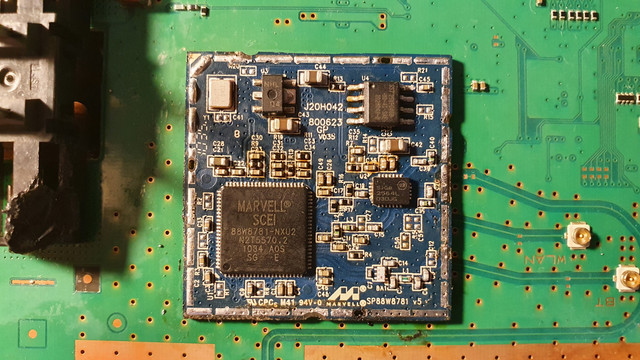 The C36 capacitor has some brown-orange stains that won't come off with isopropyl alcohol, but then I realized that a capacitor can't possibly cause a short, so I've scrubbed the module to remove any leftover solder blobs and flux, and read into what others had to say about their failed WiFi modules. Some have successfully removed the short by desoldering the voltage regulator labeled as "failed" on this photo:
 In my case, however, it's done absolutely nothing and the console still boots up to a few seconds of fan-spinning and then it shuts off. At this point I'm fresh out of ideas and I need your help!
Came to me labeled as "No PWR". Obviously wrong, as it would power on, spin the fan for a few seconds and power off with no standby light. Disassembled, cleaned it thoroughly, removed the CMOS battery, delidded with MX-4, soldered cables for SYSCON diagnostics, swapped power supply for a known good APS-250.
The SYSCON errlog is as follows:
===================================
ERR 00: 00000000 A0403034 FFFFFFFF
ERR 01: 00000000 A0404411 FFFFFFFF
ERR 02: 00000000 A0403034 FFFFFFFF
ERR 03: 00000000 A0404411 FFFFFFFF
ERR 04: 00000000 A0403034 FFFFFFFF
ERR 05: 00000000 A0404411 FFFFFFFF
ERR 06: 00000000 A0403034 FFFFFFFF
ERR 07: 00000000 A0404411 FFFFFFFF
ERR 08: 00000000 A0403034 FFFFFFFF
ERR 09: 00000000 A0404411 FFFFFFFF
ERR 10: 00000000 A0403034 FFFFFFFF
ERR 11: 00000000 A0404411 FFFFFFFF
ERR 12: 00000000 A0403034 29DE566A
ERR 13: 00000000 A0404402 29DE566A
ERR 14: 00000000 A0403034 29DDD014
ERR 15: 00000000 A0404402 29DDD013
ERR 16: 00000000 A0403034 29DDD00A
ERR 17: 00000000 A0404402 29DDD00A
ERR 18: 00000000 A0403034 29DDCEB8
ERR 19: 00000000 A0404402 29DDCEB7
===================================
ERR 00: 00000000 A0403034 FFFFFFFF
ERR 01: 00000000 A0404411 FFFFFFFF
ERR 02: 00000000 A0403034 FFFFFFFF
ERR 03: 00000000 A0404411 FFFFFFFF
ERR 04: 00000000 A0403034 FFFFFFFF
ERR 05: 00000000 A0404411 FFFFFFFF
ERR 06: 00000000 A0403034 FFFFFFFF
ERR 07: 00000000 A0404411 FFFFFFFF
ERR 08: 00000000 A0403034 FFFFFFFF
ERR 09: 00000000 A0404411 FFFFFFFF
ERR 10: 00000000 A0403034 FFFFFFFF
ERR 11: 00000000 A0404411 FFFFFFFF
ERR 12: 00000000 A0403034 29DE566A
ERR 13: 00000000 A0404402 29DE566A
ERR 14: 00000000 A0403034 29DDD014
ERR 15: 00000000 A0404402 29DDD013
ERR 16: 00000000 A0403034 29DDD00A
ERR 17: 00000000 A0404402 29DDD00A
ERR 18: 00000000 A0403034 29DDCEB8
ERR 19: 00000000 A0404402 29DDCEB7
===================================
In addition it responded to my bringup with:
ERR 00: 00000000 # [SSM] Bringup Start.
# [SSM] PS0 ok.
# [SSM] PS1 ok.
# [SSM] PS2 ok.
# [PowSeq] Error:9003
# [SSM] PS3 ng.
# [SSM] Cond/Fatal received, msg=24D0.
# [SSM] Fataldown Start.
# [SSM] Fataldown ok.
# (PowerOff State) (Fatal)
# [SSM] PS0 ok.
# [SSM] PS1 ok.
# [SSM] PS2 ok.
# [PowSeq] Error:9003
# [SSM] PS3 ng.
# [SSM] Cond/Fatal received, msg=24D0.
# [SSM] Fataldown Start.
# [SSM] Fataldown ok.
# (PowerOff State) (Fatal)
Reflowed Cell and RSX for good measure (the errors were related to RSX and Cell bus issues), but then I read into the WiFi module failing in CECH-2500 series PS3 consoles. Sure enough, the WLAN (WiFi?) antenna connector has its center pole shorted to ground. The BT antenna doesn't do that, and neither of the two have any shorts on all of my working PS3s.
When polled with "powerstate" with the console freshly connected to mains (red LED on), it said this:
00000000
# ATA: OFF
# PCI: OFF
# PCIex: OFF
# RSX: OFF
# GDDR: OFF
# XDR: OFF
# EURUS: OFF
# SB: OFF
# LAN: OFF
# WLAN: ON
# ATA: OFF
# PCI: OFF
# PCIex: OFF
# RSX: OFF
# GDDR: OFF
# XDR: OFF
# EURUS: OFF
# SB: OFF
# LAN: OFF
# WLAN: ON
vyktormvmpay25
Senior Member
Remove Wi-Fi module or WiFi ic is short
In stb you should have 3v3 and 1v8 on WiFi ic. https://s.go.ro/522ewzh4
From 25xx all same. Test those pins for short-circuit.
In stb you should have 3v3 and 1v8 on WiFi ic. https://s.go.ro/522ewzh4
From 25xx all same. Test those pins for short-circuit.
RIP-Felix
Senior Member
3034 is BGA/Bump defect. That's why it didn't work and probably explains how it powerd on for you, but not the seller. Mounting pressure can mechanically connect the broken solder joint.CECH-2503B, JSD-001
Came to me labeled as "No PWR". Obviously wrong, as it would power on, spin the fan for a few seconds and power off with no standby light. Disassembled, cleaned it thoroughly, removed the CMOS battery, delidded with MX-4, soldered cables for SYSCON diagnostics, swapped power supply for a known good APS-250.
The SYSCON errlog is as follows:
===================================
ERR 00: 00000000 A0403034 FFFFFFFF
ERR 01: 00000000 A0404411 FFFFFFFF
ERR 02: 00000000 A0403034 FFFFFFFF
ERR 03: 00000000 A0404411 FFFFFFFF
ERR 04: 00000000 A0403034 FFFFFFFF
ERR 05: 00000000 A0404411 FFFFFFFF
ERR 06: 00000000 A0403034 FFFFFFFF
ERR 07: 00000000 A0404411 FFFFFFFF
ERR 08: 00000000 A0403034 FFFFFFFF
ERR 09: 00000000 A0404411 FFFFFFFF
ERR 10: 00000000 A0403034 FFFFFFFF
ERR 11: 00000000 A0404411 FFFFFFFF
ERR 12: 00000000 A0403034 29DE566A
ERR 13: 00000000 A0404402 29DE566A
ERR 14: 00000000 A0403034 29DDD014
ERR 15: 00000000 A0404402 29DDD013
ERR 16: 00000000 A0403034 29DDD00A
ERR 17: 00000000 A0404402 29DDD00A
ERR 18: 00000000 A0403034 29DDCEB8
ERR 19: 00000000 A0404402 29DDCEB7
===================================
In addition it responded to my bringup with:
ERR 00: 00000000 # [SSM] Bringup Start.
# [SSM] PS0 ok.
# [SSM] PS1 ok.
# [SSM] PS2 ok.
# [PowSeq] Error:9003
# [SSM] PS3 ng.
# [SSM] Cond/Fatal received, msg=24D0.
# [SSM] Fataldown Start.
# [SSM] Fataldown ok.
# (PowerOff State) (Fatal)
Reflowed Cell and RSX for good measure (the errors were related to RSX and Cell bus issues), but then I read into the WiFi module failing in CECH-2500 series PS3 consoles. Sure enough, the WLAN (WiFi?) antenna connector has its center pole shorted to ground. The BT antenna doesn't do that, and neither of the two have any shorts on all of my working PS3s.
When polled with "powerstate" with the console freshly connected to mains (red LED on), it said this:
The WLAN module being on in a console in standby was odd for me, so I removed the RF shield and found this:00000000
# ATA: OFF
# PCI: OFF
# PCIex: OFF
# RSX: OFF
# GDDR: OFF
# XDR: OFF
# EURUS: OFF
# SB: OFF
# LAN: OFF
# WLAN: ON
The C36 capacitor has some brown-orange stains that won't come off with isopropyl alcohol, but then I realized that a capacitor can't possibly cause a short, so I've scrubbed the module to remove any leftover solder blobs and flux, and read into what others had to say about their failed WiFi modules. Some have successfully removed the short by desoldering the voltage regulator labeled as "failed" on this photo:
In my case, however, it's done absolutely nothing and the console still boots up to a few seconds of fan-spinning and then it shuts off. At this point I'm fresh out of ideas and I need your help!
Open and shut case as far as I'm concerned. RSX needs reballed or replaced.
vyktormvmpay25
Senior Member
yes on all models wifi is on and gets 1v8 and 3v3,otherwise we wont be able to power units from PS home button from controller . we send signal as in pc "wake on lan'. Remove wifi if see any short on pins from link ive posted early.
Felix is right 3034 is miscommunication,.post 'bringup ' log if it work or get glod.
Edit
If you are obsessed to see what is under cell and rsx just desoldered both
Those corners I often have unsoldered on pcb or on cell were not soldered to ic itself


Felix is right 3034 is miscommunication,.post 'bringup ' log if it work or get glod.
Edit
If you are obsessed to see what is under cell and rsx just desoldered both
Those corners I often have unsoldered on pcb or on cell were not soldered to ic itself
Last edited:
Bazylski
Member
Huge thanks to both RIP-Felix and vyktormvmpay25! I'll try the WiFi IC voltages first, then I'll reball the RSX - that'll be a first for me so I'll have to do it on a practice board. We'll see how it goes and how it's going to compare to the photos you've sent me.
It does make sense that WiFi gets power on standby, I forgot that's why you can power the console on wirelessly.
It does make sense that WiFi gets power on standby, I forgot that's why you can power the console on wirelessly.
vyktormvmpay25
Senior Member
Read all from Felix signature link, look at all measurements before and after reball when board is cold you should have same measurements nearly before desolder.
Or watch @Computer Booter yt channel, we are both around there for repairs.
Or watch @Computer Booter yt channel, we are both around there for repairs.
RIP-Felix
Senior Member
Huge thanks to both RIP-Felix and vyktormvmpay25! I'll try the WiFi IC voltages first, then I'll reball the RSX - that'll be a first for me so I'll have to do it on a practice board. We'll see how it goes and how it's going to compare to the photos you've sent me.
It does make sense that WiFi gets power on standby, I forgot that's why you can power the console on wirelessly.
It's great you want to learn to reball. It's a rewarding experiance when it works and truely crushing when it fails. Just be sure to do your research first. It's not a light undertaking.
But we'll help you along if you are all in on doing it. Just be shure you know what you're in for. It's a wild ride full of dissapointment and burnout. Will take perseverance, patience, and week long breaks to get your mind right after the dissapointments. It's one of the hardest levels of rework to master.
And I do not claim to be a master yet by any means. I have had some sucess lately and feel more confident. But it took a while to get this far and I have aways to go before it feels routine, predictable.
Similar threads
-

-
PS3 CECHA00 with several SYSCON errors (3004, 1001,1002, 2120,3011)
- Started by LSL
- Replies: 7
-
 PS3 Interesting PS3 Errors (1802, 1701, 1601) and Capacitor Replacement
- Started by Cheshire UK
- Replies: 2
-