PS3 Fault finding YLOD with the SYSCON - First steps and Error reporting

Okay, I just did what you said. System turns on WITH ribbon cable attached to the main motherboard, and NO BD drive. So it's not it. I assume, it might be daughterboard itself, because it just wont swoop disk inside. It's just stuck and wont get out. Okie, I just have to wait untill my parcell arrives and swap the boards, but the only tricky part is the tiny connector with very thin cables.

Hi, If you put your console on custom firmware you can perform a drive re-marry

In part one of my console referbishment you can see me perform a drive re-marry, see link below

 
I'm using a thick plastic which is pretty hard to swoop in, but it is nice and tight inside. I don't think that I somehow damaged the pins, and if so I'll have a replacement board soon. Board... Man, gotta check BD drive board itself!
The better way to check the pins is to use a needle to "push" then (individually, one by one, and of course after removing electricity from the board)
But while doing that you need to have a clear view of the pin your are pushing... thats why i mentioned to use a "magnifyer glass" or whatever you have at hand to do a good zoom inside the connector (if you have a smartphone with macro optics try to do a max zoom inside the connector)

Also, another way to check them is pertty much what you did to check the ribbon cable with a multimeter... by touching the traces one by one at one of the extremes of the ribbon cable, but touching the solder pads of the pins at the other extreme
I mean... if you look at the surroundings of the connector you are going to see the pins are soldered "around" the connector base

Connect the ribbon cable + your custom piece of plastic (to do the correct pressure), and then check continuity in between:
Pin solder pad <---> trace at the opposite extreme of the ribbon cable

You now... if the connection is fine the multimeter should display 0 resistivity (in other words, infinite conductivity)
 
The better way to check the pins is to use a needle to "push" then (individually, one by one, and of course after removing electricity from the board)
But while doing that you need to have a clear view of the pin your are pushing... thats why i mentioned to use a "magnifyer glass" or whatever you have at hand to do a good zoom inside the connector (if you have a smartphone with macro optics try to do a max zoom inside the connector)

Also, another way to check them is pertty much what you did to check the ribbon cable with a multimeter... by touching the traces one by one at one of the extremes of the ribbon cable, but touching the solder pads of the pins at the other extreme
I mean... if you look at the surroundings of the connector you are going to see the pins are soldered "around" the connector base

Connect the ribbon cable + your custom piece of plastic (to do the correct pressure), and then check continuity in between:
Pin solder pad <---> trace at the opposite extreme of the ribbon cable

You now... if the connection is fine the multimeter should display 0 resistivity (in other words, infinite conductivity)

Will check that out tomorrow. Thank you for advice
 
Hi, If you put your console on custom firmware you can perform a drive re-marry

In part one of my console referbishment you can see me perform a drive re-marry, see link below

That's the tricky part. My console is not running on any firmware, because i were tryint to install CFW without BD connected, so I'm stuck on 86% (if I'm not mistaken)
 
Hello,
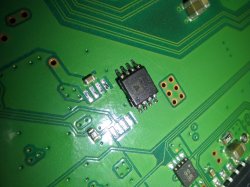
which model is this thermal sensor and where can it be purchased?
Thanks!
 

Attachments

  • IMG_20220427_221442_onFire(Abhi).jpg
    IMG_20220427_221442_onFire(Abhi).jpg
    542.2 KB · Views: 54
That's the tricky part. My console is not running on any firmware, because i were tryint to install CFW without BD connected, so I'm stuck on 86% (if I'm not mistaken)

If my memory serves me correctly as long as the drive is the same revision, you should be able to connect that drive and the update should complete.

Then you run PS3 xploit and follow the instructions, after a reboot you the install NoBd custom firmware, otherwise you won't be able to access homebrew applications. From here dump eid root key and use multiman to copy and paste it to your fat32 formatted USB stick. Now run FSM and perform a drive re-marry, now exit FSM and go back to XMB. Once you have tested some discs and confirmed the re-marry is successful you can now install normal CFW or OFW.
 
If my memory serves me correctly as long as the drive is the same revision, you should be able to connect that drive and the update should complete.

Then you run PS3 xploit and follow the instructions, after a reboot you the install NoBd custom firmware, otherwise you won't be able to access homebrew applications. From here dump eid root key and use multiman to copy and paste it to your fat32 formatted USB stick. Now run FSM and perform a drive re-marry, now exit FSM and go back to XMB. Once you have tested some discs and confirmed the re-marry is successful you can now install normal CFW or OFW.
Understood. I'll await untill "new" board will be dispatched. I'll leave a reply after that, because THIS is interesting case
 
If my memory serves me correctly as long as the drive is the same revision, you should be able to connect that drive and the update should complete.

Then you run PS3 xploit and follow the instructions, after a reboot you the install NoBd custom firmware, otherwise you won't be able to access homebrew applications. From here dump eid root key and use multiman to copy and paste it to your fat32 formatted USB stick. Now run FSM and perform a drive re-marry, now exit FSM and go back to XMB. Once you have tested some discs and confirmed the re-marry is successful you can now install normal CFW or OFW.

In evilnat 4.88.2 you can use built-in tools to dump ERK. I did this recently to remarry a BD drive. I didn't need to use a noBD CFW to do it. Just jailbroke as normal, dumped key, entered FSM, remarried drive, and GTFO!

Worked easy peezy. Although, I understand it doesn't always work.
 
Sorry for the question,
but isn't there a plugin or tool on PS3 with custom firmware that allows you to read the error logs without necessarily having to do some soldering on the board?
My PS3 FAT CECHL04 turns off with RLOD only when I launch certain games while if I stay on the xmb it stays on for hours without problems.
 
Sorry for the question,
but isn't there a plugin or tool on PS3 with custom firmware that allows you to read the error logs without necessarily having to do some soldering on the board?
My PS3 FAT CECHL04 turns off with RLOD only when I launch certain games while if I stay on the xmb it stays on for hours without problems.
Yes, PS3 advanced toolset. Link in my SYSCON tutorial here.
 
Yes southbridge.
DIA-001
Ok, i asked because i forgot in how many motherboard models was used, but i reminded i was talking about them here:
https://www.psx-place.com/threads/syscon-fan-settings-coordinate-graphs.31188/page-11#post-320701
And eventually i published it in wiki too, but i forgot to publish the image of the DIA-001
https://www.psdevwiki.com/ps3/Thermal#SB

Btw, what i mentioned about the pin configuration is explained here:
https://www.psdevwiki.com/ps3/Thermal#I2C_address
The long story short is... all this temperature monitors contains a temperature sensor integrated isnide them (optionally enabled/disabled) and also 2 pins to connect to an external temperature sensor (located inside other component)
The temperature monitors for CELL and RSX are configured as external sensor (so they have connections with the sensor inside CELL or RSX)
But all the other temperature sensors (for SouthBridge, EEGS, BEVR) are configured as internal sensor (so doesnt have connections with sensors inside other components)

All them are connected to the same "2-wires" channel and have a unique ID to identify themselfs in the channel
The ID for CELL and RSX is given at factory and cant be modifyed (have the same pinout, but you cant swap them)
And the others (configured as internal sensor) are given the ID by grounding 3 pins
As you can see (in your photo) you have pins 3,4,5 to GND.. thats whats giving it the ID=southbridge :)
But if you have some scrap motherboard you can use the other for BEVR (is located in between CELL and RSX in some COK motherboards)... or the southbridge temperature monitor from COK-001, COK-002, SEM-001

The brand is Analog Devices and the product code is AD51/007Z-0REEL but the suffix "reel" just means sony was buying them in big reels of 2000 units to use them in factory plant machines


EDIT:
I just uploaded photos in wiki of the southbridge temperature monitor location for all retail PS3 motherboards that allows to install it (COK-001, COK-002, SEM-001, DIA-001, DIA-002, DEB-001), and also your photo, is the first time i realize is labeled as "T5C"


EDIT2:
I just realized... there is a cheap way to fix your problem... simply by disabling the SB fantable (with the TTL-2-USB programmer by writing inside the thermal config area of the syscon EEPROM)... is just 1 byte and cant be considered a hack, is the standard way to enable/disable sensors individually
By default in DIA-001 the SB fantable is configured as "auto"... is just a matter of changing that byte to "disabled" and the missing component of your photo will be ignored
 
Last edited:
Thank you very much for the detailed information!

EDIT2:
I just realized... there is a cheap way to fix your problem... simply by disabling the SB fantable (with the TTL-2-USB programmer by writing inside the thermal config area of the syscon EEPROM)... is just 1 byte and cant be considered a hack, is the standard way to enable/disable sensors individually
By default in DIA-001 the SB fantable is configured as "auto"... is just a matter of changing that byte to "disabled" and the missing component of your photo will be ignored
Great! I can do it, but is there a tutorial somewhere on how to do it, because it's complicated for me.
 
Yes, PS3 advanced toolset. Link in my SYSCON tutorial here.
Thank you RIP-Felix

Today I downloaded PS3 Advanced Toolset and launched the application; Below is the content of the log file:


Firmware Version: 4.86 (build 50715)
Platform ID: CokF10
Product Code: 00 85
Product Sub Code: 00 08
Hardware Config: 4E00FFFF0307BCBF
Syscon Fimware Version: 065D.0000000000000000 (EEPROM: 0000000000000000)

Bringup Count: 1983, Shutdown Count: 1952
Runtime: 74 Days, 17 Hours, 54 Minutes, 9 Seconds

Error Log
01: A0802124 Sun Jan 1 00:01:32 2006
02: A0802124 Sun Jan 1 00:01:32 2006
03: A0801002 Sun Jan 1 00:01:31 2006
04: A0802124 Sun Jan 1 00:00:01 2006
05: A0802124 Sun Jan 1 00:00:00 2006
06: A0801002 Sun Jan 1 00:00:00 2006
07: A0802124 Sun Jan 1 00:42:05 2006
08: A0801002 Sun Jan 1 00:42:05 2006
09: A0802124 Sun Jan 1 00:25:12 2006
10: A0801002 Sun Jan 1 00:25:12 2006
11: A0802124 Sun Jan 1 14:08:28 2006
12: A0802124 Sun Jan 1 14:08:28 2006
13: A0801002 Sun Jan 1 14:08:27 2006
14: A0802124 Sun Jan 1 00:12:19 2006
15: A0801002 Sun Jan 1 00:12:19 2006
16: A0802124 Sun Jan 1 00:03:13 2006
17: A0801002 Sun Jan 1 00:03:13 2006
18: A0802124 Sun Jan 1 00:00:58 2006
19: A0801002 Sun Jan 1 00:00:57 2006
20: A0802124 Sun Jan 1 06:28:15 2006
21: A0801002 Sun Jan 1 06:28:14 2006
22: A0802124 Sun Jan 1 06:16:30 2006
23: A0802124 Sun Jan 1 06:16:30 2006
24: A0801002 Sun Jan 1 06:16:29 2006
25: A0802124 Sun Jan 1 05:19:25 2006
26: A0801002 Sun Jan 1 05:19:25 2006
27: A0802124 Sun Jan 1 05:17:20 2006
28: A0801002 Sun Jan 1 05:17:19 2006
29: A0802124 Tue Jan 3 00:20:25 2006
30: A0802124 Tue Jan 3 00:20:24 2006
31: A0801002 Tue Jan 3 00:20:24 2006
32: FFFFFFFF Fri Dec 31 23:59:59 1999


How can I interpret this Log error? So what is the problem of the RLOD and how can I solve it?

 
Great! I can do it, but is there a tutorial somewhere on how to do it, because it's complicated for me.
Sorry, i wrote it from memory, but now im looking at it more accuratelly and it seems the trick is not going to work :/

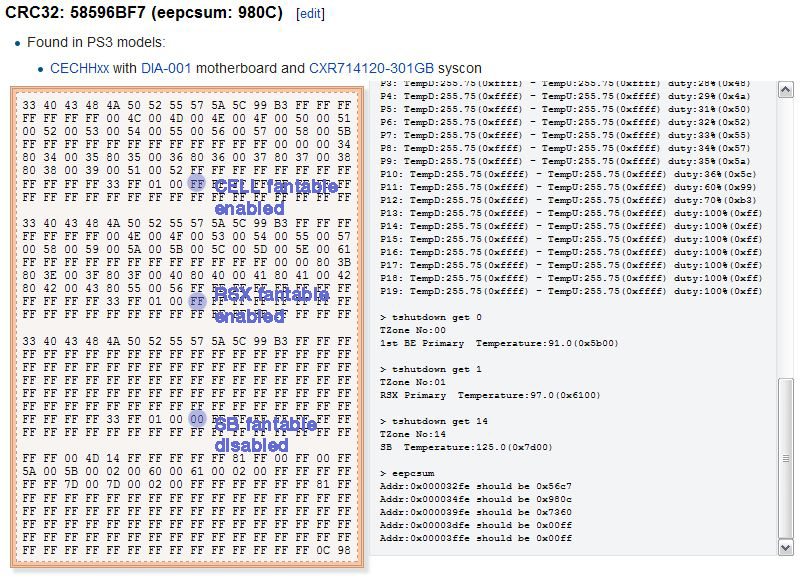
Im going to explain it anyway... in this section of the wiki page it can be seen there are 3 different formats for the "thermal config" area
https://www.psdevwiki.com/ps3/Syscon_Thermal_Configs#Thermal_Config_Formats

The syscon model used in DIA-001 motherboard requires to use format v2, and there are a couple of official thermal configs for it that differs a bit, but the problem im going to mention happens in both of them, i made an screenshot of one of them
Clipboard02-copy.png


The byte i marked with a blue dot indicates if the fantable is "active" (FF=enabled, 00=disabled)
My idea was to change the SB fantable to "disabled" but as you see is already disabled by default... so what i suggested is pointless because is already made :(

Basically, the byte 00 is telling syscon to ignore the SB sensor in the fan speed calculations
 
Last edited:
Thank you RIP-Felix

Today I downloaded PS3 Advanced Toolset and launched the application; Below is the content of the log file:


Firmware Version: 4.86 (build 50715)
Platform ID: CokF10
Product Code: 00 85
Product Sub Code: 00 08
Hardware Config: 4E00FFFF0307BCBF
Syscon Fimware Version: 065D.0000000000000000 (EEPROM: 0000000000000000)

Bringup Count: 1983, Shutdown Count: 1952
Runtime: 74 Days, 17 Hours, 54 Minutes, 9 Seconds

Error Log
01: A0802124 Sun Jan 1 00:01:32 2006
02: A0802124 Sun Jan 1 00:01:32 2006
03: A0801002 Sun Jan 1 00:01:31 2006
04: A0802124 Sun Jan 1 00:00:01 2006
05: A0802124 Sun Jan 1 00:00:00 2006
06: A0801002 Sun Jan 1 00:00:00 2006
07: A0802124 Sun Jan 1 00:42:05 2006
08: A0801002 Sun Jan 1 00:42:05 2006
09: A0802124 Sun Jan 1 00:25:12 2006
10: A0801002 Sun Jan 1 00:25:12 2006
11: A0802124 Sun Jan 1 14:08:28 2006
12: A0802124 Sun Jan 1 14:08:28 2006
13: A0801002 Sun Jan 1 14:08:27 2006
14: A0802124 Sun Jan 1 00:12:19 2006
15: A0801002 Sun Jan 1 00:12:19 2006
16: A0802124 Sun Jan 1 00:03:13 2006
17: A0801002 Sun Jan 1 00:03:13 2006
18: A0802124 Sun Jan 1 00:00:58 2006
19: A0801002 Sun Jan 1 00:00:57 2006
20: A0802124 Sun Jan 1 06:28:15 2006
21: A0801002 Sun Jan 1 06:28:14 2006
22: A0802124 Sun Jan 1 06:16:30 2006
23: A0802124 Sun Jan 1 06:16:30 2006
24: A0801002 Sun Jan 1 06:16:29 2006
25: A0802124 Sun Jan 1 05:19:25 2006
26: A0801002 Sun Jan 1 05:19:25 2006
27: A0802124 Sun Jan 1 05:17:20 2006
28: A0801002 Sun Jan 1 05:17:19 2006
29: A0802124 Tue Jan 3 00:20:25 2006
30: A0802124 Tue Jan 3 00:20:24 2006
31: A0801002 Tue Jan 3 00:20:24 2006
32: FFFFFFFF Fri Dec 31 23:59:59 1999


How can I interpret this Log error? So what is the problem of the RLOD and how can I solve it?
Error 2124 is related with either the HDMI controller, or the Digital Video Encoder chips (we are not sure)
Error 1002 is related to RSX, but RSX is connected to the other chips i mentioned above, so it could happen one of them is causing an error in RSX

This is tricy to troubleshoot, but you need to check this 2 chips (specially the power lines and the oher components responsibles to generate that power lines)
HDMI pinout ---> https://www.psdevwiki.com/ps3/MN8647091
DVE pinout ----> https://www.psdevwiki.com/ps3/CXM4024R

*Check also the pins inside the HDMI and MultiAV video connectors, just incase there is a pin bent doing a shortcircuit
 
Last edited:
Error 2124 is related with either the HDMI controller, or the Digital Video Encoder chips (we are not sure)
Error 1002 is related to RSX, but RSX is connected to the other chips i mentioned above, so it could happen one of them is causing an error in RSX

This is tricy to troubleshoot, but you need to check this 2 chips (specially the power lines and the oher components responsibles to generate that power lines)
HDMI pinout ---> https://www.psdevwiki.com/ps3/MN8647091
DVE pinout ----> https://www.psdevwiki.com/ps3/CXM4024R

*Check also the pins inside the HDMI and MultiAV video connectors, just incase there is a pin bent doing a shortcircuit


However from the log it seems that error 1002 always occurs first and then immediately after it involves 2124.
It seems that the 2124 is a consequence of the error 1002 which is the main cause (NEC / Tokin capacitors on the RSX?)
In the meantime I have already ordered from aliexpress tantalium 330uF capacitors
 

Similar threads

Back
Top