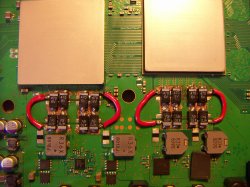
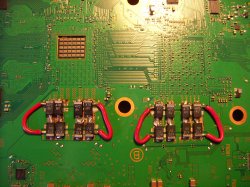
PS3 Fault finding YLOD with the SYSCON - First steps and Error reporting

Hello everyone,

After a very long read i have dragged myself through 252 pages of the research/experimental NEC thread and 147 pages of this thread. So hopefully I have arrived at the correct diagnosis here.

Console is a CECH-C02
YLOD almost instant, 1.5 secs
warranty sticker intact

I purchased it second hand and powered it up at the previous owners house to make sure I was buying a working system, no problem. Brought it home, plugged it in and it booted to xmb. I walked away and maybe 45secs later it shut down with 3 beeps. No ramp up of the fans. It has not gotten past a near instant YLOD again since.

Connecting to syscon i get the following ERRLOG

Code:
>$ ERRLOG GET 00
00000000 A0213013 FFFFFFFF
>$ ERRLOG GET 01
00000000 A0202120 FFFFFFFF
>$ ERRLOG GET 02
00000000 A0202120 FFFFFFFF
>$ ERRLOG GET 03
00000000 A0202120 FFFFFFFF
>$ ERRLOG GET 04
00000000 A0202120 FFFFFFFF
>$ ERRLOG GET 05
00000000 A0202120 FFFFFFFF
>$ ERRLOG GET 06
00000000 A0202120 FFFFFFFF
>$ ERRLOG GET 07
00000000 A0202120 FFFFFFFF
>$ ERRLOG GET 08
00000000 A0202120 FFFFFFFF
>$ ERRLOG GET 09
00000000 A0202120 FFFFFFFF
>$ ERRLOG GET 0A
00000000 A0202120 FFFFFFFF
>$ ERRLOG GET 0B
00000000 A0213013 FFFFFFFF
>$ ERRLOG GET 0C
00000000 A0202120 FFFFFFFF
>$ ERRLOG GET 0D
00000000 A0202120 FFFFFFFF
>$ ERRLOG GET 0E
00000000 A0202120 FFFFFFFF
>$ ERRLOG GET 0F
00000000 A0202120 FFFFFFFF
>$ ERRLOG GET 10
00000000 A0202120 FFFFFFFF
>$ ERRLOG GET 11
00000000 A0202120 FFFFFFFF
>$ ERRLOG GET 12
00000000 A0202120 FFFFFFFF
>$ ERRLOG GET 13
00000000 A0202120 FFFFFFFF
>$ ERRLOG GET 14
00000000 A0202120 FFFFFFFF
>$ ERRLOG GET 15
00000000 A0202120 FFFFFFFF
>$ ERRLOG GET 16
00000000 A0213013 FFFFFFFF
>$ ERRLOG GET 17
00000000 A0202120 FFFFFFFF
>$ ERRLOG GET 18
00000000 A0202120 FFFFFFFF
>$ ERRLOG GET 19
00000000 A0202120 FFFFFFFF
>$ ERRLOG GET 1A
00000000 A0202120 FFFFFFFF
>$ ERRLOG GET 1B
00000000 A0202120 FFFFFFFF
>$ ERRLOG GET 1C
00000000 A0202120 FFFFFFFF
>$ ERRLOG GET 1D
00000000 A0202120 FFFFFFFF
>$ ERRLOG GET 1E
00000000 A0202120 FFFFFFFF

This has led me to

https://www.psdevwiki.com/ps3/Syscon_Error_Codes#3013

Checking fuse f6302 it is indeed blown. I have also found the 2 smd's directly on the other side of the board of F6302 are shorting to ground on both sides. The 2 at the top of the image between the mosfet? and component labeled IRO.

circuit-png.30491

So my question is am I still looking for component C6320 and where is it? I it was mentioned here

https://www.psx-place.com/threads/r...s-replacement-ylod.25260/page-170#post-277809

But not its location. I have been over any and all schematics i can find but no luck. It may be much more obvious than this but Im lost.

Finally, what are the part numbers of the fuse F6302 and the smd's? I dont have access to any donor boards to harvest the parts.

Cheers, sorry for the long first post!
 
Sorry for the double post but wasnt quick enough to come back and edit the last.

I have found the part number for the fuse, 1-576-679-11 (3216) (5A/32V) I can order any 5A/32V fuse sized 3216?

Also learnt how to navigate the service manual better, the smds are c6320 and c6322 correct? Which are also obviously mentioned in the post by RIP-Felix that i linked, funny that. Didnt test the small c6326 smd correctly, but it is shorted on both sides too. Any ideas why all 3 would go?
 
When the buck converter turns on it sends voltage to the output. The caps filter the switching ripple/noise before it enters the processors. If you dont have continuity fro the input side of the tokins to the output side of the tokins, the buck converter sends more voltage, thinking there isnt enought to make it to the output. But the real reason is you didn't have a bridge wire. So it'll go up it's maximum output voltage of 4.5v, and blow out your caps. That's actually a feature, because they act as a fuse preventing voltage spikes above their rated voltage. So 2.5v. If you use 6volt rated caps instead they'll let that much more voltage enter the processor, destroying them.

You must have the bridge wires at all times.

If you have good caps, and they aren't shorting, and still get 3003/3004 errors, then there is another problem in the VRM. My next guess would be the Buck converters themselves.
YOU are my HERO
Thank you bro
 
Sorry for the double post but wasnt quick enough to come back and edit the last.

I have found the part number for the fuse, 1-576-679-11 (3216) (5A/32V) I can order any 5A/32V fuse sized 3216?

Also learnt how to navigate the service manual better, the smds are c6320 and c6322 correct? Which are also obviously mentioned in the post by RIP-Felix that i linked, funny that. Didnt test the small c6326 smd correctly, but it is shorted on both sides too. Any ideas why all 3 would go?
Some are fast blow and others slow blow. My guess would be fast blow, but IDK. I actually haven't needed to replace a fuse. I would probably just grab one from a donor board. I think I remember someone linked a fuse they used, which worked fine. But the post is burried.

I woud guess the voltage spike/short that blew the fuse exceeded those caps' voltage rating. If it blew one, it would likly blow the others. Caps like to fail short, so if something caused them to short, that could cause the fuse to blow.

I guess it's possable ripple or noise spikes could overvolt the MLCC's, causing them to short. Or flexing of the MB could cause them to crack, which can cause a short too (seems unintuitive that a cracked ceramic would short, instead of fail open, but it happens).

Or it could be something down stream has fallen out of spec and drew too much current. Who knows.

If it blosw again after replacing those components, then I would suggest injecting voltage to find what's getting hot. There is another short somewhere.
 
Some are fast blow and others slow blow. My guess would be fast blow, but IDK. I actually haven't needed to replace a fuse. I would probably just grab one from a donor board. I think I remember someone linked a fuse they used, which worked fine. But the post is burried.

I woud guess the voltage spike/short that blew the fuse exceeded those caps' voltage rating. If it blew one, it would likly blow the others. Caps like to fail short, so if something caused them to short, that could cause the fuse to blow.

I guess it's possable ripple or noise spikes could overvolt the MLCC's, causing them to short. Or flexing of the MB could cause them to crack, which can cause a short too (seems unintuitive that a cracked ceramic would short, instead of fail open, but it happens).

Or it could be something down stream has fallen out of spec and drew too much current. Who knows.

If it blosw again after replacing those components, then I would suggest injecting voltage to find what's getting hot. There is another short somewhere.

I've tested the MOSFETs after the capacitors and they are not shorted from the gate leg to either the source or drain so I assume they are fine (you know what they say about assuming though). Is there any point in testing further down stream if these components checked out fine?

With this in mind I'll be changing out the 3 capacitors with

- 2 22uf 16v and
- 1 0.1uf 16v

Then replacing the fuse. I've ordered a bunch of fast acting fuses in the correct amps, volts and case size along with the caps.

I don't have any way of injecting voltage, so if the problem persists I'll have to continue with checking for shorts the old fashioned way.
 
I've tested the MOSFETs after the capacitors and they are not shorted from the gate leg to either the source or drain so I assume they are fine (you know what they say about assuming though). Is there any point in testing further down stream if these components checked out fine?

With this in mind I'll be changing out the 3 capacitors with

- 2 22uf 16v and
- 1 0.1uf 16v

Then replacing the fuse. I've ordered a bunch of fast acting fuses in the correct amps, volts and case size along with the caps.

I don't have any way of injecting voltage, so if the problem persists I'll have to continue with checking for shorts the old fashioned way.
What caps did you use to replace tonkins? Edit: Nevermind, I got you confused with another user.
 
Hi, I repaired a Dia-002,PS3. It had a fault code of 2102 and it had ylod.
I reballed RSX and CELL. I cleared the error log and restarted the device and then turned it off. The device was no longer giving an error code.
The device is now always green and working, the hdd led appears briefly at the beginning but then does not appear.
The device can work in a continuous green light without ever shutting down, the processors come up to 77 degrees.
My problem is that the device does not display, there is no signal constantly.I changed the hdmi chip, all voltages without interference, I changed th2501, there is no error code, but the device does not display.
At the beginning, I reset the screen by pressing the power button, it still does not work, there is no image from the av port.I do not know about the history of the device, do you think there may be a problem with nor flash?
 
So I've removed c6320 and the shorts across c6322 and c6326 disappear.

Probing the area from qc303 and qc307, both test short across source and drain, c6342, c6344, c6346 and c6348 test short on both sides too, but there are 2 resistors in parallel r6374 and r6375. all components test fine out of circuit. I assume this would be the reason for these results?

I won't have the replacement fuse or capacitor for a few more days so will stop here for now.
 
Hi, on my ps3 i got error 1002 (and 2124), so i changed the nec tokin with tantalum capacitor, but still having error 1002 (and 2124).
Also the console torn on but i can't see nothing (already tried button reset procedure).
I want to test with multimeter and oscilloscope the Vddc line for RSX.
Can you tell if this is possible in stand-by mode or only when the ps3 is turned on (green led)?

Thank you.
 
Hi, I repaired a Dia-002,PS3. It had a fault code of 2102 and it had ylod.
I reballed RSX and CELL... it still does not work, there is no image from the av port.
Could be the bumps, black screens are common with that. Or it could be the FW is corrupt on the NAND. If you have a HW flasher you can try, otherwise I would suggest replacing the RSX (frankie preferably).
 
So I've removed c6320 and the shorts across c6322 and c6326 disappear.
Good. Input side is figured out. Now you just need to find the short downstream that caused the fuse to blow.

Probing the area from qc303 and qc307, both test short across source and drain, c6342, c6344, c6346 and c6348 test short on both sides too, but there are 2 resistors in parallel r6374 and r6375. all components test fine out of circuit. I assume this would be the reason for these results?
Those caps would test short in circuit if any of those MOSFETs are short. You tested "All" components out of circuit? Meaning the MOSFETs too? Cuz my first guess is one of them burned out.

Injecting voltage would be the easiest way to figure out which component is causing the short, but if you can't do that try using diode mode on your multimeter to measure the voltage drop across the MOSFET. Otherwise you willl have to remove them 1-by-1 to figure out where the short is. If it's not there, you will have to keep hunting downstream. 1.7V_MISC serves as power for multiple MOSFETs later on, YC_RC_VDDA, YC_RC_VDDIO, SB_VDDC, GX_VDDC, and more. Any one of them could short to ground (unlikely though).
 
Hi, on my ps3 i got error 1002 (and 2124), so i changed the nec tokin with tantalum capacitor, but still having error 1002 (and 2124).
Also the console torn on but i can't see nothing (already tried button reset procedure).
I want to test with multimeter and oscilloscope the Vddc line for RSX.
Can you tell if this is possible in stand-by mode or only when the ps3 is turned on (green led)?

Thank you.
This doesn't make sense.

If the console turns on, they you shouldn't get a YLOD. No YLOD, no errors! So how do you know there is still a 1002/2124 if the console turns on?

Be sure you are not just seeing the old errors and assuming they are current. One way to prevent this kind of confusion is to clear the errorlog. You will need internal access to do so.

Here's your SYSCON errorlog. I noticed that you were using PS3 Advanced Tooset to do this, meaning the console was turning on and displaying so you could navigate the menu. It must have been stable enough to run the SYSCON errorlog dump tool.
Here is the syscon log

Firmware Version: 4.84 (build 50696)
Platform ID: CokF10
Product Code: 00 85
Product Sub Code: 00 08
Hardware Config: 4E00FFFF0307BCBF
Syscon Fimware Version: 065D.0000000000000000 (EEPROM: 0000000000000000)
Bringup Count: 2453, Shutdown Count: 2424
Runtime: 122 Days, 3 Hours, 41 Minutes, 47 Seconds
Error Log
01: A0802124 Sun Jan 1 00:00:31 2006
02: A0802124 Sun Jan 1 00:00:31 2006
03: A0801002 Sun Jan 1 00:00:30 2006
04: A0802124 Sun Jan 1 00:00:01 2006
05: A0801002 Sun Jan 1 00:00:00 2006
06: A0802124 Sun Jan 1 19:48:25 2006
07: A0801002 Sun Jan 1 19:48:24 2006
08: A0802124 Sun Jan 1 19:47:44 2006
09: A0802124 Sun Jan 1 19:47:43 2006
10: A0801002 Sun Jan 1 19:47:43 2006
11: A0802124 Sun Jan 1 00:02:44 2006
12: A0802124 Sun Jan 1 00:02:43 2006
13: A0801002 Sun Jan 1 00:02:43 2006
14: A0802124 Sun Jan 1 00:01:11 2006
15: A0802124 Sun Jan 1 00:01:11 2006
16: A0801002 Sun Jan 1 00:01:10 2006
17: A0802124 Sun Jan 1 00:00:23 2006
18: A0801002 Sun Jan 1 00:00:22 2006
19: A0802124 Sun Jan 1 00:00:01 2006
20: A0801002 Sun Jan 1 00:00:00 2006
21: A0802124 Sun Jan 1 01:42:16 2006
22: A0801002 Sun Jan 1 01:42:16 2006
23: A0802022 Sun Jan 1 01:41:52 2006
24: A0802124 Sun Jan 1 01:08:44 2006
25: A0801002 Sun Jan 1 01:08:44 2006
26: A0802022 Sun Jan 1 01:08:16 2006
27: A0802124 Sun Jan 1 00:47:24 2006
28: A0802124 Sun Jan 1 00:47:24 2006
29: A0801002 Sun Jan 1 00:47:23 2006
30: A0802022 Sun Jan 1 00:47:10 2006
31: A0802124 Sun Jan 1 00:42:37 2006
32: FFFFFFFF Fri Dec 31 23:59:59 1999

As you can see from date and time, there is no new errors (i forgot to say that i changed also the battery that was death and set the current time and date).

(PS. sorry for my bad english).
And then you posted the log with the UART adapter. I noticed you used the windows app instead of dumping the entire 32 logs from the CMD terminal. It doesn't show new errors. Just the same ones as before...
I have replaced all nec tokin.

Yesterday i tried to play, ps3 turn on and green led stayed stable all time but no signal from hdmi and av output.
Furthermore all the 4 controller red led continue to blink and never stop (like when it tries to connect to ps3).

At this pont i have obtained the syscon with a FT232RL usb adapter and this is the result:

ERR 00: 00000000 A0802124 0B49D81F
ERR 01: 00000000 A0802124 0B49D81F
ERR 02: 00000000 A0801002 0B49D81E
ERR 03: 00000000 A0802124 0B49D801
ERR 04: 00000000 A0801002 0B49D800
ERR 05: 00000000 A0802124 0B4AEE89
ERR 06: 00000000 A0801002 0B4AEE88
ERR 07: 00000000 A0802124 0B4AEE60
ERR 08: 00000000 A0802124 0B4AEE5F
ERR 09: 00000000 A0801002 0B4AEE5F
ERR 10: 00000000 A0802124 0B49D817
ERR 11: 00000000 A0801002 0B49D816
ERR 12: 00000000 A0802124 0B49D801
ERR 13: 00000000 A0801002 0B49D800
ERR 14: 00000000 A0802124 0B49EFF8
ERR 15: 00000000 A0801002 0B49EFF8
ERR 16: 00000000 A0802022 0B49EFE0
ERR 17: 00000000 A0802124 0B49E81C
ERR 18: 00000000 A0801002 0B49E81C
ERR 19: 00000000 A0802022 0B49E800

So from what I can tell. You had a some kind of issue that led you to believe you needed to replace the tokins (we never saw the errorlog from before you replaced them), replaced them and it worked long enough for you to retrieve the logs. We don't know how may of those errors are from you testing the console during the tokin replacments, but that could explain the current errorlogs. The original errorlog, that revealed the original issue, could have been erased from this.

Then your console stopped displaying. We call this a GLOD. It can happen after a thermomechanical false positive. Basically the issue is BGA/bumps related, you assumed tokins and the heat from replacing them with tantalum allowed the console to work (temporarily). It can stay in a GLOD or return to 3034 YLOD. We don't know, because you haven't given us the errorlog from before the tokin replacement and the original codes that indicated a BGA/Bump defect are gone now.

I could be wrong. It's hard to follow your posts, since you haven't provided very much information to go off of. However, the GLOD you are currently experiencing indicate an issue with the RSX (most likely). So either way, that's where we are now.
 
Hi RIP-Felix, you are right, i made confusion with my posts.
Sorry for that.
I restart to explain from the beginning.
I have ps3 fat CECHL04 with VER-001 board.
My ps3 start after 2 or 3 tries at the beginning (i pressed start but it immediately turned off).
When i was arrived at the xmb i dumped the syscon with PS3 Advanced Tooset (first syscon error log that i posted).
Then i removed all 8 nec tokin from the board, replacing them with tantalum capacitor.
For about a week ps3 started strangely. I press the power button and the led stay green for 7 sec, then start blink yellow for 3 sec, return green for 10 sec, blink yellow again for 5 sec and finally stay green and it reach the xmb.
For all the week i didn't make a new syscon error dump.
One day when i turned on the console, it remained on (green led stable) and the controller can't connect to the console.
I tried to reset video output by pressing the power button without any results.
Because i can't reach the xmb (or i can't see it), i dumped the syscon error log (the second error log that i posted) using a usb adapter and a gui interface under windows 7 (i tried with command line but i'm not able).
This morning i tried to change the tantalum capacitor (only for rsx on both sides of the board) and dumped again the syscon, but it is the same as the last that i posted.
Because the 2 error log's are different (first one and second that i posted), i'm trying to understand were is the problem.
The tantalum capacitor can't be (i had changed them), so i suppose if the power line for rsx have some problems befor the ex nec tokin position, i can test the valtage to see if is ok (first with a multimeter the with a oscilloscope).
If the power line are ok, the problem is the rsx (BGA/Bump defect like you said but don' have error 3034).

This is all i know/made until now.

In any case, thank you for your support and your patience (i know i'm not the only one that have problems and you and all other members are trying to help us).
 
Last edited:
Hi RIP-Felix, you are right, i made confusion with my posts.
Sorry for that.
I restart to explain from the beginning.
I have ps3 fat CECHL04 with VER-001 board.
My ps3 start after 2 or 3 tries at the beginning (i pressed start but it immediately turned off).
When i was arrived at the xmb i dumped the syscon with PS3 Advanced Tooset (first syscon error log that i posted).
Then i removed all 8 nec tokin from the board, replacing them with tantalum capacitor.
For about a week ps3 started strangely. I press the power button and the led stay green for 7 sec, then start blink yellow for 3 sec, return green for 10 sec, blink yellow again for 5 sec and finally stay green and it reach the xmb.
For all the week i didn't make a new syscon error dump.
One day when i turned on the console, it remained on (green led stable) and the controller can't connect to the console.
I tried to reset video output by pressing the power button without any results.
Because i can't reach the xmb (or i can't see it), i dumped the syscon error log (the second error log that i posted) using a usb adapter and a gui interface under windows 7 (i tried with command line but i'm not able).
This morning i tried to change the tantalum capacitor (only for rsx on both sides of the board) and dumped again the syscon, but it is the same as the last that i posted.
Because the 2 error log's are different (first one and second that i posted), i'm trying to understand were is the problem.
The tantalum capacitor can't be (i had changed them), so i suppose if the power line for rsx have some problems befor the ex nec tokin position, i can test the valtage to see if is ok (first with a multimeter the with a oscilloscope).
If the power line are ok, the problem is the rsx (BGA/Bump defect like you said but don' have error 3034).

This is all i know/made until now.

In any case, thank you for your support and your patience (i know i'm not the only one that have problems and you and all other members are trying to help us).

Can you post pics of the tantalum install? Did you use hot air to remove the tokins? Did you have lots of trouble soldering the tantalums in, dumping lots of heat into the board (right next to the RSX)?

If so, then that could explain the GLOD. The BGA/bumps are pretty fragile. So yo really need to be careful replacing tokins. You can't just blast them off the board with heat gun. You didn't say how you replaced them. Also which tantalums you used to replace them with.

Pics will help.

That wierd week tho.For a week those wiered flashing yellow lights, hanging in the boot process??? Not sure what that could be. I've seen somthing similar on an overheating console, but always before a thermal shutdown. Never does it resolve and then boot into XMB. IDK that's a new one for me. Sounds like FW or HDD corruption. But after that it would load XMB and be fine. Like it was having issues in the Firmware sequence. But after a week of that then the GLOD. That makes me think either the NAND got corrupted, HDD failed, or the RSX died.

@vyktormvmpay25 says if you can't get into safe mode to see video, and no beeps, then its definately the RSX. I think I remember that dead VRAM can cause such a situation, but my memory is fuzzy.

The question is why did this happen after the tokin replacment?

A couple of possabilitues.
  1. You used too much heat replacing the tokins, which caused a BGA/bump defect.
  2. You damaged a VRAM filtering cap, which burned it out.
  3. You knocked off a SMD on the topside of the RSX, which distrobutes/decouples the VRAM signal to the chips on the substrate (interposer).
Again, pictures help prevent this kind of speculation. So please provide those and have a really good look around to be sure you didn't accidentally knock any other SMDs. That one you knocked off, be sure it's truely reattached too.

That's the best I can come up with ATM.
 
I didn' used a heat gun to remove the nec tokin.
I used a kinfe to remove them as kindly as possible
For the last one i accidentally hit a small smd that i resoldered and tested the connections with a multimeter (it seems ok).
I used 4x470Uf 6V tantalum capacitor for each nec tokin (total 32), soldering them with a normal solder (giving to the board the minimum heat to solder the new capacitor, see photo).
I also tried to enter in recovery mode using the sequence by pressing the power button (i can hear all the beebs for the correct procedure).
It seems to work, but i can't see nothing on the sceen also on recovery mode..
Maybe i can try to test the power line before the rsx with a multimeter (to se if there is signal) and a oscilloscope (quality of signal).
Because is my first time that i try to repair a ps3 i don't know if i can test the board in standby or only when is on (green ligh).
If i can know that all components give the correct power to rsx, i can understand better my situation.
I have another board (same as mine but with heating problems, error 1200) for replacement parts.
Maybe I can perform a parts transplant.

Thanks again.
 

Attachments

  • 1.JPG
    1.JPG
    1,020.9 KB · Views: 91
  • 2.JPG
    2.JPG
    1.2 MB · Views: 94
Maybe i can try to test the power line before the rsx with a multimeter (to se if there is signal) and a oscilloscope (quality of signal).
Because is my first time that i try to repair a ps3 i don't know if i can test the board in standby or only when is on (green ligh).
If i can know that all components give the correct power to rsx, i can understand better my situation.

SYSCON should error if any of those voltages weren't making it to the RSX. So I don't think that would useful.

I am not familiar with that MB revision, so IDK if some of the SMDs that are missing in your photos are supposed to be. Since you have another board (working), then inspect closely to be sure you didn't loose another SMD you missed. You can check voltages.

I would suggest an OHM test of the major voltages. This diagram is based on COK boards, not yours, but you should be able to find a similar spot to probe, since the RSX pins are identical.
mb_ohm_test_points-jpg.36295


Lastly, I suggest trying to use the command prompt again to get a bringup. There "might" be something useful in the log. Follow my guide for installing Python carefully. Be sure to add python to PATH, or that wont work. If you prefer you could use powershell. I think it supports more linux commands, but I'm not familiar with it. The original guide would be more helpful for that. Some people like it better.
 
In this days i will try to get the syscon error log using your guide and inspect all 2 board to see if there are some missing parts on mine.
To check the voltages is necessary that consoll is on or is ok also in standby?
I ask this again because if i have to test the voltages with the console turned on, i have to make an external cooling system (to avoid rex and cell burn).
Thank for the image with indications.
Maybe i can make a photo of my board with all the data that i can retrive and post here.
When i have all done i will let you know.
Thanks again.
 
To check the voltages is necessary that consoll is on or is ok also in standby?
I
No, just an ohm test to see if the resistance on the voltage line seems off. You can do this without power. Prefferably when the board is cool. Short is bad, open is bad. Otherwise, it doesn't reveal much. I don't think there's a missing voltage or SYSCON wouldn't let the console boot.

Also, the chips wont burn without HS. The'll overheat and then the system powers off with an error. They don't burn out. This is a protection feature.
 
Could be the bumps, black screens are common with that. Or it could be the FW is corrupt on the NAND. If you have a HW flasher you can try, otherwise I would suggest replacing the RSX (frankie preferably).
Firmware was not the problem. I saw that there was a bump issue. I moved the parts to another motherboard. Thanks for your answer bro.
 

Similar threads

Back
Top