
PS3 Feature for WebMan-Mod

CaioMM

Forum Noob
I've been using WebMan-Mod (It's a fantastic tool, thanks Aldo et al for developing the tool) for the last year, and one thing that aways bothered me is the fan control (I usually game on PCs, so I'm used to MSI Afterburner Fan Control).

Currently we have 3 options, use the Target Temperature, that make my PS3 fan oscilate and be really loud and noticiable, set an static fan speed or follow the Auto #2 curve, that to me, are very agressive.

So I've decided to modify Auto #2 curve to follow selected temperatures. I will be attaching an screenshot from my WebMan-Mod. I've used this modification for the past year, on 4.89, and lost the source code. Since I needed to upgrade WebMan-Mod to use on 4.90, i had to code everything again, but, this time, i've decided to share the results here. (The code is really simple).

I would be happy to share the source code for an future implementation on WebMan-Mod, if interest are shown.

Thank You for your attention, and sorry for my bad english.
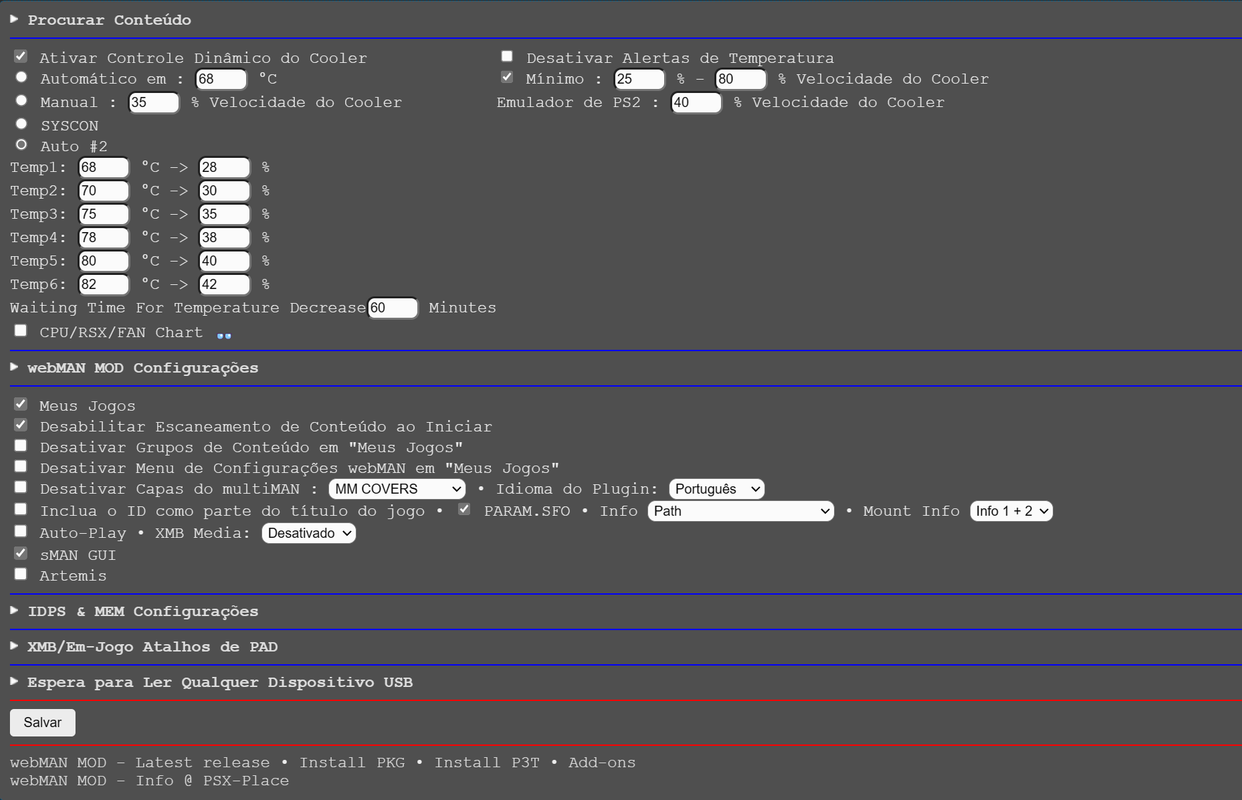
Captura-de-tela-2023-03-14-195539.png


EDIT: The curve don't simply go to the fan percentage and stays until the next step. It goes on a linear path between the current and next step.
 
Last edited:
I've been using WebMan-Mod (It's a fantastic tool, thanks Aldo et al for developing the tool) for the last year, and one thing that aways bothered me is the fan control (I usually game on PCs, so I'm used to MSI Afterburner Fan Control).

Currently we have 3 options, use the Target Temperature, that make my PS3 fan oscilate and be really loud and noticiable, set an static fan speed or follow the Auto #2 curve, that to me, are very agressive.

So I've decided to modify Auto #2 curve to follow selected temperatures. I will be attaching an screenshot from my WebMan-Mod. I've used this modification for the past year, on 4.89, and lost the source code. Since I needed to upgrade WebMan-Mod to use on 4.90, i had to code everything again, but, this time, i've decided to share the results here. (The code is really simple).

I would be happy to share the source code for an future implementation on WebMan-Mod, if interest are shown.

Thank You for your attention, and sorry for my bad english.

Captura-de-tela-2023-03-14-195539.png


EDIT: The curve don't simply go to the fan percentage and stays until the next step. It goes on a linear path between the current and next step.
@aldostools
 
I have all the forum notifications turned off. I cannot be summoned :D

I've been using WebMan-Mod (It's a fantastic tool, thanks Aldo et al for developing the tool) for the last year, and one thing that aways bothered me is the fan control (I usually game on PCs, so I'm used to MSI Afterburner Fan Control).

Currently we have 3 options, use the Target Temperature, that make my PS3 fan oscilate and be really loud and noticiable, set an static fan speed or follow the Auto #2 curve, that to me, are very agressive.

So I've decided to modify Auto #2 curve to follow selected temperatures. I will be attaching an screenshot from my WebMan-Mod. I've used this modification for the past year, on 4.89, and lost the source code. Since I needed to upgrade WebMan-Mod to use on 4.90, i had to code everything again, but, this time, i've decided to share the results here. (The code is really simple).

I would be happy to share the source code for an future implementation on WebMan-Mod, if interest are shown.

Thank You for your attention, and sorry for my bad english.

Captura-de-tela-2023-03-14-195539.png


EDIT: The curve don't simply go to the fan percentage and stays until the next step. It goes on a linear path between the current and next step.

I accept PR on Github.

Currently Auto #2 uses a semi-linear curve based on the current temperature.
// 60°C=31%, 61°C=33%, 62°C=35%, 63°C=37%, 64°C=39%, 65°C=41%, 66°C=43%, 67°C=45%, 68°C=47%, 69°C=49%
// 70°C=50%, 71°C=53%, 72°C=56%, 73°C=59%, 74°C=62%, 75°C=65%, 76°C=68%, 77°C=71%, 78°C=74%, 79°C=77%,+80°C=80%


The main difference with your table is that the fan is 20% higher. A more simple approach could be to add an user value to the setup form to add/substract % to the formula the calculated fan_speed when Auto #2 is selected.
Code:
if(t1 >= 80)
   fan_speed = 0xCC - user_val; // 80% - user value
else if(t1 >= 70)
   fan_speed = (0x80 + 0x8 * (t1 - 70)) - user_val; // 50% + 3% per degree - user value
else if(t1 >= 60)
   fan_speed = (0x50 + 0x5 * (t1 - 60)) - user_val; // 30% + 2% per degree - user value

fan_speed = RANGE(fan_speed, 0x33, 0xF2); // 20%-95%
 
The main difference with your table is that the fan is 20% higher. A more simple approach could be to add an user value to the setup form to add/substract % to the formula the calculated fan_speed when Auto #2 is selected.
yes. i think i would like that.
 
Back
Top