
You are using an out of date browser. It may not display this or other websites correctly.
You should upgrade or use an alternative browser.
You should upgrade or use an alternative browser.
PS2 FMCB/FHDB v1.9 series release thread
- Thread starter sp193
- Start date
-
- Tags
- fhdb fmcb fmcbinstaller
I am not sure, but I think some of these maybe did try more than once to check for the +NSR-Sector and it only has to verify it once... If it did, @sp193 MIGHT have thought, that he would optimize it (so a good intention)!How would you explain, that v1.8 to v1.93 works fine?
But I can't remember it for sure...
What I do know is, that during those cdvd-related tests with FMCB, we noticed that this could happen and I think we tried to prevent this issue from happening, via simply checking it multiple times...
This is NOT a guarantee, that it would work afterwards, because AFAIR ESR (which are standalone-ELFs and very [but not totally] independent of FMCB) does only check it (the +NSR-Sector) once and would still fail to load the disc and hang on a pink/magenta screen, if it fails to recognize it... What does the ESR-GUI show (disc-type)?
DVDVIDEO
That means it is unable to recognize the +NSR-Sector!!! Otherwise it would show 'PS2DVDV' (or similar)!
You can try to turn the 'Diagnosis'-Option in the OSDSYS/PS2-Menu 'on' and then insert a disc!

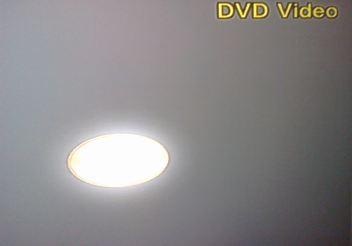
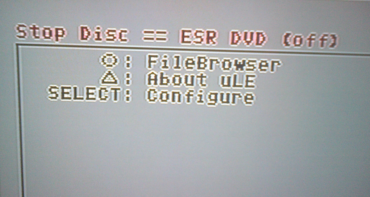
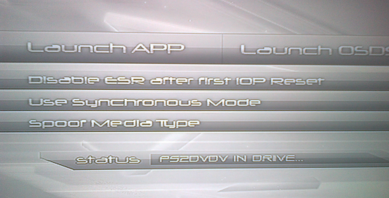
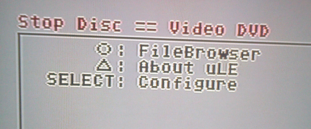
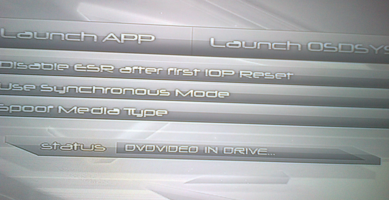
Yes. With 1.8 or 1.93 (and now 1.965 too) it always shows PS2DVDV.
However with other versions between, it mostly doesn't recognize as an ESR patched disc. (and gives the DVD player is not set up message and DVDVIDEO)
Just out of curiosity tomorrow i'll make some mc's with other versions and test them.
However with other versions between, it mostly doesn't recognize as an ESR patched disc. (and gives the DVD player is not set up message and DVDVIDEO)
Just out of curiosity tomorrow i'll make some mc's with other versions and test them.
Another reason which could cause this (for these specific FMCB-Versions), is why I mentioned that ESR is mostly independent of FMCB... Because it is not entirely independent of it, but needs some cdvd-related inits (at least the standalone-ELFs needed it in the beginning... Not sure about the later ones...)!

sp193
Developer
@unseen, have you done this yet?
Also regarding the fact that you still have FMCB v1.964:
"DVD Player is not set up" -> ESR.ELF could not be found. Check the configurator, to check that you have ESR in the right place. Ensure that you load the right settings file (a settings file from mass:/ will take precedence).
If you have a modchip, try to disable it as well. Ever since v1.96 was released with the new DVD Player support code, some modchips have been going crazy.
Also regarding the fact that you still have FMCB v1.964:
Please delete it (includes the LaunchELF version that comes with it). It contains USBHDFSD modules that can corrupt your USB disks if you use it to write files.
v1.965 was released to solve all such problems with the bundled software, even though it is not a FMCB problem.
In fact, replace all software that were built between June and the end of October 2018.

jolek
Senior Member
If you have a modchip, try to disable it as well. Ever since v1.96 was released with the new DVD Player support code, some modchips have been going crazy.
(I don't have a modchip)
@unseen
Nevermind. I haven't notice this:
I kept ESR path as original, (mc?:/BOOT/ESR.ELF) file is from this archive: ESR_GUI_test2.rar
Do you have any kind of ESR on USB?
Last edited:
jolek
Senior Member
I have a bug . When i enter into free mcboot configurator and i made any configure and saved it and whem i exit .it goes into the browser and i have only two options one Bowser and second one is system configuration
My model
PS2 SLIM SCPH 90004 v2.30
You know that your console is not fully compatible with FMCB?
Plus, you also have a modchip that can cause such a problem?
Because without modchip, FMCB will work on your console.
jolek
Senior Member
@unseen when you have updated FMCB e.g. from 1.95 to 1.965.
You've copied some of a programs on USB before format?
There were some problems with USB drivers.
Maybe some of your files were damaged?
If you like you can try FMCB v1.965+ESR beta r9b dvdv direct+Open PS2 Loader r1206:
http://www.mediafire.com/file/i3hzgah7c53fdj5/FMCB-FHDB_1965_[081218]NP_V1.7z.
You've copied some of a programs on USB before format?
There were some problems with USB drivers.
Maybe some of your files were damaged?
If you like you can try FMCB v1.965+ESR beta r9b dvdv direct+Open PS2 Loader r1206:
http://www.mediafire.com/file/i3hzgah7c53fdj5/FMCB-FHDB_1965_[081218]NP_V1.7z.
Last edited:
jolek
Senior Member

I'm not sure if I follow.
I've given a link to latest FMCB v1.965 (08\12\2018) with ESR beta r9b dvdv direct and Open PS2 Loader r1206,
because maybe before he formatted MC, he might copied a content from APPS\BOOT on USB.
For some time USB drivers were broken, so some files might be corrupted,
maybe that's why sometimes ESR works, sometimes not.
I have, but not in root, and there is no BOOT dir un USB either.Do you have any kind of ESR on USB?
Yes I tried this, and also works fine. Probably you are right, and there were some USB issues. I am no longer able do replicate that error anymore on any mc I try to install to. (I suspect it was some file corruption in SYS-CONF)I've given a link to latest FMCB v1.965 (08\12\2018) with ESR beta r9b dvdv direct and Open PS2 Loader r1206,
because maybe before he formatted MC, he might copied a content from APPS\BOOT on USB.
For some time USB drivers were broken, so some files might be corrupted,
maybe that's why sometimes ESR works, sometimes not.
Similar threads
-
 Welcome to PSX-Place (v3) - Upgrade Now Complete !!!
- Started by STLcardsWS
- Replies: 33
-

-
 PS3 PS3 Firmware 4.93 - Update is Live! (CFW and HFW Released)
- Started by LuanTeles
- Replies: 38
-
 PS2 Free McTuna! OpenTuna Installers with Free MCBoots via PS2BBL!
- Started by Ripto
- Replies: 26