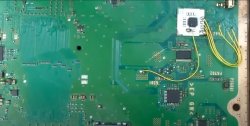
PS3 Frankenstein PHAT PS3: CECHA with 40nm RSX

Do you mean this POS?View attachment 32719
That's the one I tried (and failed) with PS3 #'s 1 and 2. The tiny little edges couldn't hold onto the chip with any force since you have to adjust the four sliding aluminum doohickeys independently. It just kinda sits in there. Well, the one on the lest has a little spring thing, but it's a joke. Pops out constantly! It made centering the chip to line up with the stencil A NIGHTMARE! Took me an hour just to set it for the RSX. Useless...

Yea , the blue one is the one I struggled with in the same way as you described . I've seen it in some video tutorials and thought everybody's using it. Well, little did I know what a pain it is... However, I sort of managed to modify it today and filed the edges that the chip rests on down so that it can 'sink' lower. This way I could secure it much better.

Also, I was thinking of using solder paste instead of solder balls. Has anyone tried that?

I watched a youtube video of a guy who reballed this way. Essentially he used the stencil to smear the paste through the holes then, without removing the stencil, used hot air to melt the paste and form the balls. No squirming solder balls bridging with their neighbors, the perfect amount of flux to prevent oxidation, the stencil kept the solder over their pad! Looked easier all around. You need stencils that can be heated and wont stick to the solder. And I'm not sure if the amount of solder paste that fits into the stencil (probably less than a ball) would work or not.

I have tried the soldering paste before. I cannot recommend it. In fact, I wouldn't recommend using hot air while keeping any type of stencil on top of the chip as it will stick to the surface due to flux (not sure if it is possible to avoid it). Also imagine cleaning the stencil after it.

The blue or silver jig is definitely usable (at least after the aforementioned modification). As for the solder balls and flux, today I have learned that the key is to use very low amounts of flux. You have to smear it with your finger or some type of tool to create a very thin layer of it. You can see it in certain youtube videos. For instance here at 22.30


The amount has to be just right. If you leave it a little too much, the balls will roll the moment you add hot air. So with the blue jig, assuming you figured out how to line up the stencil correctly, then put the balls on top of it, make sure they all dropped into the designated holes, and then lift the top part that holds the stencil carefully off. Now the chances are you will have some of the balls stuck to the stencil. Now carefully add the missing balls without messing up the others. I am using a certain "dentist tool" to perform this task. Finally, after you got all the balls in place, turn your hot air station on to approximately 340 degrees celsius and let the heater on for minute or two. Air flow at minimum. Now the key part is to hold the handle at a certain angle and distance so that it won't push the balls out of place with heat. It's a good idea to practice with a test PCB of some kind. This is the most delicate part, if your hand doesn't stay steady throughout , you risk causing nearby balls to merge. It may not be that easy to get them all perfectly soldered on the first try, but even if you screw up with a few balls, you don't need to redo the whole thing. You just redo the ones that failed. By the way, I am using 0.55 mm solder balls instead of 0.6.

Thinking about this, I should probably record a tutorial and show how I'm doing it...
 
Last edited:
Could someone let me know if watched at my reball method video în my thread ? Is simple? Been out for a few hours, limited with situation got back.
If someone doesn't understand from video I will probably post in photos.
 
@RIP-Felix Do not use solder paste, that method is useful when you have to reball tiny chips, like in ram memory or cellphone pcbs for example. Also, you need to use the exact same size of bgas as original (0.6?), and by that method I believe they're not going to be like that. Remember that these processors need to make contact with the heatsinks.

I know this guy who also is a master with the rework station:


You only apply heat after you set the bgas on the processor, not before removing the stencil. Or you could follow the guy above's trick too.

By applying a little bit of flux with your fingers is enough, and in my case I apply heat from above with the minimum temperature and air, and after a minute I'm reducing hight. After a while bgas will be stick to the pcb, but not melted, then you can go down until the gbas are completely melted. At least that's my method with those wifi modules :D
 
So, I must have gone wrong because I lifted the stencil before heating (with a hot air wand). They swam! You leave the stencil in place while heating the balls?
Sure, I'm heating the stencil with balls. And after melting I stop heating, then wait for temperature approx. 60 degrees and then loft stencil (it will stick to the chip if you'll wait too long to cold down). Sorry for my English))
 
I tried heating with the stencil in place, which was a bad idea. It bowed upwards and the balls just swam underneath. You must have a reflow over or something. Or is the stencil not in the jig. I think the reason it bowed was because it was locked in and the metal expanded under the heat and, since it was locked in around the edges, it bowed. Cleaned tried again this time without the stencil like normal. I used a business card to wipe off excess flux, but aparantly it was still too much. 1st attempt...
Attempt 1.jpg
That was on a the RSX from PS3#1 which I killed. It was pretty close, so I thought the next attempt I would get it right and went for an attempt on PS3#2's RSX - which I had previously attempted a reball on and ended up with bridged balls underneath ( I could see them). Pulled it off this morning and set it aside while I practiced on #1.

Here's the result after all that practice and deciding to go for it on #2's RSX...
Attempt 2.jpg
...Improvement was not made.,,lol!

I'll try my finger next and maybe preheat the flux to get an even, tacky coating, before applying the stencil/balls. I'm taking a break now. Maybe later I'll try again. I'm pretty discouraged ATM, need to recharge after this defeating lesson in what not to do.

I also noticed a missing pad on the PS3#2's PCB but am not sure it is a problem. I would have to look up the RSX pin-out I guess....
PS3#2_PCB.jpg
 
Last edited:
You must heat stencil slowly. I usually set 200 degrees temperature and lowest flow. Starting to heat from 10cm from chip. After approx. 1 minute I'm heating at 5cm and starting to rise flow to maximum. In my first tries I started to head at very high flow and stencil did exactly the same as yours.
 
I think I understand. You heated the aluminum jig up at the same rate as the stencil (by going slow), so there wasn't a local hot spot where the linear expansion of the metal could cause bowing.
 
I also noticed a missing pad on the PS3#2's PCB but am not sure it is a problem. I would have to look up the RSX pin-out I guess....
View attachment 32731

PS3 does not do via-in-pad, so if you don't see any traces that's a N/C.

For putting the balls on, I use a strip of masking tape on my finger and apply 2 small grains of rice worth of flux, then wipe it off until I can't see any ridges in the flux. Use a new masking tape bit every few wipes if there is still excess. It should be ridiculously thin.

I've never had good luck with bigger chips and direct heat stencils, they're just for tiny phone/handheld chips IMO. For the non-direct heat, the stencil should sit ever so slightly above the chip in the jig. You don't want flux touching the stencil, it will make the balls stick to it or move around when you lift it off. I also put a fresh strip of masking tape on my finger then rub across to press down on all the balls (while the stencil is still in place...) to try to make them stick in place a little better.

If the balls are moving around when you heat, it's too much flux or too much air.
 
Yeah, I think I figured it out. I was using too much flux before. It's not that hard when it has the right amount. Still hard to know when they have actually adhered to the pad, they looked on there but some weren't. PITA!

So I noticed a liquid and bubbles squeezing out from a pin hole next to RSX's DIE. I'm thinking that's bad! SO I'm going to consider that RSX dead. It went through a bunch of failed ball attempt anyway. Forget it! I was planning to replace it with a 65 or 40nm anyway. I just need to know if the chip works before ruining a fixable 40nm slim or working P model.
 
65nm off and drying, COK-001 minus RSX drying. I should get it on the board tonight. Now, don't anyone get your hopes up too much. Since these are experiments, I'm not sacrificing a known working COK-001 board. Just one that I HIGHLY suspect a bad RSX on.

Now, I went back over the last ten pages, and here's what I put together:

R2153 comes off
R2054 comes off, replaced with a diagonal 10K
Bridge 2 pads on the chip, then it's just ground, vcc, and the 3 points show here:
rsx-mod-cg-reset-2-png.32005


Am I missing anything?
 
Last edited:
Here is my chip:
iWNDRb6.jpg


I have a different pad layout than any of the pictures I'm seeing. The soldering / picture quality on any of the listings for this chip are too awful to tell what I'm actually supposed to bridge. And what's this capacitor that I see in the all the pictures that doesn't even have a pad on my chip?
 
Last edited:
It seems there is no need for a capacitor on the white pcb revision of the IC. The best picture of how it should look can be taken from the video. You just check what wires go where, but here you can at least see the orientation.

placement1.JPG
 
Here is my chip:
iWNDRb6.jpg


I have a different pad layout than any of the pictures I'm seeing. The soldering / picture quality on any of the listings for this chip are too awful to tell what I'm actually supposed to bridge. And what's this capacitor that I see in the all the pictures that doesn't even have a pad on my chip?
No that looks identical to the ones I got, the blue one with the capacitor in the image you see above is an older version of the mod.
 
Alright, I can actually see that picture. Thanks!

Finishing up some work and letting stuff bake a little longer, should get to it in about 3 hours.
 
No dice. 3034, 2120. Will investigate a little more tomorrow. And I've got a CECHG01 that wants to donate his known good 90nm to see if that board was good in the first place.
 
Too bad. Btw, I had the misfortune of knocking a bunch of capacitors on the RSX. So in case anyone fails with delidding the way I did, the bigger sized caps on there seem to be 100 nf, and the blue looking ones are resistors of 40 ohm for 90 nm and 60 ohm for 65 nm.
 
Last edited:
Too bad. Btw, I had the misfortune of knocking a bunch of capacitors on the RSX. So in case anyone fails with delidding the way I did, the bigger sized caps on there seem to be 100 nf, and the blue looking ones are resistors of 40 ohm. That is for 90 and 65 nm RSX at least. I can't vouch that they are ALL exactly the same values, but I measured a couple of them and those are the results I got.
Ok was about to pm, when rsx delid won't go easy leave ihs rsx on top and try desolder like that. I always desolder all model with ihs, even if I previously delided any, I stick them back and leave thermal silicone to cure. Once tigh enough desolder cpu/gpu. Both must be desoldered with ihs on top in most cases ihs is an thermal protection. Once desoldered rsx use old models of shaving blade Gillette splited in 2 parts (handle with care).
Start with each corner a little bit, then enter deep on each ram until that you feel it is completely separate. It is hard to explain that's why is on my videos in reball thread.
Keep in mind for every motherboard I desoldered first cpu and gpu with ihs sticked.
Reball back first rsx without ihs, cpu with ihs. Once cooled delid again cpu and clean for new paste. Leaving paste that has been trough reball/reflow process will never be same as new thermal paste.
Everyone should understand by now simply fact touching rsx or cpu with heat they create poor connection under one of these for sure so my trick always worked because they work in tandem and both must be reballed. It is a common issue on all. Many people with reball station will do videos on YouTube fixing ps4 because there's only one IC and must will do reflow claiming is reball.
That's why I use live streaming to give people a real proof of work.
 
Last edited:
Back
Top