PS3 Frankenstein PHAT PS3: CECHA with 40nm RSX

Wow. You sure both took my post the wrong way, he himself clearly said his motivation was money. I simply meant, that I would be doing this for my own curiosity, not looking for any financial gain from these experiments. And I've seen that he was offering help with it. Never did I state that him covering some of the shipping costs is wrong in any way.
Yeah, Fair enough, sorry. it came across like you meant he was only in it for the money, in a bad way.
 
I get it bud, but I don't see how you think saying "unlike squeept, I'm not in this for the money" can not be seen as an insult in any other way. It doesn't matter how you say it, its an insult. I didn't appreciate it. Maybe just not say stuff like that next time.
 
I get it bud, but I don't see how you think saying "unlike squeept, I'm not in this for the money" can not be seen as an insult in any other way. It doesn't matter how you say it, its an insult. I didn't appreciate it. Maybe just not say stuff like that next time.

Ok, I don't meant to keep pushing it off topic, but don't you think it's a little bit silly that you are taking offense on behalf of someone ( @squeept ) , who does not even have any issue with me? Also you have a very unusual understanding of an insult. It is only an insult if you think there is something wrong with being motivated by money. I never said it's wrong though. Everybody's free to have their own motivators. My reference was that I personally would keep testing this thing out of interest and my own curiosity first and foremost, That's all there was. Okay then? Btw English is not my native language, so I apologize again if it came out as an insult and hurt somebody deeply.
 
Last edited:
The phrasing could have easily been misinterpreted, but considering I literally said it myself, no, I'm not bothered at all. If mods just want to delete this little flurry of comments, I'd be okay with that too, then we can get back on track and not have this clogging things up. And Merry Christmas, ya bastards!
 
Well I am sad to admit that lifting the chip from the board isn't as easy at it sounded. @squeept could you advise? I got the preheater and the top heater. I heated the board up to 140 C degrees from the bottom and then turned on the top heater to get the board to 220 C. I lifted the GPU without damaging the pads on the board, however the smaller black chips on the RSX "popcorned", small solder balls came out from under them... So that's one RSX down :( what can I do to avoid it next time? Should I add another temperature sensor to the top of the RSX? Because I was mostly measuring that the board itself is heated to 220 degrees... Or was the heating process too fast? Is it caused by problem with the moisture?
 
Usually I have managed to desolder gpu with bottom temp at 200~210 and top manual hot air heat gun at 250 near 2 cm with ihs not delided . I have jovy RE8500. None of profile work for cok001, cok002.
Rest of ic's can be desoldered easy with only one profile at 232. It is a big difference from tools we have and use. Two jovy RE8500 will never work in same way most of the time. There are many things different from user to user.
Soldering back delided with top ir at 205 work every time. Only cok001/002 are difficult to not crack resin around ram. Rest of ic's never had any problems if board wasn't touched by any other person.
Usually 135 ohm on ram points of gpu and 1.8 ohms on ic die power points.
 
Last edited:
I was working on cok-002. I delidded the GPU before doing it and had a 220 C profile on my DIY heating station. It's got lamps for the bottom and ceramic heater at the top. So a bit like Jovy, but home made. I think I have figured it out. The board needs to be heated up in the oven for several hours to get rid of the moisture, otherwise the chip "explodes".
 
I have tried many times but simply realised that hot air on top would not destroy this type of gpu . I have modified sterilizer tool . Tried backing 8 ,12, 24 at 50, 75, 100. Usually 2 hours are enough at 75.
I rather don't lose time with those models. Neither phats I don't do to much.
On slims I do reball/delid both cpu/gpu and they work on first try. On 3000 reball both and delid gpu outside of board. On superslim I just change thermal paste and inspect only parts in case I find something wrong I charge that part but not necessary to reball as they become as ps4 were people forcing to play without maintenance at 2 years resulting in dead APU totally or partially side of gpu (blood most cases). I hope this ps5 will last longer because of it's liquid metal paste. Tested on few ps3 slim cpu and gpu and not very impressed was like 52 on xmd and 60 on games after one hour webman at 25.
I have tried and seen there are things that worth time and some not.
8501fe44b4de3a6858305f1feeb86fff.jpg

Edit
In case someone needs some schematic for dual controller and for hot air gun and bottom we have programed Atmega328 something similar found on net but with faster response from TC. I may open another thread with it.
 
Last edited:
Alright, so I have reviewed this thread today again and realized that I have nearly missed the very important step of dumping the EEPROM data before doing any actual syscon swaps. So reballing is not even the most challenging part here.

The syscon needs to be changed in order to support the newer RSX. You'll need a 302GB or newer.
First you have to dump the eeprom of the original syscon.
Then:
- Change the layout (Cookie old to Cookie new: https://pbs.twimg.com/media/ENs1zGGXUAIwnZl?format=png&name=large)
- Delete the complete patch (0x2800-0x2C00 and 0x4400-0x5000)
- Change the RSX revision byte (set 0x3912 to 0x21)
and flash it to the new syscon.
If you do it via hardware you don't even need any key.

@M4j0r, perhaps you could add a little more details to this? I know you have sort of explained it in the beginning, but it's been a while since I used exploits or done jailbreaks.. So if you could possibly clarify step by step, starting with how to dump the eeprom with UART or any other way, it would truly help. I'm assuming a jailbreak will be necessary?

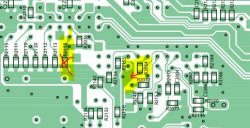
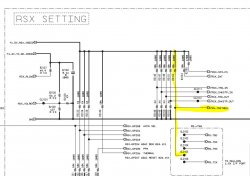
On the topic of the board modifications, I had a look at the latest photos posted here by the person with the 40nm RSX on CECHA00 and traced the changes using the schematics from COK-002 (Applies to COK-001 as well). Assuming no other changes were overlooked, here are the results:

Observation 1: R2153 is removed and bottom pin of R2054 is 'shifted' to nearby ground:

ps3 - resistor change.JPG

Removed R2153 on the schematic (goes to RS-TRSTNEG line, something to do with RESET as well ? Reset Trigger Setting Negative?):

ps3 - removed res.JPG

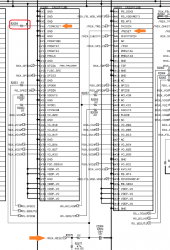
About grounded R2054:
The scheme shows that two RSX pins a driven by SYSCON RSX_RESET signal - CGRESET (AV6) and RESET (AW5). Reworked resistor grounds CGRESET (so it will always be driven low) but leaves RESET connected to RSX_RESET.

image-reset.png

Observation 2: To be continued...
 
Last edited:
@M4j0r, perhaps you could add a little more details to this? I know you have sort of explained it in the beginning, but it's been a while since I used exploits or done jailbreaks.. So if you could possibly clarify step by step, starting with how to dump the eeprom with UART or any other way, it would truly help. I'm assuming a jailbreak will be necessary?

First of all, you can't dump the complete EEPROM using the UART interface without patching the syscon firmware.
If there's no patch installed on the syscon, then you can install your own using the UART interface and patch the access restrictions, else you need CFW to delete the current patch.
You can also read/write the EEPROM using the SPI interface: https://www.psdevwiki.com/ps3/SC_EEPROM#Dumping_SC_EEPROM_-_hardware_way , this requires no UART.
 
First of all, you can't dump the complete EEPROM using the UART interface without patching the syscon firmware.
If there's no patch installed on the syscon, then you can install your own using the UART interface and patch the access restrictions, else you need CFW to delete the current patch.
You can also read/write the EEPROM using the SPI interface: https://www.psdevwiki.com/ps3/SC_EEPROM#Dumping_SC_EEPROM_-_hardware_way , this requires no UART.

Okay, let's say I install CFW, then what are the next steps?
 
Okay, let's say I install CFW, then what are the next steps?

The actual MFW needs to contain a syscon patch which patches the EEPROM handling functions, just as an example:
Code:
COK-001
0x1FDA2: 3D E0 8B 49
0x41334: 00 00 00 00
0x41338: FF 7F 00 00

DIA-001
0x20512: 3D E0 8B 49
0x4B814: 00 00 00 00
0x4B818: FF 4F 00 00

DIA-002
0x206A2: 3D E0 8B 49
0x4C284: 00 00 00 00
0x4C288: FF 4F 00 00
The patch structure is documented here: https://www.psdevwiki.com/ps3/System_Controller_Firmware#PTCH_Firmware_TOC, you can also find a decoding script here: https://pastebin.com/xGDH6taM .
The encrypted patch structure can be found here: https://www.psdevwiki.com/ps3/System_Controller_Firmware#Header.
 
I appreciate your hints, but I have a feeling I would need to dedicate a few hours to figure out what you are talking about :D I suppose no noob-friendly guides coming any time soon then?
 
Alright, so I have reviewed this thread today again and realized that I have nearly missed the very important step of dumping the EEPROM data before doing any actual syscon swaps. So reballing is not even the most challenging part here.


@M4j0r, perhaps you could add a little more details to this? I know you have sort of explained it in the beginning, but it's been a while since I used exploits or done jailbreaks.. So if you could possibly clarify step by step, starting with how to dump the eeprom with UART or any other way, it would truly help. I'm assuming a jailbreak will be necessary?

On the topic of the board modifications, I had a look at the latest photos posted here by the person with the 40nm RSX on CECHA00 and traced the changes using the schematics from COK-002 (Applies to COK-001 as well). Assuming no other changes were overlooked, here are the results:

Observation 1: R2153 is removed and bottom pin of R2054 is 'shifted' to nearby ground:

View attachment 29527

Removed R2153 on the schematic (goes to RS-TRSTNEG line, something to do with RESET as well ? Reset Trigger Setting Negative?):

View attachment 29528

About grounded R2054:


View attachment 29538

Observation 2: R6214 and R6216 are added.

View attachment 29529

As you can see, in the original schematic they were not needed (Indicated by XX). Could they be possible 0 ohms resistors that ground VD (Voltage Drain) and Vfb (Feedback voltage?) pins of the Mosfet Driver IC6200, BD3520FVM ?

View attachment 29531

...Continued from the SYSCON thread.

I spent all summer and most of this fall staring at the filter circuit (Down stream from the switching regulators), watching electrical engineering videos and reading relevent tidbits around the web to gain a working knowledge of why and how the the NEC/TOKINs were used, and what effect using Tantalums might have. I skipped over transistors, mosfets, and the like. I do need to research the VRM and how that works into the equation. Someone else (I forget who) reported that the RSX and CPU request voltage from the VRM dynamically, based on what they need. That they can request more or less as needed. That may explain why @squeept and I were consistently seeing RSX and CPU voltages above the 1.2v and 1.0v respectively, which is what I was expecting - based on the COK-001 schematics.

This is a logical place to continue my little research project, but I won't make any promises. I'm not an EE! Nor does it let you off the hook. You can duckduckgo as good as me (or google, if you like giving the 1% your personal information to sell to God knows who, for God knows what purpose - Making trillions in the process. Ostentatiously, its for personal ads. Maybe that's true 99% of the time, but if history has proven anything, it's that you can't trust the 1%. So don't google! OKAY!).
 
I assume you need to patch the SYSCON chip from a newer motherboard that has the more recent SYSCON firmware (to select a 65nm or 40nm RSX chip), meaning there's no need to do anything with the SYSCON on a COK-001/2. Or is there some info we need from it too? Those are some tiniweeny wires to fit under the SYSCON chip if you can't solder to points on the board (COK-001). Someone needs to trace the path of those pins to vias or pads on the COK-001 so we can more easily use the BUS Pirate, unless there's no reason to.
 
I assume you need to patch the SYSCON chip from a newer motherboard that has the more recent SYSCON firmware (to select a 65nm or 40nm RSX chip), meaning there's no need to do anything with the SYSCON on a COK-001/2. Or is there some info we need from it too? Those are some tiniweeny wires to fit under the SYSCON chip if you can't solder to points on the board (COK-001). Someone needs to trace the path of those pins to vias or pads on the COK-001 so we can more easily use the BUS Pirate, unless there's no reason to.

Perhaps I misunderstood, but don't we need EEPROM data from the original SYSCON on COK-001/002 because it contains data about the CELL and South Bridge? Unless you are swapping CELLs as well, but then it has been mentioned that they are not pin compatible....

This is how Syscon sees the different hardware revisions (verified by Lv1 debug output and the Syscon eeprom) on Phats:
Code:
CELL:  0x31: TMU-510, TMU-520, COK-001, COK-002
       0x40: SEM-001, DIA-001, DIA-002, VER-001, DEB-001

SB:    0x31: TMU-510, COK-001
       0x32: TMU-520
       0x40: COK-002
       0x50: SEM-001, DIA-001, DIA-002, VER-001, DEB-001

RSX:   0x10: TMU-510
       0x11: TMU-520, COK-001, COK-002, SEM-001, DIA-001
       0x21: DIA-002, VER-001, DEB-001, DYN-001
       0x30: SUR-001, ...
CELL 90nm (0x31) and 65nm (0x40) models are not pin compatible, the same applies for the different South Bridge revisions.

Which means that the RSX is the only part which can be changed cross revision.
These are the minimal retail Syscon ROM versions for the revisions:
Code:
CELL: 0x31: 201GB (v1.0)
      0x40: 203GB (v1.2)
SB:   0x31: 201GB (v1.0)
      0x40: 202GB (v1.1)
      0x50: 203GB (v1.2)
RSX:  0x11: 201GB (v1.0)
      0x21: 302GB (v1.4)
      0x30: 303GB/304GB (v1.5)
In short: 90nm RSX is supported by all, 65nm since 302GB (DIA-002) and 40nm since 303GB.
So you can use other RSX revisions, but you need a compatible Syscon.
 
Last edited:
The actual MFW needs to contain a syscon patch which patches the EEPROM handling functions, just as an example:
Code:
COK-001
0x1FDA2: 3D E0 8B 49
0x41334: 00 00 00 00
0x41338: FF 7F 00 00

DIA-001
0x20512: 3D E0 8B 49
0x4B814: 00 00 00 00
0x4B818: FF 4F 00 00

DIA-002
0x206A2: 3D E0 8B 49
0x4C284: 00 00 00 00
0x4C288: FF 4F 00 00
The patch structure is documented here: https://www.psdevwiki.com/ps3/System_Controller_Firmware#PTCH_Firmware_TOC, you can also find a decoding script here: https://pastebin.com/xGDH6taM .
The encrypted patch structure can be found here: https://www.psdevwiki.com/ps3/System_Controller_Firmware#Header.

So I've tried studying the links, but it made little sense to me at this point. Maybe it's better to ELI5. You say the actual modified firmware needs to have a syscon patch. So how do I create such a firmware? The code which you have provided as examples, where do I use it ? My board is COK-002 btw.
 
Back
Top