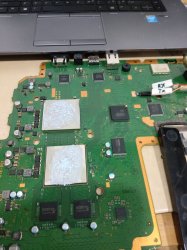
PS3 Frankenstein PHAT PS3: CECHA with 40nm RSX

Speaking more about funny error 3034...
3. Rules 3 (CellBe To RSX)
We arrived at rules 3, below I will give a 2 video "Pulse CLK" : video1 enters "rules3" and video2 final of "rules3"


When entering "rules3" you can say there is no problem with the voltage in CellBe and RSX, so the problem that occurs with "rules3" is usually only a problem with the relationship between CellBe and RSX, CellBe and sub (CXD9964)
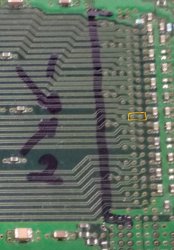
I will give examples of problems that are often encountered from ps3, especially on the RSX CXD2971, I took pictures from the DIA-001

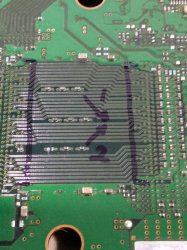
remember !!!, this is just an example, in my picture the pin-pin connection data from CellBe to RSX, a common problem that occurs in the CXD2971, when measuring resistance in IC using a digital meter (fluxe) pin 1 and pin 2 is drawn shot , pin1 and pin2 are connected internally in RSX, which shouldn't happen, that's what causes PS3 YLOD. Then I heat the RSX CXD2971 with a temperature increase of max 200c for 15 minutes, after it cools down I re-measure pin1 and pin2 that were previously connected, the RESULT? pin1 and pin2 separate back to normal, no longer connected, from such conditions I conclude that using heat can change the conditions inside the RSX CXD2971, but such repairs cannot last long, 2-3 days later pin1 and pin2 are shot again, reconnected Internally in RSX, there are a lot of similar cases like this with different results, but from the many ps3s that have been treated like this, I conclude:
1. RSX that has never been HEATED, will last quite a long time, approx. 3-6 months, will have a longer lifespan if it is used frequently, harvested continuously
2. RSX that has been HEATED, DON'T WASTE YOUR TIME, REPLACE RSX CXD530XX IMMEDIATELY !!!!!
That's why my brother("KIAW'S) made the MODRSX IC so that the old CXD2971 could be replaced.
how to heat RSX like this can only be done on RSX CXD2971, does not apply to other RSX, why? Ask Sony ...(what is clear is that the make is different)
BUT if you don't have a problem doing that, it's okay too, in principle heating to 2,3,4,5 makes the PS3's life time less and less, it's good that it doesn't interfere with other components, until it's time you replace the RSX ...
other than heating (CXD2971 only), repairing ps3 that enters "rules3" is by:
1. Replace tin ore, reballing either RSX or Cellbe, just one of them
2. Replace RSX or Cellbe because it is damaged

It seems that I also explain it for a long time, I leave it up here, hopefully it will be useful and keep up the spirit, as usual, no method is perfect, take the important parts, combine it with other methods, make it more perfect, that too is my hope
Friend what you are saying here is amazing. I don't know anybody else who mentioned this before in detail. We all knew something was wrong sometimes with the 90nm 2971... And that sometimes reballing was definitive but other times it was only a step in troubleshooting.
And that low heat from hair dryer or other unrelated sources (fake tokin fixes, fake reflow...) could change the behavior of the funny RSX in many cases....

So you are saying that "pin 1 and pin 2" are becoming shorted internally and intermittently, and is always the same pins?
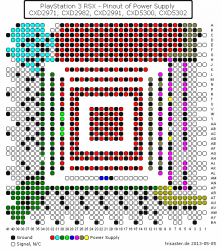
Can you specify better what pins are pin 1 and pin 2? In the picture I can't really be sure what pins are you talking about.
kakidatacxd2971.jpg
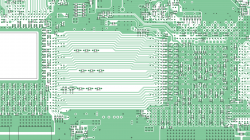
Do you mean these two?
kakidatacxd2971~3.jpg
Thank you
 

Attachments

  • rsx_messpunkte_spannungsversorgung(1).png
    rsx_messpunkte_spannungsversorgung(1).png
    12.9 KB · Views: 86
  • Screenshot_20210612-134227~2.png
    Screenshot_20210612-134227~2.png
    910.6 KB · Views: 94
Last edited:
If you take a look at the firmware you can see that these error codes can be caused by CELL being not able to train the Yellowstone interfaces for the RSX or SB. The error code can't tell you where it exactly happened (CELL, RSX, SB, or maybe just the connection). Even though it says BE Error in the manual it's handled differently in the firmware.
Ok, so CELL is the responsible of that FlexIO bit training, but it happens in between CELL/RSX/SB... and the description of the error codes sucks a bit
We need to wikify them at some point (not sure where they fits or how to organize that info in wiki), this way we have room to improve the descriptions, and also create another list of error codes specifically for sherwood, because are different than mullion, right ?

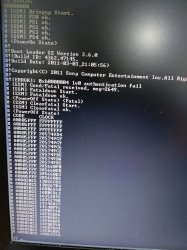
3034 is a data error. Failure in communication between CPU and... Whatever. But in this case we know it's between CPU and RSX. Normally indicated by the additional 4xxx error and with bringup, the syscon will say it's a "RSX bittraining error" or something like that.

This occurs at stage 40 of the boot sequence. 00 to 40 was OK and there were no errors (around 3 seconds), so this is more or less a late error in the sequence. Severe power fails tend to manifest around step 20 and "80" would be the final "ON" state.
If the data inside the syscon was the problem (unrelated to RSX)... Then we would expect a failure much sooner. Like A0.

The point is, that even if this sony document is "100% relevant" to this board... At the end of the day the information always needs to be taken very carefully and not definitively. It is only indicating the area where you should "look". And this is why it's a document for trained Sony technicians.
If you only look at the error log and see 3034, or 3013 CPU errors... You can see that the problem maybe has something to do with the CPU. But it's probably not being caused by the CPU itself. It could be perfectly fine.

As @M4j0r says, the system knows something is wrong between the CPU and the RSX, but can never know if the problem is the CPU, its connections, the pads and traces on the board... The RSX itself, it's connections...
In our case we have an "unsupported" RSX, so that could be suspicious and probably causing the "CPU" error 3034 too.
Hmm ok, so in this case he should run the command "bringup" and thats where he could see the bit training errors
So in plain words we could say he was having a "unsupported RSX" error, then everything makes sense
I had some laughts at the ending of the video with you and NSC btw :D

A quick recap of @squeept's attempts (pleural) to frankenstein a 65nm RSX:

First Attempt:
  1. He started on page 16 pulling the 65nm RSX and posting his initial EEPROM dump. He used a buspirate to make all the necessary changes "except the checksums." He had some trouble with them in a hex editor.
  2. He makes note of a delaminated ground plane that he didn't think was consequential. Noted the board had been through 4 thermal cycles at reflow temps and would have go through one more installing the new SYSCON chip.
  3. Reports failure to get working. "Errors A0902120, A0403034, and A0404001 at once." Posts eeprom dumps for this attempt.
Lets review this first attempt
The syscon dump he published in pastebin here is identical to the file named "original.bin" he uploaded here

From the second link...
original.bin belongs to a COK-001 or COK-002 (thermal config checksum 7115) with firmware 1.51 (and really seems to be original, not modifyed)
fixed.bin belongs to a CECHKxx/DIA-002/RSX65nm (thermal config checksum 985B) with firmware 2.36

Im using the checksum of the "thermal config" regions to try to identify who is the "owner" of the dump (motherboard model or syscon model), i think he was not modifying the "thermal config" regions because later in his second attempt he was not doing it either
@M4j0r please take a look at them incase you know better identifyers... for me there are thousands of unknown bytes
Also, is not only the thermal config what differs in between the 2 files... all the other regions are different too
So is not like if he got the "original.bin", made some modifications to it in a hexeditor and saved it as "fixed.bin". This is what we would need to review his changes (by comparing them)

We cant make that comparison because are 2 dumps from 2 different syscons

The structure of both files looks fine, but the fixed.bin doesnt seems to be modifyed
-The RSX identifyer byte at offset 0x3912 is 0x21 because the DIA-002 had a 65nm RSX from factory
-The patch1 and patch2 regions that he was supposed to cleanup by filling them with 0xFF's... contains data
-The thermal config region is the factory one used by retail DIA-001 and DIA-002 motherboards
-It doesnt have any of the other (optional) changes suggested by m4j0r

In short... im wondering if he made some mistake while organizing the files in this first attempt, and im not so sure if what he wrote in the new syscon was correct
 
Last edited:
Speaking more about funny error 3034...

Friend what you are saying here is amazing. I don't know anybody else who mentioned this before in detail. We all knew something was wrong sometimes with the 90nm 2971... And that sometimes reballing was definitive but other times it was only a step in troubleshooting.
And that low heat from hair dryer or other unrelated sources (fake tokin fixes, fake reflow...) could change the behavior of the funny RSX in many cases....

So you are saying that "pin 1 and pin 2" are becoming shorted internally and intermittently, and is always the same pins?
Can you specify better what pins are pin 1 and pin 2? In the picture I can't really be sure what pins are you talking about.
View attachment 33685
Do you mean these two?
View attachment 33687
Thank you
I'm sorry if the explanation is not detailed, because when I created the method I made it spontaneously, the cellbe relationship with rsx can be seen from the area of the paths that I drew vertical lines, besides that the paths that are on the opposite side of the picture. pin1 and pin2 in the picture are just an example of so many other pins, the short circuit that occurs is usually between one pin and its neighboring pin (it always does), it can also short that pin with ground.
the type of short circuit that occurs in my rsx is divided into 2 parts:
1. short circuit the input voltage section (R1,R2,R3,R4,R5)
a lot happens in the R1, R2, R5 area if there is a short, the rsx must be replaced (all type RSX)
2. short circuit in the cellbe rsx data connection section (pin one with neighboring pins, pin with ground) if a short circuit occurs, it can be heated or reballed, but the results are the same and temporary (CXD 2971 only)
for example, the ps3 that I heated only lasted 1-2 days because the condition of the ps3 had been heated several times
Cellbe and rsx connection problem (all module type)
bad tin ore, resulting in disconnection of cellbe with rsx, cannot be cured by heating (remember), can only be cured by reballing.
ooo yes, for a heating time of 15 minutes it is too long, 5-10 minutes is enough with a temperature increase that lasts up to a max of 200 cels.
Thank you for asking, I'm confused why no one is asking, hahaha, I'll be happy to answer all questions according to my time and ability
 
Ok, so CELL is the responsible of that FlexIO bit training, but it happens in between CELL/RSX/SB... and the description of the error codes sucks a bit
We need to wikify them at some point (not sure where they fits or how to organize that info in wiki), this way we have room to improve the descriptions, and also create another list of error codes specifically for sherwood, because are different than mullion, right ?
It's a lot of effort since not only some of the error codes change but also the power sequence steps depending on the syscon firmware version (and the board version). I'm basing everything off the cytology builds but these have some errors which don't occur on cookie and the other way around. That's why I said just look at the firmware, for me it's the fastest way as you can just search for the error.

Hmm ok, so in this case he should run the command "bringup" and thats where he could see the bit training errors
So in plain words we could say he was having a "unsupported RSX" error, then everything makes sense
In theory it's possible to just try other values for the RSX version byte or disable the RSX to see what happens.

Lets review this first attempt
The syscon dump he published in pastebin here is identical to the file named "original.bin" he uploaded here

From the second link...
original.bin belongs to a COK-001 or COK-002 (thermal config checksum 7115) with firmware 1.51 (and really seems to be original, not modifyed)
fixed.bin belongs to a CECHKxx/DIA-002/RSX65nm (thermal config checksum 985B) with firmware 2.36

Im using the checksum of the "thermal config" regions to try to identify who is the "owner" of the dump (motherboard model or syscon model), i think he was not modifying the "thermal config" regions because later in his second attempt he was not doing it either
@M4j0r please take a look at them incase you know better identifyers... for me there are thousands of unknown bytes
Also, is not only the thermal config what differs in between the 2 files... all the other regions are different too
So is not like if he got the "original.bin", made some modifications to it in a hexeditor and saved it as "fixed.bin". This is what we would need to review his changes (by comparing them)

We cant make that comparison because are 2 dumps from 2 different syscons

The structure of both files looks fine, but the fixed.bin doesnt seems to be modifyed
-The RSX identifyer byte at offset 0x3912 is 0x21 because the DIA-002 had a 65nm RSX from factory
-The patch1 and patch2 regions that he was supposed to cleanup by filling them with 0xFF's... contains data
-The thermal config region is the factory one used by retail DIA-001 and DIA-002 motherboards
-It doesnt have any of the other (optional) changes suggested by m4j0r

In short... im wondering if he made some mistake while organizing the files in this first attempt, and im not so sure if what he wrote in the new syscon was correct
Yes, these are dumps from different boards, the BE/SB/RSX versions don't match, also the clock init stuff is different.
 
I'm sorry if the explanation is not detailed, because when I created the method I made it spontaneously, the cellbe relationship with rsx can be seen from the area of the paths that I drew vertical lines, besides that the paths that are on the opposite side of the picture. pin1 and pin2 in the picture are just an example of so many other pins, the short circuit that occurs is usually between one pin and its neighboring pin (it always does), it can also short that pin with ground.
the type of short circuit that occurs in my rsx is divided into 2 parts:
1. short circuit the input voltage section (R1,R2,R3,R4,R5)
a lot happens in the R1, R2, R5 area if there is a short, the rsx must be replaced (all type RSX)
2. short circuit in the cellbe rsx data connection section (pin one with neighboring pins, pin with ground) if a short circuit occurs, it can be heated or reballed, but the results are the same and temporary (CXD 2971 only)
for example, the ps3 that I heated only lasted 1-2 days because the condition of the ps3 had been heated several times
Cellbe and rsx connection problem (all module type)
bad tin ore, resulting in disconnection of cellbe with rsx, cannot be cured by heating (remember), can only be cured by reballing.
ooo yes, for a heating time of 15 minutes it is too long, 5-10 minutes is enough with a temperature increase that lasts up to a max of 200 cels.
Thank you for asking, I'm confused why no one is asking, hahaha, I'll be happy to answer all questions according to my time and ability
I have understand that case because I got this type of shortage , not by heat, by wet environment. I work on dental surgerys, there sometimes water goes on pcb, where 2 traces can do short and not in same time. A kind of example of a qfp ic type was taking commands to itself on an ordinary button.
There was two near traces that on cold won't be short. With time, not always, when ic getting powered and left about 20 minutes of work, while getting worm those pins of buttons tends to get shot as a command. I took it home to get under microscope, it was king unfinished/mistake on factory, very tiny parts of copper left, with time they created corrosive trace/migration as short-circuit
 
Last edited:
It's a lot of effort since not only some of the error codes change but also the power sequence steps depending on the syscon firmware version (and the board version). I'm basing everything off the cytology builds but these have some errors which don't occur on cookie and the other way around. That's why I said just look at the firmware, for me it's the fastest way as you can just search for the error.


In theory it's possible to just try other values for the RSX version byte or disable the RSX to see what happens.


Yes, these are dumps from different boards, the BE/SB/RSX versions don't match, also the clock init stuff is different.
I will try , not sure why but even if I hate phat models I will try rsx skip method.
I see always a specific name of rsx with his id on putty debugging won't a swap of id's be more interesting?
Because SB debugging is show that data, rsx Id is stored there?
 
Last edited:
I will explain my experience this afternoon, the first time I tried the syscon method to analyze.
I am using a JTP-001 motherboard, the condition of the motherboard is normal
syscon-jtp-001.jpg
first reading
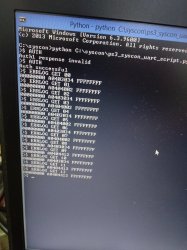
LOGnormal.jpg
403034 ; 404002 ; 404412 (GET09) Then i tried to interrupt the rsx ram by unplugging its 60 ohm resistor (ps3 will go blank) (Rules6), the goal is to see if syscon catches the change.
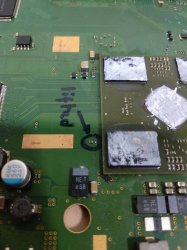
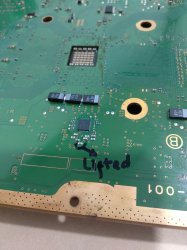
Picture of the resistor I lifted
resRAMrsx.jpg
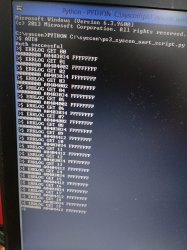
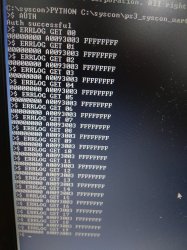
I reset the ps3 more than 10x, then I checked the syscon, and the results
LOGnor1.jpg
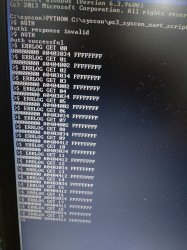
I see the ERRLOG doesn't change, then I reset it again 10 times and I read it again (curiosity)
LOGnor2.jpg
Stay the same doesn't change, I started to ask, is syscon unable to record the error that occurs?
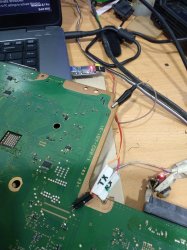
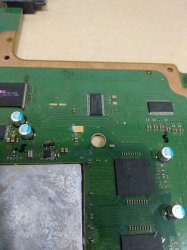
Then I did something else, which was to interrupt the cellbe voltage at C1, by removing the voltage section resistor, it can be seen from the picture below
resC1cellbe.jpg
After that I reset the ps3 more than 20x, because the power lost quickly so it didn't last long (rules1 begining), then I read it again, and the results
LOG-C1.jpg
93003 ERRLOG changed everything to 93003, lol...
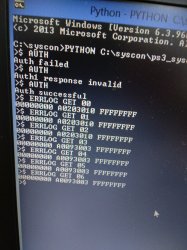
To make sure that the ERRLOG data can change, I try to disturb the other part again, this time the ICS IC to the cellbe, by lifting the resistor as well, see this picture point S is connected with S in ICS
resICS.jpg
this time I only reset the ps3 3 times (rules1 end), and the results I read
LOG-ICS.jpg
the result ERRLOG becomes 203010 for 3 retrievals, 4th retrieval and so on remains 93003
That's all for my report, please correct me if I'm wrong, because it's the first time I've done it, warm greetings to friends on the forum
Nb:In this experiment nothing was damaged (JTP-001) remained normal and no party was harmed...lol
 
I will try , not sure why but even if I hate phat models I will try rsx skip method.
I see always a specific name of rsx with his id on putty debugging won't a swap of id's be more interesting?
Because SB debugging is show that data, rsx Id is stored there?
Lv1 prints the rsx rom verion (VBIOS), we can't change that sadly (https://www.psdevwiki.com/ps3/RSX#ROM_Versions).
Sony also doesn't write the ROM version on the chip else we could easily source repair parts for COK-001/COK-002.
That's because they kept producing the 90nm RSX version until the end only for the DECR-1000 but it had the special b07 rom which wasn't used on retail consoles (retail used b03 or b08).
 
I will explain my experience this afternoon, the first time I tried the syscon method to analyze.
I am using a JTP-001 motherboard, the condition of the motherboard is normal
View attachment 33688
first reading
View attachment 33689
403034 ; 404002 ; 404412 (GET09) Then i tried to interrupt the rsx ram by unplugging its 60 ohm resistor (ps3 will go blank) (Rules6), the goal is to see if syscon catches the change.
Picture of the resistor I lifted
View attachment 33690
I reset the ps3 more than 10x, then I checked the syscon, and the results
View attachment 33691
I see the ERRLOG doesn't change, then I reset it again 10 times and I read it again (curiosity)
View attachment 33692
Stay the same doesn't change, I started to ask, is syscon unable to record the error that occurs?
Then I did something else, which was to interrupt the cellbe voltage at C1, by removing the voltage section resistor, it can be seen from the picture below
View attachment 33693
After that I reset the ps3 more than 20x, because the power lost quickly so it didn't last long (rules1 begining), then I read it again, and the results
View attachment 33694
93003 ERRLOG changed everything to 93003, lol...
To make sure that the ERRLOG data can change, I try to disturb the other part again, this time the ICS IC to the cellbe, by lifting the resistor as well, see this picture point S is connected with S in ICS
View attachment 33696
this time I only reset the ps3 3 times (rules1 end), and the results I read
View attachment 33700
the result ERRLOG becomes 203010 for 3 retrievals, 4th retrieval and so on remains 93003
That's all for my report, please correct me if I'm wrong, because it's the first time I've done it, warm greetings to friends on the forum
Nb:In this experiment nothing was damaged (JTP-001) remained normal and no party was harmed...lol
Ok, nice work. You learn fast.

By the way there is a small inaccuracy on the guide by Felix and also in the video is not really demonstrated.
The log can hold 32 errors (not 20) and all can be accessed from external mode as well. The key is that is not "00 to 19"
Instead is "00 to 1F" because we should be counting in hexadecimal format
You can do: (can copy paste batch)
Code:
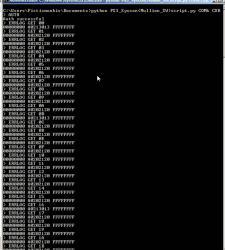
ERRLOG GET 00
ERRLOG GET 01
ERRLOG GET 02
ERRLOG GET 03
ERRLOG GET 04
ERRLOG GET 05
ERRLOG GET 06
ERRLOG GET 07
ERRLOG GET 08
ERRLOG GET 09
ERRLOG GET 0A
ERRLOG GET 0B
ERRLOG GET 0C
ERRLOG GET 0D
ERRLOG GET 0E
ERRLOG GET 0F
ERRLOG GET 10
ERRLOG GET 11
ERRLOG GET 12
ERRLOG GET 13
ERRLOG GET 14
ERRLOG GET 15
ERRLOG GET 16
ERRLOG GET 17
ERRLOG GET 18
ERRLOG GET 19
ERRLOG GET 1A
ERRLOG GET 1B
ERRLOG GET 1C
ERRLOG GET 1D
ERRLOG GET 1E
ERRLOG GET 1F

And it will display the full 32 errors with external commands.
However because you have a Sherwood Syscon from slim model (SW mode)
You can just type:
Code:
errlog
And it will list everything at once.

Unfortunately as you already noticed, the Syscon normally cannot detect problems such as "blank" or "no video". This is also known as "GLOD" (Green light of death).
In some cases it can still detect some errors (if it is related to XDR Ram for example) but not if the error is related to RSX or RSX VRAM like in your case.
As a general rule, the error codes are generated every time there is a "YLOD".
This includes most hardware problems but unfortunately not all.

Edit: When you mention that "the error doesn't change" is because no new errors are being generated. You are looking at the error "log". It remembers our beloved error 3034/4xxx which normally is associated with RSX problems.
But you say that the condition of the board now is "working" so I assume you reballed successfully or something.
So it is notmal that the error log codes are not changing. Because the machine is working fine now. Those errors are just old errors from the past, and no new error codes are being generated.
This is why the command "bringup" is the real useful thing to check what is happening right now. (Remember to attach heatsink for this command)

Cheers
 

Attachments

  • Screenshot_20210601-015727~2.png
    Screenshot_20210601-015727~2.png
    343.6 KB · Views: 41
Last edited:
I will explain my experience this afternoon, the first time I tried the syscon method to analyze.
I am using a JTP-001 motherboard, the condition of the motherboard is normal
View attachment 33688
first reading
View attachment 33689
403034 ; 404002 ; 404412 (GET09) Then i tried to interrupt the rsx ram by unplugging its 60 ohm resistor (ps3 will go blank) (Rules6), the goal is to see if syscon catches the change.
Picture of the resistor I lifted
View attachment 33690
I reset the ps3 more than 10x, then I checked the syscon, and the results
View attachment 33691
I see the ERRLOG doesn't change, then I reset it again 10 times and I read it again (curiosity)
View attachment 33692
Stay the same doesn't change, I started to ask, is syscon unable to record the error that occurs?
Then I did something else, which was to interrupt the cellbe voltage at C1, by removing the voltage section resistor, it can be seen from the picture below
View attachment 33693
After that I reset the ps3 more than 20x, because the power lost quickly so it didn't last long (rules1 begining), then I read it again, and the results
View attachment 33694
93003 ERRLOG changed everything to 93003, lol...
To make sure that the ERRLOG data can change, I try to disturb the other part again, this time the ICS IC to the cellbe, by lifting the resistor as well, see this picture point S is connected with S in ICS
View attachment 33696
this time I only reset the ps3 3 times (rules1 end), and the results I read
View attachment 33700
the result ERRLOG becomes 203010 for 3 retrievals, 4th retrieval and so on remains 93003
That's all for my report, please correct me if I'm wrong, because it's the first time I've done it, warm greetings to friends on the forum
Nb:In this experiment nothing was damaged (JTP-001) remained normal and no party was harmed...lol
Use "auth" for all SW syscon, on mullion is a different way, first less data/information with "AUTH " then after EEP SET you can go internally with "auth".
So I always get all 32 errors "auth" (small letters) on SW models.
After every change of hardware, log and clearerrlog, try power on at least 3 times . In some cases won't let you clean errors if hardware problem isn't fixed.
Some examples of commands are on this link end down of page
https://www.psdevwiki.com/ps3/System_Controller_Firmware#Sherwood_Patch_structure
Mullion has much more then SW.
 
Last edited:
Yeah, I'm absentminded and mildly dyslexic. It would not be the least bit surprising if I accidentally overwrote some EEPROM dumps and used the wrong ones (or misunderstood some of the directions provided).

Anyway, I've been working on some other projects and haven't been on the PS3 train for a few weeks. I've got plenty of candidates here, and I still have both my mod chips so I'll get back on the ride soon enough and maybe have some finished systems for sale.
 
Ok, nice work. You learn fast.

By the way there is a small inaccuracy on the guide by Felix and also in the video is not really demonstrated.
The log can hold 32 errors (not 20) and all can be accessed from external mode as well. The key is that is not "00 to 19"
Instead is "00 to 1F" because we should be counting in hexadecimal format
You can do: (can copy paste batch)
Code:
ERRLOG GET 00
ERRLOG GET 01
ERRLOG GET 02
ERRLOG GET 03
ERRLOG GET 04
ERRLOG GET 05
ERRLOG GET 06
ERRLOG GET 07
ERRLOG GET 08
ERRLOG GET 09
ERRLOG GET 0A
ERRLOG GET 0B
ERRLOG GET 0C
ERRLOG GET 0D
ERRLOG GET 0E
ERRLOG GET 0F
ERRLOG GET 10
ERRLOG GET 11
ERRLOG GET 12
ERRLOG GET 13
ERRLOG GET 14
ERRLOG GET 15
ERRLOG GET 16
ERRLOG GET 17
ERRLOG GET 18
ERRLOG GET 19
ERRLOG GET 1A
ERRLOG GET 1B
ERRLOG GET 1C
ERRLOG GET 1D
ERRLOG GET 1E
ERRLOG GET 1F

And it will display the full 32 errors with external commands.
However because you have a Sherwood Syscon from slim model (SW mode)
You can just type:
Code:
errlog
And it will list everything at once.
I didn't know that errlog could be use on SW consoles, so that's a nice nugget! I edited my tutorial to fix these. Thanks for the feedback.
 
Yeah, I'm absentminded and mildly dyslexic. It would not be the least bit surprising if I accidentally overwrote some EEPROM dumps and used the wrong ones (or misunderstood some of the directions provided).

Anyway, I've been working on some other projects and haven't been on the PS3 train for a few weeks. I've got plenty of candidates here, and I still have both my mod chips so I'll get back on the ride soon enough and maybe have some finished systems for sale.
Do you remember in your first attempt from this post if you already had the CXR714120-304GB... or you was trying to use the CXR714120-302GB (taken from the same DIA-002 where you got the 65nm RSX) in a COK-001 ?

As mentioned before the file you uploaded in that post named "fixed.bin" is not what you needed to write in the new syscon... but i cant imagine the sequence of actions you made
I realized about an interesting detail that can be seen in that files, we can read the error codes (at offset 0x3700 i dont know well that region and i dont see timestamps for them, but anyway i can recover some), they looks like this https://pastebin.com/3nLksnWJ

It seems the COK-001 cummulated some errors because the PSU was faulty and you was replacing it, i guess this errors doesnt maters because was not appearing later (it seems at some point you did a clearerr to empty the error code list or you overwrote them and was not appearing anymore)
I think you soldered the new RSX65nm and the CXR714120-302GB (both taken from the DIA-002) to the COK-001 motherboard, then you booted the PS3 several times (this is when was cummulated some errors 4001 and 3034) then you made the dump and named it "fixed.bin" ?

Im not sure, but this combination of components to create the frankenstein is very interesting because is the most easyer to achieve. I mean... is the only frankenstein posible using components from retail motherboards
1) COK-001 or COK-002 working (or with a damaged RSX waiting to be reballed)
2) The syscon CXR714120-302GB (taken from a DIA-002)
3) A RSX 65nm (it can be taken from the same DIA-002)
 
Ok, nice work. You learn fast.

By the way there is a small inaccuracy on the guide by Felix and also in the video is not really demonstrated.
The log can hold 32 errors (not 20) and all can be accessed from external mode as well. The key is that is not "00 to 19"
Instead is "00 to 1F" because we should be counting in hexadecimal format
You can do: (can copy paste batch)
Code:
ERRLOG GET 00
ERRLOG GET 01
ERRLOG GET 02
ERRLOG GET 03
ERRLOG GET 04
ERRLOG GET 05
ERRLOG GET 06
ERRLOG GET 07
ERRLOG GET 08
ERRLOG GET 09
ERRLOG GET 0A
ERRLOG GET 0B
ERRLOG GET 0C
ERRLOG GET 0D
ERRLOG GET 0E
ERRLOG GET 0F
ERRLOG GET 10
ERRLOG GET 11
ERRLOG GET 12
ERRLOG GET 13
ERRLOG GET 14
ERRLOG GET 15
ERRLOG GET 16
ERRLOG GET 17
ERRLOG GET 18
ERRLOG GET 19
ERRLOG GET 1A
ERRLOG GET 1B
ERRLOG GET 1C
ERRLOG GET 1D
ERRLOG GET 1E
ERRLOG GET 1F

And it will display the full 32 errors with external commands.
However because you have a Sherwood Syscon from slim model (SW mode)
You can just type:
Code:
errlog
And it will list everything at once.

Unfortunately as you already noticed, the Syscon normally cannot detect problems such as "blank" or "no video". This is also known as "GLOD" (Green light of death).
In some cases it can still detect some errors (if it is related to XDR Ram for example) but not if the error is related to RSX or RSX VRAM like in your case.
As a general rule, the error codes are generated every time there is a "YLOD".
This includes most hardware problems but unfortunately not all.

Edit: When you mention that "the error doesn't change" is because no new errors are being generated. You are looking at the error "log". It remembers our beloved error 3034/4xxx which normally is associated with RSX problems.
But you say that the condition of the board now is "working" so I assume you reballed successfully or something.
So it is notmal that the error log codes are not changing. Because the machine is working fine now. Those errors are just old errors from the past, and no new error codes are being generated.
This is why the command "bringup" is the real useful thing to check what is happening right now. (Remember to attach heatsink for this command)

Cheers
Thanks for the information, I've tried "ERRLOG" on KTE-001
IMG_20210614_132957.jpg
IMG_20210614_135005.jpg
805FFF (data dump crash (300x model tried to cfw)
Looks like I can capitalize all for SW, AUTH and ERRLOG, tq...
 
@botakompong 5fff is not on syscon errors of pdf but I had it many times. it is a dead cpu with near 2ohms on board or even lower
I also seen you got a error about AV ic 2022.
Try to exchange that AV ic see if it get any changes. This cpu error is something I always get lower then 2.2 ohms damaged on those and super slims. I had one situation where cpu was fine with 1.6 ohms on 2500 models, didn't get any problems with it, just like more 5 celsius than usually, about 65.
They should have 60 in XMB without fan accelerated.
Temperature will be related with internal resistance.
 
Last edited:
@botakompong 5fff is not on syscon errors of pdf but I had it many times. it is a dead cpu with near 2ohms on board or even lower
It's interesting you mention this.
He's saying this is a 3000 slim that somebody tried to install cfw on.
I always find it hard to believe that CPU is dead. And I also don't really trusted the ohms so much, as long as it's not short. I have working chips with low ohms, cool running too.

But I believe you of course. I don't really know much about slims anyway.
Maybe can mean more things?
 
@botakompong 5fff is not on syscon errors of pdf but I had it many times. it is a dead cpu with near 2ohms on board or even lower
I also seen you got a error about AV ic 2022.
Try to exchange that AV ic see if it get any changes. This cpu error is something I always get lower then 2.2 ohms damaged on those and super slims. I had one situation where cpu was fine with 1.6 ohms on 2500 models, didn't get any problems with it, just like more 5 celsius than usually, about 65.
They should have 60 in XMB without fan accelerated.
Temperature will be related with internal resistance.
I think I'll try again, previously there was only 1 and 2 805FFF, every time I reset it increases
easy to fix, just patch dump with ConOFW(last fw that was the problem)
Btw thanks for the information
Did you change 1 set of cellbe to fix it?
 
Last edited:
It's interesting you mention this.
He's saying this is a 3000 slim that somebody tried to install cfw on.
I always find it hard to believe that CPU is dead.
But I believe you of course. I don't really know much about slims anyway.
Maybe can mean more things?
In first tested board before uart error era I've also thought so. Reading dump normal, took out another cpu, syscon, nor ported to the board with problems went fine.
This is quite quick then take measurements hours/days.
There are two more unsorted 1802 and 3010 as same situation (didn't test too much). Probably @botakompong can find them in boards and reports more about them.
They seem to be in communication line, I never sorted this with reball and probably was that type of microshortage.
 
Last edited:
In first tested board before uart error era I've also thought so. Reading dump normal, took out another cpu, syscon, nor ported to the board with problems went fine.
This is quite quick then take measurements hours/days.
There are two more unsorted 1802 and 3010 as same situation (didn't test too much). Probably @botakompong can find them in boards and reports more about them.
They seem to be in communication line, I never sorted this with reball and probably was that type of microshortage.
Error 203010 ? I think I've caught the 203010 error, but I'm having a hard time explaining it, hahaha
 
Quite busy with the error 2130 that it can work as glod. After reball it still nothing.
Will have to investigate dipp in traces. And old owner flashed 3.55 patched.
Code:
>$ auth
Auth1 response invalid
>$ auth
Auth successful
>$ errlog
00000000
# CODE     CLOCK
# A0112130 FFFFFFFF
# A0112130 FFFFFFFF
# A0102130 FFFFFFFF
# A0A02130 FFFFFFFF
# A0A02130 FFFFFFFF
# A0111200 FFFFFFFF
# A0112130 FFFFFFFF
# A0112130 FFFFFFFF
# A0112130 FFFFFFFF
# A0092130 FFFFFFFF
# A0112130 FFFFFFFF
# A0092130 FFFFFFFF
# FFFFFFFF FFFFFFFF
# FFFFFFFF FFFFFFFF
# FFFFFFFF FFFFFFFF
# FFFFFFFF FFFFFFFF
# FFFFFFFF FFFFFFFF
# FFFFFFFF FFFFFFFF
# FFFFFFFF FFFFFFFF
# FFFFFFFF FFFFFFFF
# FFFFFFFF FFFFFFFF
# FFFFFFFF FFFFFFFF
# FFFFFFFF FFFFFFFF
# FFFFFFFF FFFFFFFF
# FFFFFFFF FFFFFFFF
# FFFFFFFF FFFFFFFF
# FFFFFFFF FFFFFFFF
# FFFFFFFF FFFFFFFF
# FFFFFFFF FFFFFFFF
# FFFFFFFF FFFFFFFF
# FFFFFFFF FFFFFFFF
>$ tmp 0
00000000
# TZone No:00
# Temperature:+52.75(0x34C3)
>$ tmp 1
00000000
# TZone No:01
# Temperature:+49.0(0x3100)
>$ csum
F0000006
>$ tmp 0
00000000
# TZone No:00
# Temperature:+54.0(0x3603)
>$ tmp 1
00000000
# TZone No:01
# Temperature:+50.75(0x32C0)
>$ version
00000000
# Sherwood Version = 1.11.0
>$ tmp 0
00000000
# TZone No:00
# Temperature:+54.75(0x36C3)
>$ tmp 1
00000000
# TZone No:01
# Temperature:+51.75(0x33C0)
>$ tmp 1
00000000
# TZone No:01
# Temperature:+51.50(0x3380)
>$ tmp 0
00000000
# TZone No:00
# Temperature:+54.25(0x3643)
>$ task
F0000003
# [UCMD] Unknown command.
>$ powupcause
00000000
# Powup Cause: 00 00 00 00 00 00 00 04 00 00 00 00 00 00 00 00
>$ meminfo
F0000003
# [UCMD] Unknown command.
>$ bestat
00000000
# (PowerOn State)
# State = 05
>$ shutdown
00000000
# [SSM] Shutdown Start.
# [SSM] Shutdown ok.
# (PowerOff State)

52f7f65a127c417a991a41137d12c817.jpg
Took samples within 10 minutes.
Going to try reverse dump, if won't help it is either Rsx or cpu. 3, 4 ohms cpu /rsx 3.7ohms.
 
Last edited:
Back
Top