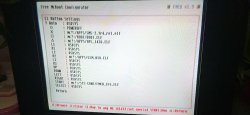
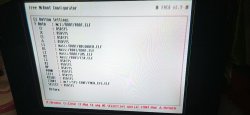
PS2 Free MCBoot Autoboot to OPL instead of going to the Free MCBoot Browser List (OSDSYS)

Thanks for photos.

Does this memory card after installing FMCB 1.965 has got "mc?:/SYS-CONF/FMCB_CFG.ELF"?
If yes try to launch it with wLe for test.
In FMCB Configurator try to load CNF from MC0\MC1.

FMCB 1.8b will not work on your console (SCPH-10000), because it is not supported by this version.

Can you try to install FMCB on a different console?
Because or this console might have some kind of a problem or memory card is faulty.
Try multi-installation. Check FMCB installation on this console and on yours.
 
Thanks for photos.

Does this memory card after installing FMCB 1.965 has got "mc?:/SYS-CONF/FMCB_CFG.ELF"?
If yes try to launch it with wLe for test.
In FMCB Configurator try to load CNF from MC0\MC1.

FMCB 1.8b will not work on your console (SCPH-10000), because it is not supported by this version.

Can you try to install FMCB on a different console?
Because or this console might have some kind of a problem or memory card is faulty.
Try multi-installation. Check FMCB installation on this console and on yours.
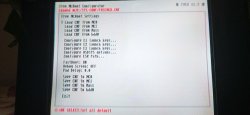
I'm able to get to FMCB Configurator, but tapping button O didn't do anything.
Unfortunately, i can't install it on different console
 

Attachments

  • IMG_20200711_183120.jpg
    IMG_20200711_183120.jpg
    549.4 KB · Views: 168
Can you try to:
Load CNF from MC0
or
Load CNF from MC1?

Can you attach photo from Configure E1 Launch keys... after loading CNF?

If :but cir: button is not working try :but x:.
 
Can you try to:
Load CNF from MC0
or
Load CNF from MC1?

Can you attach photo from Configure E1 Launch keys... after loading CNF?

If :but cir: button is not working try :but x:.
Is it safe Loading CNF from MC1 tho? Because the autoUlaunch MC is on slot 2 (MC1)
 
It is safe as long as you do not save any settings.

Could you take a photo from Configure E1 Launch keys from both memory cards
after loading CNF?
 
It is safe as long as you do not save any settings.

Could you take a photo from Configure E1 Launch keys from both memory cards
after loading CNF?
 

Attachments

  • E1 AFTER LOAD CNF MC0 (FMCB NOOBIE PACKAGE).jpg
    E1 AFTER LOAD CNF MC0 (FMCB NOOBIE PACKAGE).jpg
    782.7 KB · Views: 1,616
  • E1 AFTER LOAD CNF M1 (autoUlaunch MC).jpg
    E1 AFTER LOAD CNF M1 (autoUlaunch MC).jpg
    744.3 KB · Views: 123
So in first image (MC0) you have AUTO: OSDSYS.
In second (MC1) AUTO: mc1:/BOOT/BOOT.ELF

First memory card is not working right?

Unplug second memory card (MC1).

Load CNF from MC0.
Enter Configure E1 launch keys...
Can you try to look for any ELF for MC0?
I mean change:
AUTO: OSDSYS
into:
AUTO: mc0:/BOOT/OPL.ELF
Save CNF on MC0.
Reboot console.
 
Last edited:
You can TECHNICALLY just copy the CNF from the new MC to the old MC... but since it is your only version, I suggest this.

  1. Copy the files from the SYS-CONF folder of the new MC, to the old MC... EXCEPT for the FMCB-Config!
  2. Turn the console off!
  3. Now the Recovery/Rescue-Mode should work on your old MC at least!
 
So in first image (MC0) you have AUTO: OSDSYS.
In second (MC1) AUTO: mc1:/BOOT/BOOT.ELF

First memory card is not working right?

Unplug second memory card (MC1).

Load CNF from MC0.
Enter Configure E1 launch keys...
Can you try to look for any ELF for MC0?
I mean change:
AUTO: OSDSYS
into:
AUTO: mc0:/BOOT/OPL.ELF
Save CNF on MC0.
Reboot console.
It didn't work, no fmcb logo, black screen
IMG_20200711_194621.jpg
 
You can TECHNICALLY just copy the CNF from the new MC to the old MC... but since it is your only version, I suggest this.

  1. Copy the files from the SYS-CONF folder of the new MC, to the old MC... EXCEPT for the FMCB-Config!
  2. Turn the console off!
  3. Now the Recovery/Rescue-Mode should work on your old MC at least!
But why using recovery if i can boot to wLE using the AutowLE MC?
 
It didn't work, no fmcb logo, black screen
img_20200711_194621-jpg.26813

Hmm.
To sum up.
Now you have only one "working" memory card with Auto-booting wLe...

The other memory card refuse to work with FMCB, even after installing it on your console.
When you try to format this memory card and install FMCB 1.965, you do not receive anything (not even FMCB splash screen)...

Last resort that might can help is to format memory card with this app:
https://www.psx-place.com/resources/memorycard-killer.960/.

  1. It will only format 8MB memory card in 1st slot (MC0).

  2. Take out memory card with wLaunchELF (MC1), after launching this app.

  3. Press :but start: to format.

  4. Reboot console.

  5. Try to install this FMCB (on memory that you formatted):
    http://www.mediafire.com/file/x7m7zxb17pcofg3/%5B081218%5DFMCB-1965-bin_%28USB-140119%29.7z.
    Do not format your memory card in FMCB installer.
 
Hmm.
To sum up.
Now you have only one "working" memory card with Auto-booting wLe...

The other memory card refuse to work with FMCB, even after installing it on your console.
When you try to format this memory card and install FMCB 1.965, you do not receive anything (not even FMCB splash screen)...

Last resort that might can help is to format memory card with this app:
https://www.psx-place.com/resources/memorycard-killer.960/.

  1. It will only format 8MB memory card in 1st slot (MC0).

  2. Take out memory card with wLaunchELF (MC1), after launching this app.

  3. Press :but start: to format.

  4. Reboot console.

  5. Try to install this FMCB (on memory that you formatted):
    http://www.mediafire.com/file/x7m7zxb17pcofg3/%5B081218%5DFMCB-1965-bin_%28USB-140119%29.7z.
    Do not format your memory card in FMCB installer.
Hmm, failed?
*Update : it's complete now, maybe I'm not putting the MC properly before. (Me dumb:apologetic:)
*Both Installation is complete on normal and multi-install, but still black screen
IMG_20200711_202306.jpg
 
Last edited:
So you manage to format memory card in MC killer...

After installing FMCB did you pull out second memory card with wLaunchELF?

After rebooting console you have only black screen, nothing else?
Even after 30 sec?
 
So you manage to format memory card in MC killer...

After installing FMCB did you pull out second memory card with wLaunchELF?

After rebooting console you have only black screen, nothing else?
Even after 30 sec?
1. Yes!
2. Yes!
3. Yes! (Even after 1 minute)
 
Does that memory card with auto-booting wLaunchELF after starting console is showing FMCB logo:
fmcb_logo.png
 
Hmm.

Currently In my head I have only these variants:
  • Memory card is faulty.

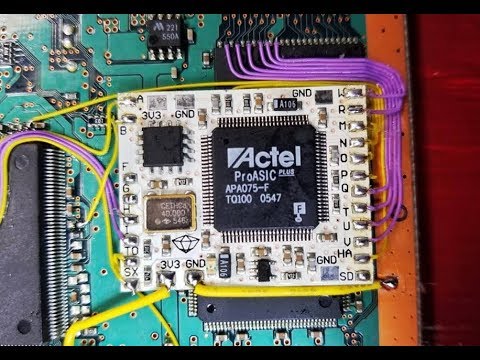
  • Your console might have modchip (without opening console is hard to tell)
    Here is how modchip might looks like:
    hqdefault.jpg

    Some modchips are not compatible with FMCB.
    But I do not understand why you have FMCB logo with another memory card at startup,
    so for now it is only assumption.


  • FMCB (even 1.965) do not support your console (but I doubt that).

Without checking this memory card on another console it will be very hard to scratch at least one variant.
 
Hmm.

Currently In my head I have only these variants:
  • Memory card is faulty.

  • Your console might have modchip (without opening console is hard to tell)
    Here is how modchip might looks like:
    hqdefault.jpg

    Some modchips are not compatible with FMCB.
    But I do not understand why you have FMCB logo with another memory card at startup,
    so for now it is only assumption.


  • FMCB (even 1.965) do not support your console (but I doubt that).

Without checking this memory card on another console it will be very hard to scratch at least one variant.
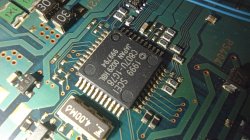
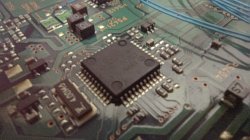
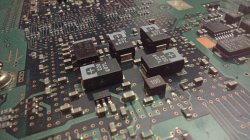
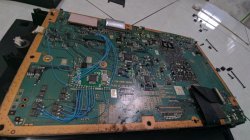
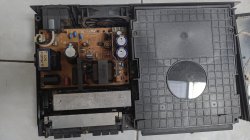
I actually do cleaned up my console before doing this softmod thingy (so many dust because i didn't play it for a long time), you might want to look at it and tell if it has mod or anything different
IMG_20200605_172913_tigr.jpg
IMG_20200605_172812_tigr.jpg
IMG_20200605_172409_tigr.jpg
IMG_20200605_172039_tigr.jpg
IMG_20200605_171923_tigr.jpg
IMG_20200605_161601_tigr.jpg
 
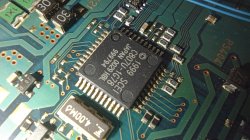
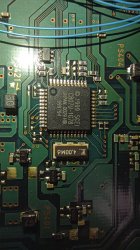
This photo shows modchip:
img_20200605_171923_tigr-jpg.26826
Which one is it?
Guess that random blog about modchip isn't wrong after all...
So..? Why it's still failed even after using noobie package modchip edition?
*I do have two more old MC that has my precious savegame, maybe i can use it but i don't want to lose the savegame.
 

Similar threads

Back
Top