FunTuna (Free McBoot for Fortuna)

PS2 FunTuna (Free McBoot for Fortuna) v1 (r3)

@HWNJ I unofficially modified a bit your FunTuna.

It has:
  • OPL 1442 instead of 1553 which can be a little bit buggy.
  • USB drivers from 14\01\2019 (these drivers should support 2 TB HDD).
  • Simple media system 2.9 rev 4 instead of 2.9 rev 2.
  • Power off from here, because the one that comes with FunTuna was not working on my console:
    https://www.psx-place.com/threads/fmcb-fhdb-v1-9-series-release-thread.13413/page-2#post-126749.
  • Removed ESR entry from FMCB menu, because some people reported that "it was not working, giving BSOD".
    ESR will launch automatically after ESR patched disc will be inserted.
  • A timestamp set to ~2093 for all files.
EDIT: A newer version can be downloaded from here:
https://www.psx-place.com/threads/funtuna-free-mcboot-for-fortuna.30973/page-12#post-309339.
 
Last edited:
Should Funtuna stick to FORTUNA folder to allow customization of BOOT folder apps by avoiding timestamp mess around? Just asking.
 
Last edited:
That's the initial idea why the "FORTUNA"-Folder got chosen!

It's name "says" everything (that there FORTUNAtely is an entry/exploit [like a "HEN"]) and it needs to remain the first icon.

wLaunchELF should come with a config Btw.!
I suggest(ed) to include SYS-CONF into the package as a second PSU (for Fortuna as well as FunTuna), which at least includes wLE's config [in both cases] and FMCB's config [in FunTuna's case] (no need for adapted CNF-paths in FMCB , no need for an edited FMCB-Configurator or wLE)
 
Should Funtuna stick to FORTUNA folder to allow customization of BOOT folder apps by avoiding timestamp mess around? Just asking.
If you do that, it will have no DEV1 boot.
As @TnA said:
wLaunchELF should come with a config Btw.!
I suggest(ed) to include SYS-CONF into the package as a second PSU (for Fortuna as well as FunTuna), which at least includes wLE's config [in both cases] and FMCB's config [in FunTuna's case] (no need for adapted CNF-paths in FMCB , no need for an edited FMCB-Configurator or wLE)
That's for a future release

@HWNJ I unofficially modified a bit your FunTuna.

It has:
  • OPL 1442 instead of 1553 which can be a little bit buggy.
  • USB drivers from 14\01\2019 (these drivers should support 2 TB HDD).
  • Simple media system 2.9 rev 4 instead of 2.9 rev 2.
  • Power off from here, because the one that comes with FunTuna was not working on my console:
    https://www.psx-place.com/threads/fmcb-fhdb-v1-9-series-release-thread.13413/page-2#post-126749.
  • Removed ESR entry from FMCB menu, because some people reported that "it was not working, giving BSOD".
    ESR will launch automatically after ESR patched disc will be inserted.
It can be downloaded from here:
https://www.psx-place.com/threads/cannot-launch-any-app-through-fortuna.32209/#post-271719.
I will add it to the OP and also upload in my server

EDIT: Done! The main link now includes your updated version too:
http://www.hwc.nat.cu/ps2-vault/hwc-projects/funtuna/FunTuna-FreeMcBoot-for-Fortuna.rar
 
Last edited:
Am I correct in assuming that OPL running from Funtuna (either OPL 1442 or OPL 1553) needs to save settings to USB only and can never save settings to MC so as to not have any issues with timestamps and ruin Funtuna's boot method?
 
Am I correct in assuming that OPL running from Funtuna (either OPL 1442 or OPL 1553) needs to save settings to USB only and can never save settings to MC so as to not have any issues with timestamps and ruin Funtuna's boot method?
As @TnA said, you can save the settings on the Memory Card. There's no risk at all
 
Can you explain how? I've tried it and the included OPL versions always try to save settings to USB and fail to save settings if no USB is present. If I change from the included OPL versions to a daily build of OPL, it saves settings to MC but then the "Corrupted Data" icon is no longer the first in the MC.
 
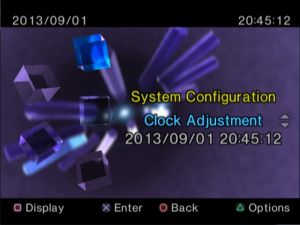
Did you change the date in System Configuration:
syscon2.jpg

or have you got the current date, e.g. 27\12\2020...

Which FunTuna package you have in mind?
Which OPL version you have in mind (1442, 1553, 1562...).

Did you try to pull out all memory cards, leave a USB device in the PS2, save settings?

EDIT: @MegaShark can you try this unofficial FunTuna from the attachment.
Try to save OPL settings into a memory card and please tell me is everything ok.

@HWNJ I re-uploaded "my" unofficial version, because previously OPL had date ~2019 in a timestamp.
Now all the files has got a timestamp set to ~2093.
Sorry for inconvenience.
It has:
  • OPL 1442 instead of 1553 which can be a little bit buggy.
  • USB drivers from 14\01\2019 (these drivers should support 2 TB HDD).
  • Simple media system 2.9 rev 4 instead of 2.9 rev 2.
  • Power off from here, because the one that comes with FunTuna was not working on my console:
    https://www.psx-place.com/threads/fmcb-fhdb-v1-9-series-release-thread.13413/page-2#post-126749.
  • Removed ESR entry from FMCB menu, because some people reported that "it was not working, giving BSOD".
    ESR will launch automatically after ESR patched disc will be inserted.
  • A timestamp set to ~2093 for all files.

EDIT: A new version is here:
https://www.psx-place.com/threads/funtuna-free-mcboot-for-fortuna.30973/page-12#post-309339.
 
Last edited:
@MegaShark I had the same issue as you, and I was becoming increasingly more frustrated about it as I wanted to get rid of the memory card sticking out of my PS2.

Here's the fix: Create a folder named "OPL" in the root of your Memory Card. Use uLaunchELF to do it of course. Simple as that.

I don't know why the folder is not just created by itself, but apparently OPL can't do this.

Let me know if it helped. I'm completely new to all of this, but learning a lot already.
 
Which version of OPL did you use?
Which FunTuna version did you use (official or unofficial). If official did you try unofficial?
 
Is it possible if i install FORTUNA on SCPH-10000 (copy Fortuna folder to the MC) then test the MC on SCPH-90006?

I can't get Freedvdboot to work on my slim ps2 (disc couldn't be read), so I ask if this method is working or not.
 
  1. Yes, you can copy it from any model, as long as you can start Homebrew.
  2. Bad media, or laser is going bad, or you burned it wrong!
 
Is it possible if i install FORTUNA on SCPH-10000 (copy Fortuna folder to the MC) then test the MC on SCPH-90006?

I can't get Freedvdboot to work on my slim ps2 (disc couldn't be read), so I ask if this method is working or not.
Please, read the warnings on the OP. While you CAN do it, be sure to NOT enter the browser on your SCPH-10000 with the FunTuna memory card connected or you will damage it. Just PSUPaste on uLE, then unplug when pasted properly. Period. Do not plug it back again on your SCPH-10000 while FunTuna is installed on it.
 
But my MC that I'm gonna paste already have FMCB, do I need to format it?

Also if I somehow accidentally connect it, then formatting the MC should fix the problem, right?
Formatting with Memory Card Annihilator will solve the issue.
Regarding FMCB, well, you can actually merge both, but that will be kinda nonsense since you will have to re-do the FMCB config for a MC you will not use again on a PHAT console. You better remove FMCB.
 
Formatting with Memory Card Annihilator will solve the issue.
Regarding FMCB, well, you can actually merge both, but that will be kinda nonsense since you will have to re-do the FMCB config for a MC you will not use again on a PHAT console. You better remove FMCB.
The method is working, but I can't copy the file to another MC, it says prohibited?
IMG_20210102_155616.jpg
 

Similar threads

Back
Top